
Python+pygame制作可视化猜字游戏【完整代码】
·
Pygame 猜数字游戏
猜数字是经典的益智游戏,本文将基于 Pygame 实现一个可视化版本的猜数字游戏,包含中文字体适配、粒子动画反馈、交互按钮设计等功能,带你从 0 到 1 理解 Pygame 游戏开发的核心流程。
一、游戏核心功能与技术栈
先明确游戏的核心玩法与技术要点:
- 玩法:程序随机生成 1-100 的整数,玩家输入数字后获得“大了/小了”的提示,直到猜对,同时记录猜测次数
- 技术栈:Pygame(界面渲染、事件处理)、Python 标准库(随机数生成、文件操作)
- 亮点功能:中文字体适配、圆角按钮、猜测历史记录、猜对粒子动画、键盘/鼠标双交互
二、关键代码解析:从基础架构到核心模块
1. 初始化与中文字体适配(解决中文乱码问题)
Pygame 默认不支持中文字体,需手动加载系统中的中文字体(如黑体、宋体),确保界面文字正常显示。
import pygame
import random
import sys
import os

class NumberGuessingGame:
    def __init__(self):
        # 1. 窗口初始化
        self.screen = pygame.display.set_mode((900, 650))
        pygame.display.set_caption("猜数字游戏")

        # 2. 中文字体适配(核心代码)
        self.setup_fonts()

        # 3. 游戏状态初始化
        self.target_number = random.randint(1, 100)  # 目标数字
        self.guess_count = 0  # 猜测次数
        self.current_guess = ""  # 当前输入
        self.message = "请输入1-100之间的数字"  # 提示信息
        self.game_over = False  # 游戏结束标记
        self.guess_history = []  # 猜测历史

    def setup_fonts(self):
        """加载系统中文字体,适配多平台"""
        # 常见中文字体名称(Windows/macOS/Linux 通用)
        chinese_fonts = ["simhei.ttf", "simsun.ttc", "msyh.ttc", "simkai.ttf"]
        # 系统字体路径(不同系统路径不同)
        font_paths = [
            "C:/Windows/Fonts/",  # Windows
            "/System/Library/Fonts/",  # macOS
            "/usr/share/fonts/"  # Linux
        ]

        font_loaded = False
        # 遍历路径和字体,尝试加载
        for font_path in font_paths:
            if os.path.exists(font_path):
                for font_name in chinese_fonts:
                    full_path = os.path.join(font_path, font_name)
                    if os.path.exists(full_path):
                        try:
                            # 定义不同大小的字体(标题/正文/按钮)
                            self.title_font = pygame.font.Font(full_path, 52)
                            self.large_font = pygame.font.Font(full_path, 36)
                            self.medium_font = pygame.font.Font(full_path, 28)
                            self.small_font = pygame.font.Font(full_path, 24)
                            font_loaded = True
                            break
                        except:
                            continue
                if font_loaded:
                    break

        # 若加载失败,使用系统默认英文宋体
        if not font_loaded:
            self.title_font = pygame.font.SysFont('arial', 52)
            self.large_font = pygame.font.SysFont('arial', 36)
代码说明:
- 多平台适配:通过判断不同系统的字体路径(如 Windows 的
C:/Windows/Fonts/),确保在主流操作系统上都能加载中文字体。 - 字体分级:定义
title_font(标题)、large_font(提示信息)等不同大小的字体,保证界面文字层级清晰。 - 降级处理:若系统中无中文字体,自动切换为英文
arial字体,避免程序崩溃。
2. 事件处理:键盘+鼠标双交互
游戏需支持两种交互方式:键盘输入数字/提交,鼠标点击按钮(提交/清空/退出),核心逻辑在 handle_events 方法中。
def handle_events(self):
    for event in pygame.event.get():
        # 1. 窗口关闭事件
        if event.type == pygame.QUIT:
            return False

        # 2. 键盘事件(输入/提交/删除)
        if event.type == pygame.KEYDOWN:
            if not self.game_over:  # 游戏未结束时才响应
                if event.key == pygame.K_RETURN:  # 回车键提交
                    self.check_guess()
                elif event.key == pygame.K_BACKSPACE:  # 退格键删除
                    self.current_guess = self.current_guess[:-1]
                elif event.unicode.isdigit():  # 数字输入(限制3位,1-100)
                    if len(self.current_guess) < 3:
                        self.current_guess += event.unicode

        # 3. 鼠标点击事件(按钮交互)
        if event.type == pygame.MOUSEBUTTONDOWN:
            mouse_pos = event.pos  # 获取鼠标位置
            # 退出按钮(右上角)
            if self.quit_button.collidepoint(mouse_pos):
                return False
            # 重新开始按钮(游戏结束后显示)
            if self.restart_button.collidepoint(mouse_pos) and self.game_over:
                self.restart_game()
            # 提交按钮(输入后提交)
            if self.submit_button.collidepoint(mouse_pos) and not self.game_over:
                self.check_guess()
            # 清空按钮(清空当前输入)
            if self.clear_button.collidepoint(mouse_pos) and not self.game_over:
                self.current_guess = ""

    return True
代码说明:
- 事件分类处理:将事件按“窗口关闭”“键盘”“鼠标”分类,逻辑清晰,便于维护。
- 状态判断:通过
self.game_over控制交互逻辑——游戏结束后,键盘输入和提交按钮失效,仅响应“重新开始”按钮。 - 输入限制:数字输入限制为 3 位(
len(self.current_guess) < 3),避免输入超过 100 的无效数字。
3. 猜数字核心逻辑:判断与反馈
check_guess 是游戏的核心方法,负责验证玩家输入、判断“大了/小了”、记录次数,并在猜对时触发游戏结束逻辑。
def check_guess(self):
    # 1. 空输入判断
    if not self.current_guess:
        self.message = "请输入一个数字!"
        self.message_color = (220, 60, 60)  # 红色提示
        return

    try:
        guess = int(self.current_guess)  # 转换为整数

        # 2. 输入范围判断(1-100)
        if guess < 1 or guess > 100:
            self.message = "请输入1到100之间的数字!"
            self.message_color = (220, 60, 60)
            self.current_guess = ""
            return

        # 3. 记录猜测次数和历史
        self.guess_count += 1
        self.guess_history.append(guess)

        # 4. 结果判断
        if guess < self.target_number:
            self.message = f"{guess} 太小了!"
            self.message_color = (70, 130, 180)  # 蓝色提示
            self.feedback = "试试更大的数字"
        elif guess > self.target_number:
            self.message = f"{guess} 太大了!"
            self.message_color = (255, 165, 0)  # 橙色提示
            self.feedback = "试试更小的数字"
        else:
            # 5. 猜对:触发游戏结束和动画
            self.message = f"恭喜你猜对了!答案就是 {self.target_number}"
            self.message_color = (50, 205, 50)  # 绿色提示
            self.game_over = True
            self.set_final_feedback()  # 生成最终评价
            self.create_particles(450, 200, (50, 205, 50))  # 绿色粒子动画

    except ValueError:
        # 非数字输入处理
        self.message = "请输入有效的数字!"
        self.message_color = (220, 60, 60)

    # 清空当前输入
    self.current_guess = ""

def set_final_feedback(self):
    """根据猜测次数生成评价"""
    if self.guess_count <= 5:
        self.feedback = "太厉害了!你是猜数字大师!"
    elif self.guess_count <= 10:
        self.feedback = "很不错!继续加油!"
    else:
        self.feedback = "还可以做得更好哦!"
代码说明:
- 异常处理:用
try-except捕获非数字输入(如字母、符号),避免程序崩溃,并给出红色提示。 - 分级反馈:
- 范围错误(<1 或 >100):红色提示“请输入1到100之间的数字”;
- 大小判断:蓝色“太小了”、橙色“太大了”,引导玩家调整;
- 猜对后:绿色提示+粒子动画,同时根据猜测次数给出评价(5次内“大师”,10次内“不错”)。
- 历史记录:将每次有效猜测加入
guess_history,后续可在界面显示,帮助玩家复盘。
4. 界面美化:圆角按钮与粒子动画
为提升视觉体验,实现两个关键美化功能:圆角按钮(替代默认方角)和猜对时的粒子爆炸动画。
(1)圆角按钮绘制
def draw_rounded_rect(self, surface, rect, color, corner_radius):
    """绘制圆角矩形(基础组件)"""
    # 绘制中间矩形(避开四个角)
    pygame.draw.rect(surface, color, (rect.left, rect.top + corner_radius,
                                     rect.width, rect.height - 2 * corner_radius))
    pygame.draw.rect(surface, color, (rect.left + corner_radius, rect.top,
                                     rect.width - 2 * corner_radius, rect.height))
    # 绘制四个圆角(圆形拼接)
    pygame.draw.circle(surface, color, (rect.left + corner_radius, rect.top + corner_radius), corner_radius)
    pygame.draw.circle(surface, color, (rect.right - corner_radius, rect.top + corner_radius), corner_radius)
    pygame.draw.circle(surface, color, (rect.left + corner_radius, rect.bottom - corner_radius), corner_radius)
    pygame.draw.circle(surface, color, (rect.right - corner_radius, rect.bottom - corner_radius), corner_radius)

def draw_button(self, rect, text, font, bg_color, text_color, hover_color=None):
    """绘制带hover效果的圆角按钮"""
    mouse_pos = pygame.mouse.get_pos()
    # 鼠标悬浮时切换颜色
    if rect.collidepoint(mouse_pos) and hover_color:
        bg_color = hover_color

    # 绘制圆角背景
    self.draw_rounded_rect(self.screen, rect, bg_color, 10)
    # 绘制按钮边框
    pygame.draw.rect(self.screen, text_color, rect, 2, border_radius=10)
    # 绘制按钮文字(居中)
    text_surf = font.render(text, True, text_color)
    text_rect = text_surf.get_rect(center=rect.center)
    self.screen.blit(text_surf, text_rect)
(2)猜对粒子动画
def create_particles(self, x, y, color):
    """创建粒子(猜对时调用)"""
    for _ in range(20):  # 生成20个粒子
        particle = {
            'x': x,  # 粒子初始x坐标
            'y': y,  # 粒子初始y坐标
            'vx': random.uniform(-3, 3),  # x方向速度(随机)
            'vy': random.uniform(-5, -1),  # y方向速度(向上)
            'radius': random.randint(2, 5),  # 粒子大小(2-5像素)
            'color': color,  # 粒子颜色(与提示文字一致)
            'life': 30  # 粒子生命周期(30帧)
        }
        self.particles.append(particle)

def update_particles(self):
    """更新粒子状态(每帧调用)"""
    for particle in self.particles[:]:  # 切片遍历,避免删除时索引异常
        # 更新位置(加入重力效果:y方向速度逐渐增加)
        particle['x'] += particle['vx']
        particle['y'] += particle['vy']
        particle['vy'] += 0.1  # 重力加速度
        # 减少生命周期
        particle['life'] -= 1

        # 生命周期结束,移除粒子
        if particle['life'] <= 0:
            self.particles.remove(particle)
代码说明:
- 圆角按钮原理:通过“中间矩形+四个圆角圆形”拼接实现圆角效果,比 Pygame 自带的
rect更美观;同时加入鼠标悬浮(hover)颜色切换,提升交互感。 - 粒子动画原理:
- 猜对时生成 20 个随机大小、随机方向的粒子;
- 每帧更新粒子位置,加入
vy += 0.1的重力效果,让粒子先向上飞再下落; - 粒子生命周期结束后自动移除,避免内存泄漏。
三、游戏运行
1. 运行步骤
- 安装 Pygame:
pip install pygame - 复制上述代码到
.py文件(如number_guess_game.py) - 运行文件,即可看到可视化猜数字界面
2、运行效果
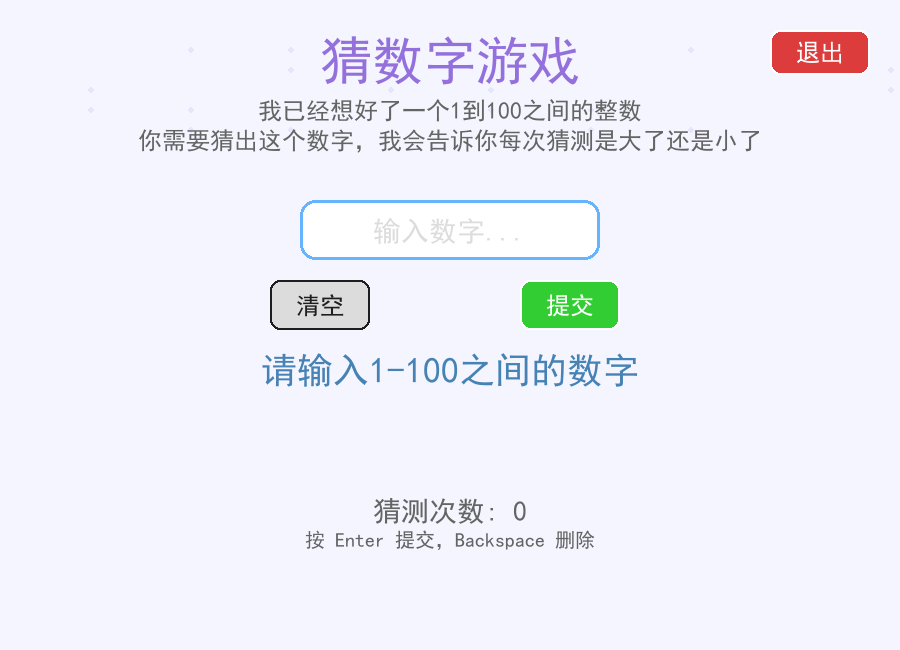
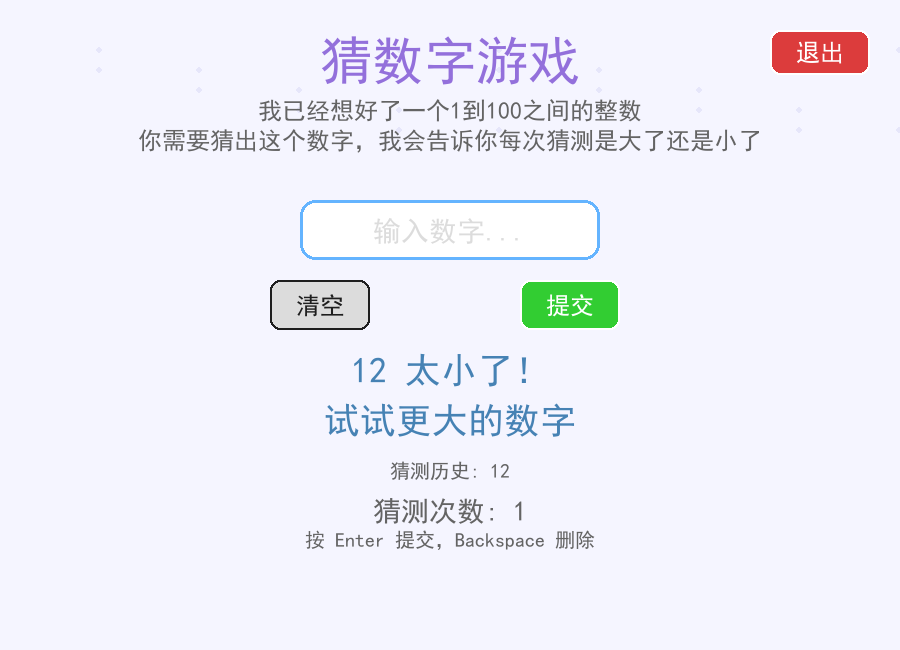
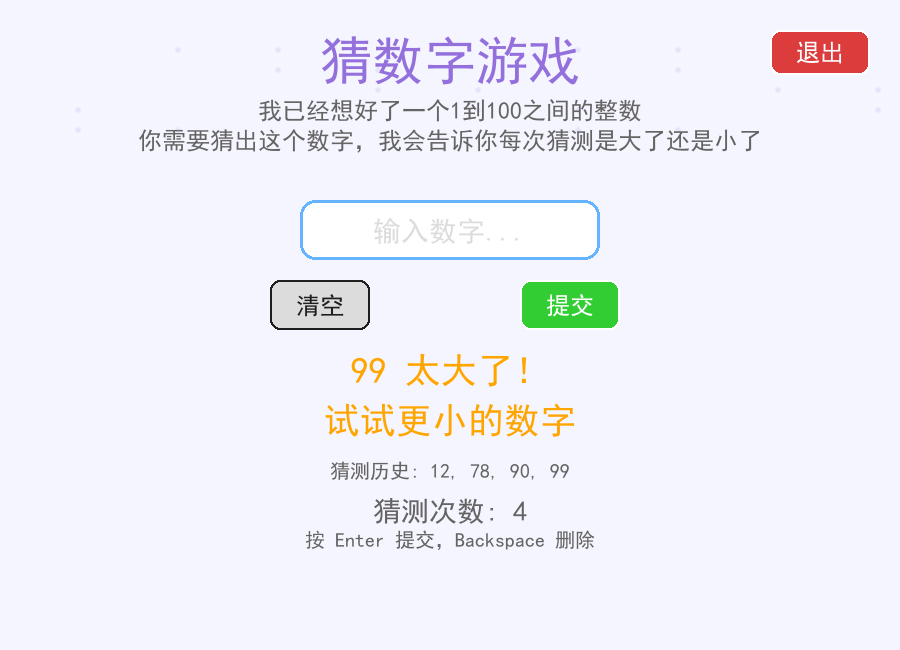
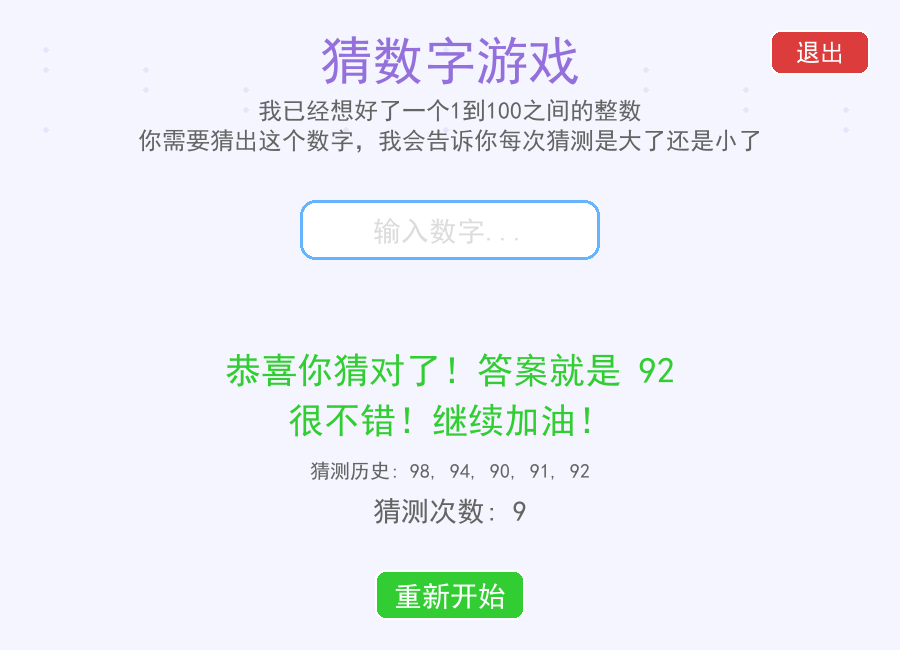
四、总结
本文通过 Pygame 实现了一个功能完整的可视化猜数字游戏,核心收获包括:
- 中文字体适配:多平台字体路径判断+降级处理,解决中文乱码问题;
- 事件驱动编程:区分键盘/鼠标事件,结合游戏状态(
game_over)控制交互逻辑; - 界面美化技巧:圆角按钮、粒子动画等细节提升视觉体验;
- 核心逻辑封装:将猜数字判断、反馈生成等功能模块化,便于维护和扩展。
五、完整代码
import pygame
import random
import sys
import os

# 初始化pygame
pygame.init()

# 游戏常量
SCREEN_WIDTH = 900
SCREEN_HEIGHT = 650
WHITE = (255, 255, 255)
BLACK = (30, 30, 30)
BLUE = (70, 130, 180)
LIGHT_BLUE = (135, 206, 250)
GREEN = (50, 205, 50)
RED = (220, 60, 60)
DARK_RED = (180, 40, 40)
GRAY = (240, 240, 240)
DARK_GRAY = (100, 100, 100)
LIGHT_GRAY = (220, 220, 220)
PURPLE = (147, 112, 219)
ORANGE = (255, 165, 0)
BACKGROUND = (245, 245, 255)
ACCENT = (100, 180, 255)

class NumberGuessingGame:
    def __init__(self):
        # 创建窗口
        self.screen = pygame.display.set_mode((SCREEN_WIDTH, SCREEN_HEIGHT))
        pygame.display.set_caption("猜数字游戏")

        # 字体 - 使用系统中文字体
        self.setup_fonts()

        # 游戏状态
        self.target_number = random.randint(1, 100)
        self.guess_count = 0
        self.current_guess = ""
        self.message = "请输入1-100之间的数字"
        self.message_color = BLUE
        self.game_over = False
        self.feedback = ""
        self.guess_history = []

        # 按钮
        self.quit_button = pygame.Rect(SCREEN_WIDTH - 130, 30, 100, 45)
        self.restart_button = pygame.Rect(SCREEN_WIDTH // 2 - 75, 570, 150, 50)
        self.submit_button = pygame.Rect(SCREEN_WIDTH // 2 + 70, 280, 100, 50)
        self.clear_button = pygame.Rect(SCREEN_WIDTH // 2 - 180, 280, 100, 50)

        # 动画相关
        self.particles = []
        self.animation_timer = 0

    def setup_fonts(self):
        """设置中文字体"""
        # 尝试几种常见的中文字体
        chinese_fonts = [
            "simhei.ttf",  # 黑体
            "simsun.ttc",  # 宋体
            "msyh.ttc",    # 微软雅黑
            "simkai.ttf",  # 楷体
        ]

        # 系统字体路径
        font_paths = [
            "C:/Windows/Fonts/",  # Windows
            "/System/Library/Fonts/",  # macOS
            "/usr/share/fonts/",  # Linux
        ]

        # 尝试加载中文字体
        font_loaded = False
        for font_path in font_paths:
            if os.path.exists(font_path):
                for font_name in chinese_fonts:
                    try:
                        full_path = os.path.join(font_path, font_name)
                        if os.path.exists(full_path):
                            self.title_font = pygame.font.Font(full_path, 52)
                            self.large_font = pygame.font.Font(full_path, 36)
                            self.medium_font = pygame.font.Font(full_path, 28)
                            self.small_font = pygame.font.Font(full_path, 24)
                            self.tiny_font = pygame.font.Font(full_path, 20)
                            font_loaded = True
                            break
                    except:
                        continue
                if font_loaded:
                    break

        # 如果无法加载中文字体,则使用系统默认字体
        if not font_loaded:
            self.title_font = pygame.font.SysFont('arial,helvetica,sans-serif', 52)
            self.large_font = pygame.font.SysFont('arial,helvetica,sans-serif', 36)
            self.medium_font = pygame.font.SysFont('arial,helvetica,sans-serif', 28)
            self.small_font = pygame.font.SysFont('arial,helvetica,sans-serif', 24)
            self.tiny_font = pygame.font.SysFont('arial,helvetica,sans-serif', 20)

    def handle_events(self):
        for event in pygame.event.get():
            if event.type == pygame.QUIT:
                return False

            if event.type == pygame.KEYDOWN:
                if not self.game_over:
                    if event.key == pygame.K_RETURN:
                        self.check_guess()
                    elif event.key == pygame.K_BACKSPACE:
                        self.current_guess = self.current_guess[:-1]
                    elif event.key in (pygame.K_MINUS, pygame.K_KP_MINUS):
                        # 允许输入负号,但只在开始位置
                        if not self.current_guess:
                            self.current_guess += "-"
                    elif event.unicode.isdigit():
                        if len(self.current_guess) < 3:  # 限制输入长度
                            self.current_guess += event.unicode
                else:
                    if event.key == pygame.K_RETURN or event.key == pygame.K_SPACE:
                        self.restart_game()

            if event.type == pygame.MOUSEBUTTONDOWN:
                if self.quit_button.collidepoint(event.pos):
                    return False
                if self.restart_button.collidepoint(event.pos) and self.game_over:
                    self.restart_game()
                if self.submit_button.collidepoint(event.pos) and not self.game_over:
                    self.check_guess()
                if self.clear_button.collidepoint(event.pos) and not self.game_over:
                    self.current_guess = ""
                # 点击输入框聚焦
                input_box = pygame.Rect(SCREEN_WIDTH // 2 - 150, 200, 300, 60)
                if input_box.collidepoint(event.pos) and not self.game_over:
                    pass  # 可以添加聚焦效果

        return True

    def create_particles(self, x, y, color):
        """创建粒子效果"""
        for _ in range(20):
            particle = {
                'x': x,
                'y': y,
                'vx': random.uniform(-3, 3),
                'vy': random.uniform(-5, -1),
                'radius': random.randint(2, 5),
                'color': color,
                'life': 30
            }
            self.particles.append(particle)

    def update_particles(self):
        """更新粒子效果"""
        for particle in self.particles[:]:
            particle['x'] += particle['vx']
            particle['y'] += particle['vy']
            particle['vy'] += 0.1  # 重力效果
            particle['life'] -= 1

            if particle['life'] <= 0:
                self.particles.remove(particle)

    def check_guess(self):
        if not self.current_guess:
            self.message = "请输入一个数字!"
            self.message_color = RED
            return

        try:
            guess = int(self.current_guess)

            if guess < 1 or guess > 100:
                self.message = "请输入1到100之间的数字!"
                self.message_color = RED
                self.current_guess = ""
                return

            self.guess_count += 1
            self.guess_history.append(guess)

            if guess < self.target_number:
                self.message = f"{guess} 太小了!"
                self.message_color = BLUE
                self.feedback = "试试更大的数字"
            elif guess > self.target_number:
                self.message = f"{guess} 太大了!"
                self.message_color = ORANGE
                self.feedback = "试试更小的数字"
            else:
                self.message = f"恭喜你猜对了!答案就是 {self.target_number}"
                self.message_color = GREEN
                self.game_over = True
                self.set_final_feedback()
                self.create_particles(SCREEN_WIDTH // 2, 200, GREEN)

        except ValueError:
            self.message = "请输入有效的数字!"
            self.message_color = RED

        self.current_guess = ""

    def set_final_feedback(self):
        if self.guess_count <= 5:
            self.feedback = "太厉害了!你是猜数字大师!"
        elif self.guess_count <= 10:
            self.feedback = "很不错!继续加油!"
        else:
            self.feedback = "还可以做得更好哦!"

    def restart_game(self):
        self.target_number = random.randint(1, 100)
        self.guess_count = 0
        self.current_guess = ""
        self.message = "请输入1-100之间的数字"
        self.message_color = BLUE
        self.game_over = False
        self.feedback = ""
        self.guess_history = []
        self.particles = []

    def draw_rounded_rect(self, surface, rect, color, corner_radius):
        """绘制圆角矩形"""
        if rect.width < 2 * corner_radius or rect.height < 2 * corner_radius:
            raise ValueError(f"Corner radius {corner_radius} too large for the rect")

        # 绘制中间的矩形
        pygame.draw.rect(surface, color, (rect.left, rect.top + corner_radius, rect.width, rect.height - 2 * corner_radius))
        pygame.draw.rect(surface, color, (rect.left + corner_radius, rect.top, rect.width - 2 * corner_radius, rect.height))

        # 绘制四个圆角
        pygame.draw.circle(surface, color, (rect.left + corner_radius, rect.top + corner_radius), corner_radius)
        pygame.draw.circle(surface, color, (rect.right - corner_radius, rect.top + corner_radius), corner_radius)
        pygame.draw.circle(surface, color, (rect.left + corner_radius, rect.bottom - corner_radius), corner_radius)
        pygame.draw.circle(surface, color, (rect.right - corner_radius, rect.bottom - corner_radius), corner_radius)

    def draw_button(self, rect, text, font, bg_color, text_color, hover_color=None):
        """绘制按钮"""
        mouse_pos = pygame.mouse.get_pos()
        if rect.collidepoint(mouse_pos) and hover_color:
            bg_color = hover_color

        self.draw_rounded_rect(self.screen, rect, bg_color, 10)
        pygame.draw.rect(self.screen, text_color, rect, 2, border_radius=10)

        text_surf = font.render(text, True, text_color)
        text_rect = text_surf.get_rect(center=rect.center)
        self.screen.blit(text_surf, text_rect)

    def draw(self):
        # 填充背景
        self.screen.fill(BACKGROUND)

        # 绘制装饰性背景元素
        for i in range(20):
            x = (i * 100 + self.animation_timer // 5) % SCREEN_WIDTH
            y = 50 + (i * 20) % 100
            pygame.draw.circle(self.screen, (230, 230, 250), (x, y), 3)

        # 绘制标题(移除了emoji)
        title = self.title_font.render("猜数字游戏", True, PURPLE)
        title_rect = title.get_rect(center=(SCREEN_WIDTH // 2, 60))
        self.screen.blit(title, title_rect)

        # 绘制游戏说明
        instructions = [
            "我已经想好了一个1到100之间的整数",
            "你需要猜出这个数字,我会告诉你每次猜测是大了还是小了"
        ]

        for i, line in enumerate(instructions):
            text = self.small_font.render(line, True, DARK_GRAY)
            text_rect = text.get_rect(center=(SCREEN_WIDTH // 2, 110 + i * 30))
            self.screen.blit(text, text_rect)

        # 绘制输入框
        input_box = pygame.Rect(SCREEN_WIDTH // 2 - 150, 200, 300, 60)
        self.draw_rounded_rect(self.screen, input_box, WHITE, 15)
        pygame.draw.rect(self.screen, ACCENT, input_box, 3, border_radius=15)

        # 绘制输入的数字
        if self.current_guess:
            input_text = self.large_font.render(self.current_guess, True, BLACK)
            text_rect = input_text.get_rect(center=(SCREEN_WIDTH // 2, 230))
            self.screen.blit(input_text, text_rect)
        else:
            placeholder = self.medium_font.render("输入数字...", True, LIGHT_GRAY)
            placeholder_rect = placeholder.get_rect(center=(SCREEN_WIDTH // 2, 230))
            self.screen.blit(placeholder, placeholder_rect)

        # 绘制提示信息
        message_text = self.large_font.render(self.message, True, self.message_color)
        message_rect = message_text.get_rect(center=(SCREEN_WIDTH // 2, 370))
        self.screen.blit(message_text, message_rect)

        # 绘制反馈信息
        if self.feedback:
            feedback_text = self.large_font.render(self.feedback, True, self.message_color)
            feedback_rect = feedback_text.get_rect(center=(SCREEN_WIDTH // 2, 420))
            self.screen.blit(feedback_text, feedback_rect)

        # 绘制猜测历史
        if self.guess_history:
            history_text = "猜测历史: " + ", ".join(map(str, self.guess_history[-5:]))  # 只显示最近5个
            history_surf = self.tiny_font.render(history_text, True, DARK_GRAY)
            history_rect = history_surf.get_rect(center=(SCREEN_WIDTH // 2, 470))
            self.screen.blit(history_surf, history_rect)

        # 绘制猜测次数
        count_text = self.medium_font.render(f"猜测次数: {self.guess_count}", True, DARK_GRAY)
        count_rect = count_text.get_rect(center=(SCREEN_WIDTH // 2, 510))
        self.screen.blit(count_text, count_rect)

        # 绘制按钮(移除了emoji)
        self.draw_button(self.quit_button, "退出", self.small_font, RED, WHITE, DARK_RED)

        if not self.game_over:
            self.draw_button(self.submit_button, "提交", self.small_font, GREEN, WHITE, (40, 180, 40))
            self.draw_button(self.clear_button, "清空", self.small_font, LIGHT_GRAY, BLACK, GRAY)
        else:
            self.draw_button(self.restart_button, "重新开始", self.medium_font, GREEN, WHITE, (40, 180, 40))

        # 绘制操作提示
        if not self.game_over:
            hint_text = self.tiny_font.render("按 Enter 提交,Backspace 删除", True, DARK_GRAY)
            hint_rect = hint_text.get_rect(center=(SCREEN_WIDTH // 2, 540))
            self.screen.blit(hint_text, hint_rect)

        # 绘制粒子效果
        for particle in self.particles:
            pygame.draw.circle(self.screen, particle['color'],
                             (int(particle['x']), int(particle['y'])),
                             particle['radius'])

        # 更新显示
        pygame.display.flip()
        self.animation_timer += 1

    def run(self):
        clock = pygame.time.Clock()
        running = True

        while running:
            running = self.handle_events()
            self.update_particles()
            self.draw()
            clock.tick(60)

        pygame.quit()
        sys.exit()

# 运行游戏
if __name__ == "__main__":
    game = NumberGuessingGame()
    game.run()
更多推荐

 43
43 0
0- 0


 已为社区贡献1条内容

所有评论(0)