
【C++设计模式】第四篇:Composite 模式(组合实体模式)- 树形结构的优雅处理方案
·
C++设计模式系列文章目录
【C++设计模式】第一篇 C++单例模式–懒汉与饿汉以及线程安全
【C++设计模式】第二篇:策略模式(Strategy)–从基本介绍,内部原理、应用场景、使用方法,常见问题和解决方案进行深度解析
【C++设计模式】第三篇:观察者模式(别名:发布-订阅模式、模型-视图模式、源-监听器模式)
【C++设计模式】第四篇:Composite 模式(组合实体模式)- 树形结构的优雅处理方案
原文链接:https://blog.csdn.net/weixin_45970964/article/details/144396488
1. 什么是组合模式
组合模式(Composite Pattern)是一种结构型设计模式,它允许你将对象组合成树形结构来表现"整体-部分"的层次关系。使用组合模式后,客户端可以统一对待单个对象和组合对象,无需关心处理的是一个叶子节点还是一个组合节点。
这种模式特别适合处理那些需要树形结构来展示的场景,比如:
-
文件系统:文件和目录的层次结构
-
GUI组件:窗口包含面板,面板包含按钮等
-
组织结构:公司部门与员工的层次关系
-
图形编辑:图形组合与简单图形的统一处理
-
菜单系统:菜单项和子菜单的统一处理
2. 组合模式的结构
组合模式主要包含以下几个角色:
- Component(抽象组件):定义组合对象和叶子对象的共同接口
- Leaf(叶子节点):表示组合中的叶子节点对象没有子节点
- Composite(组合节点):表示组合中的分支节点对象,可以包含子节点
3. UML类图
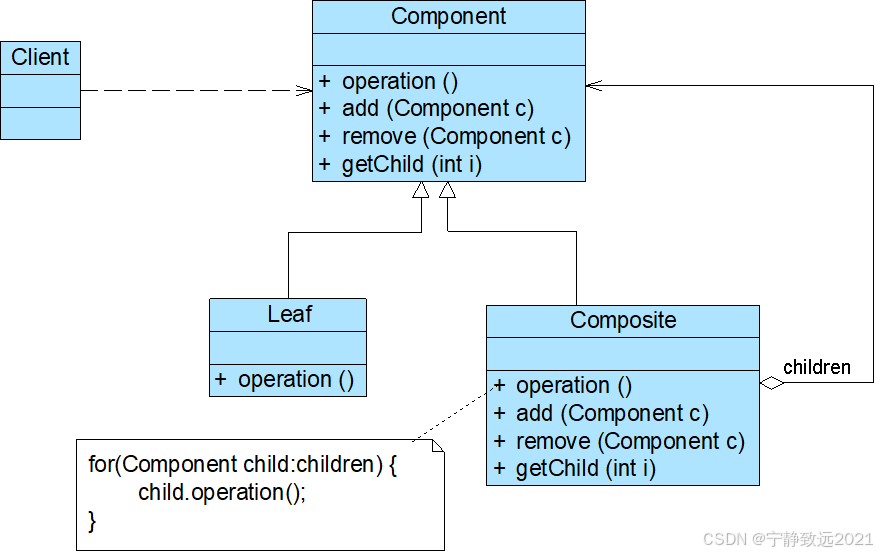
由图可知,组合模式包含以下3个角色。
- Component(抽象构件):它可以是接口或抽象类,为叶子构件和容器构件对象声明接口,在该角色中可以包含所有子类共有行为的声明和实现。在抽象构件中定义了访问及管理它的子构件的方法,如增加子构件、删除子构件、获取子构件等。
- Leaf(叶子构件):它在组合结构中表示叶子结点对象,叶子结点没有子结点,它实现了在抽象构件中定义的行为。对于那些访问及管理子构件的方法,可以通过抛出异常、提示错误等方式进行处理。
- Composite(容器构件):它在组合结构中表示容器结点对象,容器结点包含子结点,其子结点可以是叶子结点,也可以是容器结点,它提供一个集合用于存储子结点,实现类在抽象构件中定义的行为,包括那些访问及管理子构件的方法,在其业务方法中可以递归调用其子结点的业务方法。
主要解决: 它在我们树型结构的问题中,模糊了简单元素和复杂元素的概念,客户程序可以像处理简单元素一样来处理复杂元素,从而使得客户程序与复杂元素的内部结构解耦。

何时使用: 1、您想表示对象的部分-整体层次结构(树形结构)。 2、您希望用户忽略组合对象与单个对象的不同,用户将统一地使用组合结构中的所有对象。

如何解决: 树枝和叶子实现统一接口,树枝内部组合该接口。

关键代码: 树枝内部组合该接口,并且含有内部属性 List,里面放 Component。

应用实例: 1、算术表达式包括操作数、操作符和另一个操作数,其中,另一个操作数也可以是操作数、操作符和另一个操作数。 2、在 JAVA AWT 和 SWING 中,对于 Button 和 Checkbox 是树叶,Container 是树枝。

优点: 1、高层模块调用简单。 2、节点自由增加。

缺点: 在使用组合模式时,其叶子和树枝的声明都是实现类,而不是接口,违反了依赖倒置原则。

使用场景: 部分、整体场景,如树形菜单,文件、文件夹的管理。

注意事项: 定义时为具体类。
4. 实现代码示例
//Composite.h
#ifndef COMPOSITE_H
#define COMPOSITE_H
#include <list>
// 组合中的抽象基类
class Component
{
public:
 Component(){}
 virtual ~Component(){}
 // 纯虚函数,只提供接口,没有默认的实现
 virtual void Operation() = 0;
 // 虚函数,提供接口,有默认的实现就是什么都不做
 virtual void Add(Component* pChild);
 virtual void Remove(Component* pChild);
 virtual Component* GetChild(int nIndex);
};
// 派生自 Component,是其中的叶子组件的基类
class Leaf
 : public Component
{
public:
 Leaf(){}
 virtual ~Leaf(){}
 virtual void Operation();
};
// 派生自 Component,是其中的含有子件的组件的基类
class Composite
 : public Component
{
public:
 Composite(){}
 virtual ~Composite();
 virtual void Operation();
 virtual void Add(Component* pChild);
 virtual void Remove(Component* pChild);
 virtual Component* GetChild(int nIndex);
private:
 // 采用 list 容器去保存子组件
 std::list<Component*> m_ListOfComponent;
};
#endif

//Composite.cpp
#include "Composite.h"
#include <iostream>
#include <algorithm>
/*-------------------------------------------------------------------
 Component 成员函数的实现
-------------------------------------------------------------------*/
void Component::Add(Component* pChild)
{
}
void Component::Remove(Component* pChild)
{
}
Component* Component::GetChild(int nIndex)
{
 return NULL;
}
/*-------------------------------------------------------------------
 Leaf 成员函数的实现
-------------------------------------------------------------------*/
void Leaf::Operation()
{
 std::cout << "Operation by leaf\n";
}
/*-------------------------------------------------------------------
 Composite 成员函数的实现
-------------------------------------------------------------------*/
Composite::~Composite()
{
 std::list<Component*>::iterator iter1, iter2, temp;
PDF created with pdfFactory trial version www.pdffactory.com
 for (iter1 = m_ListOfComponent.begin(), iter2 = m_ListOfComponent.end();
 iter1 != iter2;
 )
 {
 temp = iter1;
 ++iter1;
 delete (*temp);
 }
}
void Composite::Add(Component* pChild)
{
 m_ListOfComponent.push_back(pChild);
}
void Composite::Remove(Component* pChild)
{
 std::list<Component*>::iterator iter;
 iter = find(m_ListOfComponent.begin(), m_ListOfComponent.end(), pChild);
 if (m_ListOfComponent.end() != iter)
 {
 m_ListOfComponent.erase(iter);
 }
}
Component* Composite::GetChild(int nIndex)
{
 if (nIndex <= 0 || nIndex > m_ListOfComponent.size())
 return NULL;
 std::list<Component*>::iterator iter1, iter2;
 int i;
 for (i = 1, iter1 = m_ListOfComponent.begin(), iter2 = m_ListOfComponent.
end();
 iter1 != iter2;
 ++iter1, ++i)
 {
 if (i == nIndex)
 break;
 }
PDF created with pdfFactory trial version www.pdffactory.com
 return *iter1;
}
void Composite::Operation()
{
 std::cout << "Operation by Composite\n";
 std::list<Component*>::iterator iter1, iter2;
 for (iter1 = m_ListOfComponent.begin(), iter2 = m_ListOfComponent.end();
 iter1 != iter2;
 ++iter1)
 {
 (*iter1)->Operation();
 }
}

#include "Composite.h"
#include <stdlib.h>
int main()
{
 Leaf *pLeaf1 = new Leaf();
 Leaf *pLeaf2 = new Leaf();
 Composite* pComposite = new Composite;
 pComposite->Add(pLeaf1);
 pComposite->Add(pLeaf2);
 pComposite->Operation();
 pComposite->GetChild(2)->Operation();
 delete pComposite;
示例2
#include <iostream>
#include <vector>
#include <memory>
#include <string>
#include <algorithm>

// ==================== 抽象组件 ====================
class FileSystemComponent {
public:
    virtual void display(int depth = 0) const = 0;
    virtual void add(std::unique_ptr<FileSystemComponent> component) {
        throw std::runtime_error("不支持添加操作");
    }
    virtual void remove(FileSystemComponent* component) {
        throw std::runtime_error("不支持删除操作");
    }
    virtual ~FileSystemComponent() = default;
};

// ==================== 叶子组件 ====================
class File : public FileSystemComponent {
    std::string name_;
    int size_;

public:
    File(const std::string& name, int size) : name_(name), size_(size) {}

    void display(int depth = 0) const override {
        std::cout << std::string(depth * 2, ' ')
                  << "- " << name_ << " (" << size_ << " KB)" << std::endl;
    }
};

// ==================== 复合组件 ====================
class Directory : public FileSystemComponent {
    std::string name_;
    std::vector<std::unique_ptr<FileSystemComponent>> children_;

public:
    explicit Directory(const std::string& name) : name_(name) {}

    void display(int depth = 0) const override {
        std::cout << std::string(depth * 2, ' ')
                  << "+ " << name_ << " (目录)" << std::endl;

        for (const auto& child : children_) {
            child->display(depth + 1);
        }
    }

    void add(std::unique_ptr<FileSystemComponent> component) override {
        children_.push_back(std::move(component));
    }

    void remove(FileSystemComponent* component) override {
        auto it = std::remove_if(children_.begin(), children_.end(),
            [component](const std::unique_ptr<FileSystemComponent>& ptr) {
                return ptr.get() == component;
            });
        children_.erase(it, children_.end());
    }
};

// ==================== 客户端代码 ====================
int main() {
    std::cout << "=== 文件系统结构 ===" << std::endl;

    // 创建根目录
    auto root = std::make_unique<Directory>("根目录");

    // 添加文件到根目录
    root->add(std::make_unique<File>("readme.txt", 100));
    root->add(std::make_unique<File>("program.exe", 1024));

    // 创建子目录
    auto documents = std::make_unique<Directory>("文档");
    documents->add(std::make_unique<File>("report.doc", 250));
    documents->add(std::make_unique<File>("presentation.ppt", 500));

    // 在子目录中再创建子目录
    auto images = std::make_unique<Directory>("图片");
    images->add(std::make_unique<File>("photo1.jpg", 800));
    images->add(std::make_unique<File>("photo2.jpg", 900));

    documents->add(std::move(images));

    // 将子目录添加到根目录
    root->add(std::move(documents));

    // 显示完整的文件系统结构
    root->display();

    return 0;
}
更多推荐
 22
22 0
0- 0


 已为社区贡献5条内容

所有评论(0)