
React-Redux的使用
·
1. Redux(状态管理器)
Redux是JS应用的状态容器,他并不是只能在React中使用,而是可以应用到任意的JS应用中(前端JS,node.js)
1.1. 使用方法
- 引入包
<script src="https://unpkg.com/redux@4.2.0/dist/redux.js"></script>
- 创建reducer整合函数
- 通过reducer对象创建store
- 对store中的state进行订阅
- 通过dispatch派发state的操作指令
问题:
- 如果state复杂,将会非常难已维护
- state每次操作时,都需要对state进行复制,然后再去修改
- case后边的变量维护起来麻烦,重名,拼错…
2. RTK (Redux Toolkit)
RTK 是 Redux 官方推荐的现代化工具集,解决了原生 Redux 所有缺点。
- 安装
npm install react-redux @reduxjs/toolkit -S
- 使用
核心API:createSlice(创建切片)
作用:自动生成reducer+action,简化状态操作
//使用RTK来构建store
import  {createSlice} from "@reduxjs/toolkit"
//createSlice创建reducer的切片
//他需要一个配置对象作为参数,通过对象的不同属性来指定它的配置
const stuSlice=createSlice({
    name:'stu',//用来自动生成action中的type
    initialState:{//state的初始值
        name:'张三',
        age:18,
        gender:'男',
        address:'上海',

    },
    reducers:{
        //指定state的各种操作,直接在对象中添加方法
        setName(state,action){
            //state参数:是一个代理对象,不是原本的state,可以直接修改,不用复制
            state.name="李四"
        },
        setAge(state,action){
            state.age=20

        }

    }
})
//切片对象会自动帮我们生成action
console.log(stuSlice.actions)
// 导出自动生成的 action 方法
export const { setName, setAge } = stuSlice.actions

// 导出 reducer
export const { reducer: stuReducer } = stuSlice

有时我们会需要多个切片,可以把他们放到两个文件里
import  {createSlice} from "@reduxjs/toolkit"
//创建一个学校切片
const schoolSlice=createSlice({
    name:'school',
    initialState:{
        name:'河南科技学院',
        address:'新乡'
    },
    reducers:{
        setName(state,action){
            state.name=action.payload;
        },
        setAddress(state,action){
            state.address=action.payload
        }
    }
})
export const {setName,setAddress}=schoolSlice.actions;
export const {reducer:schoolReducer}=schoolSlice;
import  {createSlice} from "@reduxjs/toolkit"

//createSlice创建reducer的切片
//他需要一个配置对象作为参数,通过对象的不同属性来指定它的配置
const stuSlice=createSlice({
    name:'stu',//用来自动生成action中的type
    initialState:{
        name:'张三',
        age:18,
        gender:'男',
        address:'上海',

    },//state的初始值
    reducers:{
        //指定state的各种操作,直接在对象中添加方法
        setName(state,action){
            //state参数:是一个代理对象,不是原本的state,可以直接修改,不用复制
            state.name=action.payload;
        },
        setAge(state,action){
            state.age=action.payload;

        }

    }
})
//切片对象会自动帮我们生成action
//actions中存储的是slice自动生成action创建器(函数),调用函数后会自动创建action对象
//action对象的结构{type:name/函数名,payload:参数}
// console.log(stuSlice.actions)
// const nameAction=setName("张三")
// console.log(nameAction);//{type: 'stu/setName', payload: '张三'}
export const {setName,setAge}=stuSlice.actions
export const {reducer:stuReducer}=stuSlice
创建store(configureStore)
//使用RTK来构建store
import  {configureStore} from "@reduxjs/toolkit"
import  {stuReducer} from "./stuSlice"
import  {schoolReducer} from "./schoolSlice"


//创建store 需要一个配置对象作为参数
const store=configureStore({
    reducer:{
        student:stuReducer,
        school:schoolReducer
    }
})
export default store
组件中使用RTK
import { useSelector, useDispatch } from "react-redux"
import { setName, setAge } from "./store/stuSlice"

const App = () => {
  const { student, school } = useSelector(state => state)
  const dispatch = useDispatch()

  return (
    <div>
      <p>{student.name}</p>
      <p>{student.age}</p>

      <button onClick={() => dispatch(setName("沙和尚"))}>改名</button>
      <button onClick={() => dispatch(setAge(19))}>改年龄</button>
    </div>
  )
}
3. RTKQ (RTK Query)—— 数据请求工具
作用:
- 发送 GET/POST/PUT/DELETE
- 自动管理:loading /error/data
- 自动缓存数据
- 自动重新请求
- 无需 useEffect /try/catch
import { createApi, fetchBaseQuery } from "@reduxjs/toolkit/query/react";
//创建Api对象
//createApi()用来创建RTKQ中的API对象
//RTKQ的所有功能都需要通过该对象来进行
//createApi()需要一个对象作为参数
const studentApi = createApi({
  reducerPath: "studentApi", //作为api的唯一标识,不能和其他的Api 或reducer重复
  baseQuery: fetchBaseQuery({
    baseUrl: "http://localhost:1337/api/",
  }), //指定查询的基础信息,发送请求使用的工具
  endpoints(build) {
    //build事情求的构建器,通过build来设置请求的相关信息
    return {
      getStudents: build.query({
        query() {
          //query用来指定请求的字路径
          return "students"; //会和baseUrl拼接
        },

        transformResponse(baseQueryReturnValue) {
            //这样写的话就会只返回data,不会返回meta里的数据
          return baseQueryReturnValue.data;
        },
        //设置数据缓存的时间,单位秒,默认60秒
        keepUnusedDataFor: 5,
      }),
      getStuById: build.query(),
    };
  }, //endpoints用来指定Api中的各种功能,是一个方法,他需要一个对象作为返回值
});

//Api对象创建以后,对象会根据各种方法自动生成对应的钩子函数,通过这些钩子函数,可以像服务器发送请求
//钩子函数命名规则getStudents-->useGetStudentsQuery
export const { useGetStudentsQuery } = studentApi;
export default studentApi;
store中注册RTKQ
import {configureStore} from '@reduxjs/toolkit';
import studentApi from './stuApi'
const store=configureStore({
    reducer:{
        [studentApi.reducerPath]:studentApi.reducer,
    },
    middleware:getDefaultMiddleware=>
        getDefaultMiddleware().concat(studentApi.middleware)
})
export default store;
组件中使用RTKQ
import React from "react";
import { useGetStudentsQuery } from "./store/stuApi";
// import StudentList from "./components/StudentList";
const App = () => {
  //调用api查询数据
  //这个钩子函数会返回一个对象作为返回值,请求过程中相关数据都在该对象中
  // const { data:stus, isSuccess, isLoading } = useGetStudentsQuery();
  const result=useGetStudentsQuery();
  console.log(result);
  return (
    <div>
      {/* {isLoading && <p>数据正在加载中</p>}
      {isSuccess&&<StudentList stus={stus}></StudentList>} */}
    </div>
  );
};
export default App;
result打印结果:
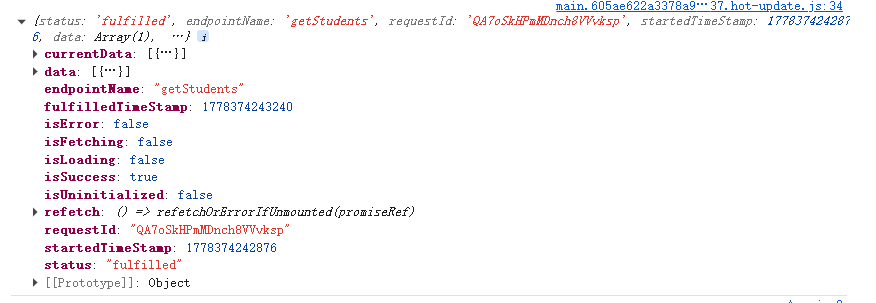
isFetching:布尔值,数据是否正在加载
isLoading:布尔值,数据是否第一次加载
isUninitiallized:请求是否还没有开始发送
refetch():一个函数,用来重新加载数据
error:错误对象,有错时才出现
更多推荐
 5
5 0
0- 0


 已为社区贡献3条内容

所有评论(0)