
Java 使用 YOLO模型检测裂缝
·
java调用onnx相关资料:https://runtime.onnx.org.cn/docs/get-started/with-java.html
前文已经训练好了我们的裂缝识别模型:https://blog.csdn.net/YXWik/article/details/161083554
导出了best.pt 模型,我们这里要在java中使用,需要将pt模型导出为onnx格式
模型导出onnx格式
from ultralytics import YOLO

# 加载你训练好的最佳模型
model = YOLO("runs/detect/train/weights/best.pt")

# 导出为 ONNX 格式(Java 能直接读)
model.export(format="onnx", imgsz=640)
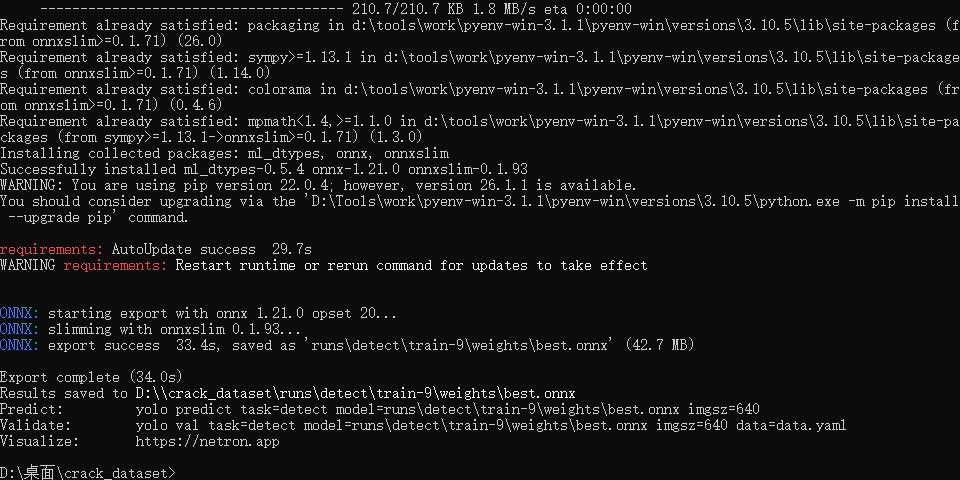
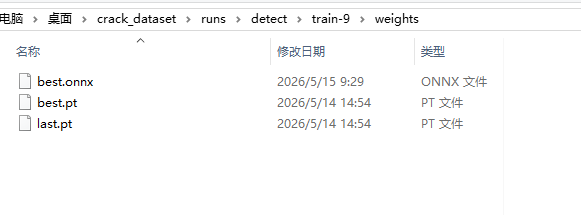
准备工作做好了,我们可以开始使用了
Demo
采用 jdk 17
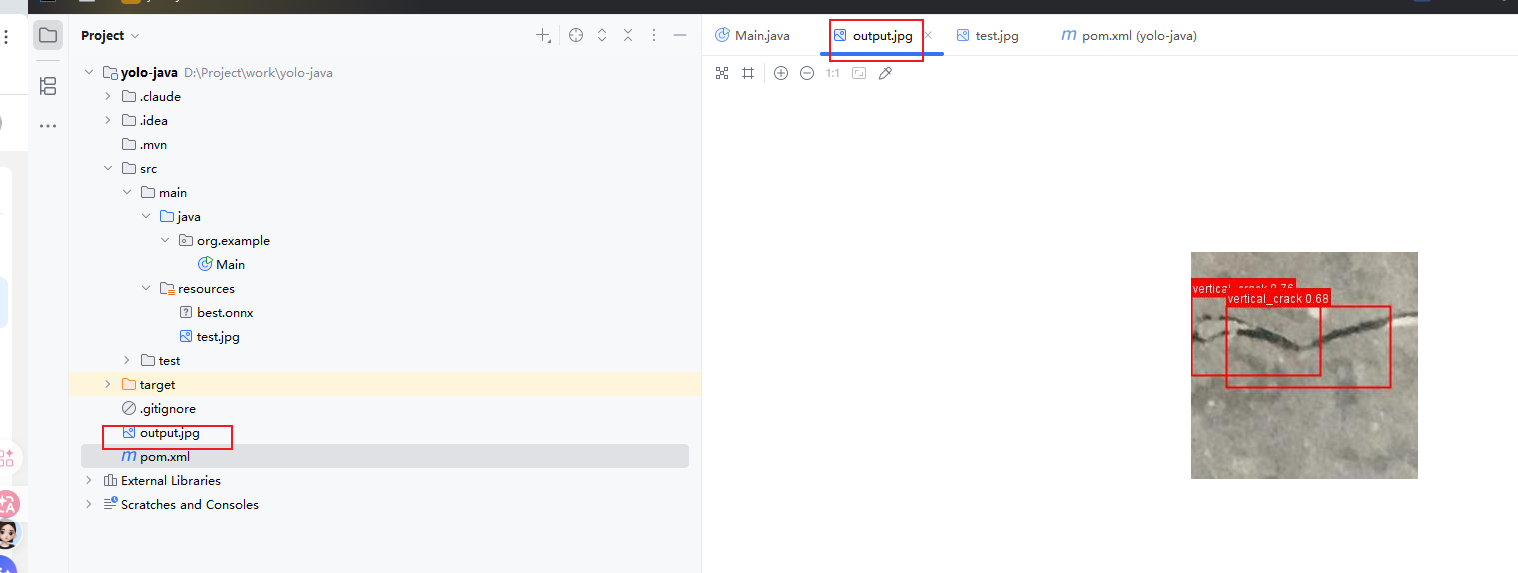
将需要onnx模型放到resource下,将要测试的图片放到resource下
依赖
<?xml version="1.0" encoding="UTF-8"?>
<project xmlns="http://maven.apache.org/POM/4.0.0"
         xmlns:xsi="http://www.w3.org/2001/XMLSchema-instance"
         xsi:schemaLocation="http://maven.apache.org/POM/4.0.0 http://maven.apache.org/xsd/maven-4.0.0.xsd">
    <modelVersion>4.0.0</modelVersion>

    <groupId>org.example</groupId>
    <artifactId>yolo-java</artifactId>
    <version>1.0-SNAPSHOT</version>

    <properties>
        <maven.compiler.source>8</maven.compiler.source>
        <maven.compiler.target>8</maven.compiler.target>
        <project.build.sourceEncoding>UTF-8</project.build.sourceEncoding>
    </properties>

    <dependencies>
        <dependency>
            <groupId>com.microsoft.onnxruntime</groupId>
            <artifactId>onnxruntime</artifactId>
            <version>1.18.0</version>
        </dependency>
    </dependencies>

</project>
代码
package org.example;

import ai.onnxruntime.*;

import javax.imageio.ImageIO;
import java.awt.*;
import java.awt.image.BufferedImage;
import java.io.*;
import java.nio.FloatBuffer;
import java.nio.file.*;
import java.util.*;
import java.util.List;

/**
 * YOLO ONNX 推理 Demo
 * 加载 ONNX 模型,对图片进行目标检测,绘制检测框并保存结果。
 */
public class Main {

    /** 置信度阈值,低于此值的检测结果会被过滤 */
    private static final float CONF_THRESHOLD = 0.5f;
    /** NMS 的 IoU 阈值,高于此值的重叠框会被抑制 */
    private static final float NMS_THRESHOLD = 0.45f;

    /** YOLO 模型训练标签类别名称 */
    private static final String[] COCO_CLASSES = {
            "vertical_crack", "horizontal_crack", "horizontal_crack"
    };

    public static void main(String[] args) throws Exception {
        // ==================== 1. 从 resources 加载 ONNX 模型 ====================
        byte[] modelBytes;
        try (InputStream is = Main.class.getClassLoader().getResourceAsStream("best.onnx")) {
            if (is == null) {
                System.err.println("模型文件未找到: best.onnx");
                return;
            }
            // 将 InputStream 读取为 byte[](兼容 Java 8)
            ByteArrayOutputStream buffer = new ByteArrayOutputStream();
            byte[] tmp = new byte[8192];
            int n;
            while ((n = is.read(tmp)) != -1) {
                buffer.write(tmp, 0, n);
            }
            modelBytes = buffer.toByteArray();
        }
        System.out.println("模型已加载: " + modelBytes.length + " 字节");

        // ==================== 2. 从 resources 加载测试图片 ====================
        BufferedImage original;
        try (InputStream is = Main.class.getClassLoader().getResourceAsStream("test.jpg")) {
            if (is == null) {
                System.err.println("图片文件未找到: test.jpg");
                return;
            }
            original = ImageIO.read(is);
        }
        System.out.println("图片已加载: " + original.getWidth() + "x" + original.getHeight());

        // ==================== 3. 创建 ONNX 推理会话 ====================
        OrtEnvironment env = OrtEnvironment.getEnvironment();
        try (OrtSession session = env.createSession(modelBytes, new OrtSession.SessionOptions())) {

            // 获取模型输入信息(名称、形状)
            Map<String, NodeInfo> inputInfo = session.getInputInfo();
            String inputName = inputInfo.keySet().iterator().next();
            NodeInfo nodeInfo = inputInfo.get(inputName);
            long[] inputShape = ((TensorInfo) nodeInfo.getInfo()).getShape();
            int inputWidth = (int) inputShape[2];
            int inputHeight = (int) inputShape[3];
            System.out.println("模型输入: " + inputName + " " + Arrays.toString(inputShape));

            // 获取模型输出信息,推算类别数(输出通道数 - 4 个坐标值)
            Map<String, NodeInfo> outputInfo = session.getOutputInfo();
            String outputName = outputInfo.keySet().iterator().next();
            long[] outputShape = ((TensorInfo) outputInfo.get(outputName).getInfo()).getShape();
            System.out.println("模型输出形状: " + Arrays.toString(outputShape));

            int numClasses = (int) outputShape[1] - 4;
            System.out.println("检测到 " + numClasses + " 个类别");

            // ==================== 4. 图片预处理 ====================
            // 包括:letterbox 缩放 + 填充、归一化 [0,1]、HWC 转 CHW
            float[] inputData = preprocess(original, inputWidth, inputHeight);
            OnnxTensor inputTensor = OnnxTensor.createTensor(env,
                    FloatBuffer.wrap(inputData), inputShape);

            // ==================== 5. 执行推理 ====================
            OrtSession.Result result = session.run(
                    Collections.singletonMap(inputName, inputTensor));
            // YOLO 输出形状 [1, 4+numClasses, numProposals],取第 0 个 batch
            float[][][] rawOutput = (float[][][]) result.get(0).getValue();
            float[][] output = rawOutput[0];
            result.close();
            inputTensor.close();

            int numProposals = output[0].length;
            System.out.println("推理完成,候选框数量: " + numProposals);

            // ==================== 6. 解析输出并过滤 ====================
            // 输出格式: [cx, cy, w, h, class0_score, class1_score, ...]
            int imgW = original.getWidth();
            int imgH = original.getHeight();

            List<Detection> detections = new ArrayList<>();
            for (int i = 0; i < numProposals; i++) {
                // 找到当前候选框中得分最高的类别
                float maxScore = 0;
                int bestClass = -1;
                for (int c = 0; c < numClasses; c++) {
                    float score = output[4 + c][i];
                    if (score > maxScore) {
                        maxScore = score;
                        bestClass = c;
                    }
                }
                // 置信度低于阈值的直接丢弃
                if (maxScore < CONF_THRESHOLD) continue;

                float cx = output[0][i];
                float cy = output[1][i];
                float w = output[2][i];
                float h = output[3][i];

                // 将中心点坐标 (cx, cy, w, h) 转换为左上/右下角坐标 (x1, y1, x2, y2)
                // 同时从模型输入尺寸映射回原始图片尺寸
                float x1 = (cx - w / 2) * imgW / inputWidth;
                float y1 = (cy - h / 2) * imgH / inputHeight;
                float x2 = (cx + w / 2) * imgW / inputWidth;
                float y2 = (cy + h / 2) * imgH / inputHeight;

                // 边界裁剪,防止坐标超出图片范围
                x1 = Math.max(0, Math.min(imgW, x1));
                y1 = Math.max(0, Math.min(imgH, y1));
                x2 = Math.max(0, Math.min(imgW, x2));
                y2 = Math.max(0, Math.min(imgH, y2));

                detections.add(new Detection(x1, y1, x2, y2, maxScore, bestClass));
            }

            System.out.println("NMS 前检测数: " + detections.size());

            // ==================== 7. 非极大值抑制 (NMS) ====================
            // 按置信度降序排列,逐轮保留最高分框并抑制与其高度重叠的框
            detections.sort((a, b) -> Float.compare(b.confidence, a.confidence));
            List<Detection> kept = new ArrayList<>();
            boolean[] suppressed = new boolean[detections.size()];
            for (int i = 0; i < detections.size(); i++) {
                if (suppressed[i]) continue;
                Detection det = detections.get(i);
                kept.add(det);
                for (int j = i + 1; j < detections.size(); j++) {
                    if (suppressed[j]) continue;
                    if (iou(det, detections.get(j)) > NMS_THRESHOLD) {
                        suppressed[j] = true;
                    }
                }
            }

            System.out.println("NMS 后检测数: " + kept.size());
            for (Detection det : kept) {
                String label = det.classId < COCO_CLASSES.length
                        ? COCO_CLASSES[det.classId] : "class-" + det.classId;
                System.out.printf("  %s: %.2f @ [%.0f, %.0f, %.0f, %.0f]%n",
                        label, det.confidence, det.x1, det.y1, det.x2, det.y2);
            }

            // ==================== 8. 绘制检测框并保存结果图 ====================
            BufferedImage annotated = drawDetections(original, kept);
            Path outputPath = Paths.get("output.jpg");
            ImageIO.write(annotated, "jpg", outputPath.toFile());
            System.out.println("结果已保存至: " + outputPath.toAbsolutePath());
        }
    }

    /**
     * 图片预处理:letterbox 缩放 → 归一化 → HWC 转 CHW。
     *
     * @param image   原始图片
     * @param targetW 模型要求的输入宽度
     * @param targetH 模型要求的输入高度
     * @return CHW 格式的 float 数组,值域 [0, 1]
     */
    private static float[] preprocess(BufferedImage image, int targetW, int targetH) {
        int origW = image.getWidth();
        int origH = image.getHeight();

        // 计算缩放比例,保持宽高比不变
        float scale = Math.min((float) targetW / origW, (float) targetH / origH);
        int newW = Math.round(origW * scale);
        int newH = Math.round(origH * scale);
        // 计算居中填充偏移量
        int padX = (targetW - newW) / 2;
        int padY = (targetH - newH) / 2;

        // 创建 640x640 画布,灰色填充(YOLO 标准 padding 色值 114)
        BufferedImage resized = new BufferedImage(targetW, targetH, BufferedImage.TYPE_INT_RGB);
        Graphics2D g = resized.createGraphics();
        g.setColor(new Color(114, 114, 114));
        g.fillRect(0, 0, targetW, targetH);
        g.setRenderingHint(RenderingHints.KEY_INTERPOLATION, RenderingHints.VALUE_INTERPOLATION_BILINEAR);
        g.drawImage(image, padX, padY, newW, newH, null);
        g.dispose();

        // 将 HWC 格式的像素值转为 CHW 格式的 float 数组,并归一化到 [0, 1]
        float[] chwData = new float[3 * targetH * targetW];
        int[] pixels = resized.getRGB(0, 0, targetW, targetH, null, 0, targetW);
        for (int c = 0; c < 3; c++) {
            float[] channel = new float[targetH * targetW];
            int planeSize = targetH * targetW;
            for (int i = 0; i < pixels.length; i++) {
                int shift = 16 - c * 8; // R=16, G=8, B=0
                int val = (pixels[i] >> shift) & 0xFF;
                channel[i] = val / 255.0f;
            }
            System.arraycopy(channel, 0, chwData, c * planeSize, planeSize);
        }
        return chwData;
    }

    /**
     * 计算两个检测框的 IoU(交并比),用于 NMS 判断重叠程度。
     */
    private static float iou(Detection a, Detection b) {
        float interX1 = Math.max(a.x1, b.x1);
        float interY1 = Math.max(a.y1, b.y1);
        float interX2 = Math.min(a.x2, b.x2);
        float interY2 = Math.min(a.y2, b.y2);
        if (interX2 <= interX1 || interY2 <= interY1) return 0;

        float interArea = (interX2 - interX1) * (interY2 - interY1);
        float areaA = (a.x2 - a.x1) * (a.y2 - a.y1);
        float areaB = (b.x2 - b.x1) * (b.y2 - b.y1);
        return interArea / (areaA + areaB - interArea);
    }

    /**
     * 在原图上绘制检测框、标签和置信度。
     *
     * @param image      原始图片
     * @param detections 经过 NMS 筛选后的检测结果列表
     * @return 绘制了检测框的新图片
     */
    private static BufferedImage drawDetections(BufferedImage image, List<Detection> detections) {
        BufferedImage copy = new BufferedImage(image.getWidth(), image.getHeight(), BufferedImage.TYPE_INT_RGB);
        Graphics2D g = copy.createGraphics();
        g.drawImage(image, 0, 0, null);
        g.setRenderingHint(RenderingHints.KEY_ANTIALIASING, RenderingHints.VALUE_ANTIALIAS_ON);

        // 不同类别使用不同颜色
        Color[] palette = {Color.RED, Color.BLUE, Color.GREEN, Color.ORANGE, Color.MAGENTA, Color.CYAN};
        g.setStroke(new BasicStroke(2));

        for (Detection det : detections) {
            Color color = palette[det.classId % palette.length];
            g.setColor(color);
            int x = Math.round(det.x1);
            int y = Math.round(det.y1);
            int w = Math.round(det.x2 - det.x1);
            int h = Math.round(det.y2 - det.y1);
            // 绘制矩形框
            g.drawRect(x, y, w, h);

            // 构造标签文字: "类别名 置信度"
            String label = det.classId < COCO_CLASSES.length
                    ? COCO_CLASSES[det.classId] : "class-" + det.classId;
            String text = String.format("%s %.2f", label, det.confidence);
            FontMetrics fm = g.getFontMetrics();
            int textWidth = fm.stringWidth(text);
            int textHeight = fm.getHeight();

            // 在框上方绘制标签背景和文字
            g.fillRect(x, y - textHeight - 2, textWidth + 4, textHeight + 2);
            g.setColor(Color.WHITE);
            g.drawString(text, x + 2, y - 3);
        }
        g.dispose();
        return copy;
    }

    /**
     * 检测结果数据结构:包含边界框坐标、置信度和类别 ID。
     */
    static class Detection {
        final float x1, y1, x2, y2, confidence;
        final int classId;

        Detection(float x1, float y1, float x2, float y2, float confidence, int classId) {
            this.x1 = x1;
            this.y1 = y1;
            this.x2 = x2;
            this.y2 = y2;
            this.confidence = confidence;
            this.classId = classId;
        }
    }
}
更多推荐
 0
0 0
0- 0


 已为社区贡献5条内容

所有评论(0)