
Python 实现满屏弹窗表白动画:心形弹窗 + 随机铺满屏幕效果
·
最近想用 Python 写一个比较有趣的桌面小动画,效果类似满屏弹窗表白。
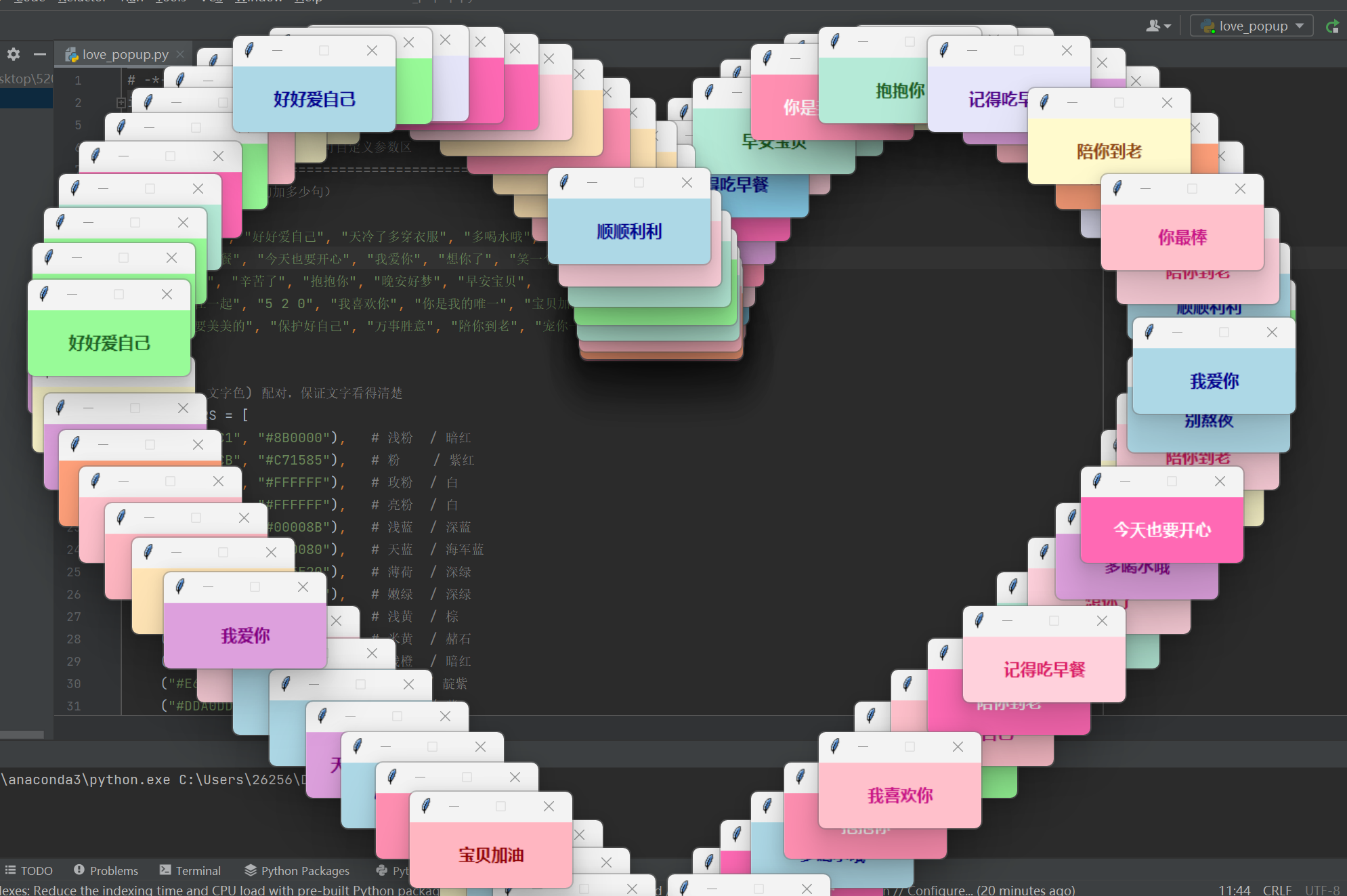
程序运行后,会先按照一定的时间间隔逐步弹出多个小窗口,每个窗口中间显示一句情话,例如“顺顺利利”“好好爱自己”“天冷了多穿衣服”“多喝水哦”“别熬夜”等。第一阶段,这些小窗口会根据心形坐标逐个出现,并最终在屏幕中间组成一颗爱心。
爱心成型后,窗口会停留几秒,然后再逐步消失。随后进入第二个动画阶段,大量小窗口会一个接一个随机弹出,分布在屏幕的不同位置,最终形成随机铺满全屏的效果。
整个效果主要包括以下几个部分:
- 使用 Python 的
tkinter创建弹窗窗口; - 每个弹窗显示不同的文字内容;
- 弹窗背景颜色随机变化;
- 通过数学公式生成心形轨迹坐标;
- 让窗口按照心形轨迹逐个出现;
- 心形窗口停留一段时间后逐步关闭;
- 最后随机生成多个弹窗,铺满整个屏幕;
- 支持调整窗口数量、出现速度、停留时间、窗口大小、文字内容和颜色。
这个小案例比较适合用来练习 Python 桌面 GUI、tkinter 弹窗控制、定时器动画以及坐标计算等内容。整体实现难度不高,但视觉效果比较有趣,适合做成表白小程序或者桌面趣味动画。
# -*- coding: utf-8 -*-
import math
import random
import tkinter as tk
# =============================================================
#                       可自定义参数区
# =============================================================
# 情话文案(想加多少句加多少句)
PHRASES = [
    "顺顺利利", "好好爱自己", "天冷了多穿衣服", "多喝水哦", "别熬夜",
    "记得吃早餐", "今天也要开心", "我爱你", "想你了", "笑一个",
    "你最棒", "辛苦了", "抱抱你", "晚安好梦", "早安宝贝",
    "永远在一起", "5 2 0", "我喜欢你", "你是我的唯一", "宝贝加油",
    "心情要美美的", "保护好自己", "万事胜意", "陪你到老", "宠你一辈子",
]

# (背景色, 文字色) 配对,保证文字看得清楚
COLOR_PAIRS = [
    ("#FFB6C1", "#8B0000"),   # 浅粉  / 暗红
    ("#FFC0CB", "#C71585"),   # 粉    / 紫红
    ("#FF8FB1", "#FFFFFF"),   # 玫粉  / 白
    ("#FF69B4", "#FFFFFF"),   # 亮粉  / 白
    ("#ADD8E6", "#00008B"),   # 浅蓝  / 深蓝
    ("#87CEEB", "#000080"),   # 天蓝  / 海军蓝
    ("#B5EAD7", "#1B5E20"),   # 薄荷  / 深绿
    ("#98FB98", "#1B5E20"),   # 嫩绿  / 深绿
    ("#FFFACD", "#8B4513"),   # 浅黄  / 棕
    ("#FFE4B5", "#A0522D"),   # 米黄  / 赭石
    ("#FFA07A", "#8B0000"),   # 浅橙  / 暗红
    ("#E6E6FA", "#4B0082"),   # 薰衣草/ 靛紫
    ("#DDA0DD", "#800080"),   # 梅紫  / 紫
    ("#FFD1DC", "#D81B60"),   # 樱花粉/ 玫红
]


CONFIG = {
    # 小窗口尺寸
    "win_width":        160,
    "win_height":        65,

    # ---------- 阶段一:心形(沿轮廓"接龙"堆叠) ----------
    "heart_count":      110,    # 沿心形轮廓排列的窗口数量(越多越密、堆得越厚)
    "heart_size_ratio":  0.78,  # 爱心占屏幕的比例(0~1),越大爱心越大
    "heart_start_phase": 0.0,   # 起始角度(弧度)。0=从心形顶部凹口出发,math.pi=从心尖出发
    "phase1_interval":   35,    # 每个心形窗口出现的间隔(毫秒)
    "shuffle_heart":     False, # False=沿轮廓顺序"接龙";True=随机顺序出现

    # ---------- 阶段二:保持 + 消失 ----------
    "hold_duration":   3000,    # 爱心保持的时间(毫秒)
    "phase2_interval":   25,    # 每个窗口消失的间隔(毫秒)
    "fade_steps":        10,    # 每个窗口"渐隐"的过渡步数,越大越平滑
    "fade_step_delay":   22,    # 渐隐每步之间的间隔(毫秒)

    # ---------- 阶段三:满屏随机 ----------
    "gap_before_phase3": 600,   # 阶段二结束到阶段三开始之间的停顿(毫秒)
    "phase3_count":     140,    # 满屏随机弹窗的数量
    "phase3_interval":   35,    # 随机弹窗每个之间的间隔(毫秒)

    # ---------- 字体 ----------
    "font_family":      "Microsoft YaHei",
    "font_size":         12,
    "font_weight":      "bold",
}


# =============================================================
#                           主程序
# =============================================================

class LovePopupShow:
    def __init__(self, config):
        self.cfg = config

        # 根窗口隐藏起来,仅用来调度
        self.root = tk.Tk()
        self.root.withdraw()
        self.root.title("520")

        # 屏幕尺寸
        self.screen_w = self.root.winfo_screenwidth()
        self.screen_h = self.root.winfo_screenheight()

        # 已创建的小窗口列表
        self.windows = []

        # 全局退出快捷键
        self.root.bind_all("<Escape>", lambda e: self.quit_all())

    # ---------- 工具方法 ----------

    def _new_popup(self, x, y, text=None, color_pair=None):
        """在 (x, y) 位置创建一个小弹窗。"""
        text = text if text is not None else random.choice(PHRASES)
        bg, fg = color_pair if color_pair is not None else random.choice(COLOR_PAIRS)

        w = tk.Toplevel(self.root)
        w.title("❤")
        w.geometry(
            f"{self.cfg['win_width']}x{self.cfg['win_height']}+{int(x)}+{int(y)}"
        )
        w.configure(bg=bg)
        w.resizable(False, False)

        label = tk.Label(
            w,
            text=text,
            bg=bg,
            fg=fg,
            font=(self.cfg["font_family"], self.cfg["font_size"], self.cfg["font_weight"]),
        )
        label.pack(expand=True, fill="both", padx=4, pady=4)

        # 单个窗口按 Esc 也能关闭整个程序
        w.bind("<Escape>", lambda e: self.quit_all())

        self.windows.append(w)
        return w

    def _heart_outline_points(self):
        """
        沿心形轮廓采样 n 个点,按参数 t 增大的方向连续排列,
        因此窗口会像一条"绳子"一样依次首尾相接地堆在轮廓上。
        参数方程:
            x = 16 sin^3(t)
            y = 13 cos(t) - 5 cos(2t) - 2 cos(3t) - cos(4t)
        在该方程下:x ∈ [-16, 16],y ∈ [-17, 5](凹口在上、心尖在下)。
        屏幕 y 轴向下,所以这里翻转 y。
        """
        n      = self.cfg["heart_count"]
        ratio  = self.cfg["heart_size_ratio"]
        t0     = self.cfg["heart_start_phase"]

        cx = self.screen_w / 2 - self.cfg["win_width"] / 2
        cy = self.screen_h / 2 - self.cfg["win_height"] / 2

        # 把数学坐标里 32 宽、22 高的心形放进屏幕的 ratio 区域
        max_w = self.screen_w * ratio
        max_h = self.screen_h * ratio
        scale = min(max_w / 32.0, max_h / 22.0)

        points = []
        for i in range(n):
            t = t0 + 2 * math.pi * i / n
            x = 16 * (math.sin(t) ** 3)
            y = 13 * math.cos(t) - 5 * math.cos(2 * t) \
                - 2 * math.cos(3 * t) - math.cos(4 * t)
            sx = cx + x * scale
            sy = cy - y * scale  # 翻转 y 轴
            points.append((sx, sy))
        return points

    def _fade_out(self, win, on_done=None):
        """让一个窗口逐步透明并销毁。"""
        steps = self.cfg["fade_steps"]
        delay = self.cfg["fade_step_delay"]

        def step(i):
            if not win.winfo_exists():
                if on_done:
                    on_done()
                return
            alpha = max(0.0, 1.0 - i / steps)
            try:
                win.attributes("-alpha", alpha)
            except tk.TclError:
                pass
            if i >= steps:
                try:
                    win.destroy()
                except tk.TclError:
                    pass
                if win in self.windows:
                    self.windows.remove(win)
                if on_done:
                    on_done()
            else:
                self.root.after(delay, lambda: step(i + 1))

        step(1)

    def quit_all(self):
        for w in list(self.windows):
            try:
                w.destroy()
            except tk.TclError:
                pass
        self.windows.clear()
        try:
            self.root.destroy()
        except tk.TclError:
            pass

    # ---------- 三个阶段 ----------

    def phase1_heart(self):
        """阶段一:沿心形轮廓依次弹出小窗口,像绳子一样首尾相接。"""
        points = self._heart_outline_points()
        if self.cfg["shuffle_heart"]:
            random.shuffle(points)

        n = len(points)
        for i, (x, y) in enumerate(points):
            self.root.after(
                i * self.cfg["phase1_interval"],
                lambda x=x, y=y: self._new_popup(x, y),
            )

        # 爱心组完 + 停留时间 之后,进入阶段二
        total = n * self.cfg["phase1_interval"] + self.cfg["hold_duration"]
        self.root.after(total, self.phase2_disappear)

    def phase2_disappear(self):
        """阶段二:爱心窗口逐个渐隐消失。"""
        wins = list(self.windows)
        random.shuffle(wins)  # 随机顺序消失,更自然

        for i, w in enumerate(wins):
            self.root.after(
                i * self.cfg["phase2_interval"],
                lambda w=w: self._fade_out(w),
            )

        # 估算最后一个窗口完全消失需要的时间
        last_start = (len(wins) - 1) * self.cfg["phase2_interval"]
        fade_time = self.cfg["fade_steps"] * self.cfg["fade_step_delay"]
        total = last_start + fade_time + self.cfg["gap_before_phase3"]
        self.root.after(total, self.phase3_random)

    def phase3_random(self):
        """阶段三:满屏随机弹窗。"""
        margin = 0
        max_x = max(margin, self.screen_w - self.cfg["win_width"] - margin)
        max_y = max(margin, self.screen_h - self.cfg["win_height"] - margin)

        for i in range(self.cfg["phase3_count"]):
            x = random.randint(margin, max_x)
            y = random.randint(margin, max_y)
            self.root.after(
                i * self.cfg["phase3_interval"],
                lambda x=x, y=y: self._new_popup(x, y),
            )

    # ---------- 启动 ----------

    def run(self):
        # 稍等一会儿再开始,给屏幕一个缓冲
        self.root.after(400, self.phase1_heart)
        self.root.mainloop()


if __name__ == "__main__":
    LovePopupShow(CONFIG).run()

更多推荐
 0
0 0
0- 0


 已为社区贡献1条内容

所有评论(0)