
Swift Control ImageCarouselView图片轮播器(源码)
·
一直觉得自己写的不是技术,而是情怀,一个个的教程是自己这一路走来的痕迹。靠专业技能的成功是最具可复制性的,希望我的这条路能让你们少走弯路,希望我能帮你们抹去知识的蒙尘,希望我能帮你们理清知识的脉络,希望未来技术之巅上有你们也有我。
Swift-ImageCarouselView(图片轮播).zip代码下载
效果

说明
图片提供一下功能
- 是否自动轮播
- 轮播时间
- 显示 pageControl
- 设置圆角
- 设置占位图
- 加载网络图片
- 点击事件
- 监听滚动事件
使用
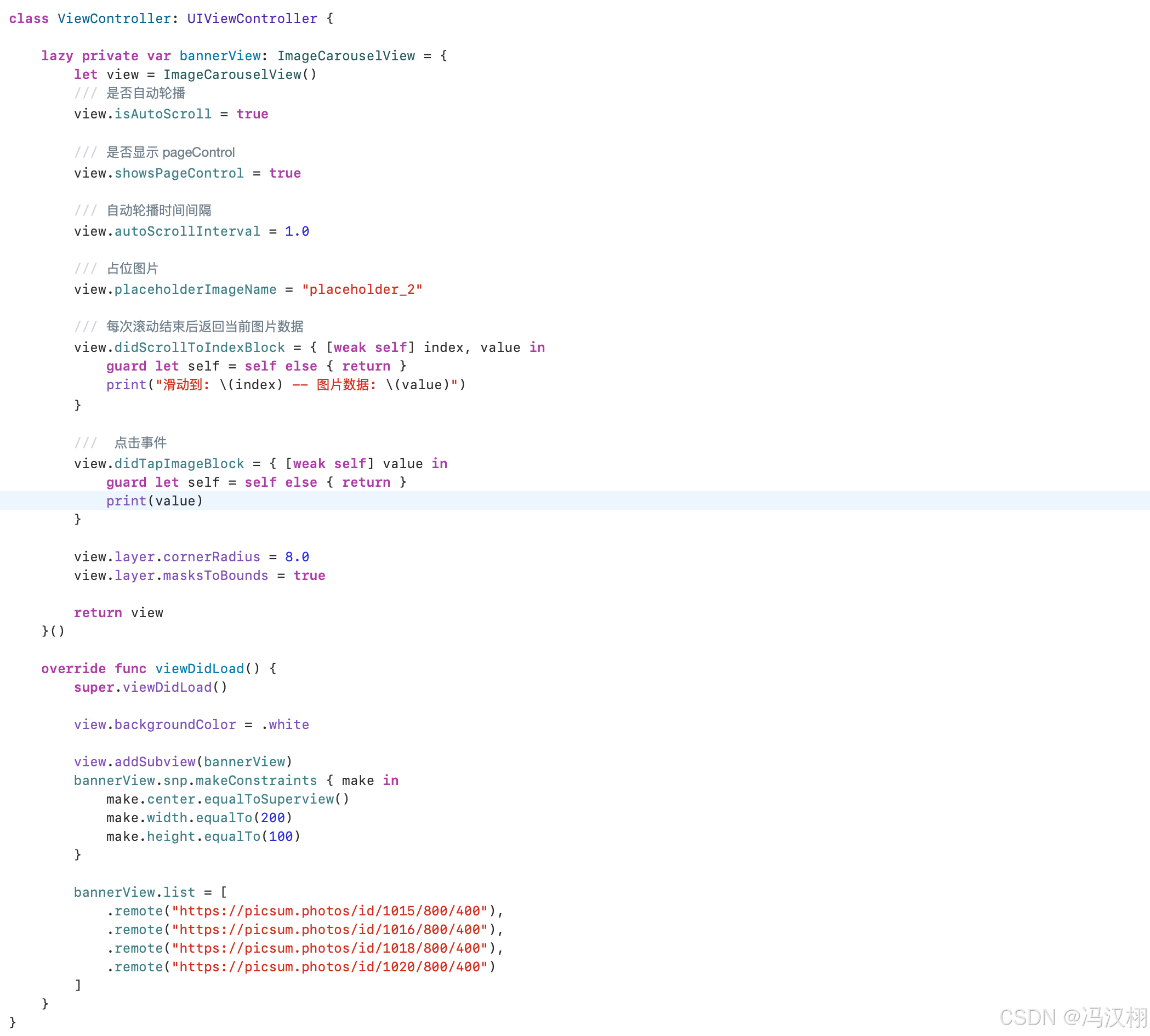
import UIKit
import SnapKit

class ViewController: UIViewController {

    lazy private var bannerView: ImageCarouselView = {
        let view = ImageCarouselView()
        /// 是否自动轮播
        view.isAutoScroll = true

        /// 是否显示 pageControl
        view.showsPageControl = true

        /// 自动轮播时间间隔
        view.autoScrollInterval = 1.0

        /// 占位图片
        view.placeholderImageName = "placeholder_2"

        /// 每次滚动结束后返回当前图片数据
        view.didScrollToIndexBlock = { [weak self] index, value in
            guard let self = self else { return }
            print("滑动到: \(index) -- 图片数据: \(value)")
        }

        ///  点击事件
        view.didTapImageBlock = { [weak self] value in
            guard let self = self else { return }
            print(value)
        }

        view.layer.cornerRadius = 8.0
        view.layer.masksToBounds = true

        return view
    }()

    override func viewDidLoad() {
        super.viewDidLoad()

        view.backgroundColor = .white

        view.addSubview(bannerView)
        bannerView.snp.makeConstraints { make in
            make.center.equalToSuperview()
            make.width.equalTo(200)
            make.height.equalTo(100)
        }

        bannerView.list = [
            .remote("https://picsum.photos/id/1015/800/400"),
            .remote("https://picsum.photos/id/1016/800/400"),
            .remote("https://picsum.photos/id/1018/800/400"),
            .remote("https://picsum.photos/id/1020/800/400")
        ]
    }
}
源码
import UIKit
import Kingfisher

class ImageCarouselView: UIView {

    enum QRCodeImageSource {
        /// 网络图片
        case remote(String)
        /// 本地图片
        case local(String)
    }

    /// 每次滚动结束后返回当前图片数据
    /// 本地图片 -> 图片名称
    /// 网络图片 -> url
    var didScrollToIndexBlock: ((Int, String) -> Void)?

    ///  点击事件
    var didTapImageBlock: ((String) -> Void)?

    /// 是否自动轮播
    var isAutoScroll: Bool = false {
        didSet {
            isAutoScroll ? startTimer() : stopTimer()
        }
    }

    /// 自动轮播时间间隔
    var autoScrollInterval: TimeInterval = 3.0

    /// 占位图片
    var placeholderImageName: String = "placeholder_2"

    /// URL图片数组
    var list: [QRCodeImageSource] = [] {

        didSet {

            guard list.count > 0 else { return }

            // 只有1张不需要无限轮播
            if list.count == 1 {

                dataSource = list

            } else {

                var temp = list

                // 前面插入最后一张
                temp.insert(list.last!, at: 0)

                // 后面插入第一张
                temp.append(list.first!)

                dataSource = temp
            }

            collectionView.reloadData()

            pageControl.numberOfPages = list.count
            pageControl.currentPage = 0
            pageControl.isHidden = !showsPageControl

            DispatchQueue.main.async {

                // 默认滚到真正第一张
                if self.list.count > 1 {

                    self.collectionView.scrollToItem(
                        at: IndexPath(item: 1, section: 0),
                        at: .centeredHorizontally,
                        animated: false
                    )
                }
            }

            if isAutoScroll {
                startTimer()
            }
        }
    }

    /// 是否显示 pageControl
    var showsPageControl: Bool = true {
        didSet {
            pageControl.isHidden = !showsPageControl
        }
    }

    lazy private var layout: UICollectionViewFlowLayout = {
        let layout = UICollectionViewFlowLayout()
        layout.scrollDirection = .horizontal
        //layout.itemSize = CGSize(width: screenWidth - 160, height: screenWidth - 160)
        layout.minimumLineSpacing = .zero
        layout.minimumInteritemSpacing = .zero
        layout.sectionInset = .zero
        layout.footerReferenceSize = CGSize.zero
        layout.headerReferenceSize = CGSize.zero
        return layout
    }()

    lazy private var collectionView: UICollectionView = {
        let collectionView = UICollectionView(frame: CGRect.zero, collectionViewLayout: layout)
        collectionView.delegate = self
        collectionView.dataSource = self
        collectionView.showsHorizontalScrollIndicator = false
        collectionView.showsVerticalScrollIndicator = false
        collectionView.isPagingEnabled = true
        collectionView.bounces = false
        collectionView.backgroundColor = .white
        collectionView.register(ImageCarouselCell.self, forCellWithReuseIdentifier: ImageCarouselCell.identifier)
        //collectionView.frame = CGRect(x: 0, y: 0, width: screenWidth - 160, height: screenWidth - 160)
        return collectionView
    }()

    lazy private var pageControl: UIPageControl = {
        let view = UIPageControl()
        // 当前页颜色
        view.currentPageIndicatorTintColor = .white
        // 未选中颜色(灰色半透明)
        view.pageIndicatorTintColor = UIColor.gray.withAlphaComponent(0.5)
        view.hidesForSinglePage = true
        view.isUserInteractionEnabled = false
        return view
    }()

    /// 用于显示的数据源
    private var dataSource: [QRCodeImageSource] = []

    /// 定时器
    private var timer: Timer?

    override init(frame: CGRect) {
        super.init(frame: frame)

        backgroundColor = .white

        addSubview(collectionView)
        collectionView.snp.makeConstraints { make in
            make.edges.equalToSuperview()
        }

        addSubview(pageControl)
        pageControl.snp.makeConstraints { make in
            make.centerX.equalToSuperview()
            make.bottom.equalToSuperview().offset(-10)
            make.height.equalTo(20)
        }

    }

    required init?(coder: NSCoder) {
        fatalError("init(coder:) has not been implemented")
    }

    override func layoutSubviews() {
        super.layoutSubviews()

        if layout.itemSize != bounds.size {
            layout.itemSize = bounds.size
            layout.invalidateLayout() //布局失效,并重新计算布局
        }
    }

    private func startTimer() {
        stopTimer() // 防止重复创建

        guard dataSource.count > 1 else { return }

        timer = Timer.scheduledTimer(withTimeInterval: autoScrollInterval, repeats: true) { [weak self] _ in
            guard let self = self else { return }
            self.scrollNext(animated: true)
        }

        RunLoop.main.add(timer!, forMode: .common)
    }

    private func stopTimer() {
        timer?.invalidate()
        timer = nil
    }

    private func adjustIfNeeded() {

        guard list.count > 1 else { return }

        let index = currentIndex()

        // 到了最前面的假cell
        if index == 0 {

            collectionView.scrollToItem(
                at: IndexPath(item: list.count, section: 0),
                at: .centeredHorizontally,
                animated: false
            )
        }

        // 到了最后面的假cell
        else if index == dataSource.count - 1 {

            collectionView.scrollToItem(
                at: IndexPath(item: 1, section: 0),
                at: .centeredHorizontally,
                animated: false
            )
        }
    }

    // 滚动完,block出去显示当前页数
    private func notifyCurrentPage() {

        guard list.count > 0 else { return }

        let index = currentIndex()
        let realIndex = realIndex(from: index)

        // 更新 pageControl
        pageControl.currentPage = realIndex

        // 当前真实数据
        let source = list[realIndex]

        switch source {
        case .remote(let urlString):
            // 返回 (当前页数, url)
            didScrollToIndexBlock?(realIndex + 1, urlString)
        case .local(let imageName):
            // 返回 (当前页数, imageName)
            didScrollToIndexBlock?(realIndex + 1, imageName)
        }
    }

}

extension ImageCarouselView: UIScrollViewDelegate {

    func scrollViewWillBeginDragging(_ scrollView: UIScrollView) {
        // 用户手动拖拽时暂停
        stopTimer()
    }

    // 修复“无限轮播的边界跳转”,避免用户看到断层
    func scrollViewDidEndDecelerating(_ scrollView: UIScrollView) {

        adjustIfNeeded()
        notifyCurrentPage()

        // 拖拽结束恢复
        if isAutoScroll {
            startTimer()
        }
    }

    // 修复“无限轮播的边界跳转”,避免用户看到断层
    func scrollViewDidEndScrollingAnimation(_ scrollView: UIScrollView) {

        adjustIfNeeded()
        notifyCurrentPage()
    }

}

extension ImageCarouselView: UICollectionViewDelegate,UICollectionViewDataSource {

    func collectionView(_ collectionView: UICollectionView,
                        numberOfItemsInSection section: Int) -> Int {
        return dataSource.count
    }

    func collectionView(_ collectionView: UICollectionView,
                        cellForItemAt indexPath: IndexPath) -> UICollectionViewCell {
        let cell:ImageCarouselCell  = collectionView.dequeueReusableCell(withReuseIdentifier: ImageCarouselCell.identifier, for: indexPath) as! ImageCarouselCell

        let source = dataSource[indexPath.item]

        switch source {
        case .remote(let urlString):
            guard let url = URL(string: urlString) else {
                return cell
            }

            cell.imageView.kf.setImage(
                with: url,
                placeholder: UIImage(named: placeholderImageName)
            )
        case .local(let imageName):
            cell.imageView.image = UIImage(named: imageName)
        }

        return cell
    }

    func collectionView(_ collectionView: UICollectionView, didSelectItemAt indexPath: IndexPath) {
        let source = dataSource[indexPath.item]

        switch source {
        case .remote(let urlString):
            didTapImageBlock?(urlString)
        case .local(let imageName):
            didTapImageBlock?(imageName)
        }
    }

}

// MARK: - Public Control API

extension ImageCarouselView {

    /// 下一张
    func scrollNext(animated: Bool = true) {
        guard dataSource.count > 1 else { return }

        let nextIndex = currentIndex() + 1
        safeScroll(to: nextIndex, animated: animated)
    }

    /// 上一张
    func scrollPrev(animated: Bool = true) {
        guard dataSource.count > 1 else { return }

        let prevIndex = currentIndex() - 1
        safeScroll(to: prevIndex, animated: animated)
    }

    // dataSource的index, 并不是滑动到那一张图片的index
    private func currentIndex() -> Int {
        let width = max(collectionView.bounds.width, 1)
        let offset = collectionView.contentOffset.x + width * 0.5
        return Int(offset / width)
    }

    // 因为无限图片轮播器的index 跟 真实滑动到那一张图片不对应,所以需要重新计算真实的index  [4,  1,2,3,4,  1]
    private func realIndex(from index: Int) -> Int {

        if list.count <= 1 {
            return 0
        }

        if index == 0 {
            return list.count - 1
        }

        if index == dataSource.count - 1 {
            return 0
        }

        return index - 1
    }

    // 前一张,下一张都用这个统一滚动方法, 有处理防止快速滚动越界问题
    private func safeScroll(to index: Int, animated: Bool) {

        guard dataSource.count > 1 else { return }

        var targetIndex = index

        //  允许“逻辑越界”,但不允许 scroll 越界
        if targetIndex < 0 {
            targetIndex = dataSource.count - 1
        }

        if targetIndex >= dataSource.count {
            targetIndex = 0
        }

        collectionView.scrollToItem(
            at: IndexPath(item: targetIndex, section: 0),
            at: .centeredHorizontally,
            animated: animated
        )
    }

}

class ImageCarouselCell: UICollectionViewCell {

    static let identifier = "ImageCarouselCellID"

    lazy var imageView: UIImageView = {
        let view = UIImageView()
        view.contentMode = .scaleAspectFill
        view.clipsToBounds = true
        return view
    }()

    override init(frame: CGRect) {
        super.init(frame: frame)

        contentView.addSubview(imageView)

        imageView.snp.makeConstraints { make in
            make.edges.equalToSuperview()
        }
    }

    required init?(coder: NSCoder) {
        fatalError()
    }
}
问题
封装CollectionView使用AutoLayout约束的常见问题?
图片轮播器的封装用的是CollectionView,我们在初始化图片轮播器使用懒加载时候,内部对CollectionView进行初始化,图片轮播器构造的时候并不知道宽高是多少,所以CollectionView的效也不知道宽高是多少,
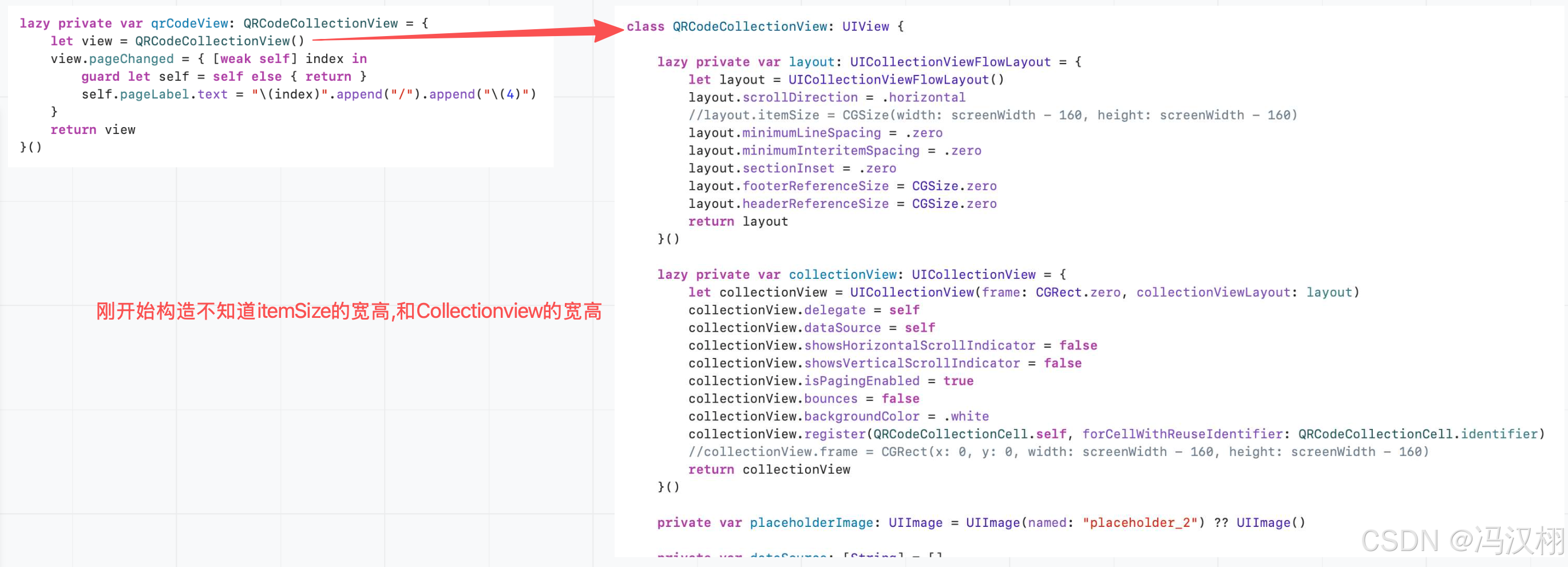
但图片轮播器构造完后,我们使用auto layout约束时,才知道图片轮播器的大小,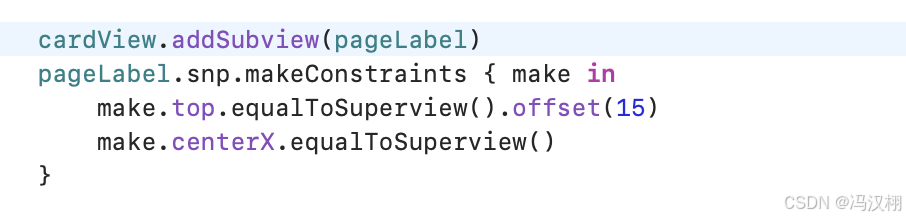
那个时候CollectionView的构造已经完成了,所以CollectionView当时的宽高和cell的宽高是零的,会出现图片轮播器的大嫂跟CollectionView的大小不一致的问题。那么我们的解决办法是在layoutSubviews的方法中,执行一个重新布局的方式来去解决这个问题的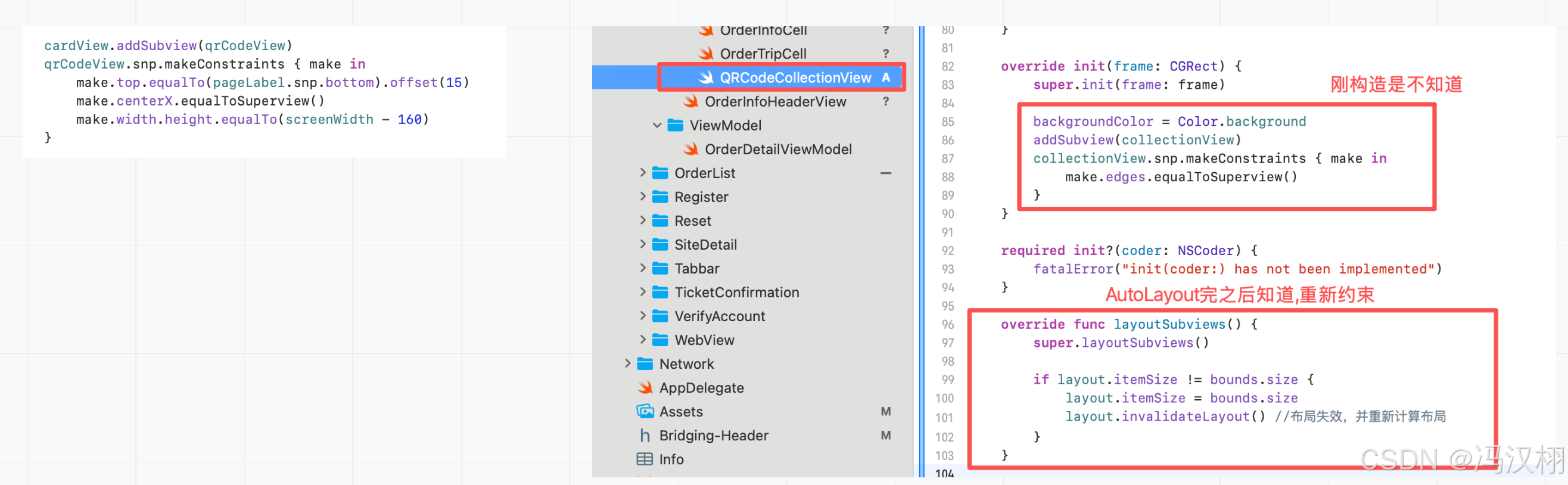
更多推荐

 0
0 0
0- 0


 已为社区贡献3条内容

所有评论(0)