
SpringBoot学习日记——DAY07(mybatis-plus代码生成器)
·
今天对MyBatis-Plus的代码生成器展开了学习:
1.使用MyBatis-Plus的代码生成器完成代码自动生成:
步骤如下:
1.1编写application.yml:
要在文件里编写上url,username,password,还有swagger的配置原则,还有mybatis-plus的一些配置,如日志等。
spring:
  datasource:
    url: jdbc:mysql://localhost:3306/mybatis?serverTimezone=GMT%2B8
    username: root
    password: dzx123123
  mvc:
    pathmatch:
      matching-strategy: ant_path_matcher
mybatis-plus:
  mapper-locations: classpath*:/mapper/**/*.xml
  type-aliases-package: com.djw.entity
  configuration:
    log-impl: org.apache.ibatis.logging.stdout.StdOutImpl
1.2再编写一个测试单元,用于开启代码生成器:
package com.djw;

import com.baomidou.mybatisplus.generator.FastAutoGenerator;
import com.baomidou.mybatisplus.generator.engine.FreemarkerTemplateEngine;
import org.junit.jupiter.api.Test;
import org.springframework.boot.test.context.SpringBootTest;

@SpringBootTest
class Day08DemoApplicationTests {

    @Test
    void contextLoads() {
        FastAutoGenerator.create("jdbc:mysql://localhost:3306/mybatis?serverTimezone=GMT%2B8",
                        "root", "密码")
                .globalConfig(builder -> {
                    builder.author("djw") // 设置作者a
                            .enableSwagger() // 开启 swagger 模式
                            .fileOverride() // 覆盖已生成文件
                            .outputDir(".\\src\\main\\java"); // 指定输出目录
                })
                .packageConfig(builder -> {
                    builder.parent("com.djw") // 设置父包名
                            .moduleName("");// 设置父包模块名
//.pathInfo(Collections.singletonMap(OutputFile.mapperXml, "D://")); // 设置mapperXml生成路径
                })
                .strategyConfig(builder -> {
                    builder.addInclude("channel") // 设置需要生成的表名
                            .addTablePrefix() // 设置过滤表前缀
                            .entityBuilder().enableLombok() //开启lombok
                            .enableChainModel()//开启链式编程
                            .controllerBuilder().enableRestStyle();//开启restController
// .logicDeletePropertyName("deleted")
// .logicDeleteColumnName("deleted");//配置逻辑删除处理
                })
                .templateEngine(new FreemarkerTemplateEngine()) // 使用Freemarker引擎模板,默认的是Velocity引擎模板
                .execute();
    }

}
1.3编写对应的Controller
package com.djw.controller;

import com.djw.entity.Channel;
import com.djw.service.IChannelService;
import com.djw.util.Result;
import io.swagger.annotations.Api;
import io.swagger.annotations.ApiOperation;
import org.springframework.beans.factory.annotation.Autowired;
import org.springframework.web.bind.annotation.*;

import javax.swing.text.html.StyleSheet;
import java.util.List;

/**
 * <p>
 * 栏目表 前端控制器
 * </p>
 *
 * @author djw
 * @since 2026-05-27
 */
@RestController
@RequestMapping("/channel")
@Api("频道控制类")
public class ChannelController {
    @Autowired
    private IChannelService iChannelService;

    @ApiOperation("查询列表")
    @GetMapping
    public Result selectList(){
        List<Channel> list = iChannelService.list();
        return Result.success().setData("list",list);
    }
    @ApiOperation("按id查询")
    @GetMapping("/{id}")
    public Result selectById(@PathVariable Integer id){
        Channel byId = iChannelService.getById(id);
        return byId!=null?Result.success().setData("channel",byId):Result.error();
    }
    @ApiOperation("保存频道")
    @PostMapping
    public Result insert(@RequestBody Channel channel){
        iChannelService.save(channel);
        return  Result.success().setData("channel",channel);
    }
    @PutMapping
    @ApiOperation("更新频道")
    public Result update(@RequestBody Channel channel){
        boolean b = iChannelService.updateById(channel);
        return b?Result.success().setData("channel",channel):Result.error();
    }
    @DeleteMapping
    @ApiOperation("删除频道")
    public Result delete(@RequestBody List<Integer> ids){
        boolean b = iChannelService.removeByIds(ids);
        return b?Result.success().setData("channel",ids):Result.error();
    }

}
1.4编写对应的所需的config,swagger和自动填充的配置
package com.djw.config;
import io.swagger.annotations.ApiOperation;
import org.springframework.context.annotation.Bean;
import org.springframework.context.annotation.Configuration;
import springfox.documentation.builders.ApiInfoBuilder;
import springfox.documentation.builders.PathSelectors;
import springfox.documentation.builders.RequestHandlerSelectors;
import springfox.documentation.service.ApiInfo;
import springfox.documentation.service.Contact;
import springfox.documentation.spi.DocumentationType;
import springfox.documentation.spring.web.plugins.Docket;

/**
 * @author djw
 */
@Configuration
public class SwaggerConfig {
    @Bean
    public Docket apiConfig() {
        return new Docket(DocumentationType.OAS_30)
                .apiInfo(apiInfo())
                .select()
                .apis(RequestHandlerSelectors.withMethodAnnotation(ApiOperation.class))
                .paths(PathSelectors.any())
                .build();
    }

    public ApiInfo apiInfo(){
        return new ApiInfoBuilder()
                .title("董济维的项目")
                .description("这是一个项目...")
                .contact(new Contact("董济维","http://www.itszb.com","1918431841@qq.com"))
                .version("1.0")
                .build();
    }

}
package com.djw.config;

import com.baomidou.mybatisplus.core.handlers.MetaObjectHandler;
import lombok.extern.slf4j.Slf4j;
import org.apache.ibatis.reflection.MetaObject;
import org.springframework.stereotype.Component;

import java.time.LocalDateTime;

// java example
@Slf4j
@Component
public class MyMetaObjectHandler implements MetaObjectHandler {

    @Override
    public void insertFill(MetaObject metaObject) {
        log.info("开始插入填充...");
        this.strictInsertFill(metaObject, "updateTime", LocalDateTime.class,LocalDateTime.now());
        this.strictInsertFill(metaObject, "createTime", LocalDateTime.class, LocalDateTime.now());
    }

    @Override
    public void updateFill(MetaObject metaObject) {
        log.info("开始更新填充...");
        this.strictUpdateFill(metaObject, "updateTime", LocalDateTime.class, LocalDateTime.now());
    }
}
接下来就可以运行测试类的操作就好了;
2.使用MyBatisX来实现代码自动生成
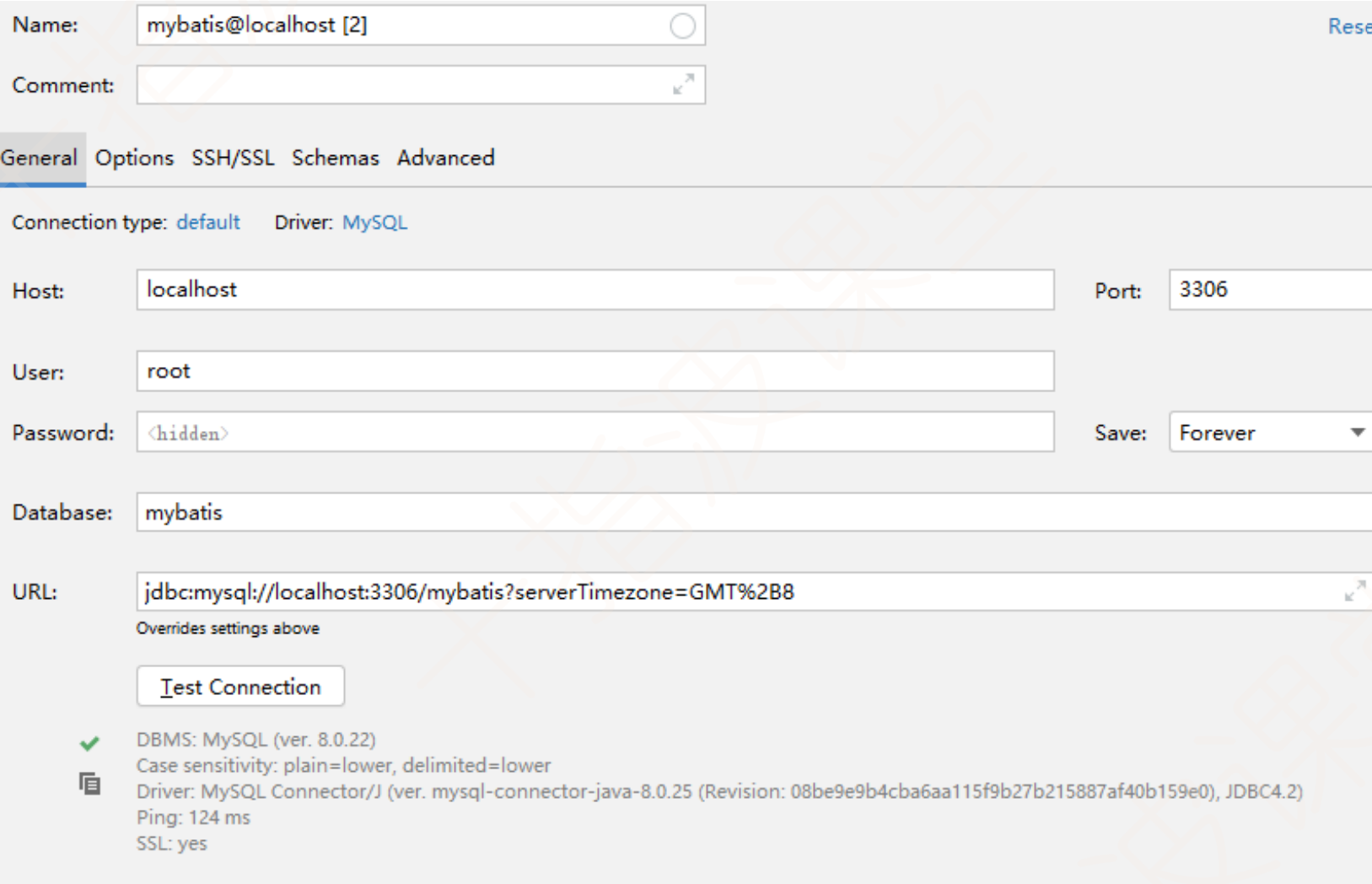
2.1在idea中完成数据库的配置:
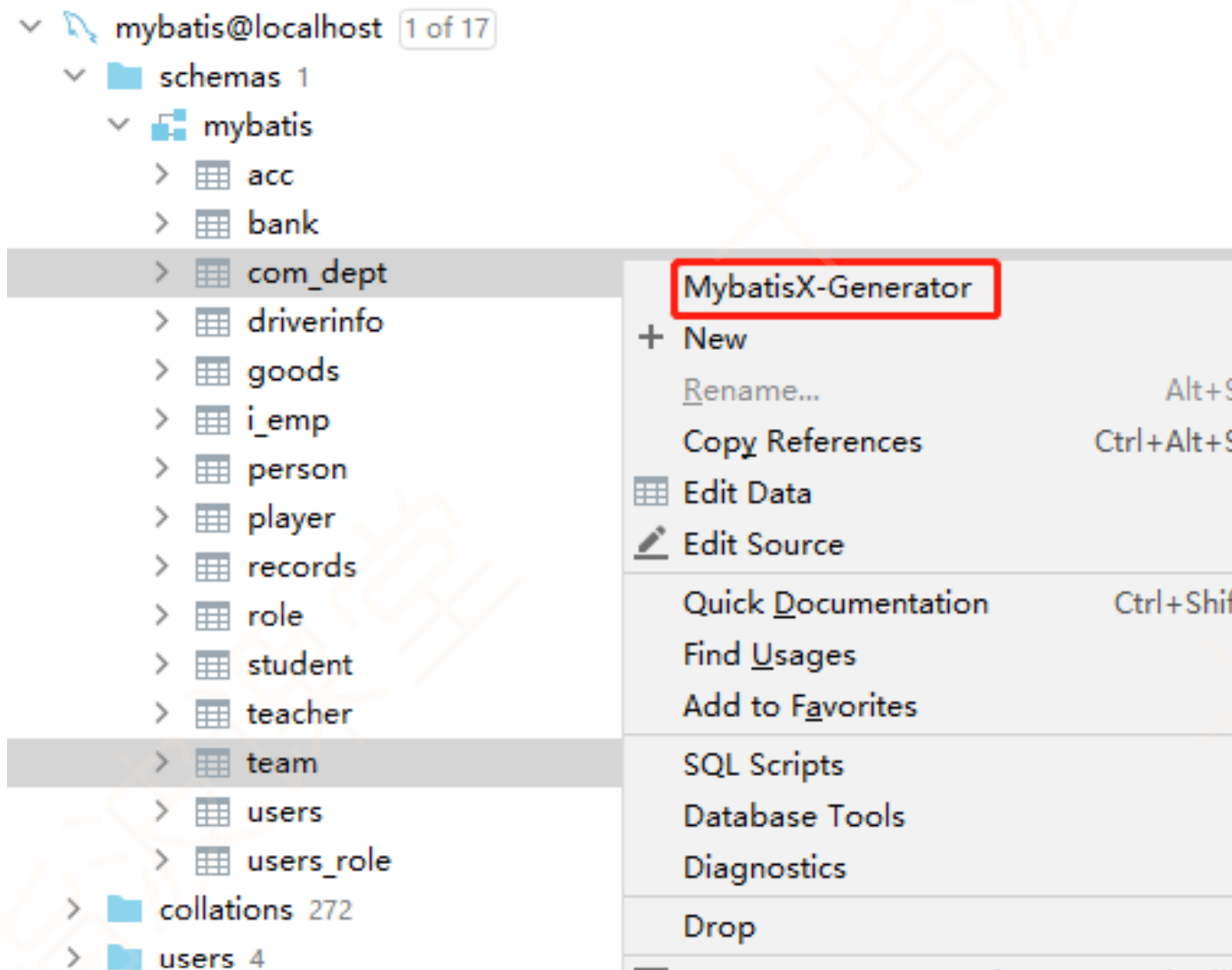
2.2右键选用的表使用MyBatisX-Generator
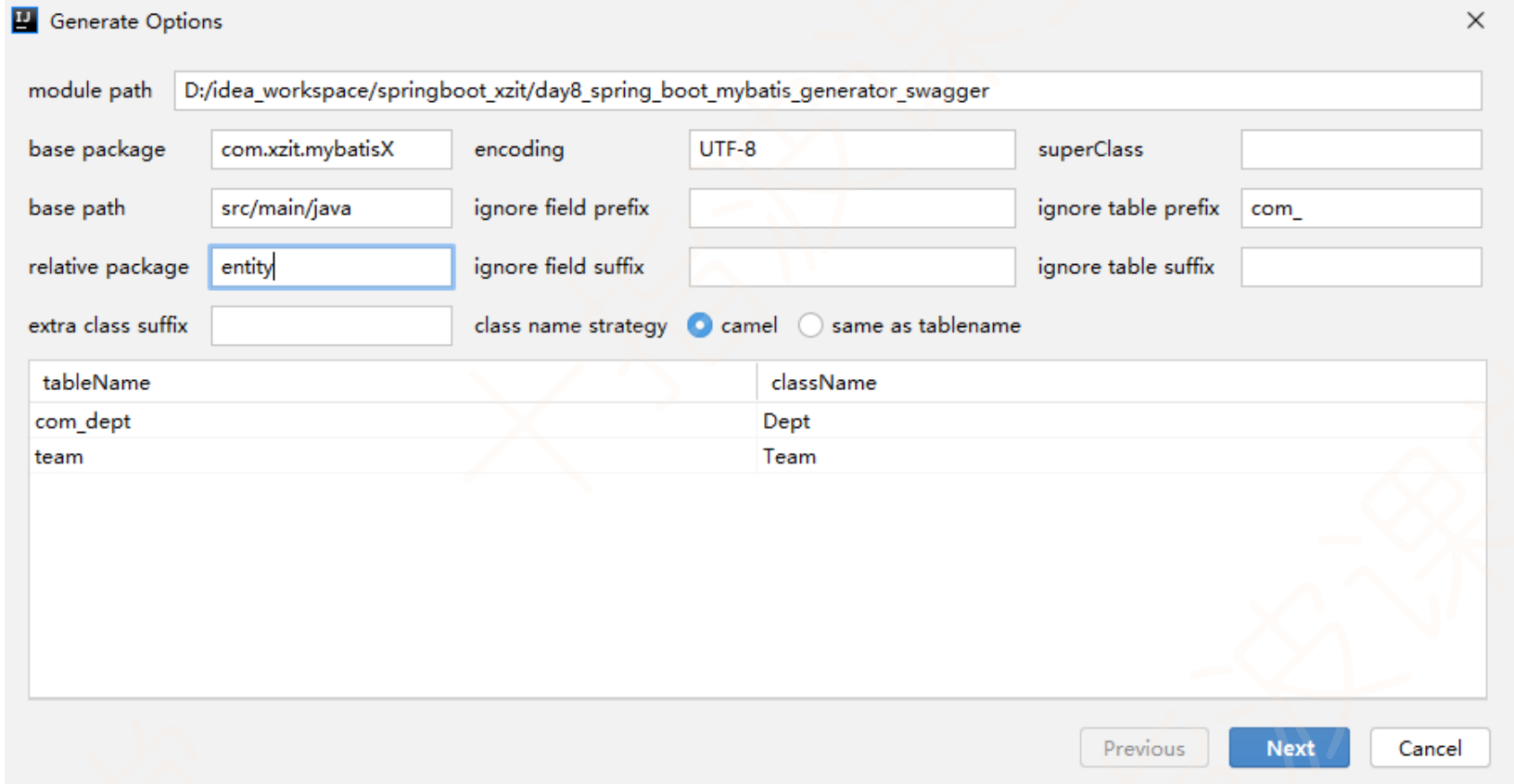
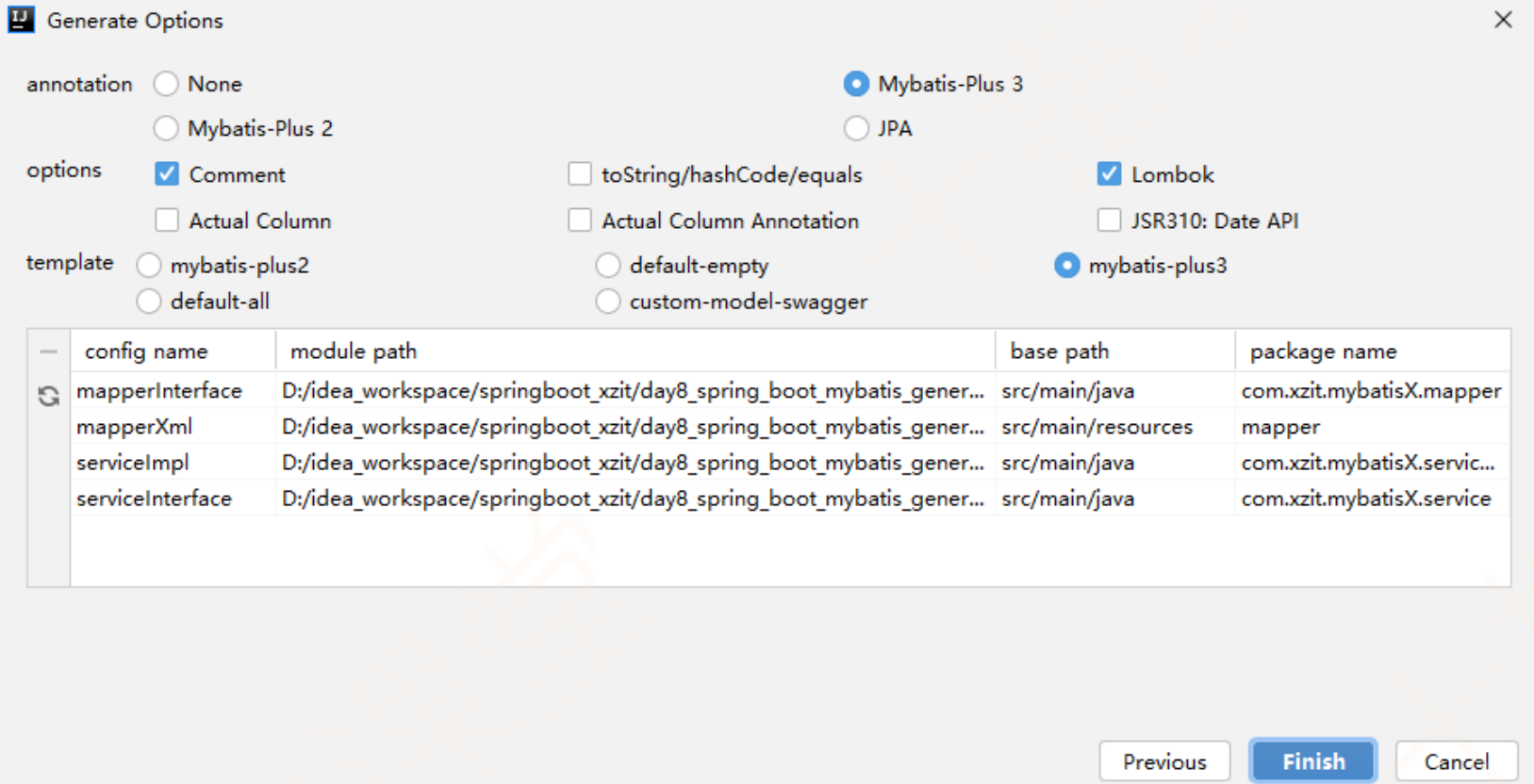
2.3配置
更多推荐

 5
5 0
0- 0


 已为社区贡献6条内容

所有评论(0)