
【C++】vector(vector的定义、vector iterator 的使用、 vector 空间增长问题、vector 增删查改、vector 迭代器失效问题、 OJ、vector模拟实现)
小编主页详情<-请点击
小编gitee代码仓库<-请点击

本文主要介绍了vector(vector的定义、vector iterator 的使用、 vector 空间增长问题、vector 增删查改、vector 迭代器失效问题、 OJ、vector模拟实现),内容全由作者原创(无AI),并带有配图帮助博友们更好的理解,点个关注不迷路,下面进入正文~~
目录
前言:
vector本质上就是我们之前学习过的顺序表,那在使用上也和string非常类似,但是vector可以支持更多类型的存储,下面我们先学习vector的一些常用接口。
1.vector的介绍及使用
1.1vector的介绍
1.2vector的使用
想了解vector的使用最关键的是学会看vector使用文档,那么下面我们根据文档介绍几个常用的接口。
1.2.1vector的定义
| 构造函数声明 | 接口说明 |
| vector()(重点) | 无参构造 |
| vector(size_type n, const value_type& val = value_type()) | 构造并初始化n个val |
| vector (const vector& x); (重点) | 拷贝构造 |
| vector (InputIterator first, InputIterator last); | 使用迭代器进行初始化构造 |
void test_vector1()
{
	vector<int> v1;
	vector<int> v2(10, 1);
	vector<int> v3(++v2.begin(), --v2.end());
}
1.2.2 vector iterator 的使用
| iterator的使用 | 接口说明 |
| begin + end(重点) | 获取第一个数据位置的iterator/const_iterator, 获取最后一个数据的下一个位置的iterator/const_iterator |
| rbegin + rend | 获取最后一个数据位置的reverse_iterator,获取第一个数据前一个位置的reverse_iterator |
void test_vector1()
{
	vector<int> v1;
	vector<int> v2(10, 1);
	vector<int> v3(++v2.begin(), --v2.end());

	for (int i = 0; i < v3.size(); i++)
	{
		cout << v3[i] << ' ';
	}

	cout << endl;

	vector<int>::iterator it = v3.begin();
	while (it != v3.end())
	{
		cout << *it << ' ';
		it++;
	}

	cout << endl;

	for (auto e : v3)
	{
		cout << e << ' ';
	}
}
1.2.3 vector 空间增长问题
| 容量空间 | 接口说明 |
| size | 获取数据个数 |
| capacity | 获取容量大小 |
| empty | 判断是否为空 |
| resize | 改变vector的size |
| reserve | 改变vector的capacity |
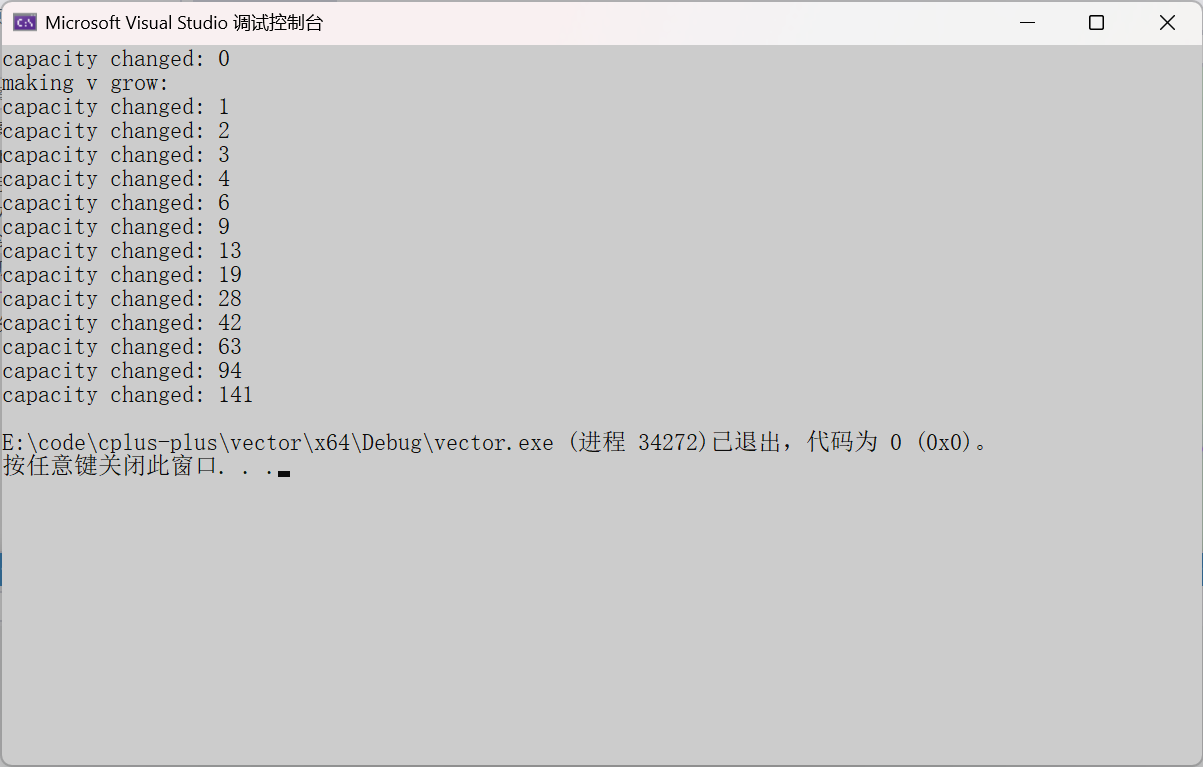
需要注意的是,vs下capacity是按1.5倍增长的,g++是按2倍增长的,所以我们不要固化的认为vector的扩容就一定是按两倍增长的。
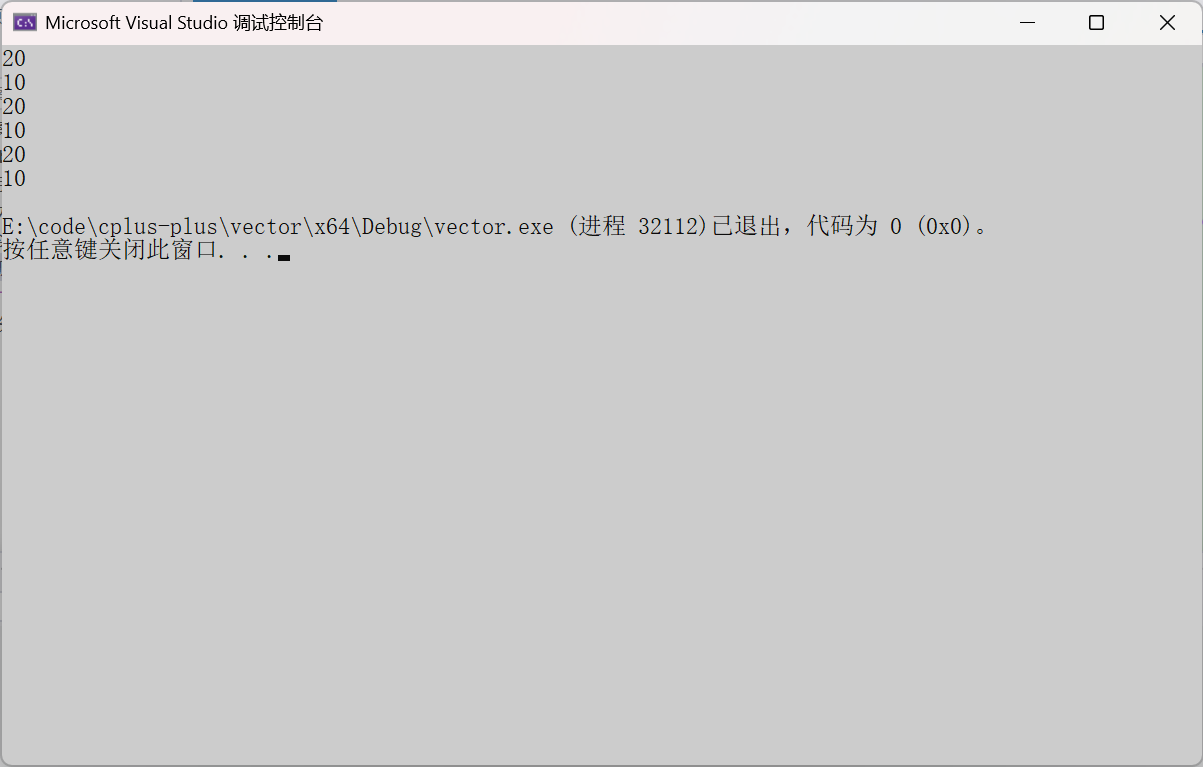
reserve只负责开辟空间,不会删除具体的数据。如果确定知道需要用多少空间,reserve可以缓解vector增容的代价缺陷问题。
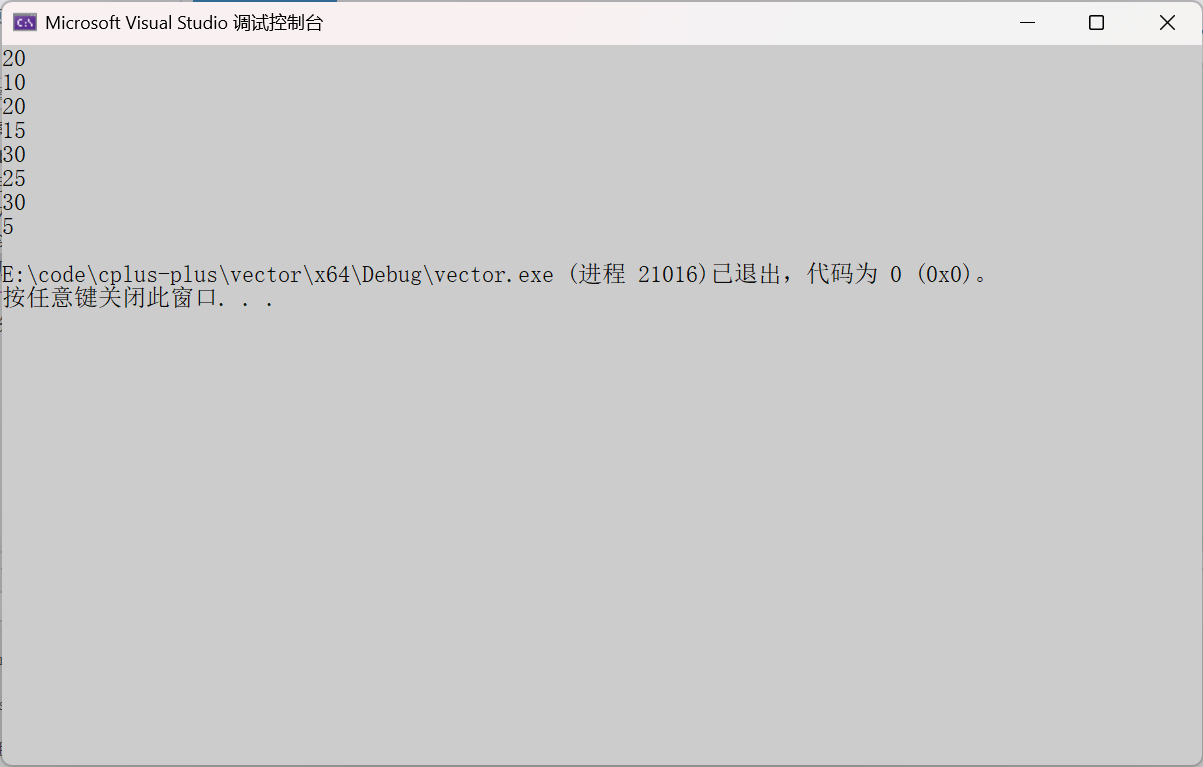
resize在开空间的同时还会进行初始化,影响size。
下面这个代码可以验证vector的扩容倍率
void TestVectorExpand()
{
	size_t sz;
	vector<int> v;
	//v.reserve(100);

	sz = v.capacity();
	cout << "capacity changed: " << sz << '\n';

	cout << "making v grow:\n";
	for (int i = 0; i < 100; ++i)
	{
		v.push_back(i);
		if (sz != v.capacity())
		{
			sz = v.capacity();
			cout << "capacity changed: " << sz << '\n';
		}
	}
}

int main()
{
	TestVectorExpand();
	return 0;
}
下面这个代码可以验证reserve只会扩容不会缩容
void test_vector2()
{
	vector<int> v(10, 1);
	v.reserve(20);
	cout << v.capacity() << endl;
	cout << v.size() << endl;

	v.reserve(15);
	cout << v.capacity() << endl;
	cout << v.size() << endl;

	v.reserve(5);
	cout << v.capacity() << endl;
	cout << v.size() << endl;
}
下面这个代码可以验证resize的机制
void test_vector3()
{
	vector<int> v(10, 1);
	v.reserve(20);
	cout << v.capacity() << endl;
	cout << v.size() << endl;

	v.resize(15,2);
	cout << v.capacity() << endl;
	cout << v.size() << endl;

	v.resize(25,3);
	cout << v.capacity() << endl;
	cout << v.size() << endl;

	v.resize(5);
	cout << v.capacity() << endl;
	cout << v.size() << endl;
}
1.2.3 vector 增删查改
| vector增删查改 | 接口说明 |
| push_back(重点) | 尾插 |
| pop_back (重点) | 尾删 |
| find | 查找。(注意这个是算法模块实现,不是vector的成员接口) |
| insert | 在position之前插入val |
| erase | 删除position位置的数据 |
| swap | 交换两个vector的数据空间 |
| operator[] (重点) | 像数组一样 |
下面是使用这些接口的一些代码
void test_vector4()
{
	vector<int> v(10, 1);
	v.push_back(2);
	v.insert(v.begin(), 3);
	for (auto e : v)
	{
		cout << e << ' ';
	}
	cout << endl;

	v.insert(v.begin() + 3, 10);
	for (auto e : v)
	{
		cout << e << ' ';
	}
	cout << endl;

	vector<int> v1(5, 0);
	for (int i = 0; i < 5; i++)
	{
		cin >> v1[i];
	}
	for (auto e : v1)
	{
		cout << e << ' ';
	}
	cout << endl;
}
vector的模板类型不一定是内置类型,也可以是自定义类型,下面是vector使用自定义类型的一些简单代码。
void test_vector5()
{
	vector<string> v1;
	string s1("xxxxx");
	v1.push_back(s1);
	v1.push_back("yyyyyyy");
	for (const auto& e : v1)
	{
		cout << e << endl;
	}

	vector<int> v(5, 1);
	vector<vector<int>> vv(10, v);
	vv[2][1] = 2;
	for (int i = 0; i < vv.size(); i++)
	{
		for (int j = 0; j < v.size(); j++)
		{
			cout << vv[i][j]<<' ';
		}
		cout << endl;
	}
}
这个我们用vector模拟实现了二维数组,我们可以使用访问二维数组的方式去访问vv。
1.2.4 vector 迭代器失效问题(重点)
迭代器的主要作用就是让算法能够不用关心底层数据结构,其底层实际就是一个指针,或者是对 指针进行了封装,我们可以像使用指针一样使用迭代器。因此迭代器失效其实就类似于野指针,本质上是迭代器 底层对应指针所指向的空间被销毁了,而使用一块已经被释放的空间。
会造成迭代器失效有以下几种操作:
1. 会引起其底层空间改变的操作,都有可能是迭代器失效,比如:resize、reserve、insert、 assign、push_back等。
#include <iostream>
using namespace std;
#include <vector>
int main()
{
    vector<int> v{1,2,3,4,5,6};
    auto it = v.begin();
    // 将有效元素个数增加到100个,多出的位置使用8填充,操作期间底层会扩容
    // v.resize(100, 8);
    // reserve的作用就是改变扩容大小但不改变有效元素个数,操作期间可能会引起底层容
    量改变
    // v.reserve(100);
    // 插入元素期间,可能会引起扩容,而导致原空间被释放
    // v.insert(v.begin(), 0);
    // v.push_back(8);
    // 给vector重新赋值,可能会引起底层容量改变
    v.assign(100, 8);
    /*
    出错原因:以上操作,都有可能会导致vector扩容,也就是说vector底层原理旧空间被释
    放掉,而在打印时,it还使用的是释放之间的旧空间,在对it迭代器操作时,实际操作的是一块
    已经被释放的空间,而引起代码运行时崩溃。
    解决方式:在以上操作完成之后,如果想要继续通过迭代器操作vector中的元素,只需给
    it重新赋值即可。
    */
    while(it != v.end())
    {
        cout<< *it << " " ;
        ++it;
    }
    cout<<endl;
    return 0;
}
2. 指定位置元素的删除操作--erase
int main()
{
    int a[] = { 1, 2, 3, 4 };
    vector<int> v(a, a + sizeof(a) / sizeof(int));
    // 使用find查找3所在位置的iterator
    vector<int>::iterator pos = find(v.begin(), v.end(), 3);
    // 删除pos位置的数据,导致pos迭代器失效。
    v.erase(pos);
    cout << *pos << endl; // 此处会导致非法访问
    return 0;
}
erase删除pos位置元素后,pos位置之后的元素会往前搬移,没有导致底层空间的改变,理 论上讲迭代器不应该会失效,但是:如果pos刚好是最后一个元素,删完之后pos刚好是end 的位置,而end位置是没有元素的,那么pos就失效了。因此删除vector中任意位置上元素 时,vs就认为该位置迭代器失效了。
以下代码的功能是删除vector中所有的偶数,请问那个代码是正确的,为什么?
#include <iostream>
using namespace std;
#include <vector>
int main()
{
    vector<int> v{ 1, 2, 3, 4 };
    auto it = v.begin();
    while (it != v.end())
    {
        if (*it % 2 == 0)
            v.erase(it);
        ++it;
    }

    return 0;
}
int main()
{
    vector<int> v{ 1, 2, 3, 4 };
    auto it = v.begin();
    while (it != v.end())
    {
        if (*it % 2 == 0)
            it = v.erase(it);
        else
            ++it;
    }
    return 0;
}
答案是第二个代码是正确的。在删除一个数之后,后面的数都向前移动了一位,从另一个角度看已经完成了++it,如果在删除后还++it,就会导致迭代器跳过一个数,导致删除失败。
3. 注意:Linux下,g++编译器对迭代器失效的检测并不是非常严格,处理也没有vs下极端。
SGI STL中,迭代器失效后,代码并不一定会崩溃,但是运行 结果肯定不对,如果it不在begin和end范围内,肯定会崩溃的。
4. 与vector类似,string在插入+扩容操作+erase之后,迭代器也会失效
迭代器失效解决办法:在使用前,对迭代器重新赋值即可。
1.2.5 vector 在OJ中的使用
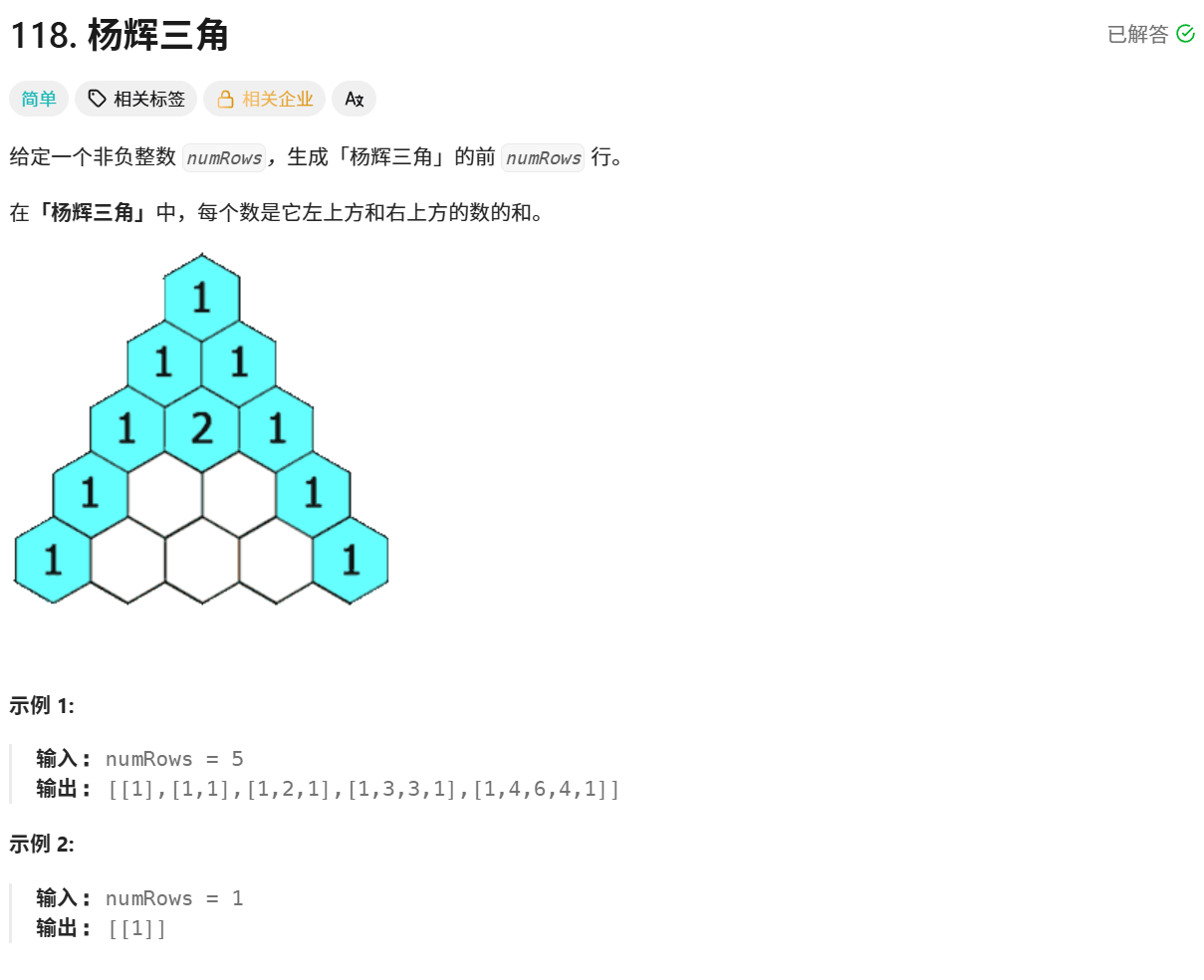
核心思想:找出杨辉三角的规律,发现每一行头尾都是1,中间第[j]个数等于上一行[j-1]+ [j]
class Solution {
public:
    vector<vector<int>> generate(int numRows) {
        vector<vector<int>> vv(numRows);
        for(int i = 0; i < numRows; i++)
        {
            vv[i].resize(i + 1, 1);
        }
        for(int i = 2; i < numRows; i++)
        {
            for(int j = 1; j < i; j++)
            {
                vv[i][j] = vv[i - 1][j - 1] + vv[i - 1][j];
            }
        }
        return vv;
    }

};2.vector模拟实现
vector的成员与string的成员有所不同。string的成员是size、capacity以及str,而vector的成员是start(数组的起始地址)、finish(数组结束地址的下一位)以及end_of_storgae(数组的最大容量处的地址)。虽然他们的成员有区别,但其实实现起来没有什么区别。
还需要注意的是,拷贝构造要使用深拷贝,不然析构的时候析构同一个地址会出问题
2.1string.h
下面是实现各个接口的具体方法:
#define _CRT_SECURE_NO_WARNINGS
#pragma once

#include<assert.h>
using namespace std;

namespace cyh
{
	template<class T>
	class vector
	{
	public:
		typedef T* iterator;
		typedef const T* const_iterator;
		vector() = default;

		vector(const vector<T>& v)
		{
			reserve(v.size());
			for (auto e : v)
			{
				push_back(e);
			}
		}

		template <class InputIterator>
		vector(InputIterator first, InputIterator last)
		{
			while (first != last)
			{
				push_back(*first);
				++first;
			}
		}

		vector(size_t n, const T& val = T())
		{
			reserve(n);
			for (size_t i = 0; i < n; i++)
			{
				push_back(val);
			}
		}

		void clear()
		{
			_start = _finish;
		}

		void swap(vector<T>& v)
		{
			std::swap(_start, v._start);
			std::swap(_finish, v._finish);
			std::swap(_end_of_storage, v._end_of_storage);
		}

		vector<T>& operator=(vector<T> v)
		{
			swap(v);
			return *this;
		}

		~vector()
		{
			if (_start)
			{
				delete[] _start;
				_start = _finish = _end_of_storage = nullptr;
			}
		}
		iterator begin()
		{
			return _start;
		}
		iterator end()
		{
			return _finish;
		}
		const_iterator begin() const
		{
			return _start;
		}
		const_iterator end() const
		{
			return _finish;
		}

		size_t size() const
		{
			return _finish - _start;
		}

		size_t capacity() const
		{
			return _end_of_storage - _start;
		}

		void reserve(size_t n)
		{
			if (n > capacity())
			{
				size_t old_size = size();
				T* tmp = new T[n];
				memcpy(tmp, _start, size() * sizeof(T));
				delete[] _start;

				_start = tmp;
				_finish = tmp + old_size;
				_end_of_storage = tmp + n;
			}
		}

		void push_back(const T& x)
		{
			if (_finish == _end_of_storage)
			{
				reserve(_start == _finish ? 4 : 2 * capacity());
			}
			*_finish = x;
			++_finish;
		}

		void pop_back()
		{
			assert(!empty());
			--_finish;
		}


		bool empty()
		{
			return _start == _finish;
		}

		iterator insert(iterator pos, const T& x)
		{
			if (_finish == _end_of_storage)
			{
				size_t len = pos - _start;
				reserve(_start == _finish ? 4 : 2 * capacity());
				pos = _start + len;
			}

			iterator end = _finish - 1;
			while (pos <= end)
			{
				*(end + 1) = *end;
				--end;
			}

			*pos = x;
			++_finish;
			return pos;
		}

		T& operator[](size_t i)
		{
			assert(i < size());
			return _start[i];
		}

		const T& operator[](size_t i) const
		{
			assert(i < size());
			return _start[i];
		}

		void erase(iterator pos)
		{
			assert(_start <= pos);
			assert(pos < _finish);

			iterator it = pos;
			while (it != end() - 1)
			{
				*it = *(it + 1);
				++it;
			}
		}
	private:
		iterator _start = nullptr;
		iterator _finish = nullptr;
		iterator _end_of_storage = nullptr;
	};

	template<class Container>
	void print_Container(const Container& v)
	{
		// 规定,没有实例化的类模板里面取东西,编译器不能区分这里const_iterator
		// 是类型还是静态成员变量
		/*typename vector<T>::const_iterator it = v.begin();

		while (it != v.end())
		{
			cout << *it << ' ';
			++it;
		}*/

		for (auto e : v)
		{
			cout << e << ' ';
		}
		cout << endl;
	}

	void test_vector1()
	{
		vector<int> v;
		v.push_back(1);
		v.push_back(2);
		v.push_back(3);
		v.push_back(4);
		v.push_back(5);

		for (size_t i = 0; i < v.size(); i++)
		{
			cout << v[i] << " ";
		}
		cout << endl;

		vector<int>::iterator it = v.begin();
		while (it != v.end())
		{
			cout << *it << " ";
			++it;
		}
		cout << endl;

		for (auto e : v)
		{
			cout << e << " ";
		}
		cout << endl;

		print_Container(v);

		vector<double> vd;
		vd.push_back(1.1);
		vd.push_back(2.1);
		vd.push_back(3.1);
		vd.push_back(4.1);
		vd.push_back(5.1);

		print_Container(vd);
	}

	void test_vector2()
	{
		vector<int> v;
		v.push_back(1);
		v.push_back(2);
		v.push_back(3);
		v.push_back(4);
		//.push_back(5);

		print_Container(v);

		//v.insert(v.begin() + 2, 30);
		//print_Container(v);

		int x;
		cin >> x;
		auto p = find(v.begin(), v.end(), x);
		if (p != v.end())
		{
			// insert以后p就是失效,不要直接访问,要访问就要更新这个失效的迭代器的值
			//v.insert(p, 40);
			//(*p) *= 10;

			p = v.insert(p, 40);
			(*(p + 1)) *= 10;
		}
		print_Container(v);
	}

	void test_vector3()
	{
		std::vector<int> v;
		v.push_back(1);
		v.push_back(2);
		v.push_back(3);
		v.push_back(4);

		print_Container(v);

		// 删除所有的偶数
		auto it = v.begin();
		while (it != v.end())
		{
			if (*it % 2 == 0)
			{
				v.erase(it);
				it++;
			}
			else
			{
				++it;
			}
		}

		print_Container(v);
	}
}
结语:
这篇文章全文由作者手写,图片由画图软件所制,无AI制作,希望各位博友能有所收获
欢迎各位博友的讨论,觉得不错的小伙伴,别忘了点赞关注哦~
更多推荐
 61
61 0
0- 0


 已为社区贡献15条内容

所有评论(0)