
封装一个去导航的公共函数,打开第三方地图去导航,兼容h5和小程序,技术栈uniapp+vue3+setup
·
我主要是自己在中项目中需要用到所以就封装了,简单记录一下。那就废话少说,直接上代码了
export function openLocation(latitude, longitude, name, address) {
	try {
		// 参数校验
		if (!latitude || !longitude || !name) {
			uni.showToast({
				title: '导航参数不完整',
				icon: 'none'
			});
			return;
		}

		// 环境判断
		const platform = uni.getSystemInfoSync().platform;
		const isH5 = process.env.UNI_PLATFORM === 'h5';
		const isMiniProgram = process.env.UNI_PLATFORM === 'mp-weixin' ||
			process.env.UNI_PLATFORM === 'mp-alipay' ||
			process.env.UNI_PLATFORM === 'mp-baidu';
		const isWechatBrowser = isH5 && navigator.userAgent.toLowerCase().includes('micromessenger');

		// 小程序端
		if (isMiniProgram) {
			handleMiniProgramMap(latitude, longitude, name, address);
		}
		// H5端(区分微信内置浏览器和普通浏览器)
		else if (isH5) {
			if (isWechatBrowser) {
				handleWechatH5Map(latitude, longitude, name, address);
			} else {
				handleNormalH5Map(latitude, longitude, name, address);
			}
		}
		// App端
		else {
			handleAppMap(latitude, longitude, name, address);
		}
	} catch (error) {
		console.error('地图导航打开失败:', error);
		uni.showToast({
			title: '暂不支持该地图导航',
			icon: 'none'
		});
	}
};

/**
 * 小程序端处理
 */
const handleMiniProgramMap = async (latitude, longitude, name, address) => {
	try {
		// 微信小程序优先用内置地图
		if (process.env.UNI_PLATFORM === 'mp-weixin') {
			await uni.openLocation({
				latitude,
				longitude,
				name,
				address
			});
			return;
		}

		// 其他小程序尝试唤起第三方地图Scheme
		const mapSchemes = [{
				name: '腾讯地图',
				scheme: `qqmap://map/routeplan?type=drive&to=${name}&tocoord=${latitude},${longitude}`
			},
			{
				name: '高德地图',
				scheme: `amap://route?sourceApplication=appname&dlat=${latitude}&dlon=${longitude}&dname=${name}&dev=0&t=0`
			},
			{
				name: '百度地图',
				scheme: `bdapp://map/direction?destination=name:${name}|latlng:${latitude},${longitude}&mode=driving&src=andr.baidu.openAPIdemo`
			}
		];

		for (const map of mapSchemes) {
			try {
				await uni.navigateTo({
					url: map.scheme
				});
				return;
			} catch (err) {
				continue;
			}
		}
		throw new Error('没有可用的地图应用');
	} catch (error) {
		throw error;
	}
};

/**
 * 微信内置浏览器H5处理(核心适配逻辑)
 */
const handleWechatH5Map = async (latitude, longitude, name, address) => {
	try {
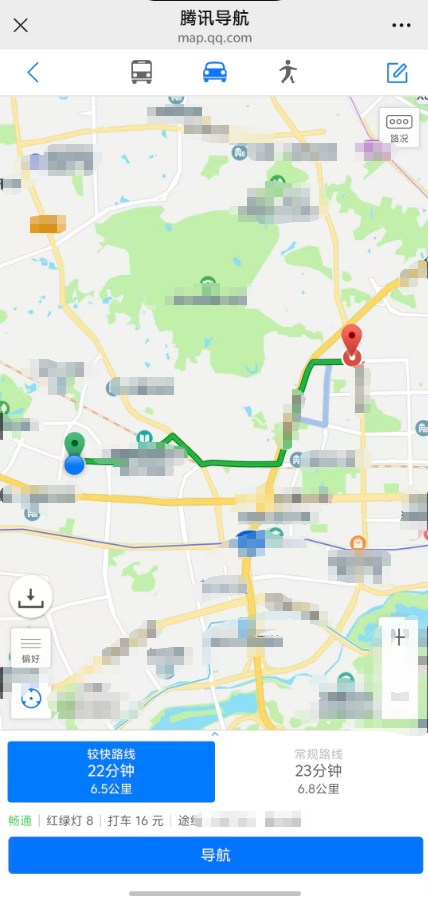
		// 1. 先打开腾讯地图H5导航页(只展示路线,不唤起App)
		const tencentWebUrl =
			`https://apis.map.qq.com/uri/v1/routeplan?type=drive&to=${encodeURIComponent(name)}&tocoord=${latitude},${longitude}&referer=电影票务`;
		window.open(tencentWebUrl, '_blank');

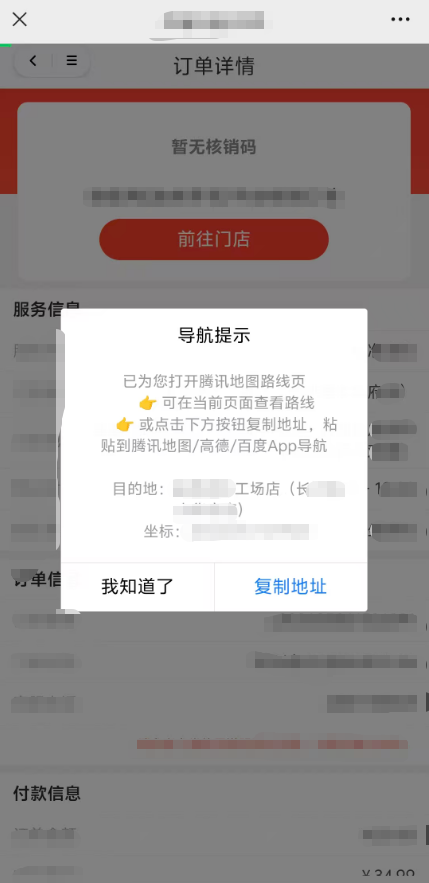
		// 2. 弹窗提示 + 一键复制功能
		await uni.showModal({
			title: '导航提示',
			content: `已为您打开腾讯地图路线页
      👉 可在当前页面查看路线
      👉 或点击下方按钮复制地址,粘贴到腾讯地图/高德/百度App导航

      目的地:${name}
      坐标:${latitude},${longitude}`,
			confirmText: '复制地址',
			cancelText: '我知道了',
			success: async (res) => {
				if (res.confirm) {
					// 一键复制地址+坐标到剪贴板
					const copyText = `目的地:${address}`
					try {
						// uni-app 复制API
						await uni.setClipboardData({
							data: copyText
						});
						uni.showToast({
							title: '地址已复制',
							icon: 'success'
						});
					} catch (err) {
						// H5环境兜底复制
						if (navigator.clipboard) {
							await navigator.clipboard.writeText(copyText);
							uni.showToast({
								title: '地址已复制',
								icon: 'success'
							});
						} else {
							uni.showToast({
								title: '复制失败,请手动复制',
								icon: 'none'
							});
						}
					}
				}
			}
		});
	} catch (error) {
		throw error;
	}
};
/**
 * 普通浏览器H5处理(非微信环境)
 */
const handleNormalH5Map = async (latitude, longitude, name, address) => {
	try {
		const mapUrls = [
			// 腾讯地图最新H5链接
			{
				name: '腾讯地图',
				url: `https://apis.map.qq.com/uri/v1/routeplan?type=drive&to=${encodeURIComponent(name)}&tocoord=${latitude},${longitude}&referer=电影票务`
			},
			// 高德地图
			{
				name: '高德地图',
				url: `https://amap.com/navigation?lat=${latitude}&lng=${longitude}&name=${encodeURIComponent(name)}&type=drive`
			},
			// 百度地图
			{
				name: '百度地图',
				url: `https://api.map.baidu.com/direction?destination=${latitude},${longitude}&origin=我的位置&mode=driving&output=html`
			}
		];

		// 优先打开腾讯地图
		try {
			window.open(mapUrls[0].url, '_blank');
			return;
		} catch (err) {
			console.log('腾讯地图打开失败', err);
		}

		// 失败则显示选择菜单
		const mapOptions = mapUrls.map(item => ({
			text: `打开${item.name}`,
			value: item.url
		}));
		uni.showActionSheet({
			itemList: mapOptions.map(item => item.text),
			success: (res) => {
				window.open(mapOptions[res.tapIndex].value, '_blank');
			}
		});
	} catch (error) {
		throw error;
	}
};

/**
 * App端处理
 */
const handleAppMap = async (latitude, longitude, name, address) => {
	if (window.plus) {
		const mapSchemes = [
			`qqmap://map/routeplan?type=drive&to=${name}&tocoord=${latitude},${longitude}`,
			`amap://route?sourceApplication=appname&dlat=${latitude}&dlon=${longitude}&dname=${name}&dev=0&t=0`,
			`bdapp://map/direction?destination=name:${name}|latlng:${latitude},${longitude}&mode=driving&src=appname`
		];

		for (const scheme of mapSchemes) {
			try {
				await window.plus.runtime.openURL(scheme);
				return;
			} catch (err) {
				continue;
			}
		}
	}

	// 兜底用内置地图
	await uni.openLocation({
		latitude,
		longitude,
		name,
		address
	});
};
你只需引入这个函数,传入四个参数即可,经纬度,门店名称,门店地址
	import {
		openLocation
	} from './components/locationMap.js'


    //去导航
	const handleNav = () => {
		const {
			storeName,
			address,
			lat,
			lng
		} = orderDetail.info
		openLocation(lat, lng, storeName, address);
	}
实现效果如下
更多推荐
 0
0 0
0- 0


 已为社区贡献3条内容

所有评论(0)