
DAY_01深度博客:CSS 响应式布局 · BFC · JavaScript 完全指南(下)
五、数据类型完全指南
5.1 类型分类
名词解释:原始类型 vs 对象类型
| 对比维度 | 原始类型(Primitive) | 对象类型(Object) |
|---|---|---|
| 存储位置 | 栈内存(Stack) | 堆内存(Heap)+ 栈中存引用 |
| 赋值方式 | 值复制 | 引用复制 |
| 比较方式 | 比较值 | 比较引用地址 |
| 可变性 | 不可变(immutable) | 可变(mutable) |
| 示例 | 42、'hello'、true |
[1,2,3]、{name:'张三'} |
5.2 typeof 运算符
<!DOCTYPE html>
<html lang="zh-CN">
<head>
    <meta charset="UTF-8">
    <meta name="viewport" content="width=device-width, initial-scale=1.0">
    <title>typeof 完整示例</title>
    <style>
        body { font-family: Arial; padding: 20px; }
        table { border-collapse: collapse; width: 100%; }
        th, td { border: 1px solid #ddd; padding: 10px 14px; font-size: 14px; text-align: left; }
        th { background: #3498db; color: white; }
        tr:nth-child(even) { background: #f8f9fa; }
        .type-tag {
            display: inline-block;
            padding: 2px 10px;
            border-radius: 12px;
            font-size: 12px;
            font-weight: bold;
        }
        .t-number { background: #d5f5e3; color: #1e8449; }
        .t-string { background: #d6eaf8; color: #1a5276; }
        .t-boolean { background: #fdebd0; color: #784212; }
        .t-undefined { background: #f2f3f4; color: #7f8c8d; }
        .t-object { background: #f4ecf7; color: #6c3483; }
        .t-function { background: #fef9e7; color: #7d6608; }
        .warn { color: #e74c3c; font-size: 13px; }
    </style>
</head>
<body>
    <h2>typeof 运算符完整示例</h2>

    <table>
        <tr>
            <th>表达式</th>
            <th>typeof 结果</th>
            <th>说明</th>
        </tr>
        <tr>
            <td><code>typeof 42</code></td>
            <td><span class="type-tag t-number">"number"</span></td>
            <td>整数</td>
        </tr>
        <tr>
            <td><code>typeof 3.14</code></td>
            <td><span class="type-tag t-number">"number"</span></td>
            <td>浮点数</td>
        </tr>
        <tr>
            <td><code>typeof NaN</code></td>
            <td><span class="type-tag t-number">"number"</span></td>
            <td>NaN 是 number 类型</td>
        </tr>
        <tr>
            <td><code>typeof Infinity</code></td>
            <td><span class="type-tag t-number">"number"</span></td>
            <td>Infinity 是 number 类型</td>
        </tr>
        <tr>
            <td><code>typeof "hello"</code></td>
            <td><span class="type-tag t-string">"string"</span></td>
            <td>字符串</td>
        </tr>
        <tr>
            <td><code>typeof ''</code></td>
            <td><span class="type-tag t-string">"string"</span></td>
            <td>空字符串也是 string</td>
        </tr>
        <tr>
            <td><code>typeof true</code></td>
            <td><span class="type-tag t-boolean">"boolean"</span></td>
            <td>布尔值</td>
        </tr>
        <tr>
            <td><code>typeof undefined</code></td>
            <td><span class="type-tag t-undefined">"undefined"</span></td>
            <td>未定义</td>
        </tr>
        <tr>
            <td><code>typeof null</code></td>
            <td><span class="type-tag t-object">"object"</span> <span class="warn">⚠️ 历史 Bug!</span></td>
            <td>null 的 typeof 结果是 "object",这是 JS 早期的历史遗留 Bug</td>
        </tr>
        <tr>
            <td><code>typeof {}</code></td>
            <td><span class="type-tag t-object">"object"</span></td>
            <td>普通对象</td>
        </tr>
        <tr>
            <td><code>typeof []</code></td>
            <td><span class="type-tag t-object">"object"</span></td>
            <td>数组也是 object(用 Array.isArray() 判断数组)</td>
        </tr>
        <tr>
            <td><code>typeof function(){}</code></td>
            <td><span class="type-tag t-function">"function"</span></td>
            <td>函数(function 是 object 的子类型)</td>
        </tr>
    </table>

    <div style="background: #fff3cd; border: 1px solid #ffc107; border-radius: 6px; padding: 14px; margin-top: 16px; font-size: 14px;">
        <strong>⚠️ 经典陷阱:<code>typeof null === "object"</code></strong><br>
        这是 JavaScript 的历史 Bug(由于早期实现中 null 的类型标签是 0,与 object 相同)。<br>
        判断是否为 null 应使用:<code>value === null</code>
    </div>

    <script>
        // 验证上表中的结论
        console.log(typeof 42);           // "number"
        console.log(typeof 3.14);         // "number"
        console.log(typeof NaN);          // "number"
        console.log(typeof Infinity);     // "number"
        console.log(typeof "hello");      // "string"
        console.log(typeof '');           // "string"
        console.log(typeof true);         // "boolean"
        console.log(typeof undefined);    // "undefined"
        console.log(typeof null);         // "object" ← 历史 Bug!
        console.log(typeof {});           // "object"
        console.log(typeof []);           // "object"
        console.log(typeof function(){}); // "function"

        // typeof 的嵌套使用
        console.log(typeof typeof 42);    // "string" ← typeof 返回字符串,所以 typeof "number" = "string"
    </script>
</body>
</html>
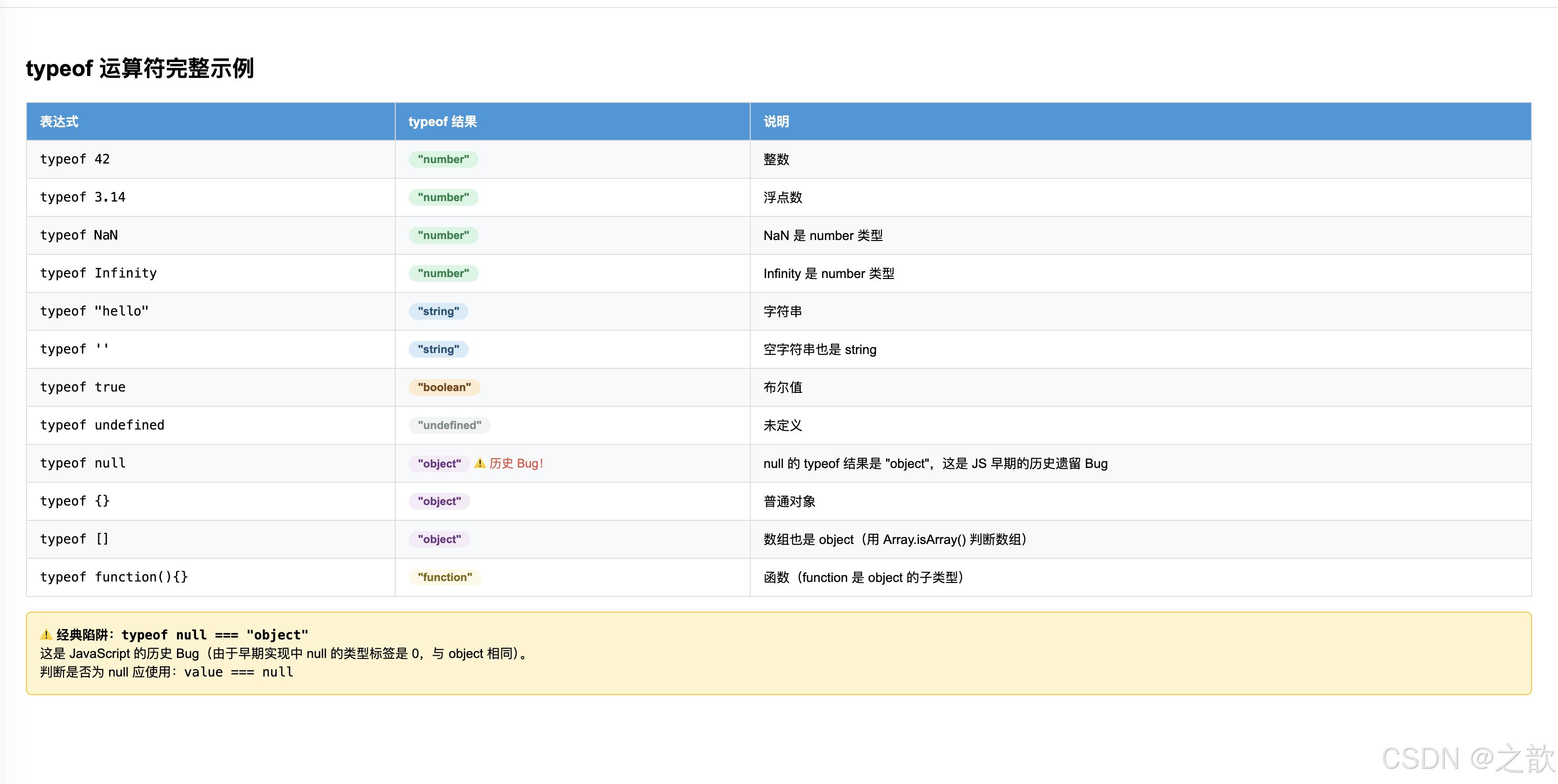
💡 代码解释:typeof 运算符
一、typeof 的基本用法
// 语法:typeof 操作数
typeof 42;           // "number"
typeof "hello";      // "string"

// 也可以用括号(但不必要)
typeof(42);          // "number"
typeof(true);        // "boolean"
二、typeof 返回值完整列表
| typeof 操作数 | 返回值 | 说明 |
|---|---|---|
| 数字(整数/浮点数) | "number" |
包括NaN、Infinity |
| 字符串 | "string" |
包括空字符串 |
| 布尔值 | "boolean" |
true 或 false |
| undefined | "undefined" |
未定义 |
| null | "object" |
⚠️ 历史Bug |
| 对象 | "object" |
包括数组 |
| 函数 | "function" |
函数是特殊的对象 |
| Symbol (ES6+) | "symbol" |
唯一值 |
| BigInt (ES2020+) | "bigint" |
大整数 |
三、代码中的关键案例分析
案例1:NaN 和 Infinity 的类型
console.log(typeof NaN);       // "number"(虽然 NaN = Not a Number)
console.log(typeof Infinity);  // "number"

// 原因:NaN 和 Infinity 都是 number 类型的特殊值
// NaN 表示"非数字"但本身是 number 类型
// Infinity 表示无穷大,也是 number 类型
案例2:typeof null 的历史Bug
console.log(typeof null);  // "object" ← 错误!应该是 "null"

// 原因:JavaScript 最初实现时的Bug
// 在第一版 JavaScript 中,值用32位表示:
// - 对象的类型标签是 0
// - null 被表示为全0(0x00)
// 因此 null 被误判为 object 类型
正确判断 null 的方法:
var value = null;

// ❌ 错误:typeof 无法准确判断 null
if (typeof value === 'object') {
    // 这里会误判 null 和真正的对象
}

// ✅ 正确:直接比较
if (value === null) {
    console.log('value 是 null');
}

// ✅ 正确:同时判断 null 和 undefined
if (value == null) {  // 使用 ==(不是 ===)
    console.log('value 是 null 或 undefined');
}
案例3:数组的typeof是"object"
console.log(typeof []);          // "object"
console.log(typeof [1, 2, 3]);  // "object"

// 原因:数组本质上是对象,只是特殊的对象
// 正确判断数组的方法:
Array.isArray([]);                // true
Array.isArray({ name: '张三' }); // false

// 或者使用 instanceof:
[] instanceof Array;  // true
案例4:typeof 的嵌套使用
console.log(typeof typeof 42);  // "string"

// 执行过程:
// 1. typeof 42 → "number"(字符串)
// 2. typeof "number" → "string"("number"是字符串)
四、typeof 的典型应用场景
场景1:参数验证
function calculateArea(width, height) {
    // 检查参数类型
    if (typeof width !== 'number' || typeof height !== 'number') {
        throw new Error('参数必须是数字');
    }
    return width * height;
}

calculateArea(10, 20);      // ✅ 200
// calculateArea('10', 20); // ❌ 报错
场景2:判断变量是否存在
// ✅ 正确:使用 typeof 检查未声明的变量不会报错
if (typeof someUndeclaredVariable === 'undefined') {
    console.log('变量不存在');
}

// ❌ 错误:直接访问会报错
// if (someUndeclaredVariable === undefined) {  // ReferenceError
场景3:特性检测(Feature Detection)
// 检查浏览器是否支持某个API
if (typeof fetch === 'function') {
    // 支持 fetch API
    fetch('/api/data').then(...);
} else {
    // 不支持,使用备用方案(如 XMLHttpRequest)
    var xhr = new XMLHttpRequest();
    // ...
}

// 检查是否有 localStorage
if (typeof localStorage !== 'undefined') {
    localStorage.setItem('key', 'value');
}
场景4:区分函数和其他值
function executeCallback(callback) {
    if (typeof callback === 'function') {
        callback();  // 是函数,执行它
    } else {
        console.log('callback 不是函数');
    }
}

executeCallback(function() { console.log('执行了'); });  // ✅ 执行
executeCallback('not a function');  // ❌ 不执行,输出提示
五、typeof 的局限性
| 限制 | 示例 | 说明 |
|---|---|---|
| 无法区分 null 和对象 | typeof null === "object" |
需要用 === null |
| 无法区分数组和对象 | typeof [] === "object" |
需要用 Array.isArray() |
| 无法区分不同类型的对象 | typeof new Date() === "object" |
需要用 instanceof |
六、typeof 的替代方案
// 方法1:Object.prototype.toString(最准确)
Object.prototype.toString.call([]);        // "[object Array]"
Object.prototype.toString.call({});        // "[object Object]"
Object.prototype.toString.call(null);      // "[object Null]"
Object.prototype.toString.call(undefined); // "[object Undefined]"
Object.prototype.toString.call(new Date()); // "[object Date]"

// 方法2:instanceof(检查原型链)
[] instanceof Array;        // true
{} instanceof Object;       // true
new Date() instanceof Date; // true

// 方法3:Array.isArray()(检查数组)
Array.isArray([]);    // true
Array.isArray({});    // false
七、真实项目示例
示例1:React Prop Types 验证
function UserCard(props) {
    // 类型检查
    if (typeof props.name !== 'string') {
        console.warn('UserCard: name 应该是字符串');
    }
    if (typeof props.age !== 'number') {
        console.warn('UserCard: age 应该是数字');
    }
    return <div>{props.name}, {props.age}岁</div>;
}
示例2:工具函数
// 检查是否为对象(排除 null)
function isObject(value) {
    return typeof value === 'object' && value !== null;
}

isObject({});        // true
isObject([]);        // true
isObject(null);      // false
isObject(undefined); // false
5.3 number 数值类型
整数的三种进制表示
浮点精度问题(IEEE 754)
JavaScript 使用 IEEE 754 双精度浮点数(64位)表示所有数字。
十进制小数无法被精确地转换为二进制浮点数,导致运算误差。

0.1 + 0.2 = 0.30000000000000004   ← 不是 0.3!

解决方案:
1. toFixed(2) — 保留小数位(返回字符串)
2. Math.round(result * 100) / 100 — 四舍五入
3. 使用 decimal.js 等第三方库处理精确计算(如金融场景)
NaN 与 Infinity 完整示例
<!DOCTYPE html>
<html lang="zh-CN">
<head>
    <meta charset="UTF-8">
    <meta name="viewport" content="width=device-width, initial-scale=1.0">
    <title>number 数值类型完整示例</title>
    <style>
        body { font-family: Arial; padding: 20px; background: #f0f4f8; }
        .section {
            background: white;
            border-radius: 10px;
            padding: 20px 24px;
            margin-bottom: 20px;
            box-shadow: 0 2px 8px rgba(0,0,0,0.08);
        }
        h3 { color: #2c3e50; border-bottom: 2px solid #3498db; padding-bottom: 8px; }
        .result-grid {
            display: grid;
            grid-template-columns: repeat(auto-fill, minmax(280px, 1fr));
            gap: 12px;
            margin-top: 12px;
        }
        .result-item {
            background: #f8f9fa;
            border-radius: 6px;
            padding: 10px 14px;
            font-family: monospace;
            font-size: 13px;
        }
        .result-item .expr { color: #2980b9; }
        .result-item .arrow { color: #7f8c8d; margin: 0 6px; }
        .result-item .val { color: #27ae60; font-weight: bold; }
        .result-item .warn { color: #e74c3c; font-weight: bold; }
        .tip { background: #e8f4fd; border-radius: 6px; padding: 10px 14px; font-size: 13px; margin-top: 10px; }
    </style>
</head>
<body>
    <div class="section">
        <h3>① 整数进制表示</h3>
        <div class="result-grid">
            <div class="result-item">
                <span class="expr">764</span><span class="arrow">→</span>
                <span class="val">764</span>(十进制)
            </div>
            <div class="result-item">
                <span class="expr">012</span><span class="arrow">→</span>
                <span class="val">10</span>(八进制:1×8 + 2 = 10)
            </div>
            <div class="result-item">
                <span class="expr">0x12</span><span class="arrow">→</span>
                <span class="val">18</span>(十六进制:1×16 + 2 = 18)
            </div>
            <div class="result-item">
                <span class="expr">0xFF</span><span class="arrow">→</span>
                <span class="val">255</span>(十六进制,颜色常用)
            </div>
        </div>
    </div>

    <div class="section">
        <h3>② 浮点数与精度问题</h3>
        <div class="result-grid">
            <div class="result-item">
                <span class="expr">1 + 2</span><span class="arrow">→</span>
                <span class="val">3</span>(整数加法正确)
            </div>
            <div class="result-item">
                <span class="expr">0.1 + 0.2</span><span class="arrow">→</span>
                <span class="warn">0.30000000000000004</span>⚠️ 精度问题
            </div>
            <div class="result-item">
                <span class="expr">(0.1+0.2).toFixed(1)</span><span class="arrow">→</span>
                <span class="val">"0.3"</span>(字符串形式)
            </div>
            <div class="result-item">
                <span class="expr">Math.round(0.1+0.2, 10)</span><span class="arrow">→</span>
                <span class="val">0</span>→ 使用parseFloat(n.toFixed(10))
            </div>
        </div>
        <div class="tip">💡 金融计算中必须处理精度问题,推荐使用 <code>decimal.js</code> 库或将金额转换为整数(分)进行运算。</div>
    </div>

    <div class="section">
        <h3>③ 科学计数法</h3>
        <div class="result-grid">
            <div class="result-item">
                <span class="expr">1.3e4</span><span class="arrow">→</span>
                <span class="val">13000</span>(1.3 × 10⁴)
            </div>
            <div class="result-item">
                <span class="expr">2.3e-2</span><span class="arrow">→</span>
                <span class="val">0.023</span>(2.3 × 10⁻²)
            </div>
            <div class="result-item">
                <span class="expr">1.67e78</span><span class="arrow">→</span>
                <span class="val">1.67e+78</span>(极大数)
            </div>
        </div>
    </div>

    <div class="section">
        <h3>④ NaN(Not a Number)</h3>
        <div class="result-grid">
            <div class="result-item">
                <span class="expr">typeof NaN</span><span class="arrow">→</span>
                <span class="warn">"number"</span>(NaN 是 number 类型!)
            </div>
            <div class="result-item">
                <span class="expr">NaN * 0</span><span class="arrow">→</span>
                <span class="warn">NaN</span>(与任何数运算都是NaN)
            </div>
            <div class="result-item">
                <span class="expr">NaN == NaN</span><span class="arrow">→</span>
                <span class="warn">false</span>(NaN 不等于自己!)
            </div>
            <div class="result-item">
                <span class="expr">isNaN(NaN)</span><span class="arrow">→</span>
                <span class="val">true</span>
            </div>
            <div class="result-item">
                <span class="expr">isNaN(250)</span><span class="arrow">→</span>
                <span class="val">false</span>
            </div>
            <div class="result-item">
                <span class="expr">isNaN('hello')</span><span class="arrow">→</span>
                <span class="val">true</span>('hello' 转 number 失败,得 NaN)
            </div>
            <div class="result-item">
                <span class="expr">Number.isNaN(NaN)</span><span class="arrow">→</span>
                <span class="val">true</span>(ES6:不会转换,更精确)
            </div>
            <div class="result-item">
                <span class="expr">Number.isNaN('hello')</span><span class="arrow">→</span>
                <span class="val">false</span>(ES6:字符串不是 NaN)
            </div>
        </div>
        <div class="tip">
            💡 <strong>NaN 的三大特点:</strong><br>
            1. NaN 是 number 类型(<code>typeof NaN === "number"</code>)<br>
            2. NaN 与任何数字运算结果都是 NaN<br>
            3. NaN 不等于任何值,包括自身(<code>NaN !== NaN</code>)
        </div>
    </div>

    <div class="section">
        <h3>⑤ 数字的有效范围</h3>
        <div class="result-grid">
            <div class="result-item">
                <span class="expr">Number.MAX_VALUE</span><span class="arrow">→</span>
                <span class="val">1.7976931348623157e+308</span>
            </div>
            <div class="result-item">
                <span class="expr">Number.MIN_VALUE</span><span class="arrow">→</span>
                <span class="val">5e-324</span>(最小正数)
            </div>
            <div class="result-item">
                <span class="expr">3e400</span><span class="arrow">→</span>
                <span class="warn">Infinity</span>(超出范围)
            </div>
            <div class="result-item">
                <span class="expr">-3e400</span><span class="arrow">→</span>
                <span class="warn">-Infinity</span>
            </div>
            <div class="result-item">
                <span class="expr">isFinite(100)</span><span class="arrow">→</span>
                <span class="val">true</span>
            </div>
            <div class="result-item">
                <span class="expr">isFinite(Infinity)</span><span class="arrow">→</span>
                <span class="val">false</span>
            </div>
            <div class="result-item">
                <span class="expr">isFinite(NaN)</span><span class="arrow">→</span>
                <span class="val">false</span>
            </div>
            <div class="result-item">
                <span class="expr">1 / 0</span><span class="arrow">→</span>
                <span class="warn">Infinity</span>(JS中除以0不报错!)
            </div>
        </div>
    </div>

    <script>
        // 整型进制
        console.log(764);    // 764
        console.log(012);    // 10
        console.log(0x12);   // 18
        console.log(0xFF);   // 255

        // 浮点精度
        console.log(0.1 + 0.2);                        // 0.30000000000000004
        console.log((0.1 + 0.2).toFixed(1));           // "0.3"

        // 科学计数法
        console.log(1.3e4);   // 13000
        console.log(2.3e-2);  // 0.023

        // NaN
        console.log(typeof NaN);   // "number"
        console.log(NaN * 0);      // NaN
        console.log(NaN == NaN);   // false
        console.log(isNaN(NaN));   // true
        console.log(isNaN('hello')); // true

        // 有效范围
        console.log(Number.MAX_VALUE);  // 1.7976931348623157e+308
        console.log(3e400);             // Infinity
        console.log(isFinite(3e400));   // false
        console.log(1 / 0);            // Infinity
    </script>
</body>
</html>
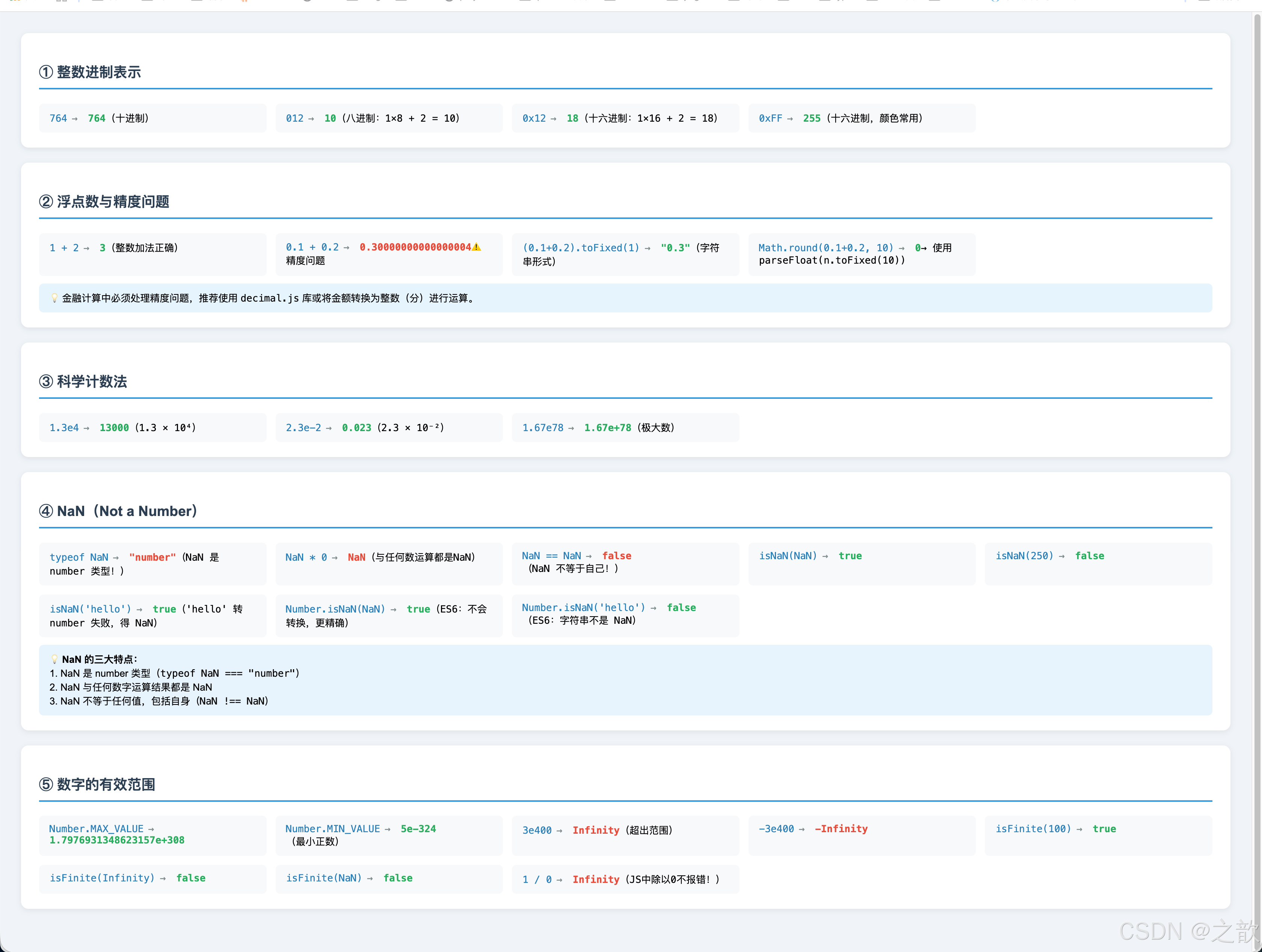
💡 代码解释:number 数值类型核心要点
一、整数进制速查
| 进制 | 前缀 | 示例 | 换算十进制 | 常用场景 |
|---|---|---|---|---|
| 十进制 | 无 | 764 |
764 | 日常计算 |
| 八进制 | 0 |
012 |
10(1×8+2) | 文件权限(Linux) |
| 十六进制 | 0x |
0xFF |
255(15×16+15) | CSS颜色、编码 |
| 二进制(ES6) | 0b |
0b1010 |
10 | 位运算、权限掩码 |
// 十六进制在CSS颜色中最常用
var red = 0xFF0000;    // CSS: #FF0000
var white = 0xFFFFFF;  // CSS: #FFFFFF

// 进制转换
(255).toString(16);  // "ff" → 转十六进制
(10).toString(2);    // "1010" → 转二进制
parseInt('FF', 16);  // 255 → 十六进制转十进制
二、浮点精度问题(IEEE 754)深度理解
// ❌ 精度丢失
0.1 + 0.2  // 0.30000000000000004

// 原因:十进制小数 → 二进制时无限循环
// 0.1 = 0.0001100110011... (二进制无限循环)
// 0.2 = 0.0011001100110... (二进制无限循环)
// 两者相加出现舍入误差

// ✅ 解决方案1:toFixed(四舍五入,返回字符串)
(0.1 + 0.2).toFixed(2)   // "0.30"
parseFloat((0.1 + 0.2).toFixed(2))  // 0.3 (数值)

// ✅ 解决方案2:整数计算(推荐金融场景)
// 将金额转为"分"(整数),避免浮点误差
var price1 = 0.1 * 100;  // 10分
var price2 = 0.2 * 100;  // 20分
var total = (price1 + price2) / 100;  // 0.3 ✅

// ✅ 解决方案3:Number.EPSILON(ES6)
Math.abs(0.1 + 0.2 - 0.3) < Number.EPSILON  // true
三、NaN 的三大特性(面试必考)
// 特性1:NaN 的 typeof 是 "number"
typeof NaN === "number"  // true(反直觉!)

// 特性2:NaN 与任何值都不相等,包括自身
NaN === NaN   // false(唯一一个不等于自身的值)
NaN == NaN    // false

// 特性3:任何与 NaN 的运算结果都是 NaN
NaN + 1       // NaN
NaN * 0       // NaN
NaN ** 0      // 1(唯一例外:任何数的0次方是1)
⚠️ 注意:isNaN 与 Number.isNaN 的区别
// isNaN():先尝试转换为 number,再判断
isNaN(NaN)      // true
isNaN('hello')  // true('hello' 转 number 得 NaN)
isNaN('123')    // false('123' 转 number 得 123)

// Number.isNaN()(ES6):不转换,只判断是否严格为 NaN
Number.isNaN(NaN)      // true
Number.isNaN('hello')  // false(字符串不是NaN)
Number.isNaN(undefined) // false

// ✅ 推荐使用 Number.isNaN(),更精确
四、Infinity 与数值范围
// 正负无穷
1 / 0       // Infinity
-1 / 0      // -Infinity
Infinity + 1  // Infinity
Infinity * 0  // NaN

// ⚠️ JavaScript 除以零不报错!(不像 Java/C++)
1 / 0       // Infinity(不抛异常)

// 安全整数范围(2^53 - 1)
Number.MAX_SAFE_INTEGER  // 9007199254740991
Number.MIN_SAFE_INTEGER  // -9007199254740991

// 超出安全范围,整数计算不精确
9007199254740991 + 1  // 9007199254740992 ✅
9007199254740991 + 2  // 9007199254740992 ❌(应为 ...993)

// 解决大整数问题:使用 BigInt
9007199254740991n + 2n  // 9007199254740993n ✅
五、科学计数法
// 表示极大/极小数
1.3e4   // 13000   (1.3 × 10^4)
2.3e-2  // 0.023   (2.3 × 10^-2)
1.5e308 // 接近最大值

// 实际场景
var BYTES_PER_GB = 1e9;       // 1,000,000,000 字节
var LIGHT_SPEED = 3e8;        // 3×10^8 米/秒
var ATOM_SIZE = 1e-10;        // 原子直径(米)
六、常见数值陷阱总结
| 陷阱 | 错误期望 | 实际结果 | 正确处理 |
|---|---|---|---|
0.1 + 0.2 |
0.3 |
0.30000000000000004 |
toFixed(2) |
NaN === NaN |
true |
false |
Number.isNaN() |
typeof NaN |
"nan" |
"number" |
直接与 NaN 比较不可靠 |
1 / 0 |
报错 | Infinity |
isFinite() 检查 |
超大整数+1 |
精确 | 可能不精确 | 使用 BigInt |
5.4 string 字符串类型
名词解释:字符串(String)
字符串是由零个或多个字符组成的字符序列。在 JavaScript 中,字符串是不可变的原始类型,一旦创建,其内容无法改变(对字符串的操作会返回新字符串)。
转义字符表
| 转义序列 | 含义 | 示例 | 输出 |
|---|---|---|---|
\n |
换行(Newline) | '第一行\n第二行' |
换行显示 |
\t |
制表符(Tab) | '名字\t年龄' |
水平对齐 |
\' |
单引号 | 'it\'s ok' |
it's ok |
\" |
双引号 | "他说\"你好\"" |
他说"你好" |
\\ |
反斜杠本身 | 'C:\\Users' |
C:\Users |
\uXXXX |
Unicode 字符 | '\u0041' |
A |
\r |
回车(Carriage Return) | '\r\n' |
Windows换行 |
<!DOCTYPE html>
<html lang="zh-CN">
<head>
    <meta charset="UTF-8">
    <meta name="viewport" content="width=device-width, initial-scale=1.0">
    <title>字符串完整示例</title>
    <style>
        body { font-family: Arial; padding: 20px; background: #f0f4f8; }
        .section { background: white; border-radius: 10px; padding: 20px; margin-bottom: 16px; box-shadow: 0 2px 8px rgba(0,0,0,0.08); }
        h3 { color: #2c3e50; border-bottom: 2px solid #27ae60; padding-bottom: 8px; }
        pre { background: #282c34; color: #abb2bf; padding: 16px; border-radius: 6px; font-size: 13px; line-height: 1.6; white-space: pre-wrap; }
        .tag { color: #e06c75; }
        .str { color: #98c379; }
        .kw { color: #c678dd; }
        .num { color: #d19a66; }
        .cmt { color: #5c6370; font-style: italic; }
        .output-box {
            background: #1e2227;
            color: #d4d4d4;
            padding: 14px;
            border-radius: 6px;
            font-family: monospace;
            font-size: 13px;
            margin-top: 10px;
            white-space: pre-wrap;
        }
        .tip { background: #e8f4fd; border-radius: 6px; padding: 12px; font-size: 13px; margin-top: 10px; }
    </style>
</head>
<body>
    <div class="section">
        <h3>① 字符串的三种定界符</h3>
        <pre><span class="cmt">// 单引号</span>
<span class="kw">var</span> str1 = <span class="str">'Hello, JavaScript!'</span>;

<span class="cmt">// 双引号(内容中包含单引号时使用双引号)</span>
<span class="kw">var</span> str2 = <span class="str">"it's a beautiful day"</span>;

<span class="cmt">// 模板字符串(ES6,反引号 ` ,支持变量插值和多行)</span>
<span class="kw">var</span> name = <span class="str">'JavaScript'</span>;
<span class="kw">var</span> str3 = `Hello, ${name}!`;    <span class="cmt">// 模板字符串</span>
<span class="kw">var</span> str4 = `第一行
第二行
第三行`;                          <span class="cmt">// 模板字符串支持多行</span></pre>
        <div class="tip">💡 ES6 的模板字符串(backtick)功能强大,推荐在需要字符串拼接时使用。</div>
    </div>

    <div class="section">
        <h3>② 转义字符实战</h3>
        <div id="escape-demo"></div>
    </div>

    <div class="section">
        <h3>③ 字符串常用属性和方法预览</h3>
        <pre><span class="kw">var</span> str = <span class="str">'Hello, JavaScript!'</span>;

str.length          <span class="cmt">// 18 — 字符串长度</span>
str.toUpperCase()   <span class="cmt">// 'HELLO, JAVASCRIPT!'</span>
str.toLowerCase()   <span class="cmt">// 'hello, javascript!'</span>
str.indexOf(<span class="str">'Script'</span>) <span class="cmt">// 12 — 查找子串位置</span>
str.includes(<span class="str">'Java'</span>)  <span class="cmt">// true — 是否包含子串(ES6)</span>
str.slice(0, 5)     <span class="cmt">// 'Hello' — 截取子串</span>
str.split(<span class="str">', '</span>)     <span class="cmt">// ['Hello', 'JavaScript!'] — 分割</span>
str.trim()          <span class="cmt">// 去除首尾空格</span>
str.replace(<span class="str">'Hello'</span>, <span class="str">'Hi'</span>) <span class="cmt">// 'Hi, JavaScript!'</span></pre>
    </div>

    <script>
        // 字符串基础
        var msg01 = 'Hello"高小乐';
        var msg02 = "你好'老头乐";
        console.log(msg01, typeof msg01);
        console.log(msg02, typeof msg02);

        // 转义字符
        var poem = '锄禾日当午\n汗滴禾下土\n水质盘中餐\n粒粒皆辛苦';
        console.log(poem);

        var msg03 = '使用\'可以在单引号字符串里包含单引号';
        var msg04 = "使用\"可以在双引号字符串里包含双引号";
        console.log(msg03);
        console.log(msg04);

        var msg05 = '在 JS 中,\\n 是转义字符,表示换行';
        console.log(msg05);

        console.log('\u0041');   // A
        console.log('\u4e2d');   // 中

        // 渲染转义字符演示
        var demo = document.getElementById('escape-demo');
        var escapeExamples = [
            { code: "'Hello\\nWorld'", result: 'Hello\nWorld', desc: '\\n 换行' },
            { code: "'it\\'s ok'", result: "it's ok", desc: "\\' 单引号" },
            { code: '"say \\"hi\\""', result: 'say "hi"', desc: '\\" 双引号' },
            { code: "'C:\\\\Users'", result: 'C:\\Users', desc: '\\\\ 反斜杠' },
            { code: "'\\u4e2d\\u6587'", result: '\u4e2d\u6587', desc: '\\uXXXX Unicode字符' },
        ];

        var html = '<div style="display:grid;grid-template-columns:1fr 1fr 1fr;gap:10px;">';
        escapeExamples.forEach(function(ex) {
            html += '<div style="background:#f8f9fa;padding:10px;border-radius:6px;font-family:monospace;font-size:13px;">' +
                '<div style="color:#2980b9">' + ex.code + '</div>' +
                '<div style="color:#7f8c8d;font-size:11px;margin:4px 0">' + ex.desc + '</div>' +
                '<div style="color:#27ae60;font-weight:bold;white-space:pre">' + ex.result + '</div>' +
                '</div>';
        });
        html += '</div>';
        demo.innerHTML = html;
    </script>
</body>
</html>
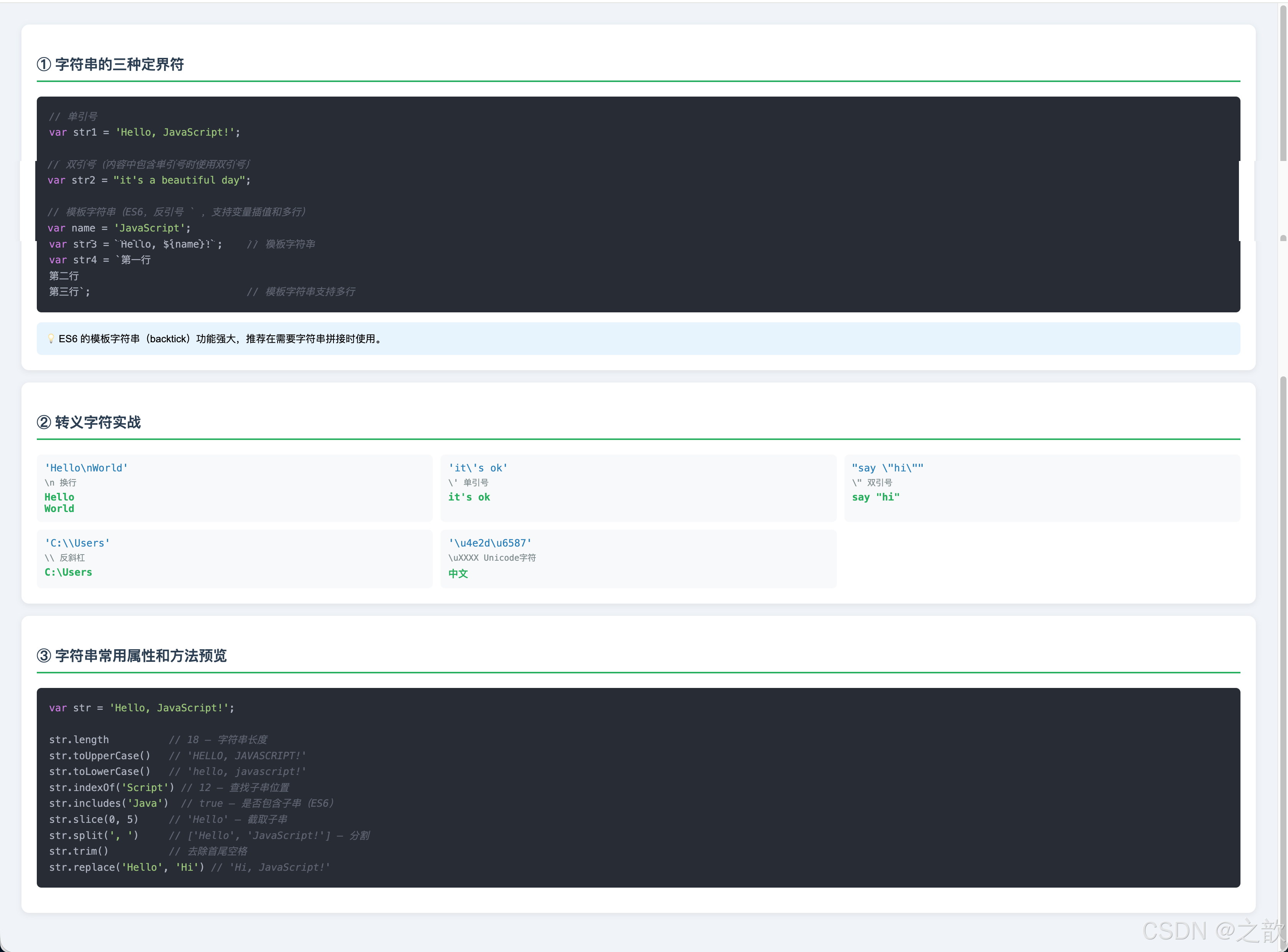
💡 代码解释:string 字符串类型核心要点
一、三种定界符的选择原则
// 单引号 vs 双引号:功能完全相同,选择一种保持统一
var str1 = 'Hello, JavaScript!';   // 推荐(更简洁)
var str2 = "Hello, JavaScript!";   // 同样合法

// 嵌套引号:内外使用不同引号,避免转义
var str3 = "it's a beautiful day";   // ✅ 内含单引号,用双引号包裹
var str4 = '他说 "你好"';              // ✅ 内含双引号,用单引号包裹
var str5 = 'it\'s ok';               // ✅ 转义,但不如上面直观

// 模板字符串(ES6,反引号 ` ):推荐用于拼接
var name = 'JavaScript';
var greeting = `Hello, ${name}!`;    // Hello, JavaScript!
二、转义字符完整用法
// \n 换行(最常用)
console.log('第一行\n第二行');
// 输出:
// 第一行
// 第二行

// \t 制表符(对齐)
console.log('姓名\t年龄\t城市');
console.log('张三\t25\t北京');
// 输出:
// 姓名    年龄    城市
// 张三    25     北京

// 引号转义
var msg1 = '我说\'你好\'';      // 我说'你好'
var msg2 = "他说\"再见\"";      // 他说"再见"

// 反斜杠转义(\本身)
var path = 'C:\\Users\\zhangsan';  // C:\Users\zhangsan

// Unicode 转义
console.log('\u0041');  // A
console.log('\u4e2d');  // 中
console.log('\u6587');  // 文

// 实际代码中使用示例
var filePath = 'C:\\Program Files\\MyApp\\config.json';
var poem = '床前明月光,\n疑是地上霜。\n举头望明月,\n低头思故乡。';
三、字符串不可变性(重要!)
var str = 'Hello';
str[0] = 'J';              // 尝试修改第一个字符
console.log(str);          // 'Hello'(没有变!)
console.log(str[0]);       // 'H'(没有变!)

// 字符串是不可变的(immutable)
// 对字符串的操作都会返回新字符串,原字符串不变

var original = 'hello';
var upper = original.toUpperCase();
console.log(original);  // 'hello'(原字符串不变)
console.log(upper);     // 'HELLO'(新字符串)
四、模板字符串(Template Literals)的强大功能
var name = '张三';
var age = 25;
var city = '北京';

// ❌ 传统字符串拼接(繁琐)
var msg1 = '姓名:' + name + ',年龄:' + age + ',城市:' + city;

// ✅ 模板字符串(简洁)
var msg2 = `姓名:${name},年龄:${age},城市:${city}`;

// 表达式插值(不只是变量)
var a = 10, b = 20;
var result = `${a} + ${b} = ${a + b}`;   // "10 + 20 = 30"
var upper = `${name.toUpperCase()} 的年龄是 ${age > 18 ? '成年' : '未成年'}`;

// 多行字符串(模板字符串的独特优势)
var html = `
  <div class="user-card">
    <h3>${name}</h3>
    <p>年龄:${age}</p>
    <p>城市:${city}</p>
  </div>
`;

// 传统多行字符串(麻烦)
var html2 = '<div class="user-card">\n' +
            '  <h3>' + name + '</h3>\n' +
            '  <p>年龄:' + age + '</p>\n' +
            '</div>';
五、字符串常用方法速查
var str = 'Hello, JavaScript!';

// 长度
str.length           // 18

// 大小写
str.toUpperCase()    // 'HELLO, JAVASCRIPT!'
str.toLowerCase()    // 'hello, javascript!'

// 查找
str.indexOf('Java')        // 7(返回索引,找不到返回-1)
str.lastIndexOf('a')       // 15(从后往前找)
str.includes('Java')       // true(ES6,推荐)
str.startsWith('Hello')    // true(ES6)
str.endsWith('!')          // true(ES6)

// 截取
str.slice(0, 5)            // 'Hello'
str.slice(-1)              // '!'(负数从末尾算)
str.substring(7, 17)       // 'JavaScript'

// 分割与合并
'a,b,c'.split(',')         // ['a', 'b', 'c']
['a', 'b', 'c'].join('-')  // 'a-b-c'

// 去空格
'  hello  '.trim()         // 'hello'
'  hello  '.trimStart()    // 'hello  '(ES2019)
'  hello  '.trimEnd()      // '  hello'(ES2019)

// 替换
str.replace('Hello', 'Hi')            // 'Hi, JavaScript!'
str.replace(/javascript/gi, 'JS')     // 正则替换(全局、忽略大小写)
str.replaceAll('l', 'L')              // 'HeLLo, JavaScriptL!'(ES2021)

// 填充(ES2017)
'5'.padStart(3, '0')       // '005'
'5'.padEnd(3, '0')         // '500'

// 重复
'ab'.repeat(3)             // 'ababab'(ES6)
六、字符串比较(、=、localeCompare)
// 严格比较(推荐)
'hello' === 'hello'    // true
'hello' === 'HELLO'    // false(区分大小写)

// 不区分大小写比较
'hello'.toLowerCase() === 'HELLO'.toLowerCase()  // true

// 字典顺序比较
'apple' < 'banana'    // true(按字母顺序)
'b' > 'a'             // true

// localeCompare(支持中文排序)
['张三', '李四', '王五'].sort((a, b) => a.localeCompare(b, 'zh-CN'));
// 按中文拼音排序:['李四', '王五', '张三']
七、⚠️ 常见陷阱与注意事项
// 陷阱1:字符串 + 数字
'10' + 5     // '105'(字符串拼接,不是数学加法!)
10 + '5'     // '105'
'10' - 5     // 5(减号会尝试转换为数字)
'10' * 2     // 20(乘号会尝试转换为数字)

// 陷阱2:字符串比较
'10' > '9'   // false!(字符串按字典序,'1' < '9')
10 > 9       // true(数字比较)

// 陷阱3:访问越界的索引
'hello'[10]  // undefined(不报错)
'hello'.charAt(10)  // ''(空字符串)

// 陷阱4:字符串转数字
Number('123')    // 123 ✅
Number('12.3')   // 12.3 ✅
Number('')       // 0(空字符串转为0!)
Number(' ')      // 0(空白字符串也是0!)
Number('abc')    // NaN

parseInt('123px')   // 123(解析到遇到非数字停止)
parseInt('px123')   // NaN
八、真实应用场景
// 1. 表单验证
function validateEmail(email) {
    return email.includes('@') && email.includes('.');
}

// 2. 手机号脱敏(中间4位隐藏)
function maskPhone(phone) {
    return phone.slice(0, 3) + '****' + phone.slice(-4);
}
maskPhone('13812345678');  // '138****5678'

// 3. URL 参数解析
function getURLParam(url, key) {
    const params = new URLSearchParams(url.split('?')[1]);
    return params.get(key);
}

// 4. 驼峰转连字符
function camelToKebab(str) {
    return str.replace(/([A-Z])/g, '-$1').toLowerCase();
}
camelToKebab('borderRadius');  // 'border-radius'

// 5. 模板生成 HTML
function renderProductCard(product) {
    return `
        <div class="card" data-id="${product.id}">
            <h3>${product.name}</h3>
            <span class="price">¥${product.price.toFixed(2)}</span>
        </div>
    `;
}
5.5 boolean 布尔类型
名词解释:布尔(Boolean)
布尔类型只有两个值:true(真)和 false(假),用于逻辑判断。名字来自英国数学家 George Boole,他创立了布尔代数(Boolean Algebra)。
<!DOCTYPE html>
<html lang="zh-CN">
<head>
    <meta charset="UTF-8">
    <meta name="viewport" content="width=device-width, initial-scale=1.0">
    <title>boolean 布尔类型完整示例</title>
    <style>
        body { font-family: Arial; padding: 20px; }
        .grid { display: grid; grid-template-columns: 1fr 1fr; gap: 20px; margin-top: 16px; }
        .card { background: #f8f9fa; border-radius: 8px; padding: 16px; }
        .true-card { border-left: 4px solid #27ae60; }
        .false-card { border-left: 4px solid #e74c3c; }
        .truth-table { border-collapse: collapse; width: 100%; margin-top: 16px; }
        .truth-table th, .truth-table td { border: 1px solid #ddd; padding: 8px 12px; text-align: center; font-size: 14px; }
        .truth-table th { background: #2c3e50; color: white; }
        .t { color: #27ae60; font-weight: bold; }
        .f { color: #e74c3c; font-weight: bold; }
    </style>
</head>
<body>
    <h2>boolean 布尔类型</h2>

    <div class="grid">
        <div class="card true-card">
            <h3 style="color: #27ae60;">true — 表示"是/肯定/真"</h3>
            <ul style="margin-top: 10px; font-size: 14px; line-height: 2;">
                <li>用户是否已登录:<code>var isLoggedIn = true</code></li>
                <li>表单是否验证通过:<code>var isValid = true</code></li>
                <li>商品是否有库存:<code>var inStock = true</code></li>
                <li>开关是否打开:<code>var isOpen = true</code></li>
            </ul>
        </div>
        <div class="card false-card">
            <h3 style="color: #e74c3c;">false — 表示"否/否定/假"</h3>
            <ul style="margin-top: 10px; font-size: 14px; line-height: 2;">
                <li>用户未登录:<code>var isLoggedIn = false</code></li>
                <li>表单验证失败:<code>var isValid = false</code></li>
                <li>商品缺货:<code>var inStock = false</code></li>
                <li>开关关闭:<code>var isOpen = false</code></li>
            </ul>
        </div>
    </div>

    <h3 style="margin-top: 20px;">Falsy 值(转为布尔时为 false 的值)</h3>
    <p style="font-size: 14px; color: #666;">以下 6 个值转为布尔值时为 <strong>false</strong>,其他所有值均为 <strong>true</strong>:</p>

    <table class="truth-table">
        <tr>
            <th>值</th>
            <th>类型</th>
            <th>Boolean(value)</th>
            <th>说明</th>
        </tr>
        <tr><td><code>false</code></td><td>boolean</td><td class="f">false</td><td>布尔假值本身</td></tr>
        <tr><td><code>0</code></td><td>number</td><td class="f">false</td><td>数字零</td></tr>
        <tr><td><code>-0</code></td><td>number</td><td class="f">false</td><td>负零</td></tr>
        <tr><td><code>""</code> 或 <code>''</code></td><td>string</td><td class="f">false</td><td>空字符串</td></tr>
        <tr><td><code>null</code></td><td>null</td><td class="f">false</td><td>空值</td></tr>
        <tr><td><code>undefined</code></td><td>undefined</td><td class="f">false</td><td>未定义</td></tr>
        <tr><td><code>NaN</code></td><td>number</td><td class="f">false</td><td>非数字</td></tr>
        <tr><td><code>"0"</code></td><td>string</td><td class="t">true</td><td>非空字符串(注意!)</td></tr>
        <tr><td><code>[]</code></td><td>object</td><td class="t">true</td><td>空数组(注意!)</td></tr>
        <tr><td><code>{}</code></td><td>object</td><td class="t">true</td><td>空对象(注意!)</td></tr>
    </table>

    <script>
        console.log(Boolean(false));     // false
        console.log(Boolean(0));         // false
        console.log(Boolean(''));        // false
        console.log(Boolean(null));      // false
        console.log(Boolean(undefined)); // false
        console.log(Boolean(NaN));       // false

        console.log(Boolean('0'));       // true ← 注意!非空字符串
        console.log(Boolean([]));        // true ← 注意!空数组
        console.log(Boolean({}));        // true ← 注意!空对象
        console.log(Boolean(1));         // true
        console.log(Boolean('hello'));   // true
    </script>
</body>
</html>
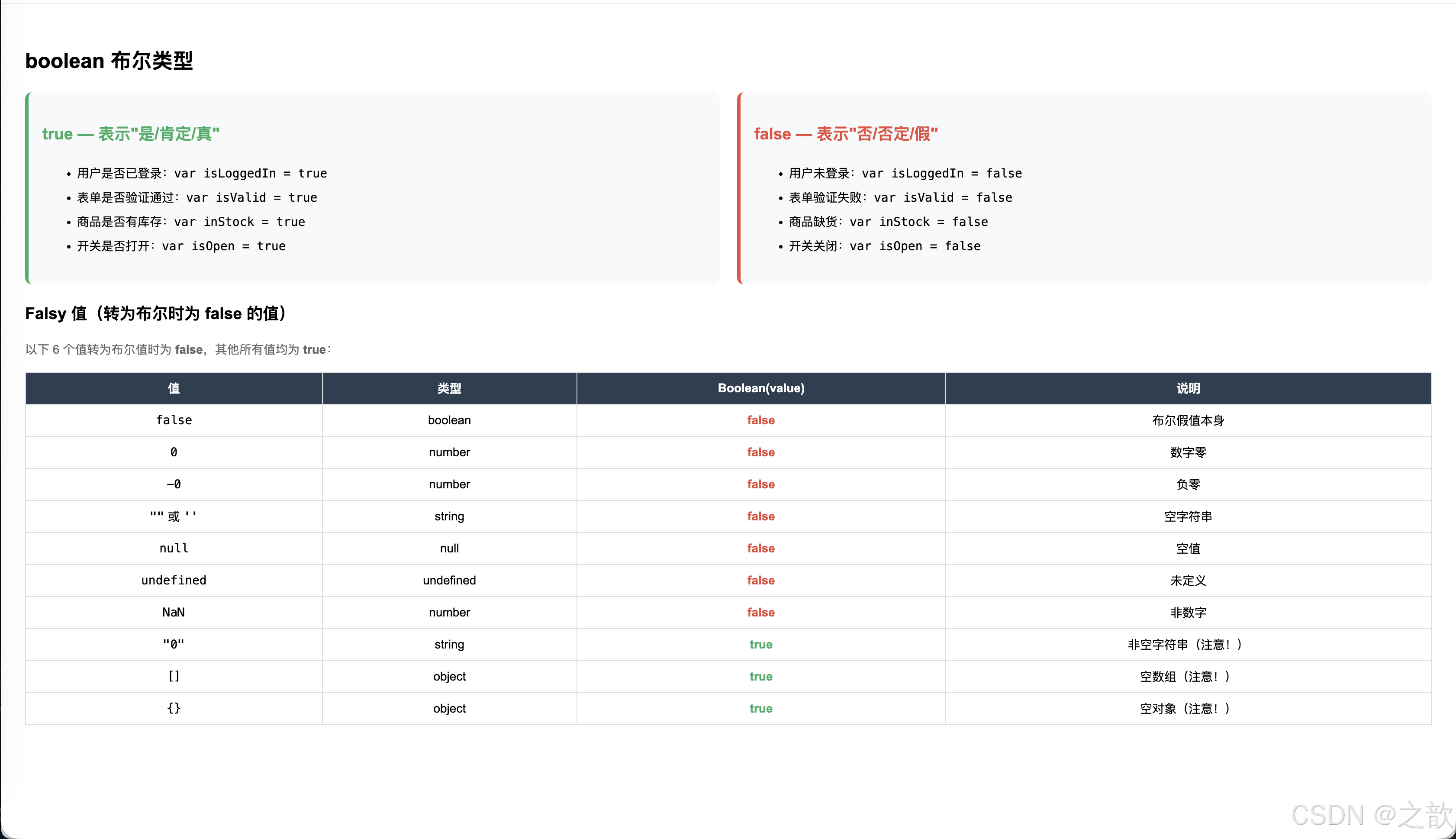
💡 代码解释:boolean 布尔类型核心要点
一、布尔值的本质
// 只有两个值
true   // 真、是、1
false  // 假、否、0

// 布尔值参与数学运算会转为数字
true + 1   // 2  (true → 1)
false + 1  // 1  (false → 0)
true * 10  // 10
二、Falsy 值(转布尔为 false 的值)完整记忆
这是 JavaScript 最重要的知识点之一,共 7个 Falsy 值:
// 7个 Falsy 值
Boolean(false)     // false — 布尔 false 本身
Boolean(0)         // false — 数字零
Boolean(-0)        // false — 负零(少见)
Boolean(0n)        // false — BigInt 零(ES2020)
Boolean('')        // false — 空字符串(长度为0)
Boolean(null)      // false — 空值
Boolean(undefined) // false — 未定义
Boolean(NaN)       // false — 非数字

// 其他所有值都是 Truthy(转布尔为 true)
Boolean('0')       // true ← ⚠️ 非空字符串!
Boolean(' ')       // true ← ⚠️ 含空格的字符串!
Boolean([])        // true ← ⚠️ 空数组!
Boolean({})        // true ← ⚠️ 空对象!
Boolean(-1)        // true ← 负数也是 truthy
Boolean(Infinity)  // true
记忆口诀: false、0、''、null、undefined、NaN 这6类是 falsy,其余都是 truthy。
三、布尔运算符详解
// && 逻辑与:两者都为真才为真
true && true    // true
true && false   // false
false && true   // false
false && false  // false

// || 逻辑或:任一为真则为真
true || true    // true
true || false   // true
false || true   // true
false || false  // false

// ! 逻辑非:取反
!true   // false
!false  // true
!!''    // false(双重取反,转为布尔值)
!!'JS'  // true
四、短路求值(Short-Circuit Evaluation)
这是 JavaScript 中非常实用的特性:
// && 短路:左边为 falsy 则返回左边,否则返回右边
false && '不执行'  // false(左边是 falsy,不求值右边)
0 && '不执行'      // 0
'' && '不执行'     // ''
'hello' && 'world' // 'world'(左边是 truthy,返回右边)

// || 短路:左边为 truthy 则返回左边,否则返回右边
true || '不执行'   // true
'hello' || '默认值' // 'hello'(左边是 truthy,不求值右边)
'' || '默认值'      // '默认值'(左边是 falsy,返回右边)
null || '默认值'    // '默认值'
实际应用(非常常见):
// 1. 默认值模式
var name = userInput || '匿名用户';
// 如果 userInput 为空字符串、null、undefined 等 falsy 值,
// 则 name = '匿名用户'

// 2. 条件渲染(React 中常用)
var isLoggedIn = true;
var element = isLoggedIn && '<div>欢迎回来!</div>';
// isLoggedIn 为 true 时,element = '<div>欢迎回来!</div>'
// isLoggedIn 为 false 时,element = false

// 3. 防御性编程
var user = { profile: { name: '张三' } };
var name = user && user.profile && user.profile.name;
// 避免 Cannot read properties of undefined

// 4. ES2020 可选链(更现代)
var name2 = user?.profile?.name;  // 与上面等价
五、比较运算符返回布尔值
// 所有比较运算符都返回布尔值
5 > 3         // true
5 < 3         // false
5 >= 5        // true
5 <= 4        // false
5 == '5'      // true(宽松比较,会类型转换)
5 === '5'     // false(严格比较,类型不同)
5 != '5'      // false(宽松不等)
5 !== '5'     // true(严格不等,推荐使用)
⚠️ == vs === 的区别(面试必考):
// == 宽松相等:会进行类型转换
0 == false     // true(false 转 0)
'' == false    // true('' 转 false,false 转 0,'' 转 0)
null == undefined  // true
1 == '1'       // true('1' 转数字 1)
[] == false    // true([] 转 '' 转 0,false 转 0)

// === 严格相等:不转换类型(推荐使用!)
0 === false    // false(类型不同)
'' === false   // false(类型不同)
null === undefined  // false(类型不同)
1 === '1'      // false(类型不同)
六、布尔值在条件语句中的应用
// if 语句会自动将条件转为布尔值
var user = null;
if (user) {
    console.log('用户存在');
} else {
    console.log('用户不存在');  // ← 执行这里,因为 null 是 falsy
}

// 利用 falsy 检查
var arr = [];
if (arr.length) {           // arr.length 为 0,是 falsy
    console.log('有数据');
} else {
    console.log('没有数据');  // ← 执行这里
}

// 字符串非空检查
var str = '';
if (!str) {
    console.log('字符串为空');  // ← 执行
}
七、⚠️ 布尔类型常见陷阱
// 陷阱1:空数组和空对象是 truthy!
if ([]) { console.log('空数组也是 truthy!'); }  // 会执行
if ({}) { console.log('空对象也是 truthy!'); }  // 会执行

// 正确检查数组是否为空
if (arr.length === 0) { ... }
if (arr.length) { ... }  // 等价,利用 truthy/falsy

// 陷阱2:字符串 '0' 和 'false' 是 truthy!
Boolean('0')       // true(不是 false!)
Boolean('false')   // true(字符串 'false' 也是 truthy!)

// 陷阱3:== 比较中的隐式转换
null == 0          // false(null 只和 null/undefined 宽松相等)
null == false      // false
undefined == false // false
八、真实应用场景
// 1. 表单验证
function validateForm(data) {
    var errors = {};

    if (!data.username) {
        errors.username = '用户名不能为空';
    }
    if (!data.password || data.password.length < 6) {
        errors.password = '密码至少6位';
    }
    if (!data.email || !data.email.includes('@')) {
        errors.email = '邮箱格式不正确';
    }

    return Object.keys(errors).length === 0 ? null : errors;
}

// 2. 权限控制
var user = { role: 'admin', isActive: true };
var canEdit = user.role === 'admin' && user.isActive;
var canDelete = user.role === 'admin' && user.isActive && user.isSuperAdmin;

// 3. 开关状态
var isDarkMode = false;
function toggleDarkMode() {
    isDarkMode = !isDarkMode;  // 切换布尔值
    document.body.classList.toggle('dark', isDarkMode);
}

// 4. 加载状态
var isLoading = false;
async function fetchData() {
    isLoading = true;
    renderLoadingSpinner(isLoading);
    try {
        var data = await fetch('/api/data').then(r => r.json());
        renderData(data);
    } finally {
        isLoading = false;
        renderLoadingSpinner(isLoading);
    }
}
5.6 null 与 undefined
名词解释
| 值 | 类型 | 含义 | typeof | 使用场景 |
|---|---|---|---|---|
null |
null | 空,有意为之的"无值" | "object" ⚠️ |
初始化一个将来会赋值的变量,表示"暂无" |
undefined |
undefined | 未定义,意外的"无值" | "undefined" |
变量声明未赋值;函数无返回值;对象不存在的属性 |
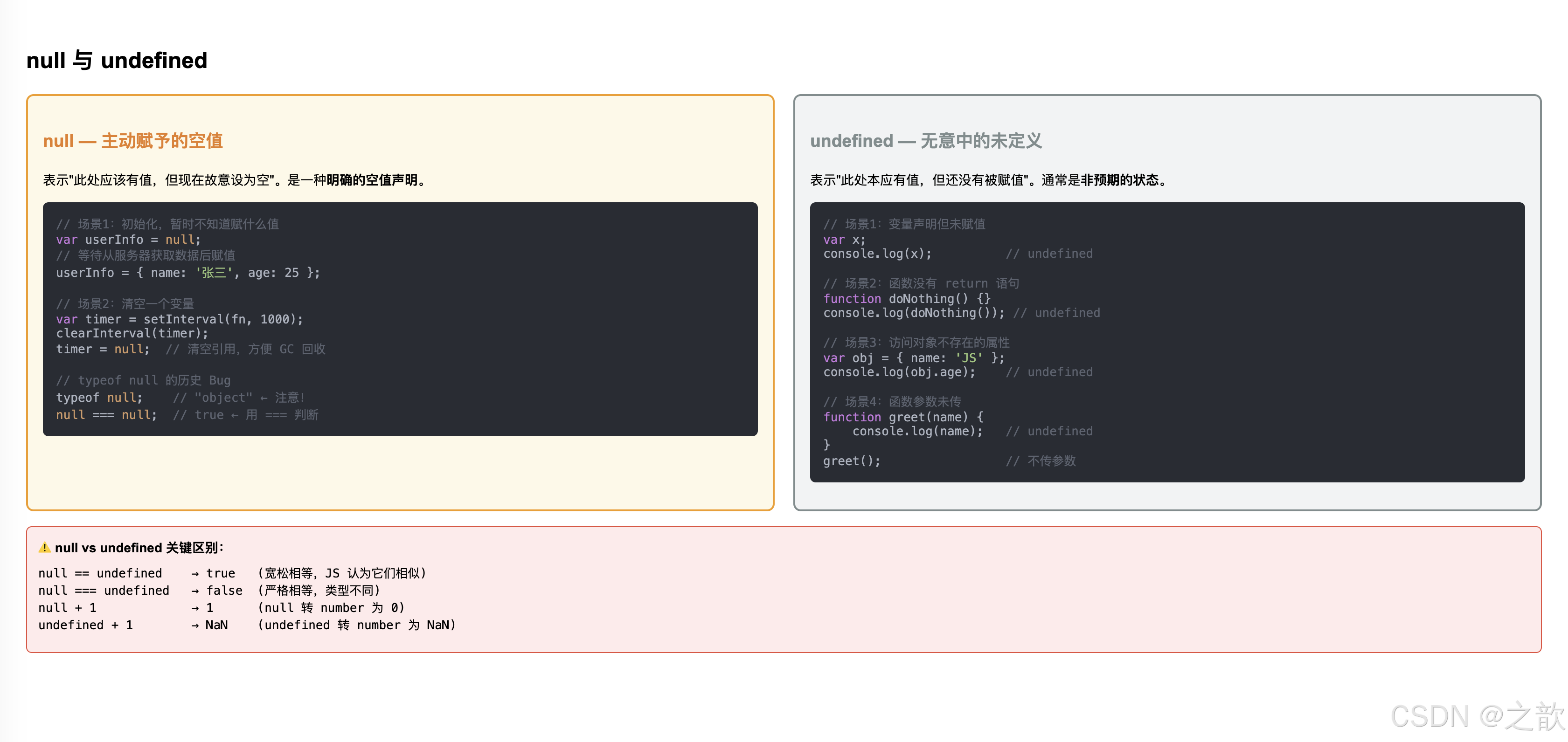
<!DOCTYPE html>
<html lang="zh-CN">
<head>
    <meta charset="UTF-8">
    <meta name="viewport" content="width=device-width, initial-scale=1.0">
    <title>null 与 undefined 完整示例</title>
    <style>
        body { font-family: Arial; padding: 20px; }
        .compare { display: grid; grid-template-columns: 1fr 1fr; gap: 20px; }
        .null-card { background: #fef9e7; border: 2px solid #f39c12; border-radius: 8px; padding: 16px; }
        .undef-card { background: #f2f3f4; border: 2px solid #7f8c8d; border-radius: 8px; padding: 16px; }
        pre { background: #282c34; color: #abb2bf; padding: 14px; border-radius: 6px; font-size: 13px; margin-top: 10px; }
        .kw { color: #c678dd; }
        .str { color: #98c379; }
        .cmt { color: #5c6370; }
        .num { color: #d19a66; }
        .warn-box { background: #ffeaea; border: 1px solid #e74c3c; border-radius: 6px; padding: 12px; margin-top: 16px; font-size: 14px; }
    </style>
</head>
<body>
    <h2>null 与 undefined</h2>

    <div class="compare">
        <div class="null-card">
            <h3 style="color: #e67e22;">null — 主动赋予的空值</h3>
            <p style="font-size: 14px; margin-top: 8px;">表示"此处应该有值,但现在故意设为空"。是一种<strong>明确的空值声明</strong>。</p>
            <pre><span class="cmt">// 场景1:初始化,暂时不知道赋什么值</span>
<span class="kw">var</span> userInfo = <span class="num">null</span>;
<span class="cmt">// 等待从服务器获取数据后赋值</span>
userInfo = { name: <span class="str">'张三'</span>, age: 25 };

<span class="cmt">// 场景2:清空一个变量</span>
<span class="kw">var</span> timer = setInterval(fn, 1000);
clearInterval(timer);
timer = <span class="num">null</span>;  <span class="cmt">// 清空引用,方便 GC 回收</span>

<span class="cmt">// typeof null 的历史 Bug</span>
typeof <span class="num">null</span>;    <span class="cmt">// "object" ← 注意!</span>
<span class="num">null</span> === <span class="num">null</span>;  <span class="cmt">// true ← 用 === 判断</span></pre>
        </div>

        <div class="undef-card">
            <h3 style="color: #7f8c8d;">undefined — 无意中的未定义</h3>
            <p style="font-size: 14px; margin-top: 8px;">表示"此处本应有值,但还没有被赋值"。通常是<strong>非预期的状态</strong>。</p>
            <pre><span class="cmt">// 场景1:变量声明但未赋值</span>
<span class="kw">var</span> x;
console.log(x);          <span class="cmt">// undefined</span>

<span class="cmt">// 场景2:函数没有 return 语句</span>
<span class="kw">function</span> doNothing() {}
console.log(doNothing()); <span class="cmt">// undefined</span>

<span class="cmt">// 场景3:访问对象不存在的属性</span>
<span class="kw">var</span> obj = { name: <span class="str">'JS'</span> };
console.log(obj.age);    <span class="cmt">// undefined</span>

<span class="cmt">// 场景4:函数参数未传</span>
<span class="kw">function</span> greet(name) {
    console.log(name);   <span class="cmt">// undefined</span>
}
greet();                 <span class="cmt">// 不传参数</span></pre>
        </div>
    </div>

    <div class="warn-box">
        <strong>⚠️ null vs undefined 关键区别:</strong>
        <pre style="background: transparent; padding: 8px 0; margin: 0; color: inherit;">
null == undefined    → true   (宽松相等,JS 认为它们相似)
null === undefined   → false  (严格相等,类型不同)
null + 1             → 1      (null 转 number 为 0)
undefined + 1        → NaN    (undefined 转 number 为 NaN)</pre>
    </div>

    <script>
        // null
        var address = null;
        console.log(address);          // null
        console.log(typeof address);   // "object"

        // undefined
        var phoneNum;
        console.log(phoneNum);         // undefined
        console.log(typeof phoneNum);  // "undefined"

        // 比较
        console.log(null == undefined);   // true
        console.log(null === undefined);  // false
        console.log(null + 1);            // 1
        console.log(undefined + 1);       // NaN
    </script>
</body>
</html>
💡 代码解释:null 与 undefined 核心要点
一、两者的本质区别(一句话概括)
| null | undefined | |
|---|---|---|
| 语义 | 有意为之的"空",表示"我知道这里没有值" | 无意的"未定义",表示"还没有被赋值" |
| 来源 | 由程序员主动赋值 | 由 JavaScript 引擎自动产生 |
| 类比 | 空杯子(知道这是杯子,但里面是空的) | 没有杯子(连杯子都不存在) |
二、undefined 产生的四种场景
// 场景1:变量声明但未赋值
var x;
console.log(x);           // undefined

// 场景2:函数没有 return 语句
function doNothing() {}
console.log(doNothing()); // undefined

// 场景3:访问对象不存在的属性
var obj = { name: 'JS' };
console.log(obj.age);     // undefined(不是报错)
console.log(obj.foo);     // undefined

// 场景4:函数参数未传值
function greet(name) {
    console.log(name);    // undefined(没有传参)
}
greet();  // 调用时不传参数
三、null 的主动使用场景
// 场景1:初始化一个将来要赋值的变量
var currentUser = null;   // 表示"还没有用户,稍后从服务器获取"
// 用户登录后:
currentUser = { name: '张三', id: 123 };

// 场景2:清空变量,释放引用(帮助垃圾回收)
var largeObject = { /* 大量数据 */ };
// 使用完毕
largeObject = null;  // 让 GC 回收内存

// 场景3:表示"查找无结果"
function findUser(id) {
    // 找到了
    if (id === 1) return { name: '张三' };
    // 没找到
    return null;  // 明确表示"找了但没找到",不返回 undefined
}

var user = findUser(999);
if (user === null) {
    console.log('用户不存在');
}
四、== 与 === 判断差异(重要)
null == undefined    // true(它们被认为是"相似的空值")
null === undefined   // false(类型不同:null vs undefined)

// 利用 == null 同时检查 null 和 undefined(常用技巧)
var value = null;
if (value == null) {           // 同时捕获 null 和 undefined
    console.log('值为空');
}

// 等价于:
if (value === null || value === undefined) {
    console.log('值为空');
}

// 现代写法(ES2020 空值合并运算符)
var result = value ?? '默认值';
// 只有 null 或 undefined 时才使用默认值
// (与 || 不同:|| 对所有 falsy 值都用默认值)
五、数值转换对比
// null 转数值:0
null + 1        // 1(null → 0)
Number(null)    // 0
+null           // 0

// undefined 转数值:NaN
undefined + 1   // NaN
Number(undefined) // NaN
+undefined      // NaN

// 重要区别
null + 1        // 1(可以参与加法)
undefined + 1   // NaN(结果是 NaN)
六、可选链操作符(?.)— 解决 undefined 报错
在访问可能为 null/undefined 的属性时,旧代码需要冗长的判断:
// ❌ 旧方式(冗长)
var street;
if (user && user.address && user.address.street) {
    street = user.address.street;
}

// ✅ 可选链(ES2020,简洁)
var street = user?.address?.street;
// 如果 user 是 null/undefined,返回 undefined 而不报错
// 如果 user.address 是 null/undefined,返回 undefined
// 否则返回 user.address.street 的值

// 还可以用于函数调用
user?.getAddress?.();  // 如果 getAddress 不存在,不调用也不报错
arr?.[0]               // 安全访问数组元素
七、空值合并运算符(??)
// ?? 与 || 的区别:
// || :左边是 falsy 值时使用右边(包括 0、''、false)
// ?? :左边是 null 或 undefined 时才使用右边

var count = 0;
count || 10   // 10(因为 0 是 falsy)
count ?? 10   // 0  (0 不是 null/undefined,所以保留 0)

var name = '';
name || '匿名' // '匿名'('' 是 falsy)
name ?? '匿名' // ''('' 不是 null/undefined,所以保留 '')
什么时候用 ?? 而不是 ||:
// 场景:用户设置了"每页显示0条"(pageSize = 0是合法的)
var pageSize = userSettings.pageSize ?? 20;
// 如果用 ||,pageSize = 0 时会错误地替换为 20!
// 用 ?? 更安全:只有 null/undefined 时才使用默认值
八、⚠️ 常见误区总结
// 误区1:用 typeof 判断 null
typeof null === 'object'  // true(历史Bug)
// ✅ 正确判断 null:
value === null

// 误区2:认为 undefined 会报错
var obj = {};
obj.foo  // undefined(不报错)
obj.foo.bar  // ❌ TypeError: Cannot read properties of undefined

// 误区3:null 和 undefined 都是"没有值"就不分了
var a = null;
var b = undefined;
a == b   // true(宽松相等)
a === b  // false(严格不等)
九、实际编程规范建议
// ✅ 推荐:用 null 明确表示"空值"
var selectedItem = null;  // 表示还没选择任何项目

// ✅ 推荐:用 === null 判断是否为 null
if (selectedItem === null) { ... }

// ✅ 推荐:用 == null 同时判断 null 和 undefined
if (selectedItem == null) { ... }

// ✅ 推荐:避免手动赋值 undefined
// 让 JavaScript 自动产生 undefined 即可
var x;         // ✅ 声明但不赋值
var y = null;  // ✅ 明确表示"空",不要写 var y = undefined

// ✅ 推荐:函数无结果时返回 null(不是 undefined)
function findItem(id) {
    var found = items.filter(item => item.id === id)[0];
    return found || null;  // 明确返回 null 表示未找到
}
六、知识总结与思维导图
Day01 全部知识点总览
CSS 响应式布局常用断点总结
JavaScript 数据类型速查
七、经典作业解析
作业一:交换两个变量的值
var a = 100;
var b = 200;
题目要求: 交换 a 和 b 的值,使 a = 200,b = 100。
<!DOCTYPE html>
<html lang="zh-CN">
<head>
    <meta charset="UTF-8">
    <meta name="viewport" content="width=device-width, initial-scale=1.0">
    <title>变量交换 - 多种方案</title>
    <style>
        body { font-family: Arial; padding: 20px; background: #f0f4f8; }
        .solution {
            background: white;
            border-radius: 10px;
            padding: 20px;
            margin-bottom: 16px;
            box-shadow: 0 2px 8px rgba(0,0,0,0.08);
        }
        h3 { color: #2c3e50; }
        pre {
            background: #282c34;
            color: #abb2bf;
            padding: 16px;
            border-radius: 6px;
            font-size: 14px;
            line-height: 1.7;
        }
        .kw { color: #c678dd; }
        .num { color: #d19a66; }
        .cmt { color: #5c6370; font-style: italic; }
        .var-name { color: #e06c75; }
        .best { border-left: 5px solid #27ae60; }
        .result-box { background: #e8f8f5; border-radius: 6px; padding: 10px 14px; font-family: monospace; font-size: 14px; margin-top: 10px; }
    </style>
</head>
<body>
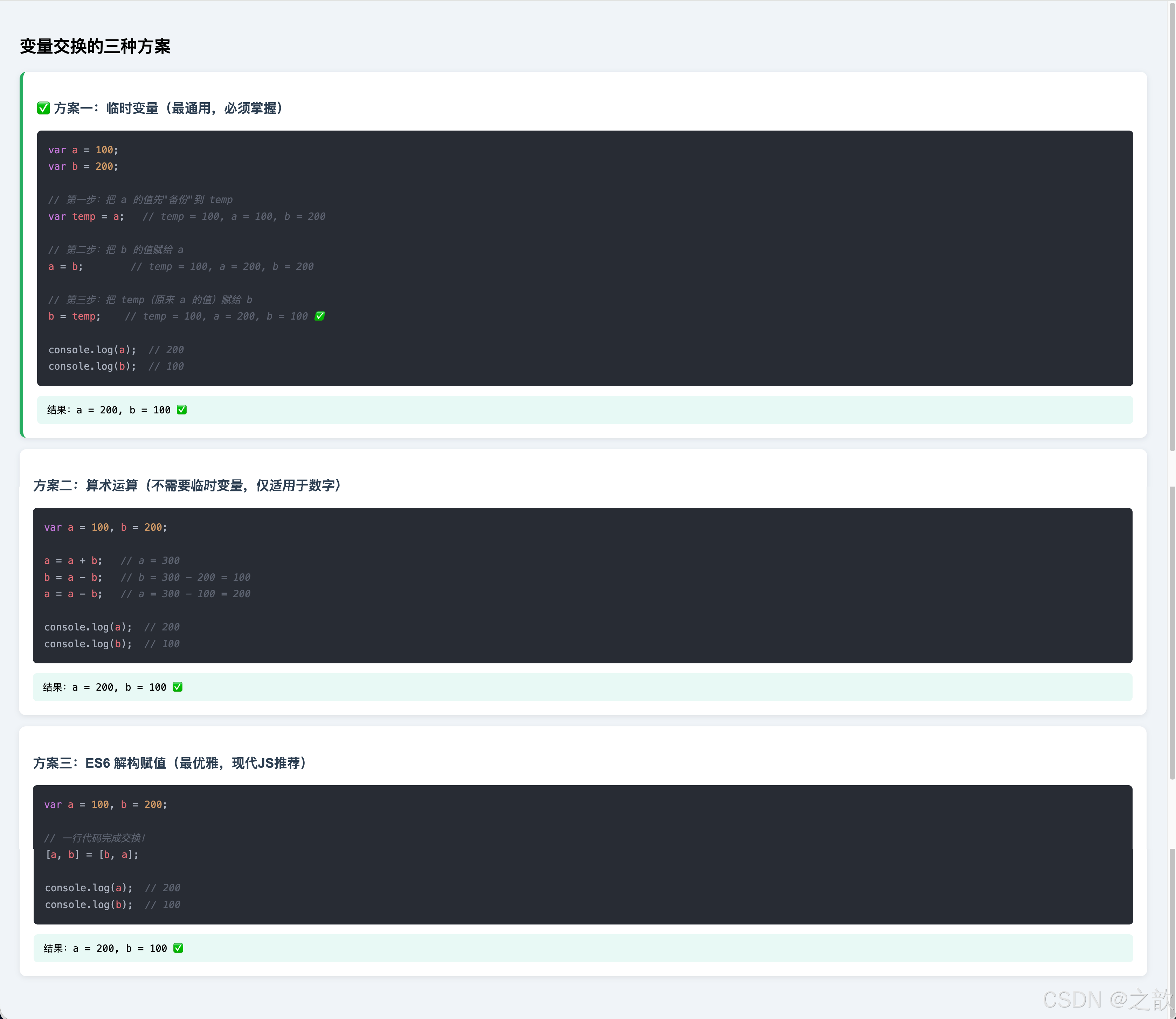
    <h2>变量交换的三种方案</h2>

    <div class="solution best">
        <h3>✅ 方案一:临时变量(最通用,必须掌握)</h3>
        <pre><span class="kw">var</span> <span class="var-name">a</span> = <span class="num">100</span>;
<span class="kw">var</span> <span class="var-name">b</span> = <span class="num">200</span>;

<span class="cmt">// 第一步:把 a 的值先"备份"到 temp</span>
<span class="kw">var</span> <span class="var-name">temp</span> = <span class="var-name">a</span>;   <span class="cmt">// temp = 100, a = 100, b = 200</span>

<span class="cmt">// 第二步:把 b 的值赋给 a</span>
<span class="var-name">a</span> = <span class="var-name">b</span>;        <span class="cmt">// temp = 100, a = 200, b = 200</span>

<span class="cmt">// 第三步:把 temp(原来 a 的值)赋给 b</span>
<span class="var-name">b</span> = <span class="var-name">temp</span>;    <span class="cmt">// temp = 100, a = 200, b = 100 ✅</span>

console.log(<span class="var-name">a</span>);  <span class="cmt">// 200</span>
console.log(<span class="var-name">b</span>);  <span class="cmt">// 100</span></pre>
        <div class="result-box" id="r1">计算中...</div>
    </div>

    <div class="solution">
        <h3>方案二:算术运算(不需要临时变量,仅适用于数字)</h3>
        <pre><span class="kw">var</span> <span class="var-name">a</span> = <span class="num">100</span>, <span class="var-name">b</span> = <span class="num">200</span>;

<span class="var-name">a</span> = <span class="var-name">a</span> + <span class="var-name">b</span>;   <span class="cmt">// a = 300</span>
<span class="var-name">b</span> = <span class="var-name">a</span> - <span class="var-name">b</span>;   <span class="cmt">// b = 300 - 200 = 100</span>
<span class="var-name">a</span> = <span class="var-name">a</span> - <span class="var-name">b</span>;   <span class="cmt">// a = 300 - 100 = 200</span>

console.log(<span class="var-name">a</span>);  <span class="cmt">// 200</span>
console.log(<span class="var-name">b</span>);  <span class="cmt">// 100</span></pre>
        <div class="result-box" id="r2">计算中...</div>
    </div>

    <div class="solution">
        <h3>方案三:ES6 解构赋值(最优雅,现代JS推荐)</h3>
        <pre><span class="kw">var</span> <span class="var-name">a</span> = <span class="num">100</span>, <span class="var-name">b</span> = <span class="num">200</span>;

<span class="cmt">// 一行代码完成交换!</span>
[<span class="var-name">a</span>, <span class="var-name">b</span>] = [<span class="var-name">b</span>, <span class="var-name">a</span>];

console.log(<span class="var-name">a</span>);  <span class="cmt">// 200</span>
console.log(<span class="var-name">b</span>);  <span class="cmt">// 100</span></pre>
        <div class="result-box" id="r3">计算中...</div>
    </div>

    <script>
        // 方案一:临时变量
        var a1 = 100, b1 = 200;
        var temp = a1;
        a1 = b1;
        b1 = temp;
        document.getElementById('r1').textContent = '结果:a = ' + a1 + ', b = ' + b1 + '  ✅';

        // 方案二:算术
        var a2 = 100, b2 = 200;
        a2 = a2 + b2;
        b2 = a2 - b2;
        a2 = a2 - b2;
        document.getElementById('r2').textContent = '结果:a = ' + a2 + ', b = ' + b2 + '  ✅';

        // 方案三:解构(ES6)
        var a3 = 100, b3 = 200;
        [a3, b3] = [b3, a3];
        document.getElementById('r3').textContent = '结果:a = ' + a3 + ', b = ' + b3 + '  ✅';
    </script>
</body>
</html>
💡 代码解释:变量交换三种方案对比
一、方案一:临时变量法(必须掌握的基础解法)
var a = 100, b = 200;

// 分步骤理解:想象将两杯水互相倒换,需要第三个杯子
var temp = a;   // 第三个杯子装 a 的水(temp=100, a=100, b=200)
a = b;          // a 的杯子倒 b 的水(temp=100, a=200, b=200)
b = temp;       // b 的杯子倒 temp 的水(temp=100, a=200, b=100)✅
状态跟踪表(面试常用):
| 步骤 | temp | a | b |
|---|---|---|---|
| 初始 | — | 100 | 200 |
var temp = a |
100 | 100 | 200 |
a = b |
100 | 200 | 200 |
b = temp |
100 | 200 | 100 |
| 结果 | — | 200 | 100 ✅ |
二、方案二:算术运算法(仅适用于数字)
var a = 100, b = 200;

a = a + b;   // a = 300(包含两者之和)
b = a - b;   // b = 300 - 200 = 100(用和减去原b,得到原a)
a = a - b;   // a = 300 - 100 = 200(用和减去新b,得到原b)
原理分析:
设原始值 a₀ = 100, b₀ = 200

步骤1:a = a₀ + b₀ = 300
步骤2:b = (a₀ + b₀) - b₀ = a₀ = 100  ✅
步骤3:a = (a₀ + b₀) - a₀ = b₀ = 200  ✅
⚠️ 局限性:
- 仅限数字,字符串、对象无法使用
- 超大数字可能溢出(Number.MAX_SAFE_INTEGER)
三、方案三:ES6 解构赋值(现代最优写法)
let a = 100, b = 200;

// 一行代码完成!
[a, b] = [b, a];

// 原理:
// 右边 [b, a] 先创建新数组 [200, 100]
// 左边 [a, b] 解构这个数组:a = 200, b = 100
扩展:解构赋值的其他用途
// 1. 交换多个变量
let x = 1, y = 2, z = 3;
[x, y, z] = [z, x, y];  // x=3, y=1, z=2

// 2. 函数返回多个值
function getMinMax(arr) {
    return [Math.min(...arr), Math.max(...arr)];
}
const [min, max] = getMinMax([5, 3, 8, 1, 9]);  // min=1, max=9

// 3. 获取数组元素
const [first, second, ...rest] = [1, 2, 3, 4, 5];
// first=1, second=2, rest=[3,4,5]
四、三种方案综合对比
| 方案 | 代码行数 | 适用类型 | 兼容性 | 推荐度 |
|---|---|---|---|---|
| 临时变量 | 3行 | 所有类型 | 所有环境 | ⭐⭐⭐⭐(基础必会) |
| 算术运算 | 3行 | 仅数字 | 所有环境 | ⭐⭐(了解即可) |
| 解构赋值 | 1行 | 所有类型 | ES6+ | ⭐⭐⭐⭐⭐(现代推荐) |
五、异或运算法(面试进阶)
// 使用位运算异或(XOR)交换,不需要额外变量
let a = 100, b = 200;

a = a ^ b;  // a = 100 ^ 200
b = a ^ b;  // b = (100 ^ 200) ^ 200 = 100
a = a ^ b;  // a = (100 ^ 200) ^ 100 = 200

console.log(a, b);  // 200, 100 ✅

// 原理:a ^ b ^ b = a(异或两次同一个数等于原值)
// ⚠️ 局限:仅适用于整数
附录:推荐学习资源
| 资源 | 链接 | 说明 |
|---|---|---|
| MDN Web Docs(官方) | https://developer.mozilla.org/zh-CN/docs/Web/JavaScript | 最权威的 JS 参考文档 |
| W3C CSS 规范 | https://www.w3.org/TR/CSS22/ | CSS 官方规范 |
| ECMAScript 规范 | https://tc39.es/ecma262/ | JS 语言规范(高级) |
| Can I Use | https://caniuse.com/ | 浏览器兼容性查询 |
| JavaScript.info | https://zh.javascript.info/ | 现代 JS 教程(免费、完整) |
| CSS-Tricks | https://css-tricks.com/ | CSS 技巧与响应式布局 |
八、ES6+ 进阶:let、const 与变量提升
8.1 var 的局限性与历史问题
根据 MDN 官方文档和 DigitalOcean 技术文章,var 存在以下问题:
var 的三大问题
完整示例:var 的问题演示
<!DOCTYPE html>
<html lang="zh-CN">
<head>
    <meta charset="UTF-8">
    <meta name="viewport" content="width=device-width, initial-scale=1.0">
    <title>var 的问题演示</title>
    <style>
        body { font-family: Arial; padding: 20px; background: #f8f9fa; }
        .problem { background: #fff; border-left: 4px solid #e74c3c; padding: 16px; margin: 16px 0; border-radius: 6px; }
        h3 { color: #e74c3c; }
        pre { background: #282c34; color: #abb2bf; padding: 16px; border-radius: 6px; font-size: 13px; line-height: 1.6; }
        .kw { color: #c678dd; }
        .cmt { color: #5c6370; }
        .str { color: #98c379; }
    </style>
</head>
<body>
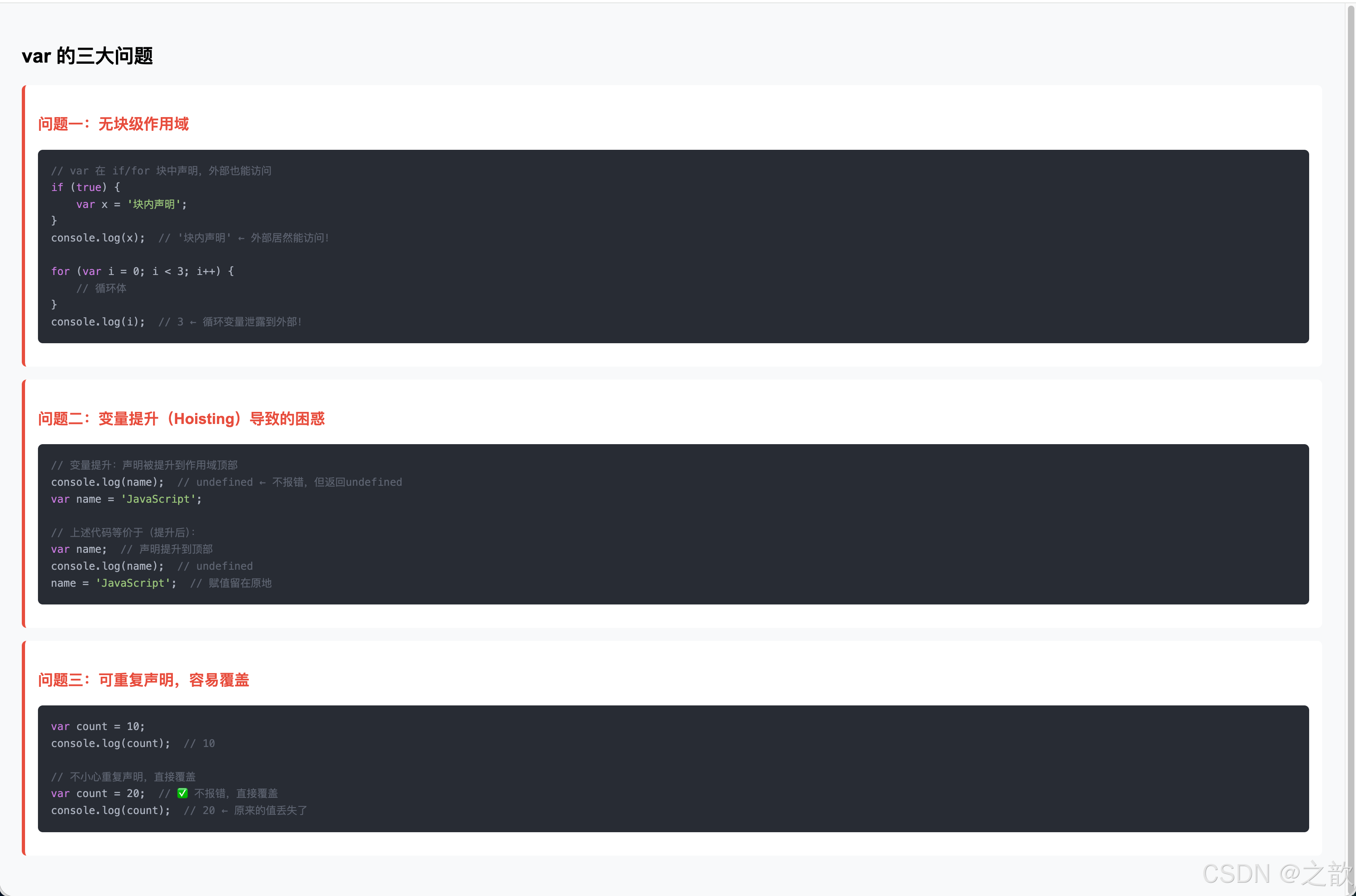
    <h2>var 的三大问题</h2>

    <div class="problem">
        <h3>问题一:无块级作用域</h3>
        <pre><span class="cmt">// var 在 if/for 块中声明,外部也能访问</span>
<span class="kw">if</span> (<span class="kw">true</span>) {
    <span class="kw">var</span> x = <span class="str">'块内声明'</span>;
}
console.log(x);  <span class="cmt">// '块内声明' ← 外部居然能访问!</span>

<span class="kw">for</span> (<span class="kw">var</span> i = 0; i < 3; i++) {
    <span class="cmt">// 循环体</span>
}
console.log(i);  <span class="cmt">// 3 ← 循环变量泄露到外部!</span></pre>
    </div>

    <div class="problem">
        <h3>问题二:变量提升(Hoisting)导致的困惑</h3>
        <pre><span class="cmt">// 变量提升:声明被提升到作用域顶部</span>
console.log(name);  <span class="cmt">// undefined ← 不报错,但返回undefined</span>
<span class="kw">var</span> name = <span class="str">'JavaScript'</span>;

<span class="cmt">// 上述代码等价于(提升后):</span>
<span class="kw">var</span> name;  <span class="cmt">// 声明提升到顶部</span>
console.log(name);  <span class="cmt">// undefined</span>
name = <span class="str">'JavaScript'</span>;  <span class="cmt">// 赋值留在原地</span></pre>
    </div>

    <div class="problem">
        <h3>问题三:可重复声明,容易覆盖</h3>
        <pre><span class="kw">var</span> count = 10;
console.log(count);  <span class="cmt">// 10</span>

<span class="cmt">// 不小心重复声明,直接覆盖</span>
<span class="kw">var</span> count = 20;  <span class="cmt">// ✅ 不报错,直接覆盖</span>
console.log(count);  <span class="cmt">// 20 ← 原来的值丢失了</span></pre>
    </div>

    <script>
        // 实际运行示例
        if (true) {
            var x = '块内声明';
        }
        console.log('问题一:', x);

        console.log('问题二:', typeof name2);
        var name2 = 'JS';

        var count = 10;
        var count = 20;
        console.log('问题三:', count);
    </script>
</body>
</html>
💡 代码解释:var 的三大问题深度分析
问题一:无块级作用域 — 变量泄露
// var 的作用域是"函数",不是"块"({})
if (true) {
    var x = '块内声明';
    // 这里能访问 x ✅
}
console.log(x);  // '块内声明' ← 泄露到块外!

// for 循环变量泄露(经典问题)
for (var i = 0; i < 3; i++) {
    console.log(i);  // 0, 1, 2
}
console.log(i);  // 3 ← 循环结束后 i 还存在!

// 造成的真实问题:异步循环中的变量共享
for (var i = 0; i < 3; i++) {
    setTimeout(function() {
        console.log(i);  // 全部输出 3!(不是 0, 1, 2)
    }, 100);
}
// 原因:所有回调共享同一个 var i,循环完了才执行,此时 i = 3

// ✅ 用 let 解决:
for (let j = 0; j < 3; j++) {
    setTimeout(function() {
        console.log(j);  // 正确输出 0, 1, 2
    }, 100);
}
问题二:变量提升(Hoisting)— 声明被"搬"到顶部
// 写的代码:
console.log(name);  // 打印什么?
var name = 'JavaScript';

// JavaScript 引擎实际执行的(提升后):
var name;           // 声明提升到顶部,但不赋值
console.log(name);  // undefined(不是 'JavaScript',也不是报错)
name = 'JavaScript'; // 赋值留在原地

// 为什么说这是"问题"?
// → 允许在声明之前访问变量,容易造成逻辑混乱
// → 程序员以为会报错,但实际得到 undefined,难以定位 Bug

// 函数提升(整个函数被提升)
hello();  // '你好!' ← 可以在声明前调用!
function hello() {
    console.log('你好!');
}
// 函数声明整体提升,所以可以在声明前调用

// 函数表达式不会提升
// hi();  // TypeError: hi is not a function
var hi = function() { console.log('Hi!'); };
问题三:可重复声明 — 意外覆盖
var count = 10;

// ... 很多代码 ...

// 忘了已经声明过 count,再次声明
var count = 20;  // 不报错!直接覆盖了

console.log(count);  // 20(原来的 10 丢失了)

// 实际工程中的危害:
// 1. 大文件中重名变量难以发现
// 2. 多人协作时容易覆盖别人的变量
// 3. 引入第三方库时可能产生冲突
三大问题对比总结
| 问题 | var 行为 | 影响 | let/const 行为 |
|---|---|---|---|
| 作用域 | 函数作用域 | 变量泄露到块外 | 块级作用域 |
| 变量提升 | 提升且初始化为 undefined | 可以在声明前访问 | 提升但有 TDZ,访问报错 |
| 重复声明 | 允许,静默覆盖 | 意外丢失值 | 禁止,报 SyntaxError |
8.2 let 和 const:ES6 的解决方案
根据 ECMAScript 2026 规范 和 MDN 官方文档,ES6 引入了 let 和 const 来解决 var 的问题。
let vs const vs var 对比表
| 特性 | var | let | const |
|---|---|---|---|
| 作用域 | 函数作用域 | 块级作用域 ✅ | 块级作用域 ✅ |
| 变量提升 | 提升且初始化为undefined | 提升但处于暂时性死区 | 提升但处于暂时性死区 |
| 可重复声明 | ✅ 可以 | ❌ 报错 | ❌ 报错 |
| 可重新赋值 | ✅ 可以 | ✅ 可以 | ❌ 不可以(常量) |
| 声明时必须初始化 | ❌ 不需要 | ❌ 不需要 | ✅ 必须 |
| 最佳实践 | ⚠️ 避免使用 | ✅ 可变数据用 | ✅✅ 优先使用 |
暂时性死区(Temporal Dead Zone, TDZ)
let 和 const 完整示例
<!DOCTYPE html>
<html lang="zh-CN">
<head>
    <meta charset="UTF-8">
    <meta name="viewport" content="width=device-width, initial-scale=1.0">
    <title>let 和 const 完整示例</title>
    <style>
        body { font-family: Arial; padding: 20px; }
        .solution { background: #e8f8f5; border-left: 4px solid #27ae60; padding: 16px; margin: 16px 0; border-radius: 6px; }
        h3 { color: #27ae60; }
        pre { background: #282c34; color: #abb2bf; padding: 16px; border-radius: 6px; font-size: 13px; line-height: 1.6; }
        .table { border-collapse: collapse; width: 100%; margin: 16px 0; }
        .table th, .table td { border: 1px solid #ddd; padding: 10px; font-size: 14px; }
        .table th { background: #27ae60; color: white; }
    </style>
</head>
<body>
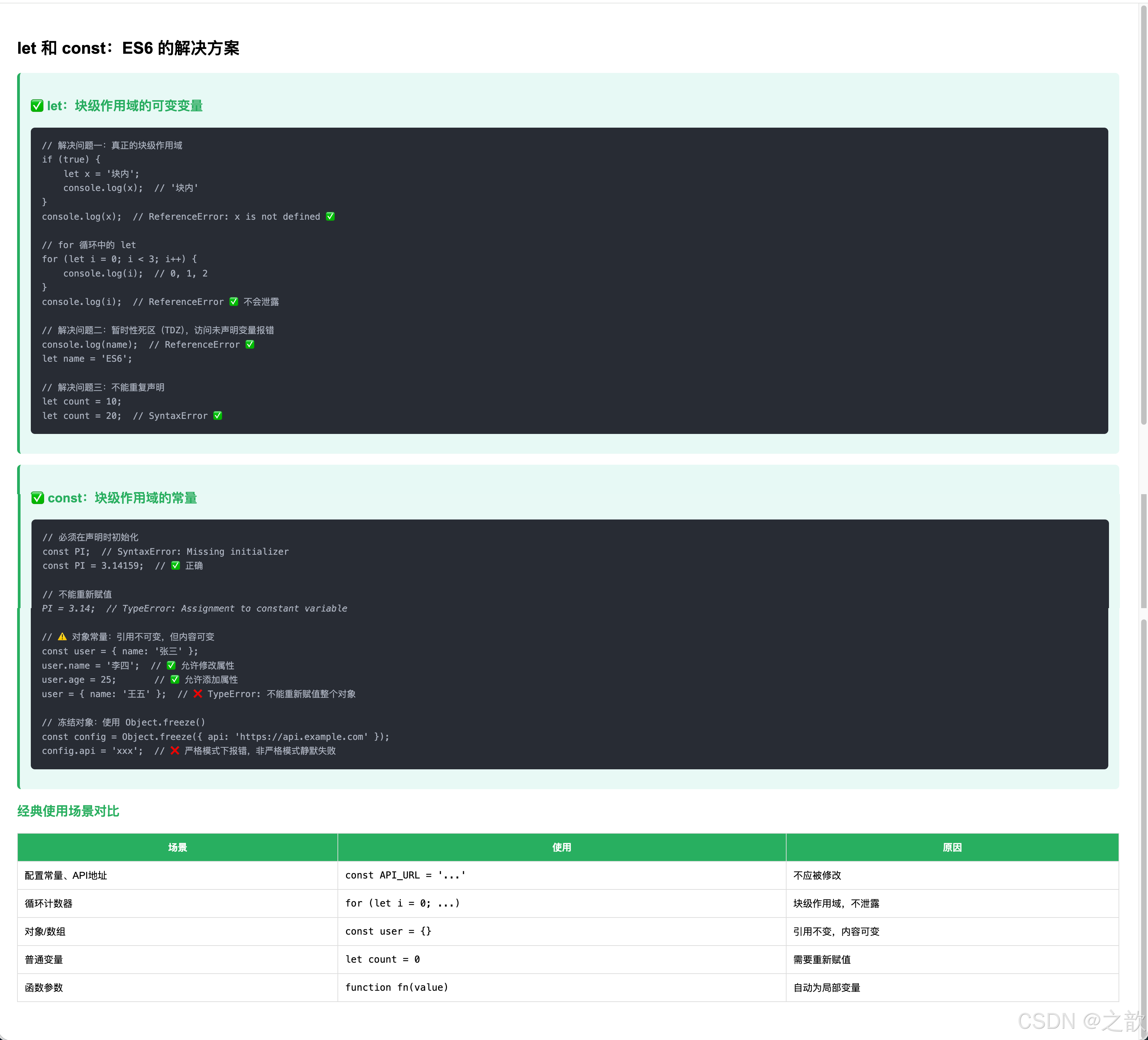
    <h2>let 和 const:ES6 的解决方案</h2>

    <div class="solution">
        <h3>✅ let:块级作用域的可变变量</h3>
        <pre><span class="cmt">// 解决问题一:真正的块级作用域</span>
<span class="kw">if</span> (<span class="kw">true</span>) {
    <span class="kw">let</span> x = <span class="str">'块内'</span>;
    console.log(x);  <span class="cmt">// '块内'</span>
}
console.log(x);  <span class="cmt">// ReferenceError: x is not defined ✅</span>

<span class="cmt">// for 循环中的 let</span>
<span class="kw">for</span> (<span class="kw">let</span> i = 0; i < 3; i++) {
    console.log(i);  <span class="cmt">// 0, 1, 2</span>
}
console.log(i);  <span class="cmt">// ReferenceError ✅ 不会泄露</span>

<span class="cmt">// 解决问题二:暂时性死区(TDZ),访问未声明变量报错</span>
console.log(name);  <span class="cmt">// ReferenceError ✅</span>
<span class="kw">let</span> name = <span class="str">'ES6'</span>;

<span class="cmt">// 解决问题三:不能重复声明</span>
<span class="kw">let</span> count = 10;
<span class="kw">let</span> count = 20;  <span class="cmt">// SyntaxError ✅</span></pre>
    </div>

    <div class="solution">
        <h3>✅ const:块级作用域的常量</h3>
        <pre><span class="cmt">// 必须在声明时初始化</span>
<span class="kw">const</span> PI;  <span class="cmt">// SyntaxError: Missing initializer</span>
<span class="kw">const</span> PI = 3.14159;  <span class="cmt">// ✅ 正确</span>

<span class="cmt">// 不能重新赋值</span>
PI = 3.14;  <span class="cmt">// TypeError: Assignment to constant variable</span>

<span class="cmt">// ⚠️ 对象常量:引用不可变,但内容可变</span>
<span class="kw">const</span> user = { name: <span class="str">'张三'</span> };
user.name = <span class="str">'李四'</span>;  <span class="cmt">// ✅ 允许修改属性</span>
user.age = 25;       <span class="cmt">// ✅ 允许添加属性</span>
user = { name: <span class="str">'王五'</span> };  <span class="cmt">// ❌ TypeError: 不能重新赋值整个对象</span>

<span class="cmt">// 冻结对象:使用 Object.freeze()</span>
<span class="kw">const</span> config = Object.freeze({ api: <span class="str">'https://api.example.com'</span> });
config.api = <span class="str">'xxx'</span>;  <span class="cmt">// ❌ 严格模式下报错,非严格模式静默失败</span></pre>
    </div>

    <h3>经典使用场景对比</h3>
    <table class="table">
        <tr>
            <th>场景</th>
            <th>使用</th>
            <th>原因</th>
        </tr>
        <tr>
            <td>配置常量、API地址</td>
            <td><code>const API_URL = '...'</code></td>
            <td>不应被修改</td>
        </tr>
        <tr>
            <td>循环计数器</td>
            <td><code>for (let i = 0; ...)</code></td>
            <td>块级作用域,不泄露</td>
        </tr>
        <tr>
            <td>对象/数组</td>
            <td><code>const user = {}</code></td>
            <td>引用不变,内容可变</td>
        </tr>
        <tr>
            <td>普通变量</td>
            <td><code>let count = 0</code></td>
            <td>需要重新赋值</td>
        </tr>
        <tr>
            <td>函数参数</td>
            <td><code>function fn(value)</code></td>
            <td>自动为局部变量</td>
        </tr>
    </table>
</body>
</html>
💡 代码解释:let 和 const 核心要点
一、let 解决了 var 的三大问题
// 解决1:块级作用域
{
    let blockVar = '块内变量';
    console.log(blockVar);  // ✅ 块内可以访问
}
// console.log(blockVar);  // ❌ ReferenceError:块外无法访问

// 解决2:暂时性死区(TDZ)— 声明前访问报错
// console.log(name);  // ❌ ReferenceError(不再是 undefined)
let name = 'ES6';
console.log(name);     // ✅ 'ES6'

// 解决3:不能重复声明
let count = 10;
// let count = 20;  // ❌ SyntaxError: Identifier 'count' already been declared
count = 20;         // ✅ 可以重新赋值(只是不能再次 let)
二、const 的完整规则
// 规则1:必须在声明时初始化
// const PI;       // ❌ SyntaxError: Missing initializer
const PI = 3.14159;  // ✅

// 规则2:不能重新赋值(针对变量绑定)
// PI = 3.14;      // ❌ TypeError: Assignment to constant variable

// 规则3:const 保护的是"引用",不是"值"
// 对象/数组的内容可以改变!
const user = { name: '张三', age: 25 };
user.name = '李四';   // ✅ 修改属性允许
user.city = '北京';   // ✅ 添加属性允许
// user = { name: '王五' };  // ❌ 不能重新赋值整个对象

const arr = [1, 2, 3];
arr.push(4);          // ✅ 修改数组内容允许
arr[0] = 100;         // ✅ 修改元素允许
// arr = [4, 5, 6];   // ❌ 不能重新赋值整个数组
三、暂时性死区(TDZ)深度理解
// TDZ(Temporal Dead Zone)= 从进入作用域到声明语句之间的区域
{
    // ← TDZ 开始(let name 还没执行)
    console.log(name);  // ❌ ReferenceError(在 TDZ 中)
    let name = 'ES6';   // ← TDZ 结束,name 变量可用
    console.log(name);  // ✅ 'ES6'
}

// TDZ 的设计目的:
// 避免 var 的"声明前访问得到 undefined"的困惑
// 让代码行为更可预测,更容易发现 Bug
四、const 冻结对象(完全不可变)
// 普通 const:对象内容可变
const config = { theme: 'dark', lang: 'zh' };
config.theme = 'light';  // ✅ 可以修改

// Object.freeze():冻结对象,内容不可变
const frozenConfig = Object.freeze({ theme: 'dark', lang: 'zh' });
frozenConfig.theme = 'light';  // ❌(严格模式报错,非严格模式静默失败)
console.log(frozenConfig.theme);  // 'dark'(没有改变)

// ⚠️ freeze 是浅冻结,嵌套对象仍然可变
const obj = Object.freeze({ nested: { value: 1 } });
obj.nested.value = 2;  // ✅(嵌套对象未被冻结)
五、let/const 最佳使用原则
// 原则1:默认用 const,需要改变才用 let
const SITE_NAME = '学习平台';     // 配置不变,用 const
const config = { debug: false };   // 对象引用不变,用 const
let currentPage = 1;               // 会改变,用 let
let isLoading = false;             // 会改变,用 let

// 原则2:循环计数器用 let
for (let i = 0; i < 10; i++) { ... }  // ✅ 用 let
for (const item of items) { ... }     // ✅ 也可以用 const(每次迭代都是新绑定)

// 原则3:不再使用 var(除非需要支持非常老的代码)
// ❌ var x = 10;
// ✅ const x = 10;  或  let x = 10;
六、实际项目应用示例
// 实际项目中的典型用法

// 配置常量(const)
const API_URL = 'https://api.example.com';
const MAX_RETRIES = 3;
const DEFAULT_PAGE_SIZE = 20;

// DOM 元素引用(const,引用不变)
const btn = document.querySelector('#submit-btn');
const form = document.querySelector('#login-form');

// 状态变量(let,会改变)
let currentUser = null;
let cartItems = [];
let isSubmitting = false;

// 函数内的局部变量
function fetchUsers(page) {
    const url = `${API_URL}/users?page=${page}`;  // 不变
    let retries = 0;                                // 会变

    // ...
}
8.3 Symbol 和 BigInt:ES6+ 新增的原始类型
根据 MDN 官方文档 和 ECMAScript 2027 规范,JavaScript 新增了两种原始类型。
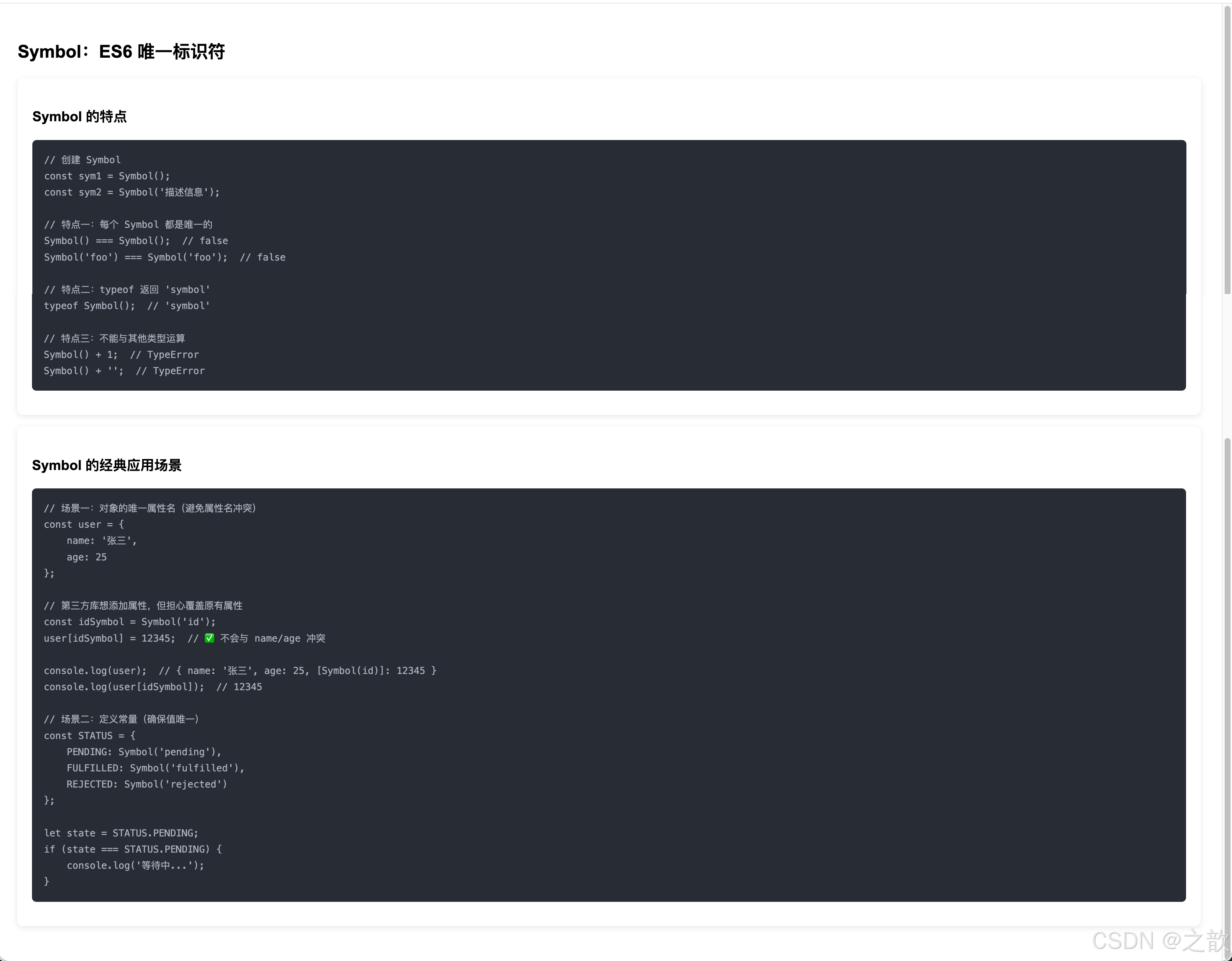
Symbol:唯一标识符(ES2015)
<!DOCTYPE html>
<html lang="zh-CN">
<head>
    <meta charset="UTF-8">
    <meta name="viewport" content="width=device-width, initial-scale=1.0">
    <title>Symbol 完整示例</title>
    <style>
        body { font-family: Arial; padding: 20px; }
        .card { background: #fff; border-radius: 8px; padding: 20px; margin: 16px 0; box-shadow: 0 2px 8px rgba(0,0,0,0.1); }
        pre { background: #282c34; color: #abb2bf; padding: 16px; border-radius: 6px; font-size: 13px; line-height: 1.7; }
    </style>
</head>
<body>
    <h2>Symbol:ES6 唯一标识符</h2>

    <div class="card">
        <h3>Symbol 的特点</h3>
        <pre><span class="cmt">// 创建 Symbol</span>
<span class="kw">const</span> sym1 = Symbol();
<span class="kw">const</span> sym2 = Symbol(<span class="str">'描述信息'</span>);

<span class="cmt">// 特点一:每个 Symbol 都是唯一的</span>
Symbol() === Symbol();  <span class="cmt">// false</span>
Symbol(<span class="str">'foo'</span>) === Symbol(<span class="str">'foo'</span>);  <span class="cmt">// false</span>

<span class="cmt">// 特点二:typeof 返回 'symbol'</span>
<span class="kw">typeof</span> Symbol();  <span class="cmt">// 'symbol'</span>

<span class="cmt">// 特点三:不能与其他类型运算</span>
Symbol() + 1;  <span class="cmt">// TypeError</span>
Symbol() + <span class="str">''</span>;  <span class="cmt">// TypeError</span></pre>
    </div>

    <div class="card">
        <h3>Symbol 的经典应用场景</h3>
        <pre><span class="cmt">// 场景一:对象的唯一属性名(避免属性名冲突)</span>
<span class="kw">const</span> user = {
    name: <span class="str">'张三'</span>,
    age: 25
};

<span class="cmt">// 第三方库想添加属性,但担心覆盖原有属性</span>
<span class="kw">const</span> idSymbol = Symbol(<span class="str">'id'</span>);
user[idSymbol] = 12345;  <span class="cmt">// ✅ 不会与 name/age 冲突</span>

console.log(user);  <span class="cmt">// { name: '张三', age: 25, [Symbol(id)]: 12345 }</span>
console.log(user[idSymbol]);  <span class="cmt">// 12345</span>

<span class="cmt">// 场景二:定义常量(确保值唯一)</span>
<span class="kw">const</span> STATUS = {
    PENDING: Symbol(<span class="str">'pending'</span>),
    FULFILLED: Symbol(<span class="str">'fulfilled'</span>),
    REJECTED: Symbol(<span class="str">'rejected'</span>)
};

<span class="kw">let</span> state = STATUS.PENDING;
<span class="kw">if</span> (state === STATUS.PENDING) {
    console.log(<span class="str">'等待中...'</span>);
}</pre>
    </div>

    <script>
        const sym1 = Symbol('test');
        const sym2 = Symbol('test');
        console.log('Symbol示例:', sym1 === sym2);  // false

        const user = { name: '张三' };
        const id = Symbol('id');
        user[id] = 999;
        console.log('Symbol作为属性:', user);
    </script>
</body>
</html>
💡 代码解释:Symbol 核心要点
一、Symbol 解决了什么问题?
在 Symbol 出现之前,如果多个代码库想给同一个对象添加属性,很可能产生名字冲突:
// 问题:属性名冲突
var user = { name: '张三' };

// 第一个库添加 id
user.id = 1001;

// 第二个库也添加 id(覆盖了!)
user.id = 'USER_ABC';  // 覆盖了上面的 id!

// ✅ 用 Symbol 解决(每个 Symbol 都是唯一的)
const lib1Id = Symbol('id');
const lib2Id = Symbol('id');

user[lib1Id] = 1001;        // 不会冲突
user[lib2Id] = 'USER_ABC';  // 不会冲突

console.log(user[lib1Id]);  // 1001
console.log(user[lib2Id]);  // 'USER_ABC'
console.log(lib1Id === lib2Id);  // false(即使描述相同,也是不同的 Symbol)
二、Symbol 的创建方式
// 方式1:不带描述
const sym1 = Symbol();
console.log(sym1);          // Symbol()
console.log(typeof sym1);   // 'symbol'

// 方式2:带描述(便于调试)
const sym2 = Symbol('用户ID');
console.log(sym2);            // Symbol(用户ID)
console.log(sym2.description); // '用户ID'(ES2019)

// ⚠️ Symbol 不能用 new(不是构造函数)
// const sym3 = new Symbol();  // ❌ TypeError: Symbol is not a constructor
三、Symbol 的关键特性
// 特性1:每个 Symbol 都唯一
Symbol() === Symbol()             // false(即使无描述)
Symbol('foo') === Symbol('foo')   // false(即使描述相同)

// 特性2:不能参与数学/字符串运算
Symbol('a') + '';   // ❌ TypeError
Symbol('a') + 1;    // ❌ TypeError
Symbol('a').toString();  // 'Symbol(a)'(可以转字符串)
String(Symbol('a'));     // 'Symbol(a)'

// 特性3:Symbol 属性不出现在 for...in 和 Object.keys() 中
const obj = { name: '张三', [Symbol('id')]: 123 };
Object.keys(obj);        // ['name'](不包含 Symbol 属性)
for (let key in obj) { console.log(key); }  // 只输出 'name'

// ✅ 获取 Symbol 属性
Object.getOwnPropertySymbols(obj);  // [Symbol(id)]
Reflect.ownKeys(obj);               // ['name', Symbol(id)]
四、Symbol 的实际应用场景
// 应用1:定义枚举常量(确保值唯一)
const Direction = {
    NORTH: Symbol('north'),
    SOUTH: Symbol('south'),
    EAST: Symbol('east'),
    WEST: Symbol('west')
};

// 不能被伪造:
Direction.NORTH === Symbol('north')  // false!每个 Symbol 都唯一
// 所以这种枚举不会被意外匹配

function move(direction) {
    if (direction === Direction.NORTH) {
        console.log('向北走');
    }
}

// 应用2:Promise 状态枚举
const STATUS = {
    PENDING: Symbol('pending'),
    RESOLVED: Symbol('resolved'),
    REJECTED: Symbol('rejected')
};

// 应用3:内置 Symbol(Well-known Symbols)
// JavaScript 内部使用 Symbol 来定义对象行为
class MyArray {
    [Symbol.iterator]() {  // 定义迭代器
        let index = 0;
        const data = [1, 2, 3];
        return {
            next() {
                return { value: data[index++], done: index > data.length };
            }
        };
    }
}

for (const item of new MyArray()) {
    console.log(item);  // 1, 2, 3
}
五、Symbol.for() — 全局注册表
// Symbol.for():在全局注册表中查找/创建 Symbol
const s1 = Symbol.for('shared');
const s2 = Symbol.for('shared');
console.log(s1 === s2);  // true(同一个 Symbol!)

// 区别:Symbol() 每次都是新的,Symbol.for() 使用共享注册
const a = Symbol('test');
const b = Symbol('test');
const c = Symbol.for('test');
const d = Symbol.for('test');

a === b  // false(普通 Symbol,每次新建)
c === d  // true(注册 Symbol,共享复用)
BigInt:大整数(ES2020)
<!DOCTYPE html>
<html lang="zh-CN">
<head>
    <meta charset="UTF-8">
    <meta name="viewport" content="width=device-width, initial-scale=1.0">
    <title>BigInt 完整示例</title>
    <style>
        body { font-family: Arial; padding: 20px; }
        .card { background: #fff; border-radius: 8px; padding: 20px; margin: 16px 0; box-shadow: 0 2px 8px rgba(0,0,0,0.1); }
        pre { background: #282c34; color: #abb2bf; padding: 16px; border-radius: 6px; font-size: 13px; line-height: 1.7; }
    </style>
</head>
<body>
    <h2>BigInt:ES2020 大整数</h2>

    <div class="card">
        <h3>为什么需要 BigInt?</h3>
        <pre><span class="cmt">// Number 类型的安全整数范围限制</span>
console.log(Number.MAX_SAFE_INTEGER);  <span class="cmt">// 9007199254740991 (2^53 - 1)</span>
console.log(Number.MIN_SAFE_INTEGER);  <span class="cmt">// -9007199254740991</span>

<span class="cmt">// 超出安全范围,计算出错</span>
<span class="kw">const</span> max = Number.MAX_SAFE_INTEGER;
console.log(max + 1);  <span class="cmt">// 9007199254740992</span>
console.log(max + 2);  <span class="cmt">// 9007199254740992 ← 错误!应该是 9007199254740993</span>
console.log(max + 1 === max + 2);  <span class="cmt">// true ← 错误!</span></pre>
    </div>

    <div class="card">
        <h3>BigInt 的使用</h3>
        <pre><span class="cmt">// 创建 BigInt:在数字后加 n</span>
<span class="kw">const</span> big1 = 123456789012345678901234567890n;
<span class="kw">const</span> big2 = BigInt(<span class="str">'123456789012345678901234567890'</span>);
<span class="kw">const</span> big3 = BigInt(999);

console.log(<span class="kw">typeof</span> big1);  <span class="cmt">// 'bigint'</span>

<span class="cmt">// BigInt 可以精确计算大整数</span>
<span class="kw">const</span> huge = 9007199254740991n;
console.log(huge + 1n);  <span class="cmt">// 9007199254740992n ✅</span>
console.log(huge + 2n);  <span class="cmt">// 9007199254740993n ✅</span>
console.log(huge + 1n === huge + 2n);  <span class="cmt">// false ✅</span>

<span class="cmt">// 运算:+, -, *, /, %, **</span>
10n + 20n;  <span class="cmt">// 30n</span>
10n * 5n;   <span class="cmt">// 50n</span>
10n ** 100n;  <span class="cmt">// 非常大的数</span>

<span class="cmt">// ⚠️ 不能与 Number 混用</span>
10n + 5;  <span class="cmt">// TypeError: Cannot mix BigInt and other types</span>

<span class="cmt">// 转换:必须显式转换</span>
10n + BigInt(5);  <span class="cmt">// 15n ✅</span>
Number(10n) + 5;  <span class="cmt">// 15 ✅</span></pre>
    </div>

    <div class="card">
        <h3>BigInt 的经典应用场景</h3>
        <pre><span class="cmt">// 场景一:处理超大数字(如区块链、加密货币)</span>
<span class="kw">const</span> satoshis = 2100000000000000n;  <span class="cmt">// 比特币总量(聪)</span>

<span class="cmt">// 场景二:精确的 ID 生成(如 Twitter 的 Snowflake ID)</span>
<span class="kw">const</span> tweetId = 1453892349283749384n;

<span class="cmt">// 场景三:科学计算(如阶乘)</span>
<span class="kw">function</span> factorial(n) {
    <span class="kw">let</span> result = 1n;
    <span class="kw">for</span> (<span class="kw">let</span> i = 2n; i <= n; i++) {
        result *= i;
    }
    <span class="kw">return</span> result;
}
console.log(factorial(20n));  <span class="cmt">// 2432902008176640000n(Number无法精确表示)</span></pre>
    </div>

    <script>
        const big = 9007199254740991n;
        console.log('BigInt示例:', big + 1n, big + 2n);
        console.log('是否相等:', big + 1n === big + 2n);  // false
    </script>
</body>
</html>

💡 代码解释:BigInt 核心要点
一、为什么需要 BigInt?
// Number 类型的安全整数范围
Number.MAX_SAFE_INTEGER  // 9007199254740991 (2^53 - 1,约9千兆)

// 超出安全范围的计算会出错!
const max = Number.MAX_SAFE_INTEGER;
console.log(max + 1 === max + 2);  // true(本应是 false)

// 实际问题场景
// 1. 数据库的 bigint 主键(超过 JS Number 范围)
// 2. 加密货币中的精确金额(比特币 Satoshi)
// 3. 社交媒体的 ID(Twitter Snowflake ID)
// 4. 科学计算(大阶乘、大质数)
二、BigInt 的语法
// 方式1:数字后加 n
const big1 = 9007199254740993n;  // 普通Number无法精确表示的数
const big2 = 0n;                  // 零
const big3 = -100n;               // 负数

// 方式2:BigInt() 构造函数
const big4 = BigInt(9007199254740991);     // 从 Number 转换
const big5 = BigInt('12345678901234567890'); // 从字符串转换(推荐大数)
const big6 = BigInt('0xFF');               // 十六进制字符串

// typeof
typeof 42n  // 'bigint'
三、BigInt 运算规则
// ✅ 支持的运算:+、-、*、/、%、**(整除,不保留小数)
10n + 20n    // 30n
100n - 1n    // 99n
5n * 3n      // 15n
10n / 3n     // 3n(整除!不是 3.333...)
10n % 3n     // 1n(余数)
2n ** 10n    // 1024n

// ⚠️ 不能与 Number 混用
10n + 5      // ❌ TypeError: Cannot mix BigInt and other types
10n + 5n     // ✅ 15n

// 需要混用时,显式转换
Number(10n) + 5    // ✅ 15(BigInt → Number)
10n + BigInt(5)    // ✅ 15n(Number → BigInt)

// ⚠️ 不支持小数
5n / 2n     // 2n(整除,丢弃小数部分)
// 没有 2.5n 这种写法

// 比较运算(可以和 Number 比较)
10n == 10    // true(宽松相等,类型不同)
10n === 10   // false(严格相等,类型不同)
10n > 9      // true(可以和 Number 比较大小)
10n < 20     // true
四、BigInt 的使用限制
// ❌ 不支持 Math 方法
Math.max(10n, 20n)   // TypeError
Math.sqrt(4n)        // TypeError
// ✅ 替代方案:手动实现
function bigIntMax(a, b) { return a > b ? a : b; }

// ❌ 不能直接转为 JSON
JSON.stringify(10n)   // TypeError: Do not know how to serialize a BigInt
// ✅ 替代方案
JSON.stringify({ id: 10n }, (key, value) =>
    typeof value === 'bigint' ? value.toString() : value
);

// ❌ 不能和浮点数混用
10.5n   // SyntaxError(BigInt 没有小数点)
五、实际应用场景
// 1. 处理 Twitter/微博 ID(Snowflake ID 超过 2^53)
const tweetId = 1569953993819185152n;  // 精确存储
const nextId = tweetId + 1n;           // 精确计算

// 2. 加密货币(比特币 Satoshi)
const BTC_TOTAL_SATOSHI = 2100000000000000n;  // 2100万比特币的聪
const satoshiPerBTC = 100000000n;              // 1 BTC = 1亿 Satoshi

// 3. 阶乘计算(Number 很快溢出)
function factorial(n) {
    if (n <= 1n) return 1n;
    return n * factorial(n - 1n);
}
console.log(factorial(50n));  // 准确的50!(Number 无法表示)

// 4. 密码学大质数
const p = 115792089237316195423570985008687907853269984665640564039457584007908834671663n;
九、综合实战:购物车计算器
结合所学知识点,创建一个综合实战项目。
<!DOCTYPE html>
<html lang="zh-CN">
<head>
    <meta charset="UTF-8">
    <meta name="viewport" content="width=device-width, initial-scale=1.0">
    <title>购物车计算器 - 综合实战</title>
    <style>
        * { margin: 0; padding: 0; box-sizing: border-box; }
        body { font-family: Arial, sans-serif; background: #f0f2f5; padding: 20px; }

        .container { max-width: 800px; margin: 0 auto; }
        h1 { color: #2c3e50; margin-bottom: 20px; }

        .cart-item {
            background: white;
            border-radius: 8px;
            padding: 16px;
            margin-bottom: 12px;
            display: flex;
            align-items: center;
            gap: 16px;
            box-shadow: 0 2px 4px rgba(0,0,0,0.08);
        }

        .item-image {
            width: 80px;
            height: 80px;
            background: linear-gradient(135deg, #667eea 0%, #764ba2 100%);
            border-radius: 6px;
            display: flex;
            align-items: center;
            justify-content: center;
            font-size: 32px;
        }

        .item-info { flex: 1; }
        .item-name { font-size: 16px; font-weight: bold; color: #333; margin-bottom: 4px; }
        .item-price { font-size: 18px; color: #e74c3c; font-weight: bold; }

        .quantity-control {
            display: flex;
            align-items: center;
            gap: 8px;
        }

        .qty-btn {
            width: 32px;
            height: 32px;
            border: 1px solid #ddd;
            background: white;
            border-radius: 4px;
            cursor: pointer;
            font-size: 18px;
            display: flex;
            align-items: center;
            justify-content: center;
        }

        .qty-btn:hover { background: #f0f0f0; }
        .qty-input { width: 50px; text-align: center; font-size: 16px; border: 1px solid #ddd; border-radius: 4px; padding: 4px; }

        .summary {
            background: white;
            border-radius: 8px;
            padding: 20px;
            margin-top: 20px;
            box-shadow: 0 2px 8px rgba(0,0,0,0.1);
        }

        .summary-row {
            display: flex;
            justify-content: space-between;
            padding: 10px 0;
            font-size: 15px;
        }

        .summary-row.total {
            border-top: 2px solid #eee;
            font-size: 20px;
            font-weight: bold;
            color: #e74c3c;
            margin-top: 10px;
            padding-top: 16px;
        }

        .checkout-btn {
            width: 100%;
            padding: 14px;
            background: #27ae60;
            color: white;
            border: none;
            border-radius: 6px;
            font-size: 16px;
            font-weight: bold;
            cursor: pointer;
            margin-top: 16px;
        }

        .checkout-btn:hover { background: #229954; }

        .tag { display: inline-block; padding: 2px 8px; background: #3498db; color: white; border-radius: 4px; font-size: 11px; margin-left: 8px; }
    </style>
</head>
<body>
    <div class="container">
        <h1>🛒 购物车计算器 <span class="tag">综合实战</span></h1>

        <div id="cartItems"></div>

        <div class="summary">
            <div class="summary-row">
                <span>商品总数:</span>
                <span id="totalItems">0 件</span>
            </div>
            <div class="summary-row">
                <span>商品小计:</span>
                <span id="subtotal">¥0.00</span>
            </div>
            <div class="summary-row">
                <span>运费:</span>
                <span id="shipping">¥0.00</span>
            </div>
            <div class="summary-row total">
                <span>应付总额:</span>
                <span id="total">¥0.00</span>
            </div>
            <button class="checkout-btn" onclick="checkout()">立即结算</button>
        </div>
    </div>

    <script>
        // 使用 const 定义常量(商品数据)
        const products = [
            { id: 1, name: '无线蓝牙耳机', price: 299, emoji: '🎧', quantity: 1 },
            { id: 2, name: '智能手表', price: 899, emoji: '⌚', quantity: 1 },
            { id: 3, name: '移动电源', price: 149, emoji: '🔋', quantity: 2 }
        ];

        const FREE_SHIPPING_THRESHOLD = 500;  // 满500免运费
        const SHIPPING_FEE = 15;  // 运费

        // 渲染购物车
        function renderCart() {
            const cartContainer = document.getElementById('cartItems');
            cartContainer.innerHTML = '';

            // 使用 for...of 遍历(ES6)
            for (const product of products) {
                const itemHTML = `
                    <div class="cart-item">
                        <div class="item-image">${product.emoji}</div>
                        <div class="item-info">
                            <div class="item-name">${product.name}</div>
                            <div class="item-price">¥${product.price.toFixed(2)}</div>
                        </div>
                        <div class="quantity-control">
                            <button class="qty-btn" onclick="changeQuantity(${product.id}, -1)">−</button>
                            <input type="number" class="qty-input" value="${product.quantity}"
                                   onchange="updateQuantity(${product.id}, this.value)" min="1">
                            <button class="qty-btn" onclick="changeQuantity(${product.id}, 1)">+</button>
                        </div>
                    </div>
                `;
                cartContainer.innerHTML += itemHTML;
            }

            updateSummary();
        }

        // 修改数量
        function changeQuantity(productId, delta) {
            // 使用 find() 查找商品(ES6)
            const product = products.find(p => p.id === productId);
            if (product) {
                product.quantity = Math.max(1, product.quantity + delta);
                renderCart();
            }
        }

        // 更新数量
        function updateQuantity(productId, newQuantity) {
            const quantity = parseInt(newQuantity);
            if (isNaN(quantity) || quantity < 1) {
                alert('数量必须大于0');
                renderCart();
                return;
            }

            const product = products.find(p => p.id === productId);
            if (product) {
                product.quantity = quantity;
                renderCart();
            }
        }

        // 更新汇总信息
        function updateSummary() {
            // 使用 reduce() 计算总数和小计(ES6)
            let totalItems = 0;
            let subtotal = 0;

            for (const product of products) {
                totalItems += product.quantity;
                subtotal += product.price * product.quantity;
            }

            // 计算运费(满500免运费)
            const shipping = subtotal >= FREE_SHIPPING_THRESHOLD ? 0 : SHIPPING_FEE;
            const total = subtotal + shipping;

            // 更新 DOM(精度处理:使用 toFixed(2))
            document.getElementById('totalItems').textContent = `${totalItems} 件`;
            document.getElementById('subtotal').textContent = `¥${subtotal.toFixed(2)}`;
            document.getElementById('shipping').textContent = shipping === 0 ?
                '免运费 ✅' : `¥${shipping.toFixed(2)}`;
            document.getElementById('total').textContent = `¥${total.toFixed(2)}`;
        }

        // 结算
        function checkout() {
            const totalItems = products.reduce((sum, p) => sum + p.quantity, 0);
            const total = products.reduce((sum, p) => sum + p.price * p.quantity, 0);

            alert(`感谢购买!\n商品数量:${totalItems} 件\n实付金额:¥${total.toFixed(2)}`);
        }

        // 初始化
        renderCart();
    </script>
</body>
</html>
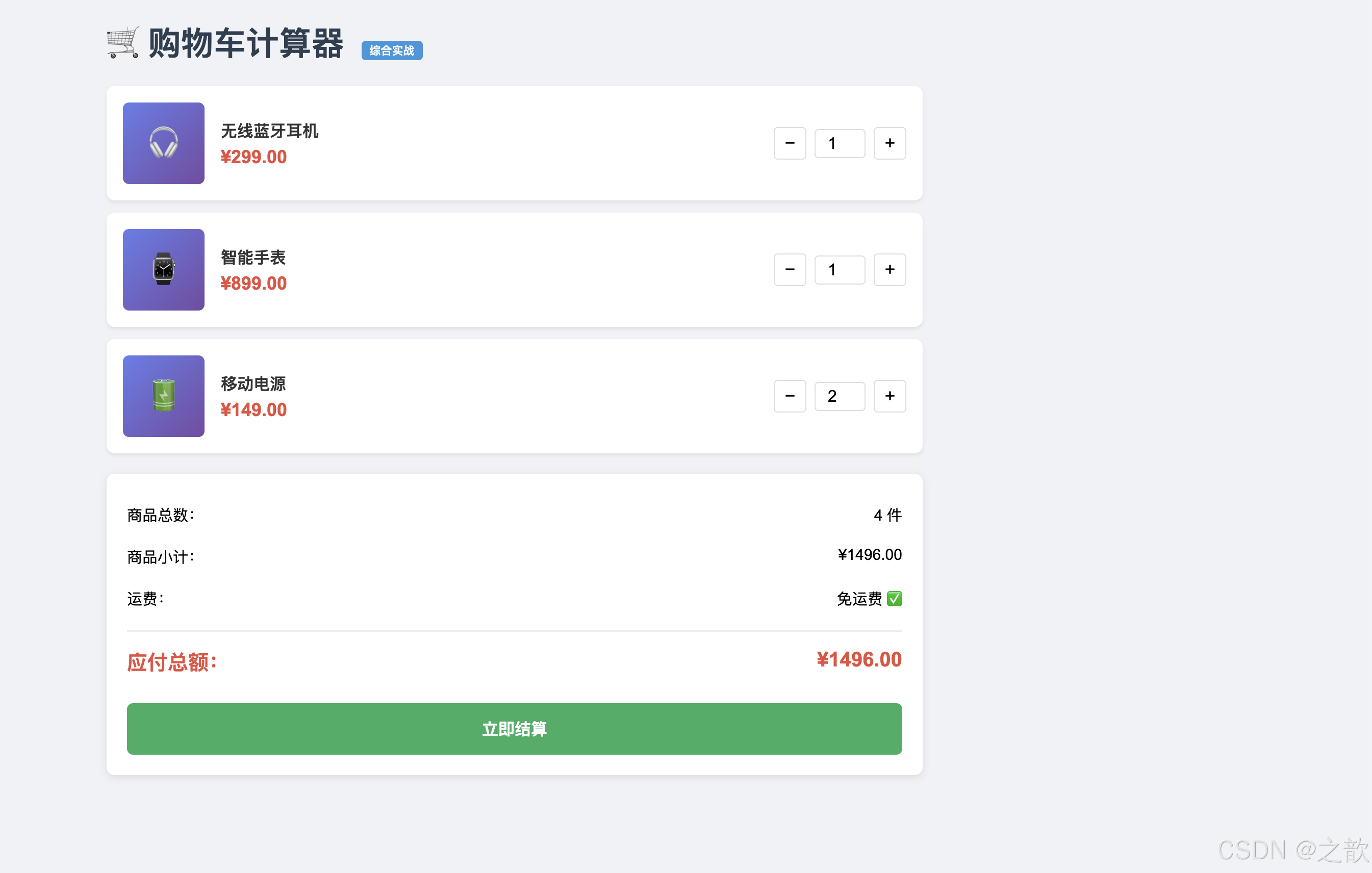
项目涉及的知识点:
- ✅
const常量定义 - ✅ 模板字符串(ES6)
- ✅
for...of循环(ES6) - ✅ 箭头函数(ES6)
- ✅
find()和reduce()数组方法(ES6) - ✅ 浮点精度处理(
toFixed(2)) - ✅
isNaN()数据验证 - ✅ DOM 操作
- ✅ 响应式布局(Flexbox)
💡 代码解释:购物车计算器综合实战解析
这个项目综合运用了本章所有核心知识点,是最佳的综合练习案例。
一、数据结构设计
// 使用 const 定义不变的配置常量(CONSTANT_CASE 命名)
const SHIPPING_FEE = 15;               // 运费
const FREE_SHIPPING_THRESHOLD = 500;   // 免运费门槛

// 使用 const 定义商品数组(数组内容可变,引用不变)
const products = [
    {
        id: 1,              // 唯一标识(整数)
        name: 'iPhone...',  // 商品名称(字符串)
        price: 6999,        // 单价(数字,使用整数避免浮点误差)
        quantity: 1,        // 数量(可变)
        emoji: '📱'         // 表情图标(字符串)
    },
    // ...
];
二、模板字符串生成 HTML
function renderCart() {
    const cartContainer = document.getElementById('cart-items');
    cartContainer.innerHTML = '';  // 清空后重新渲染

    for (const product of products) {  // for...of 遍历数组
        const itemHTML = `
            <div class="cart-item">
                <div class="item-image">${product.emoji}</div>
                <!--                  ↑ 模板字符串插值 -->
                <div class="item-name">${product.name}</div>
                <div class="item-price">¥${product.price.toFixed(2)}</div>
                <!--                         ↑ toFixed(2) 保留两位小数 -->
                <button onclick="changeQuantity(${product.id}, -1)">−</button>
                <!--              ↑ 将 product.id 插入事件处理属性 -->
            </div>
        `;
        cartContainer.innerHTML += itemHTML;
    }

    updateSummary();
}
三、数组 find() 方法(ES6)
function changeQuantity(productId, delta) {
    // find() 查找满足条件的第一个元素
    // p => p.id === productId 是箭头函数(ES6)
    const product = products.find(p => p.id === productId);
    //                         ↑ 箭头函数:p 是每个商品,返回 id 匹配的那个

    if (product) {
        // Math.max(1, 数量 + 变化量) 确保数量最少为 1
        product.quantity = Math.max(1, product.quantity + delta);
        renderCart();  // 重新渲染
    }
}

// 等价的传统写法(理解对比)
var product = products.find(function(p) {
    return p.id === productId;
});
四、数组 reduce() 方法(ES6)
function checkout() {
    // reduce() 将数组归并为单个值
    const totalItems = products.reduce(
        (sum, p) => sum + p.quantity,  // 累加每个商品的数量
        0                              // 初始值为 0
    );

    const total = products.reduce(
        (sum, p) => sum + p.price * p.quantity,  // 累加每个商品的小计
        0
    );

    // 等价的传统写法
    let total2 = 0;
    for (var i = 0; i < products.length; i++) {
        total2 += products[i].price * products[i].quantity;
    }
}
五、浮点精度处理
// 商品价格使用整数(元),避免浮点误差
// 但显示时需要保留两位小数
document.getElementById('total').textContent = `¥${total.toFixed(2)}`;
//                                                     ↑ toFixed(2) 返回字符串,如 "99.00"

// 实际注意事项
0.1 + 0.2           // 0.30000000000000004(浮点误差)
(0.1 + 0.2).toFixed(2)  // "0.30"(格式化后正确显示)

// 更安全的金融计算:转为分再计算
var priceCents = 6999 * 100;  // 699900 分
var total = priceCents * 2 / 100;  // 13998 元
六、输入验证
function updateQuantity(productId, newQuantity) {
    const quantity = parseInt(newQuantity);  // 转为整数

    // 多重验证
    if (isNaN(quantity) || quantity < 1) {
        alert('数量必须大于0');  // 用户提示
        renderCart();            // 重置显示
        return;                  // 提前退出函数
    }

    // 验证通过,更新数据
    const product = products.find(p => p.id === productId);
    if (product) {
        product.quantity = quantity;
        renderCart();
    }
}
七、响应式布局(Flexbox)在实战中的应用
/* 购物车条目:Flexbox 横向布局 */
.cart-item {
    display: flex;           /* 创建 Flex 容器 */
    align-items: center;     /* 垂直居中 */
    gap: 16px;              /* 项目间距 */
    padding: 16px;
}

/* 商品名称占据剩余空间 */
.item-info {
    flex: 1;               /* flex-grow: 1,撑满剩余空间 */
}

/* 数量控件不被压缩 */
.quantity-control {
    flex-shrink: 0;        /* 不缩小 */
    display: flex;
    align-items: center;
    gap: 8px;
}
八、项目架构总结
购物车计算器 架构图:

数据层(Data)
  ├── products[]        → 商品列表(含数量)
  ├── SHIPPING_FEE      → 运费常量
  └── FREE_SHIPPING_THRESHOLD → 免运费门槛

视图层(View)
  ├── renderCart()      → 渲染购物车列表
  └── updateSummary()   → 更新价格汇总

交互层(Controller)
  ├── changeQuantity()  → 增减数量
  ├── updateQuantity()  → 输入修改数量
  └── checkout()        → 结算

数据流:
用户操作 → 修改 products 数组 → renderCart() 重新渲染 → 用户看到新界面
九、可扩展的改进方向
// 1. 添加"删除商品"功能
function removeProduct(id) {
    const index = products.findIndex(p => p.id === id);
    if (index !== -1) {
        products.splice(index, 1);  // 从数组中删除
        renderCart();
    }
}

// 2. 添加"清空购物车"功能
function clearCart() {
    products.splice(0, products.length);  // 清空数组
    renderCart();
}

// 3. 使用 reduce 计算总价(更函数式)
const subtotal = products.reduce((sum, p) => sum + p.price * p.quantity, 0);

// 4. 保存到 localStorage(持久化)
function saveCart() {
    localStorage.setItem('cart', JSON.stringify(products));
}
function loadCart() {
    const saved = localStorage.getItem('cart');
    if (saved) {
        const data = JSON.parse(saved);
        products.splice(0, products.length, ...data);
    }
}
本文总结:
本博客基于 MDN 官方文档、W3C 规范、ECMAScript 2026/2027 规范、CSS-Tricks 和 DigitalOcean 技术文章,深度解析了 CSS 响应式布局(媒体查询、Flexbox、响应式图片)、BFC 块级格式上下文的原理与实战、JavaScript 基础入门知识(语法、变量、数据类型),以及 ES6+ 新特性(let/const/Symbol/BigInt、变量提升)。每个知识点均配有可运行的 HTML 示例、mermaid 图示、官方定义和真实网站使用案例。掌握这些基础知识,是走向前端工程师的第一步。
十、全章注意事项汇总 ⚠️
10.1 CSS 响应式布局注意事项
| 序号 | 注意点 | 错误写法 | 正确写法 |
|---|---|---|---|
| 1 | viewport meta 标签必须写 | 不写,移动端布局错乱 | <meta name="viewport" content="width=device-width, initial-scale=1.0"> |
| 2 | 移动优先(min-width),性能更好 | max-width 从大到小 |
min-width 从小到大 |
| 3 | picture 中 img 是必须的 |
不写 img,降级不生效 |
最后一个子元素必须是 <img> |
| 4 | flex: 1 的含义 |
以为是 flex-grow: 1 |
等价于 flex: 1 1 0(grow/shrink/basis) |
| 5 | 媒体查询断点使用一致的单位 | px 和 rem 混用 | 统一用 px 或统一用 rem |
| 6 | display: flex !important 覆盖 |
忘记 !important 导致规则被覆盖 |
展开导航时加 !important |
10.2 BFC 注意事项
| 序号 | 注意点 | 说明 |
|---|---|---|
| 1 | overflow: hidden 会裁剪溢出内容 |
使用前确认没有需要溢出显示的元素(如 tooltip) |
| 2 | display: flow-root 是最佳选择 |
专为创建 BFC 设计,无副作用,但 IE 不支持 |
| 3 | 兄弟元素外边距塌陷通常不需要处理 | 这是规范预期行为,不是 Bug |
| 4 | position: absolute 也创建 BFC 但脱离文档流 |
会影响其他元素布局,谨慎使用 |
| 5 | float 已不推荐用于布局 |
使用 Flexbox/Grid 代替,float 仅用于文字环绕 |
10.3 JavaScript 语法注意事项
// ⚠️ 注意1:严格区分大小写
alert(100);    // ✅
Alert(100);    // ❌ ReferenceError

// ⚠️ 注意2:字符串比较区分大小写
'hello' === 'Hello'  // false(不同!)

// ⚠️ 注意3:== 会进行类型转换(尽量使用 ===)
0 == false    // true(转换后相等)
0 === false   // false(类型不同)

// ⚠️ 注意4:typeof null 是 "object"(历史Bug)
typeof null === 'object'  // true,但 null 不是对象
// 正确判断:value === null

// ⚠️ 注意5:NaN 不等于自身
NaN === NaN   // false
// 正确判断:Number.isNaN(value)

// ⚠️ 注意6:浮点数精度问题
0.1 + 0.2 !== 0.3  // true(计算有误差)
// 正确处理:(0.1 + 0.2).toFixed(2) 或转整数运算

// ⚠️ 注意7:字符串拼接 vs 数学加法
'5' + 3     // '53'(字符串拼接)
'5' - 3     // 2(数字运算,-会转换类型)
5 + '3'     // '53'(字符串拼接,顺序无关)

// ⚠️ 注意8:var 变量提升
console.log(x);  // undefined(不报错)
var x = 10;

// ⚠️ 注意9:document.write() 在页面加载后调用会清空页面
// 页面加载完成后不要使用 document.write()

// ⚠️ 注意10:空数组/空对象是 truthy!
Boolean([])   // true(不是 false!)
Boolean({})   // true(不是 false!)
10.4 ES6+ 注意事项
// ⚠️ const 声明的对象,内容可以修改
const user = { name: '张三' };
user.name = '李四';   // ✅ 允许(修改属性)
// user = {};        // ❌ 报错(不能重新赋值)

// ⚠️ let/const 有暂时性死区(TDZ)
// console.log(x);  // ❌ ReferenceError
let x = 10;
// 不能在声明前访问(与 var 不同,var 返回 undefined)

// ⚠️ BigInt 不能与 Number 混用
10n + 5     // ❌ TypeError
10n + 5n    // ✅
Number(10n) + 5  // ✅ 显式转换

// ⚠️ Symbol 每次调用都创建新的唯一值
Symbol('a') === Symbol('a')  // false(不相等!)
Symbol.for('a') === Symbol.for('a')  // true(注册表复用)
十一、知识点速查总结
11.1 CSS 响应式布局速查
/* 1. 必备 viewport meta */
<meta name="viewport" content="width=device-width, initial-scale=1.0">

/* 2. 移动优先媒体查询模板 */
/* 手机端(默认样式) */
.container { width: 100%; }

/* 平板端 */
@media (min-width: 640px) {
    .container { max-width: 640px; }
}

/* 桌面端 */
@media (min-width: 1024px) {
    .container { max-width: 1200px; }
}

/* 3. Flexbox 常用模板 */
.flex-center {
    display: flex;
    justify-content: center;  /* 水平居中 */
    align-items: center;      /* 垂直居中 */
}

.flex-between {
    display: flex;
    justify-content: space-between;  /* 两端对齐 */
    align-items: center;
}

/* 4. 响应式网格 */
.grid {
    display: grid;
    grid-template-columns: repeat(2, 1fr);  /* 2列 */
    gap: 16px;
}
@media (min-width: 768px) {
    .grid { grid-template-columns: repeat(3, 1fr); }  /* 3列 */
}
11.2 JavaScript 数据类型速查表
| 类型 | 典型值 | typeof | 转布尔 | 特殊注意 |
|---|---|---|---|---|
| number | 42, 3.14, NaN, Infinity |
"number" |
0/NaN→false | NaN≠NaN |
| string | 'hello', "", `${x}` |
"string" |
""→false | 不可变 |
| boolean | true, false |
"boolean" |
false→false | — |
| null | null |
"object" ⚠️ |
false | typeof Bug |
| undefined | undefined |
"undefined" |
false | — |
| symbol | Symbol() |
"symbol" |
true | 每次唯一 |
| bigint | 42n |
"bigint" |
0n→false | 不混number |
| object | {}, [], null |
"object" |
true(除null) | 引用类型 |
| function | function(){} |
"function" |
true | function是object子类 |
11.3 var/let/const 三分钟速记
var  → 函数作用域 + 可重复声明 + 有提升(值为undefined)→ 不推荐
let  → 块级作用域 + 不可重复声明 + TDZ → 用于可变值
const→ 块级作用域 + 不可重复声明 + TDZ + 不可重新赋值 → 优先使用

选择原则:
1. 默认用 const
2. 需要重新赋值用 let
3. 不要用 var(除非维护老代码)
11.4 BFC 三分钟速记
BFC = 独立的渲染容器,内外隔离

触发方式(常用):
  display: flow-root → 最推荐,无副作用
  overflow: hidden   → 最常用,会裁剪溢出
  float: left/right  → 会脱离文档流
  position: absolute/fixed → 会脱离文档流

解决的问题:
  1. 高度塌陷(浮动子元素导致父元素高度为0)
  2. 外边距塌陷(父子元素margin合并)
  3. 阻止文字环绕浮动元素

记忆口诀:
  overflow hidden 最常用
  flow-root 最干净
  看到高度塌陷 = 给父元素加BFC
  看到margin穿透 = 给父元素加BFC
十二、学习路线建议
学习建议:
- Day01 核心重点:掌握响应式布局三件套(viewport + 媒体查询 + Flexbox),JavaScript 基础语法和 6 种数据类型
- 理解而非死记:理解为什么
typeof null === 'object',为什么有 NaN,而不是死背答案 - 动手实践:每个示例都要亲手敲一遍,在浏览器开发者工具中验证结果
- 善用 MDN:遇到不确定的 API,第一时间查 MDN Web Docs
- 建立错误集:遇到 Bug 记录到错误本,防止重复踩坑
更多推荐
 9
9 0
0- 0


 已为社区贡献57条内容

所有评论(0)