
如何用python制作妈妈我爱你动画
昨天是母亲节,今天我来教大家如何在python中制作一个关于妈妈我爱你的简单小动画
import time
import random
import os
import math
import sys
# 尝试导入颜色支持库,如果没有则使用基本输出
try:
import colorama
from colorama import Fore, Back, Style, init
init(autoreset=True)
COLORAMA_AVAILABLE = True
except ImportError:
COLORAMA_AVAILABLE = False
print("提示: 安装colorama可以获得更好的颜色效果: pip install colorama")
class LoveEffect:
def __init__(self):
self.colors = [
'\033[91m', '\033[92m', '\033[93m', '\033[94m',
'\033[95m', '\033[96m', '\033[97m', '\033[91m',
'\033[38;5;196m', '\033[38;5;200m', '\033[38;5;201m',
'\033[38;5;213m', '\033[38;5;219m', '\033[38;5;225m'
]
self.reset = '\033[0m'
def clear_screen(self):
os.system('cls' if os.name == 'nt' else 'clear')
def heart_pattern(self, size=15):
"""生成心形图案"""
heart = []
for y in range(size, -size-1, -1):
row = ""
for x in range(-size, size+1):
# 心形方程: (x^2 + y^2 - 1)^3 - x^2 * y^3 = 0
formula = (x*0.04)**2 + (y*0.1)**2 - 1
value = formula**3 - (x*0.04)**2 * (y*0.1)**3
if value <= 0:
row += "♥"
else:
row += " "
heart.append(row)
return heart
def print_rainbow_text(self, text, delay=0.05):
"""彩虹色打字效果"""
colors = [Fore.RED, Fore.YELLOW, Fore.GREEN, Fore.CYAN,
Fore.BLUE, Fore.MAGENTA] if COLORAMA_AVAILABLE else self.colors
for i, char in enumerate(text):
color = colors[i % len(colors)]
if COLORAMA_AVAILABLE:
print(color + char, end='', flush=True)
else:
print(f"{self.colors[i % len(self.colors)]}{char}", end='', flush=True)
time.sleep(delay)
print()
def heart_rain(self):
"""心形雨效果"""
width = 60
height = 15
hearts = ['♥', '❤', '💕', '💖', '💗', '💝', '💘']
# 初始化雨滴位置
raindrops = []
for _ in range(20):
raindrops.append({
'x': random.randint(0, width-1),
'y': random.randint(-height, -1),
'speed': random.uniform(0.3, 1.0),
'char': random.choice(hearts)
})
for _ in range(50):
self.clear_screen()
screen = [[' ' for _ in range(width)] for _ in range(height)]
# 更新和绘制雨滴
for drop in raindrops:
drop['y'] += drop['speed']
if drop['y'] >= height:
drop['y'] = 0
drop['x'] = random.randint(0, width-1)
x, y = int(drop['x']), int(drop['y'])
if 0 <= y < height and 0 <= x < width:
screen[y][x] = '\033[91m' + drop['char'] + self.reset
# 打印屏幕
for row in screen:
print(''.join(row))
time.sleep(0.1)
def sparkle_text(self, text, duration=3):
"""闪烁文字效果"""
end_time = time.time() + duration
while time.time() < end_time:
self.clear_screen()
# 随机颜色
color = random.choice(self.colors)
# 随机位置(居中带偏移)
offset = random.randint(-5, 5)
padding = " " * (20 + offset)
# 随机大小写
display_text = text.upper() if random.random() > 0.5 else text
# 添加星星装饰
stars = "✨" * random.randint(1, 5)
print(f"\n\n\n{padding}{color}{stars} {display_text} {stars}{self.reset}")
time.sleep(0.2)
def expanding_heart(self):
"""扩展心形动画"""
for size in range(3, 12, 2):
self.clear_screen()
heart = self.heart_pattern(size)
color = self.colors[random.randint(0, len(self.colors)-1)]
print(f"\n{color}妈妈我爱你{self.reset}\n")
for row in heart:
if row.strip():
print(f" {color}{row}{self.reset}")
time.sleep(0.3)
def matrix_love(self):
"""矩阵风格的心形雨"""
width = 50
height = 15
chars = '❤妈妈我爱你'
columns = [random.randint(0, height-1) for _ in range(width)]
for _ in range(100):
self.clear_screen()
for y in range(height):
row = ""
for x in range(width):
if columns[x] == y:
color = self.colors[random.randint(0, len(self.colors)-1)]
char = random.choice(chars)
row += f"{color}{char}"
elif columns[x] < y:
row += " "
else:
if random.random() < 0.1:
color = self.colors[random.randint(0, len(self.colors)-1)]
row += f"{color}{random.choice(chars)}"
else:
row += " "
print(row)
# 更新列位置
for i in range(len(columns)):
if random.random() < 0.1:
columns[i] = (columns[i] + 1) % height
time.sleep(0.15)
def bounce_text(self, text):
"""弹跳文字效果"""
width = 40
height = 10
x, y = width//2, height//2
dx, dy = 1, 1
text_len = len(text)
for _ in range(50):
self.clear_screen()
# 更新位置
x += dx
y += dy
# 边界检测
if x <= 0 or x >= width - text_len:
dx = -dx
if y <= 0 or y >= height:
dy = -dy
# 绘制
for row in range(height):
if row == y:
padding = " " * x
color = self.colors[random.randint(0, len(self.colors)-1)]
hearts = "💕" * 2
print(f"{padding}{color}{hearts} {text} {hearts}{self.reset}")
else:
print()
time.sleep(0.1)
def ascii_art_love(self):
"""ASCII艺术字效果"""
art = """
💗💗💗💗💗💗💗💗💗💗💗💗💗💗
💗 ✨ 妈妈我爱你 ✨ 💗
💗💗💗💗💗💗💗💗💗💗💗💗💗💗
❤️❤️ ❤️❤️
❤️ ❤️ ❤️ ❤️
❤️ ❤️ ❤️ ❤️
❤️ ❤️ ❤️
❤️ ❤️
❤️ ❤️
❤️ ❤️
❤️ ❤️
❤️ ❤️
❤️❤️
❤️
"""
for _ in range(5):
self.clear_screen()
color = random.choice(self.colors)
print(f"{color}{art}{self.reset}")
time.sleep(0.5)
self.clear_screen()
time.sleep(0.3)
def gradient_text(self, text):
"""渐变色文字"""
colors = [
(255, 0, 0), (255, 127, 0), (255, 255, 0),
(0, 255, 0), (0, 255, 255), (0, 0, 255), (139, 0, 255)
]
for _ in range(3):
self.clear_screen()
print("\n\n")
for i, char in enumerate(text):
# 计算渐变色
ratio = i / len(text)
color_index = ratio * (len(colors) - 1)
idx1 = int(color_index)
idx2 = min(idx1 + 1, len(colors) - 1)
fraction = color_index - idx1
r = int(colors[idx1][0] + (colors[idx2][0] - colors[idx1][0]) * fraction)
g = int(colors[idx1][1] + (colors[idx2][1] - colors[idx1][1]) * fraction)
b = int(colors[idx1][2] + (colors[idx2][2] - colors[idx1][2]) * fraction)
print(f"\033[38;2;{r};{g};{b}m{char}", end='', flush=True)
time.sleep(0.1)
print("\n")
time.sleep(0.5)
def fireworks(self):
"""烟花效果"""
width = 40
height = 12
for _ in range(5):
self.clear_screen()
# 随机烟花位置
cx, cy = random.randint(5, width-5), random.randint(2, height-4)
# 动画帧
for radius in range(1, 8):
self.clear_screen()
screen = [[' ' for _ in range(width)] for _ in range(height)]
# 绘制烟花粒子
for angle in range(0, 360, 15):
rad = math.radians(angle)
x = int(cx + radius * math.cos(rad))
y = int(cy + radius * math.sin(rad))
if 0 <= x < width and 0 <= y < height:
# 粒子颜色和样式
particles = ['❤', '✨', '💕', '💖', '*', '♥']
screen[y][x] = random.choice(particles)
# 绘制屏幕
for row in screen:
line = ''.join(row)
# 添加颜色
colored_line = ""
for char in line:
if char != ' ':
color = self.colors[random.randint(0, len(self.colors)-1)]
colored_line += f"{color}{char}{self.reset}"
else:
colored_line += char
print(colored_line)
time.sleep(0.15)
time.sleep(0.3)
def run_full_show(self):
"""运行完整表演"""
print("准备开始表演...")
time.sleep(1)
# 1. 彩虹文字出场
print("\n" * 3)
self.print_rainbow_text("✨ 妈妈我爱你 ✨")
time.sleep(1)
# 2. 心形扩展
self.expanding_heart()
time.sleep(0.5)
# 3. 弹跳文字
self.bounce_text("妈妈我爱你")
time.sleep(0.5)
# 4. 烟花表演
self.fireworks()
# 5. 闪烁效果
self.sparkle_text("妈妈我爱你", 2)
# 6. 心形雨
self.heart_rain()
# 7. ASCII艺术
self.ascii_art_love()
# 8. 渐变色
self.gradient_text("妈妈我爱你")
# 9. 矩阵风格
self.matrix_love()
# 最终展示
self.clear_screen()
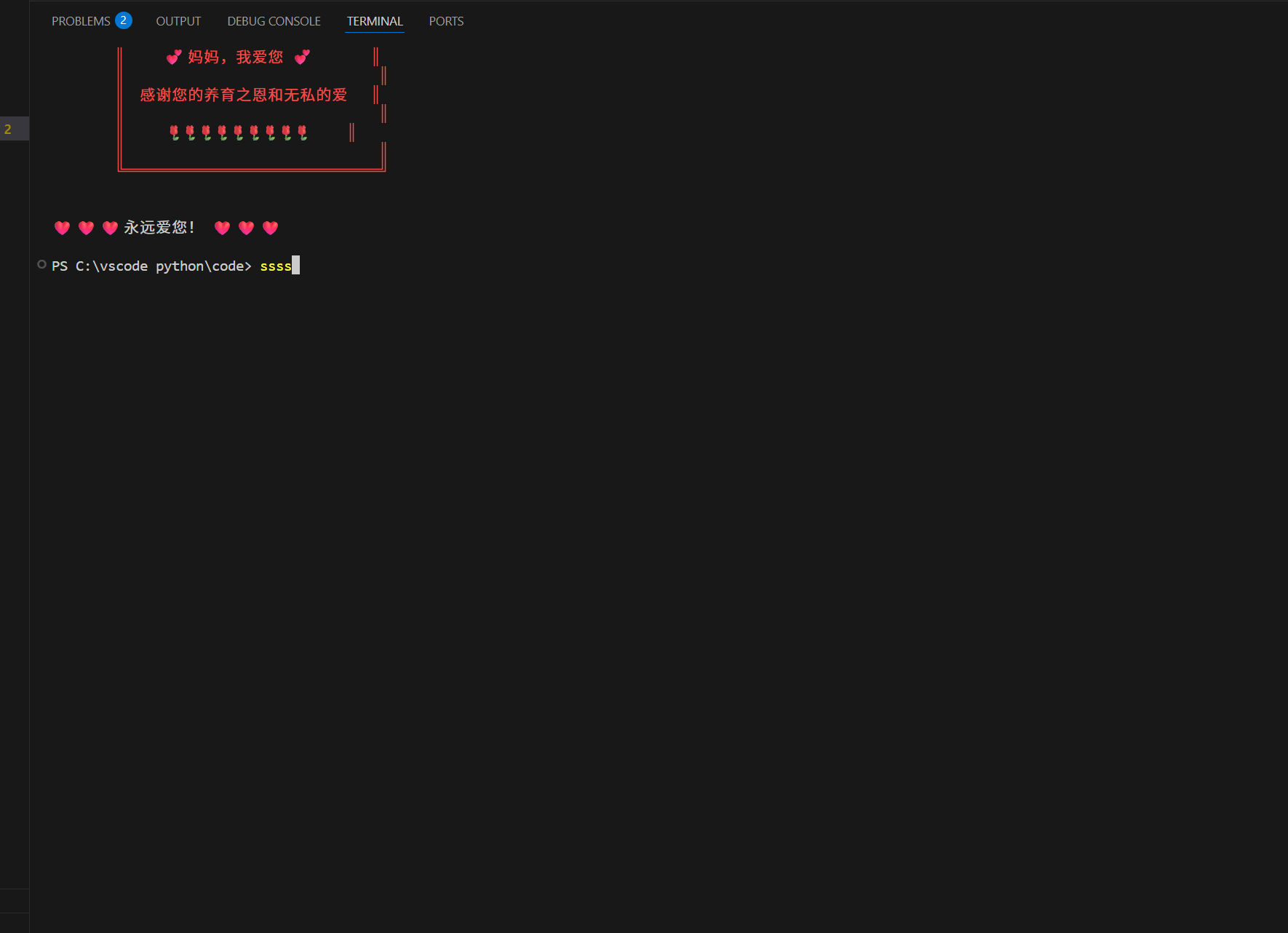
final_art = """
╔════════════════════════════════╗
║ ║
║ 💕 妈妈,我爱您 💕 ║
║ ║
║ 感谢您的养育之恩和无私的爱 ║
║ ║
║ 🌹🌹🌹🌹🌹🌹🌹🌹🌹 ║
║ ║
╚════════════════════════════════╝
"""
print("\033[91m" + final_art + "\033[0m")
time.sleep(2)
print("\n❤️ ❤️ ❤️ 永远爱您! ❤️ ❤️ ❤️\n")
if __name__ == "__main__":
try:
show = LoveEffect()
show.run_full_show()
except KeyboardInterrupt:
print("\n\n💕 爱您的心永远不会停止!💕\n")
except Exception as e:
print(f"出了点小问题: {e}")
print("但是爱妈妈的心是一样的!❤️")
代码中准备了多种报错后的运行方式,以防万一。注意安装依赖
pip install colorama
会使得表达效果更好,如果没有你用的是Visual Studio Code的话会自动下载。
希望我的文章能够帮到你,谢谢观看
部分内容展示
更多推荐
 4
4 0
0- 0


 已为社区贡献19条内容

所有评论(0)