
【C++项目】基于 C++ 的高并发代码评测系统(上)
文章目录
一、演⽰项⽬
项⽬源码链接:https://gitee.com/zhang-shiyang-h/l_code/tree/master/OnlineOJ
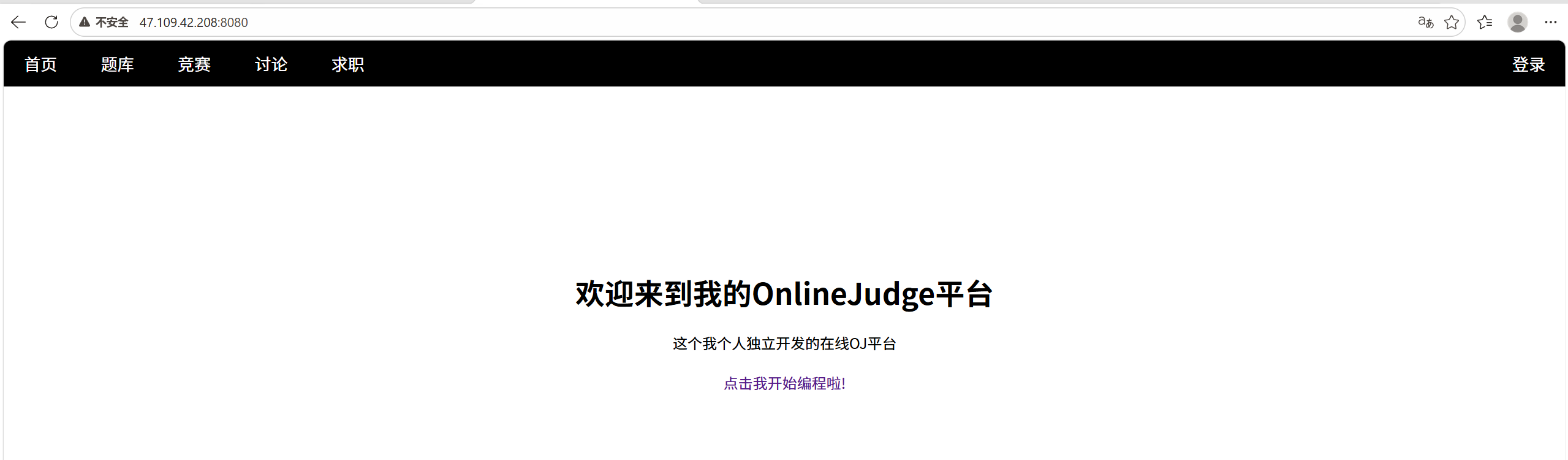
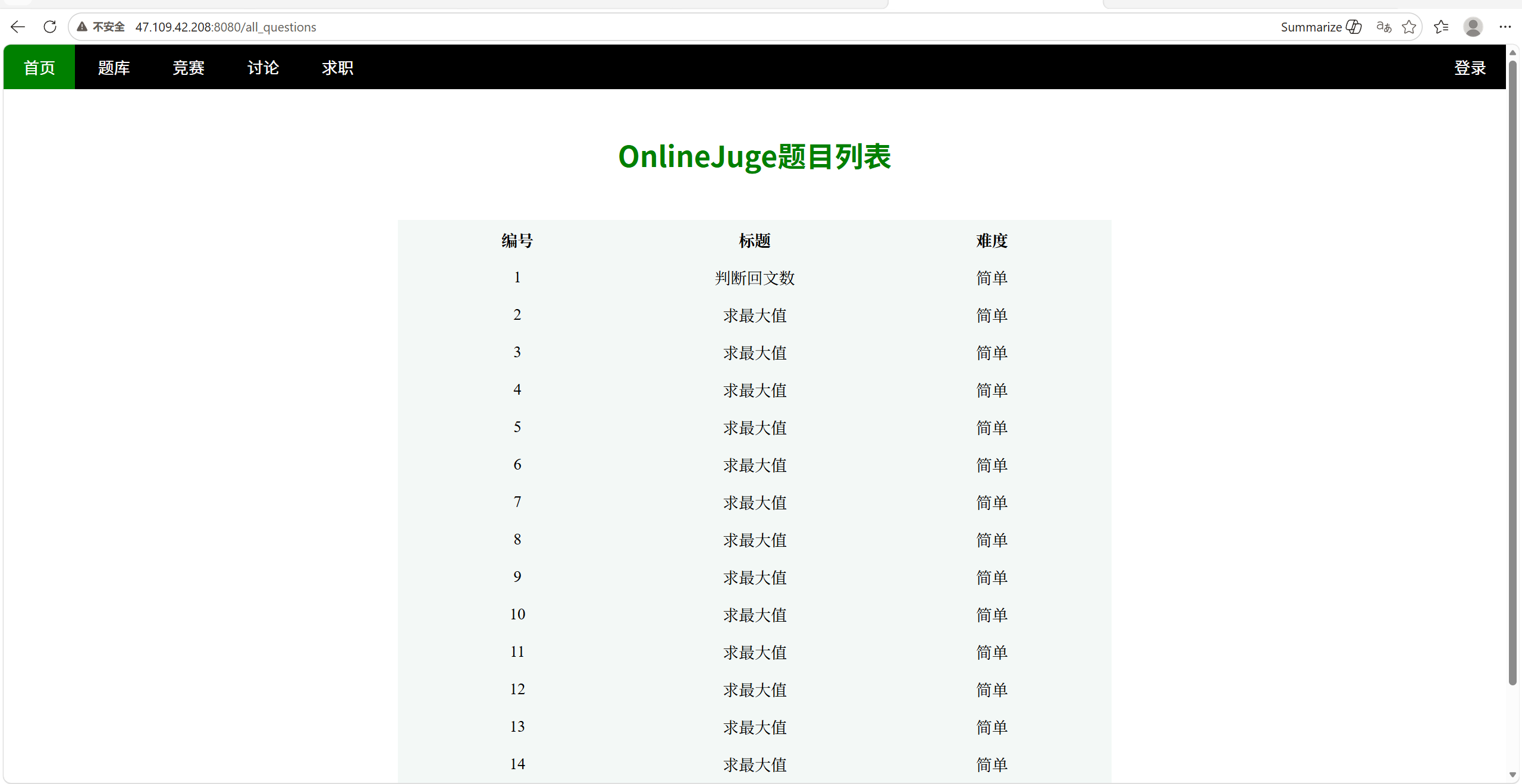
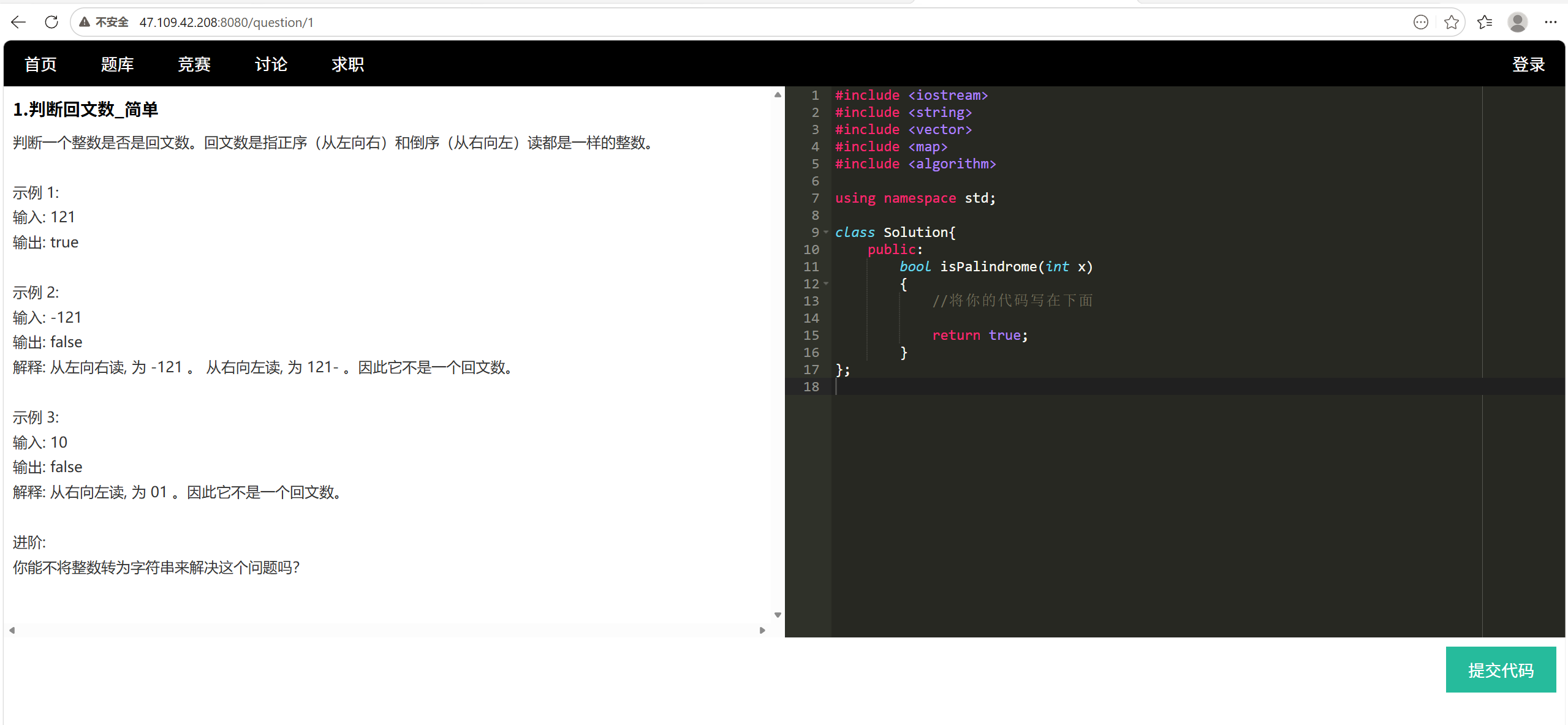
客户端1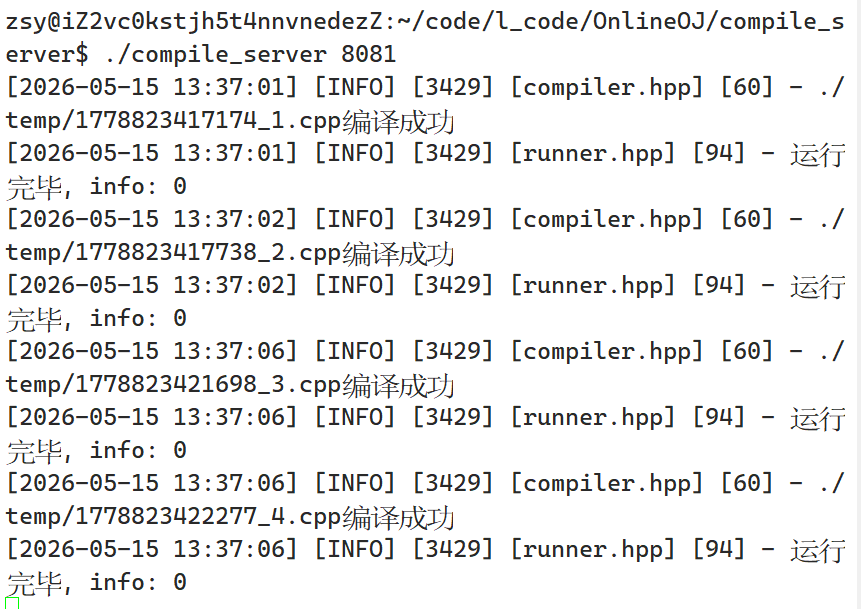
客户端2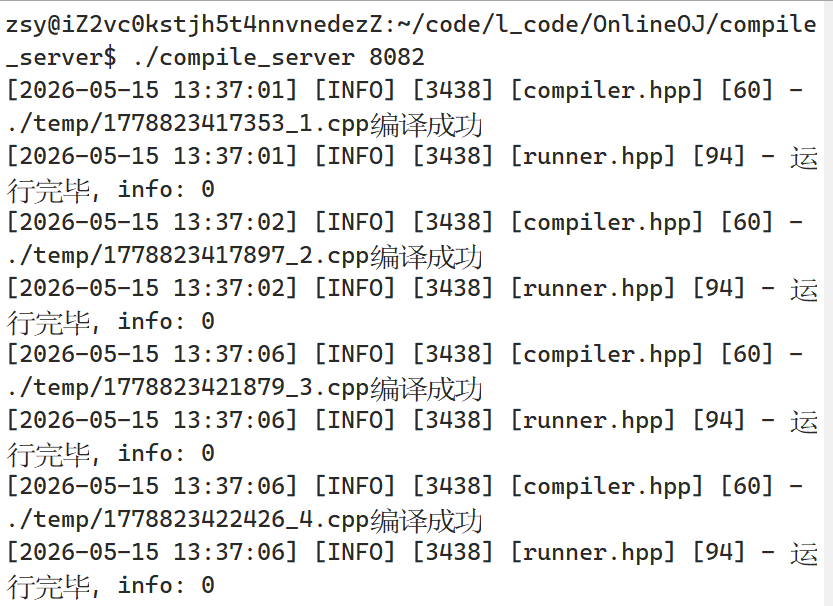
客户端3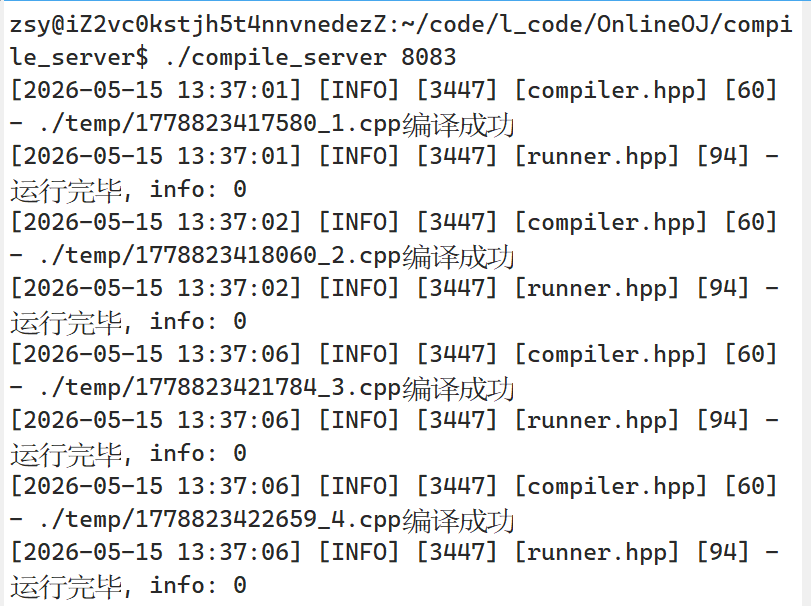
服务端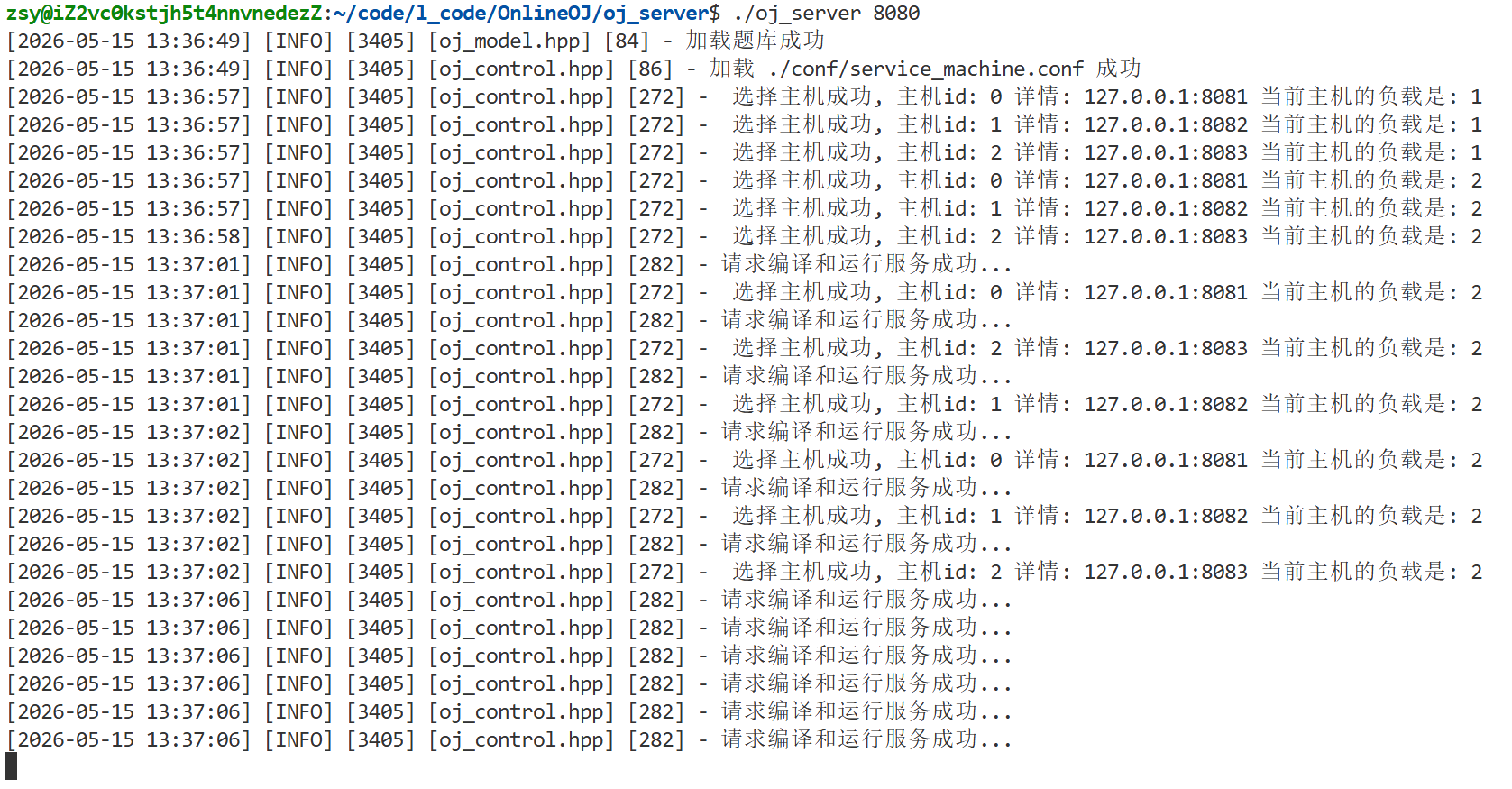
二、所⽤技术与开发环境
1、核心技术栈
后端开发
- C++基础 + STL标准库
- 多进程、多线程并发编程
- 负载均衡架构设计
第三方库
- Boost库(字符串切割等工具)
- cpp-httplib HTTP 网络库
- ctemplate 前端模板渲染库
- jsoncpp JSON 序列化 / 反序列库
数据库
- MySQL + C API 数据库连接
前端基础
- HTML/CSS/JS/jQuery/AJAX
- Ace 在线代码编辑器
2、开发环境
- 服务器:Ubuntu 20.04 云服务器
- 开发工具:VS Code
- 数据库管理:MySQL Workbench
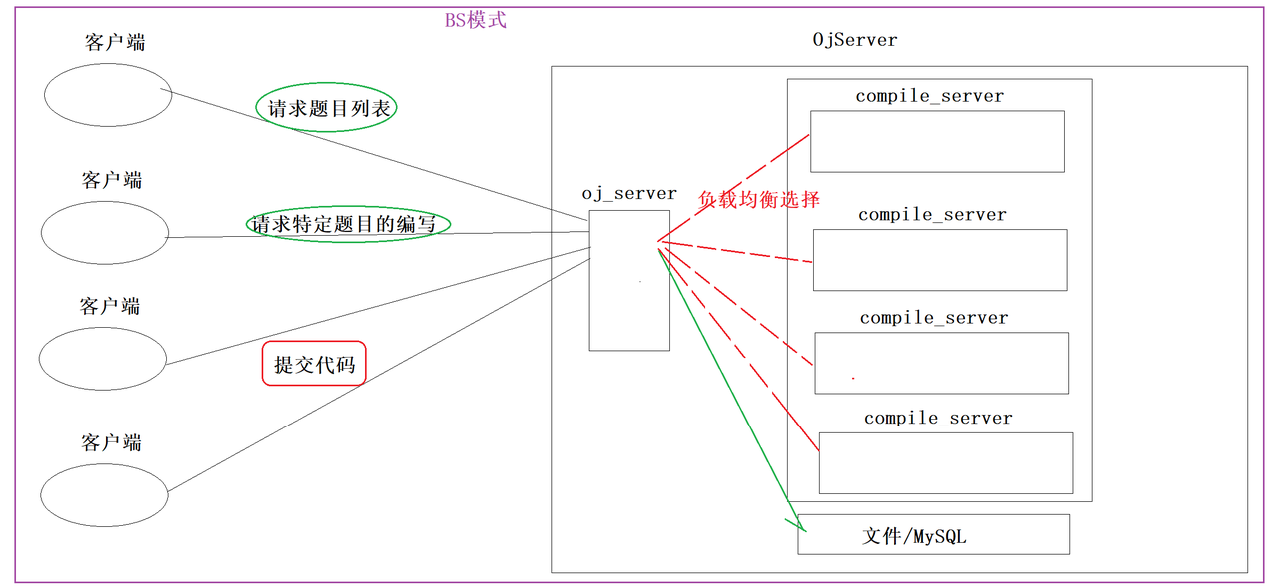
三、项⽬宏观结构
我的项⽬核⼼由三个模块组成:
- comm: 公共模块
- compile_server: 编译运行模块
- oj_server: 题目管理、负载均衡及业务功能
代码结构:
comm:
	httplib.h
	Mutex.hpp
	Log.hpp
	Util.hpp

compile_server:
	compile.hpp
	runner.hpp
	compile_run.hpp
	compile_server.cc
	temp 存放临时文件

oj_server
	oj_model.hpp 文件版
	oj_model2.hpp MySQL版
	oj_view.hpp
	oj_control.hpp
	oj_server.cc
	conf:
		service_machine.conf
	questions:
		questions.list
		1:
			desc.txt
			header.cpp
			tail.hpp
	template_html:
		all_questions.html
		one_question.html
	wwwroot
		index.html
makefile1
compile_server:compile_server.cc
	g++ -o $@ $^ -std=c++17 -ljsoncpp -lpthread
.PHONY:clean
clean:
	rm -rf compile_server
makefile2
oj_server:oj_server.cc
	g++ -o $@ $^ -I./include -L./lib -std=c++17 -lpthread -lctemplate -ljsoncpp -lmysqlclient
.PHONY:clean
clean:
	rm -rf oj_server
makefile3
.PHONY:all
all:
	@cd compile_server; \
	make;\
	cd -;\
	cd oj_server;\
	make;\
	cd -;

.PHONY:output
output:
	@mkdir -p output/compile_server;\
	mkdir -p output/oj_server;\
	cp -rf compile_server/compile_server output/compile_server;\
	cp -rf compile_server/temp output/compile_server;\
	cp -rf oj_server/conf output/oj_server/;\
	cp -rf oj_server/questions output/oj_server/;\
	cp -rf oj_server/template_html output/oj_server/;\
	cp -rf oj_server/wwwroot output/oj_server/;\
	cp -rf oj_server/oj_server output/oj_server/;

.PHONY:clean
clean:
	@cd compile_server;\
	make clean;\
	cd -;\
	cd oj_server;\
	make clean;\
	cd -;\
	rm -rf output;
四、公共模块comm
1、Mutex.hpp
#pragma once
#include <iostream>
#include <pthread.h>

namespace MutexModule
{
    // 互斥锁封装类
    class Mutex
    {
    public:
        // 初始化锁
        Mutex()
        {
            pthread_mutex_init(&_mutex, nullptr);
        }

        // 加锁
        void Lock()
        {
            int n = pthread_mutex_lock(&_mutex);
        }

        // 解锁
        void Unlock()
        {
            int n = pthread_mutex_unlock(&_mutex);
        }

        // 获取锁指针
        pthread_mutex_t *Get()
        {
            return &_mutex;
        }

        // 销毁锁
        ~Mutex()
        {
            pthread_mutex_destroy(&_mutex);
        }

    private:
        pthread_mutex_t _mutex; // 原生互斥锁对象
    };

    // RAII 自动锁
    class LockGuard
    {
    public:
        LockGuard(Mutex &mutex)
            : _mutex(mutex)
        {
            _mutex.Lock();
        }

        ~LockGuard()
        {
            _mutex.Unlock();
        }

    private:
        Mutex &_mutex;
    };
}
2、Log.hpp
#pragma once
#include <iostream>
#include <cstdio>
#include <string>
#include <filesystem>
#include <fstream>
#include <sstream>
#include <memory>
#include <ctime>
#include <sys/types.h>
#include <unistd.h>
#include "Mutex.hpp"

namespace LogModule
{
    using namespace MutexModule;

    const std::string gsep = "\r\n";

    // 日志策略基类(接口)
    class LogStrategy
    {
    public:
        ~LogStrategy() = default;
        virtual void SyncLog(const std::string &message) = 0;
    };

    // 控制台日志输出(线程安全)
    class ConsoleLogStrategy : public LogStrategy
    {
    public:
        void SyncLog(const std::string &message) override
        {
            LockGuard lockguard(_mutex);
            std::cout << message << gsep;
        }

        ~ConsoleLogStrategy() {}

    private:
        Mutex _mutex;
    };

    const std::string defaultpath = "/var/log";
    const std::string defaultfile = "my.log";

    // 文件日志输出(自动建目录、线程安全)
    class FileLogStrategy : public LogStrategy
    {
    public:
        FileLogStrategy(const std::string &path = defaultpath, const std::string &file = defaultfile)
            : _path(path), _file(file)
        {
            LockGuard lockguard(_mutex);
            if (std::filesystem::exists(_path))
                return;

            try
            {
                std::filesystem::create_directories(_path);
            }
            catch (const std::filesystem::filesystem_error &e)
            {
                std::cerr << e.what() << std::endl;
            }
        }

        // 追加写入日志文件
        void SyncLog(const std::string &message) override
        {
            LockGuard lockguard(_mutex);
            std::string filename = _path + (_path.back() == '/' ? "" : "/") + _file;
            std::ofstream out(filename, std::ios::app);
            if (!out.is_open())
                return;

            out << message << gsep;
            out.close();
        }

    private:
        std::string _path;
        std::string _file;
        Mutex _mutex;
    };

    // 日志等级类
    enum class LogLevel
    {
        DEBUG,
        INFO,
        WARNING,
        ERROR,
        FATAL
    };

    // 日志等级转字符串
    std::string LevelStr(LogLevel level)
    {
        switch (level)
        {
        case LogLevel::DEBUG:
            return "DEBUG";
        case LogLevel::INFO:
            return "INFO";
        case LogLevel::WARNING:
            return "WARNING";
        case LogLevel::ERROR:
            return "ERROR";
        case LogLevel::FATAL:
            return "FATAL";
        default:
            return "UNKNOWN";
        }
    }

    // 获取格式化时间字符串(线程安全)
    std::string GetTimeStamp()
    {
        time_t curr = time(nullptr);
        struct tm curr_tm; // 出参
        localtime_r(&curr, &curr_tm);
        char buf[128]; // 出参
        snprintf(buf, sizeof(buf), "%4d-%02d-%02d %02d:%02d:%02d",
                 curr_tm.tm_year + 1900,
                 curr_tm.tm_mon + 1,
                 curr_tm.tm_mday,
                 curr_tm.tm_hour,
                 curr_tm.tm_min,
                 curr_tm.tm_sec);
        return buf;
    }

    // 日志核心管理类
    class Logger
    {
    public:
        Logger()
        {
            EnableConsoleLogStrategy();
        }

        // 切换为文件输出
        void EnableFileLogStrategy()
        {
            _fflush_strategy = std::make_unique<FileLogStrategy>();
        }

        // 切换为控制台输出
        void EnableConsoleLogStrategy()
        {
            _fflush_strategy = std::make_unique<ConsoleLogStrategy>();
        }

        // 日志消息构造: 负责拼接内容, 析构时自动输出
        class LogMessage
        {
        public:
            // 构造日志头部(时间、等级、进程ID、文件名、行号)
            LogMessage(LogLevel level, std::string src_name, int line_number, Logger &logger)
                :  _logger(logger)
            {
                std::stringstream ss;
                ss << "[" << GetTimeStamp() << "] "
                   << "[" << LevelStr(level) << "] "
                   << "[" << getpid() << "] "
                   << "[" << src_name << "] "
                   << "[" << line_number << "] - ";
                _loginfo = ss.str();
            }

            // 流方式拼接日志内容
            template <typename T>
            LogMessage &operator<<(const T &info)
            {
                std::stringstream ss;
                ss << info;
                _loginfo += ss.str();
                return *this;
            }

            // 析构自动输出日志
            ~LogMessage()
            {
                if (_logger._fflush_strategy)
                {
                    _logger._fflush_strategy->SyncLog(_loginfo);
                }
            }

        private:
            std::string _loginfo;
            Logger &_logger;
        };

        // 仿函数接口, 创建日志消息
        LogMessage operator()(LogLevel level, std::string name, int line)
        {
            return LogMessage(level, name, line, *this);
        }

    private:
        std::unique_ptr<LogStrategy> _fflush_strategy;
    };

    Logger logger;

// 简化调用宏
#define LOG(level) logger(level, __FILE__, __LINE__)
#define Enable_Console_Log_Strategy() logger.EnableConsoleLogStrategy()
#define Enable_File_Log_Strategy() logger.EnableFileLogStrategy()
}
3、Util.hpp
#pragma once

#include <iostream>
#include <string>
#include <sys/time.h>
#include <sys/types.h>
#include <sys/stat.h>
#include <unistd.h>
#include <atomic>
#include <fstream>
#include <vector>
#include <cstdio>
#include <cstdlib>
#include <boost/algorithm/string.hpp>

const std::string temp_path = "./temp/";

namespace UtilModule
{
    // 时间工具类
    class TimeUtil
    {
    public:
        // 获取秒级时间戳
        static std::string GetTimeStamp()
        {
            struct timeval _time; // 出参
            gettimeofday(&_time, nullptr);
            return std::to_string(_time.tv_sec);
        }

        // 获取毫秒级时间戳
        static std::string GetTimeMs()
        {
            struct timeval _time; // 出参
            gettimeofday(&_time, nullptr);
            return std::to_string(_time.tv_sec * 1000 + _time.tv_usec / 1000);
        }
    };

    // 路径工具类: 拼接编译/运行所需临时文件路径
    class PathUtil
    {
    public:
        // 给文件名添加指定后缀
        static std::string AddSuffix(const std::string &file_name, const std::string &suffix)
        {
            std::string path_name = temp_path;
            path_name += file_name;
            path_name += suffix;
            return path_name;
        }

        // 源文件
        static std::string Src(const std::string &file_name)
        {
            return AddSuffix(file_name, ".cpp");
        }

        // 可执行文件
        static std::string Exe(const std::string &file_name)
        {
            return AddSuffix(file_name, ".exe");
        }

        // 编译错误文件
        static std::string CompileError(const std::string &file_name)
        {
            return AddSuffix(file_name, ".compile_error");
        }

        // 标准输入输出错误文件
        static std::string Stdin(const std::string &file_name)
        {
            return AddSuffix(file_name, ".stdin");
        }

        static std::string Stdout(const std::string &file_name)
        {
            return AddSuffix(file_name, ".stdout");
        }

        static std::string Stderr(const std::string &file_name)
        {
            return AddSuffix(file_name, ".stderr");
        }
    };

    // 文件工具类: 文件判断、读写、唯一文件名生成
    class FileUtil
    {
    public:
        // 判断文件是否存在
        static bool IsFileExists(const std::string &path_name)
        {
            struct stat st;
            if (stat(path_name.c_str(), &st) == 0)
            {
                return true;
            }
            return false;
        }

        // 生成唯一文件名(时间戳+原子自增ID)
        static std::string UniqFileName()
        {
            static std::atomic_uint id(0);
            id++;
            std::string ms = TimeUtil::GetTimeMs();
            return ms + "_" + std::to_string(id);
        }

        // 写入文件
        static bool WriteFile(const std::string &target, const std::string &content)
        {
            std::ofstream out(target);
            if (!out.is_open())
                return false;

            out.write(content.c_str(), content.size());
            out.close();
            return true;
        }

        // 读取文件, keep控制是否保留换行符
        static bool ReadFile(const std::string &target, std::string *content, bool keep = false)
        {
            (*content).clear();
            std::ifstream in(target);
            if (!in.is_open())
                return false;

            std::string line;              // 出参
            while (std::getline(in, line)) // 读取一行
            {
                (*content) += line;
                (*content) += (keep ? "\n" : "");
            }
            in.close();
            return true;
        }
    };

    // 字符串工具类: 字符串分割
    class StringUtil
    {
    public:
        // 分隔字符串,合并连续分隔符    target出参
        static void SplitString(const std::string &src, std::vector<std::string> *target, const std::string &sep)
        {
            boost::split(*target, src, boost::is_any_of(sep), boost::algorithm::token_compress_on);
        }
    };
}
五、编译运行模块compile_server
提供服务:代码编译运行,输出格式化执行结果
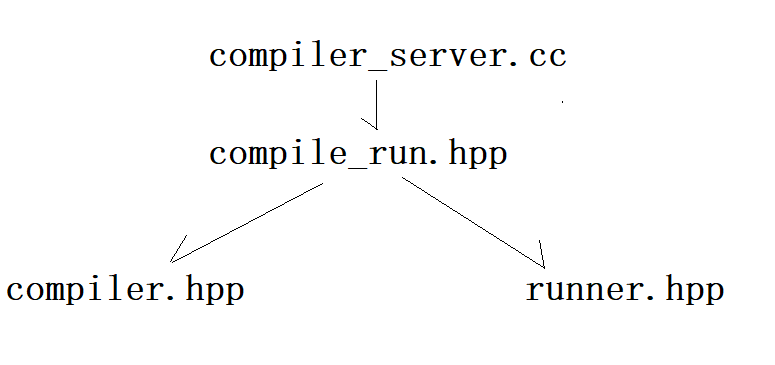
1、compiler.hpp
它是整个 OJ 系统的「代码编译器模块」,专门负责把用户提交的 C++ 源代码,调用 g++ 编译成可执行程序,并且捕获编译错误、保证编译过程安全、不影响主服务。
#pragma once

#include <iostream>
#include <sys/types.h>
#include <sys/stat.h>
#include <sys/wait.h>
#include <fcntl.h>
#include <unistd.h>
#include "../comm/Log.hpp"
#include "../comm/Util.hpp"

namespace ns_compiler
{
    using namespace LogModule;
    using namespace UtilModule;

    // 编译模块: 负责调用g++编译用户代码
    class Compiler
    {
    public:
        Compiler() = default;
        ~Compiler() = default;

        // 编译指定源文件, 生成可执行程序
        static bool Compile(const std::string &file_name)
        {
            pid_t pid = fork();
            if (pid < 0)
            {
                LOG(LogLevel::ERROR) << "创建子进程失败";
                return false;
            }
            else if (pid == 0)
            {
                // 子进程: 执行编译逻辑
                umask(0);
                int _stderr = open(PathUtil::CompileError(file_name).c_str(), O_CREAT | O_WRONLY, 0644);
                if (_stderr < 0)
                {
                    LOG(LogLevel::WARNING) << "打开stderr文件失败";
                    exit(1);
                }

                // 标准错误重定向到文件
                dup2(_stderr, 2);

                // 替换为g++执行编译
                execlp("g++", "g++", "-o", PathUtil::Exe(file_name).c_str(), PathUtil::Src(file_name).c_str(),
                       "-D", "COMPILER_ONLINE", "-std=c++11", nullptr);

                LOG(LogLevel::ERROR) << "启动编译器g++失败";
                exit(2);
            }
            else
            {
                // 父进程: 等待子进程完成
                waitpid(pid, nullptr, 0);
                if (FileUtil::IsFileExists(PathUtil::Exe(file_name)))
                {
                    LOG(LogLevel::INFO) << PathUtil::Src(file_name) << "编译成功";
                    return true;
                }
            }
            LOG(LogLevel::ERROR) << "编译失败, 未生成可执行程序";
            return false;
        }
    };
}
详细功能:
1. 调用 g++ 编译用户代码
1)接收一个唯一文件名(如 时间戳_ID)
2)找到对应的 .cpp 源文件
3)调用系统编译器 g++ 编译生成可执行文件 .exe
execlp("g++", "g++", "-o", 可执行文件, 源文件, "-D COMPILER_ONLINE", "-std=c++11", nullptr);
2. 创建子进程执行编译,实现安全沙箱(最重要!)
pid_t pid = fork();
if (pid == 0) {
    // 子进程执行编译
}
1)编译操作放在子进程里做
2)编译崩溃、卡死、出错不会影响主服务进程
3)这是安全沙箱的核心体现之一:进程隔离
3. 捕获编译错误信息,返回给前端
int _stderr = open(错误文件, O_CREAT | O_WRONLY, 0644);
dup2(_stderr, 2);
1)把 g++ 的标准错误(编译报错) 重定向到文件
2)用户代码语法错误、链接错误都会被保存下来
3)最后返回给网页显示:xxx 行缺少分号、变量未定义 等
4. 给编译添加关键宏定义:COMPILER_ONLINE
"-D", "COMPILER_ONLINE"
1)告诉编译器在线编译模式生效
2)让测试用例文件 tail.cpp 不重复引入头文件
3)实现用户代码 + 测试用例自动拼接
5. 等待编译完成,并判断是否成功
waitpid(pid, nullptr, 0);
if (可执行文件存在) 编译成功
1)父进程阻塞等待子进程编译完成
2)通过是否生成 exe 文件判断编译成功 / 失败
3)成功返回 true,失败返回 false
2、runner.hpp
它是 OJ 系统的「代码运行沙箱模块」,专门负责安全、受控地执行用户编译好的程序 ,限制 CPU 和内存资源,重定向输入输出,并返回程序运行状态。
#pragma once

#include <iostream>
#include <sys/time.h>
#include <sys/resource.h>
#include <sys/types.h>
#include <sys/wait.h>
#include <sys/stat.h>
#include <fcntl.h>
#include <cstdlib>
#include "../comm/Log.hpp"
#include "../comm/Util.hpp"

namespace ns_runner
{
    using namespace LogModule;
    using namespace UtilModule;

    // 运行模块: 执行用户程序, 限制资源, 重定向输入输出
    class Runner
    {
    public:
        Runner() = default;
        ~Runner() = default;

        // 设置进程资源限制(CPU时间、内存大小)
        static void SetProcLimit(int _cpu_limit, int _mem_limit)
        {
            // 设置CPU时长限制(秒)
            struct rlimit cpu_rlimit;
            cpu_rlimit.rlim_max = RLIM_INFINITY;
            cpu_rlimit.rlim_cur = _cpu_limit;
            setrlimit(RLIMIT_CPU, &cpu_rlimit);

            // 设置内存大小限制(KB)
            struct rlimit mem_rlimit;
            mem_rlimit.rlim_max = RLIM_INFINITY;
            mem_rlimit.rlim_cur = _mem_limit * 1024;
            setrlimit(RLIMIT_AS, &mem_rlimit);
        }

        // 运行可执行程序, 返回运行状态码
        static int Run(const std::string &file_name, int cpu_limit, int mem_limit)
        {
            std::string _execute = PathUtil::Exe(file_name);
            std::string _stdin = PathUtil::Stdin(file_name);
            std::string _stdout = PathUtil::Stdout(file_name);
            std::string _stderr = PathUtil::Stderr(file_name);

            umask(0);
            int _stdin_fd = open(_stdin.c_str(), O_CREAT | O_RDONLY, 0644);
            int _stdout_fd = open(_stdout.c_str(), O_CREAT | O_WRONLY, 0644);
            int _stderr_fd = open(_stderr.c_str(), O_CREAT | O_WRONLY, 0644);

            if (_stdin_fd < 0 || _stdout_fd < 0 || _stderr_fd < 0)
            {
                LOG(LogLevel::ERROR) << "运行时打开标准文件失败";
                return -1;
            }

            pid_t pid = fork();
            if (pid < 0)
            {
                LOG(LogLevel::ERROR) << "运行时创建子进程失败";
                close(_stdin_fd);
                close(_stdout_fd);
                close(_stderr_fd);
                return -2;
            }
            else if (pid == 0)
            {
                // 子进程: 重定向并执行程序
                dup2(_stdin_fd, 0);
                dup2(_stdout_fd, 1);
                dup2(_stderr_fd, 2);
                close(_stdin_fd);
                close(_stdout_fd);
                close(_stderr_fd);

                SetProcLimit(cpu_limit, mem_limit);
                execl(_execute.c_str(), _execute.c_str(), nullptr);

                exit(1);
            }
            else
            {
                // 父进程: 等待子进程退出
                close(_stdin_fd);
                close(_stdout_fd);
                close(_stderr_fd);

                int status = 0; // 出参
                waitpid(pid, &status, 0);
                LOG(LogLevel::INFO) << "运行完毕, info: " << (status & 0x7F);
                return status & 0x7F;
            }
        }
    };
}
1. 受控运行用户程序(沙箱核心)
1)调用 fork() 创建独立子进程。
2)在子进程中通过 execl() 替换执行用户的可执行程序。
3)用户程序崩溃、死循环只会杀死子进程,绝对不会影响主服务进程
,实现进程隔离。
2. 严格限制资源(防止恶意代码)
setrlimit(RLIMIT_CPU, &cpu_rlimit); // 限制CPU时间
setrlimit(RLIMIT_AS, &mem_rlimit);  // 限制内存大小
1)限制 CPU: 防止死循环耗尽服务器性能(超时系统自动杀死)。
2)限制内存: 防止无限 new 内存把服务器打挂(超限系统自动杀死)。
3)作用: 从操作系统内核层面限制资源,是资源隔离。
3. 重定向输入输出(文件隔离)
dup2(_stdin_fd, 0);  // 标准输入 <- 文件
dup2(_stdout_fd, 1); // 标准输出 -> 文件
dup2(_stderr_fd, 2); // 标准错误 -> 文件
1)用户代码的所有输入、输出、报错全部写入临时文件。
2)程序不能直接访问控制台,也不能访问系统文件。
3)作用:文件系统隔离,用户代码无法破坏服务器环境。
4. 捕获程序运行结果
1)父进程 waitpid 等待子进程退出。
2)获取子进程退出状态码 status。
3)提取 status & 0x7F 得到终止信号。
0:正常运行结束
6(SIGABRT):内存溢出
24(SIGXCPU):CPU 超时
11(SIGSEGV):段错误
5. 文件描述符安全管理
1)打开文件后,无论成功失败,都会及时 close。
2)子进程 dup2 后立即关闭无用的 fd,防止文件描述符泄漏。
3、compile_run.hpp
它是整个编译运行服务的「总调度核心」,负责把 Compiler(编译)和 Runner(运行)组装起来,提供一套完整的、对外可用的「代码编译 + 运行 + 结果返回 + 自动清理」服务接口。
#pragma once

#include <signal.h>
#include <jsoncpp/json/json.h>
#include "../comm/Log.hpp"
#include "../comm/Util.hpp"
#include "compiler.hpp"
#include "runner.hpp"

namespace ns_compile_and_run
{
    using namespace LogModule;
    using namespace UtilModule;
    using namespace ns_compiler;
    using namespace ns_runner;

    // 编译运行模块: 整合编译、运行、结果返回、临时文件清理
    class CompileAndRun
    {
    public:
        // 清理本次请求产生的所有临时文件
        static void RemoveTempFile(const std::string &file_name)
        {
            unlink(PathUtil::Src(file_name).c_str());
            unlink(PathUtil::Exe(file_name).c_str());
            unlink(PathUtil::CompileError(file_name).c_str());
            unlink(PathUtil::Stdin(file_name).c_str());
            unlink(PathUtil::Stdout(file_name).c_str());
            unlink(PathUtil::Stderr(file_name).c_str());
        }

        // 状态码转描述信息
        static std::string CodeToDesc(int code, const std::string &file_name)
        {
            std::string desc; // 出参
            switch (code)
            {
            case 0:
                desc = "编译运行成功";
                break;
            case -1:
                desc = "提交的代码为空";
                break;
            case -2:
                desc = "未知错误";
                break;
            case -3:
                FileUtil::ReadFile(PathUtil::CompileError(file_name), &desc, true);
                break;
            case SIGABRT:
                desc = "内存超过限制";
                break;
            case SIGXCPU:
                desc = "CPU使用超时";
                break;
            case SIGFPE:
                desc = "浮点数溢出";
                break;
            default:
                desc = "未知错误: " + std::to_string(code);
                break;
            }
            return desc;
        }

        // 编译运行服务入口
        // 输入: JSON字符串(代码、输入、资源限制)
        // 输出: JSON字符串(状态、描述、运行结果)
        static void Start(const std::string &in_json, std::string *out_json)
        {
            Json::Value in_value; // 出参
            Json::Reader reader;
            reader.parse(in_json, in_value);

            std::string code = in_value["code"].asString();
            std::string input = in_value["input"].asString();
            int cpu_limit = in_value["cpu_limit"].asInt();
            int mem_limit = in_value["mem_limit"].asInt();

            int status_code = 0;
            int run_result = 0;
            Json::Value out_value; // 出参
            std::string file_name;

            // 代码为空
            if (code.size() == 0)
            {
                status_code = -1;
                goto END;
            }

            // 生成唯一文件名
            file_name = FileUtil::UniqFileName();

            // 写入源文件
            if (!FileUtil::WriteFile(PathUtil::Src(file_name), code))
            {
                status_code = -2;
                goto END;
            }

            // 编译
            if (!Compiler::Compile(file_name))
            {
                status_code = -3;
                goto END;
            }

            // 运行
            run_result = Runner::Run(file_name, cpu_limit, mem_limit);
            if (run_result < 0)
                status_code = -2;
            else if (run_result > 0)
                status_code = run_result;
            else
                status_code = 0; // 运行成功


        END:
            out_value["status"] = status_code;
            out_value["reason"] = CodeToDesc(status_code, file_name);

            // 运行成功, 读取输出
            if (status_code == 0)
            {
                std::string stdout_str; // 出参
                FileUtil::ReadFile(PathUtil::Stdout(file_name), &stdout_str, true);
                out_value["stdout"] = stdout_str;

                std::string stderr_str;
                FileUtil::ReadFile(PathUtil::Stderr(file_name), &stderr_str, true);
                out_value["stderr"] = stderr_str;
            }

            // 构造返回JSON
            Json::StyledWriter writer;
            *out_json = writer.write(out_value);

            // 清理临时文件
            RemoveTempFile(file_name);
        }
    };
}
1. 整合编译 + 运行两大模块(总控)
1)调用 Compiler::Compile() 编译代码
2)调用 Runner::Run() 运行程序
3)对外只暴露一个入口:Start()
4)作用: 模块化解耦,上层不用关心内部细节,直接调用即可。
2. 解析输入 JSON,构造输出 JSON
1)输入: 前端 / 业务服务传过来的 JSON(代码、输入、CPU 限制、内存限制)
2)输出: 封装好的 JSON(状态码、原因、标准输出、标准错误)
3)作用: 统一服务间通信格式,方便 HTTP 接口传输。
3. 生成唯一文件名,保证多并发安全
file_name = FileUtil::UniqFileName();
1)毫秒时间戳 + 原子自增 ID
2)多线程 / 多请求同时编译运行不会文件名冲突
3)作用: 高并发安全,文件不覆盖、不混乱。
4. 状态码统一管理,错误信息人性化
CodeToDesc(status_code, file_name)
0:成功
-1:代码为空
-2:未知错误
-3:编译错误(直接读取编译错误文件)
SIGABRT:内存超限
SIGXCPU:CPU 超时
5. 自动清理所有临时文件(非常关键)
RemoveTempFile(file_name);
1)无论成功 / 失败,最后一定删除:
.cpp / .exe
.compile_error / .stdin / .stdout / .stderr
2)作用: 不残留垃圾文件,不占磁盘,安全不留痕迹。
6. 流程控制:失败直接跳转结束(goto)
1)代码为空 → 结束
2)写文件失败 → 结束
3)编译失败 → 结束
4)运行异常 → 结束
5)作用: 流程清晰,避免多层 if/else 嵌套。
4、compile_server.cc
它是整个编译运行服务的HTTP 服务器启动入口 ,本质是一个网络服务框架,负责接收前端网络请求,并把请求交给 compile_run.hpp 处理,最后把结果返回给前端。
#include"compile_run.hpp"
#include"../comm/httplib.h"

using namespace ns_compile_and_run;
using namespace httplib;

// 帮助提示: 参数错误时打印用法
void Usage(std::string proc)
{
    std::cerr << "Usage: " << "\n\t" << proc << " port" << std::endl;
}

// HTTP服务主入口: 提供在线编译运行接口
int main(int argc,char* argv[])
{
    // 校验启动参数
    if(argc!=2)
    {
        Usage(argv[0]);
        return 1;
    }

    Server svr;

    // 注册服务接口: 接收JSON, 处理后返回JSON
    svr.Post("/compile_and_run",[](const Request& req, Response& resp)
    {
        std::string in_json = req.body;
        std::string out_json; // 出参

        if(!in_json.empty())
        {
            // 调用核心编译运行服务
            CompileAndRun::Start(in_json,&out_json);
            resp.set_content(out_json,"application/json;charset=utf-8");
        }
    });

    // 启动服务器, 监听全部网卡
    svr.listen("0.0.0.0",atoi(argv[1]));
    return 0;
}
1. 搭建 HTTP 服务,提供网络接口
1)使用第三方 httplib 库搭建 http 服务器
2)对外暴露 http 接口,让前端 / 其他服务可以远程调用
3)作用: 让编译运行功能变成可远程访问的网络服务,而不是只能本地运行
2. 接收前端 POST 请求
svr.Post("/compile_and_run", ...)
1)接口地址:/compile_and_run
2)接收前端发来的 JSON 格式请求(代码、输入、资源限制)
3)作用: 完成前后端交互
3. 调用核心编译运行逻辑
CompileAndRun::Start(in_json, &out_json);
1)把前端传来的 json 字符串直接交给 compile_run 模块
2)由它完成:编译 → 运行 → 结果封装
3)作用:网络层与业务层解耦,网络只负责收发数据,业务负责编译运行
4. 返回 JSON 结果给前端
resp.set_content(out_json, "application/json;charset=utf-8");
1)把处理好的结果 json 发回前端
2)格式标准:application/json
3)作用: 前端可以直接解析并展示给用户
更多推荐


 3
3 0
0- 0


 已为社区贡献2条内容

所有评论(0)