
【Python系列课程】Python正则表达式(上):元字符、量词与核心函数
·
📊 阅读时长:23分钟 | 关键词:Python正则表达式、re模块、元字符、字符集、量词、贪婪/非贪婪
引言:为什么需要正则表达式?
你已经学会了字符串的索引、切片、各种方法(find()、replace()、split() 等),这些操作能解决 80% 的字符串处理需求。
但当你遇到这些问题时,上面的方法就捉襟见肘了:
- 验证一个字符串是否是合法的邮箱地址
- 从一段文本中提取所有手机号码
- 把文本中所有 URL 替换为可点击的链接
- 从HTML中提取所有标签之间的内容
这些问题有一个共同点:要匹配的不是固定的字符串,而是一类"模式"。
# 用普通字符串方法验证邮箱 —— 非常困难
text = "我的邮箱是 abc123@example.com"

# 用正则表达式 —— 一行搞定
import re
pattern = r'[\w\.-]+@[\w\.-]+\.\w+'
result = re.search(pattern, text)
print(result.group())  # abc123@example.com
正则表达式(Regular Expression) 就是用来描述这类"模式"的工具。
一、正则表达式基础
1.1 什么是正则表达式?
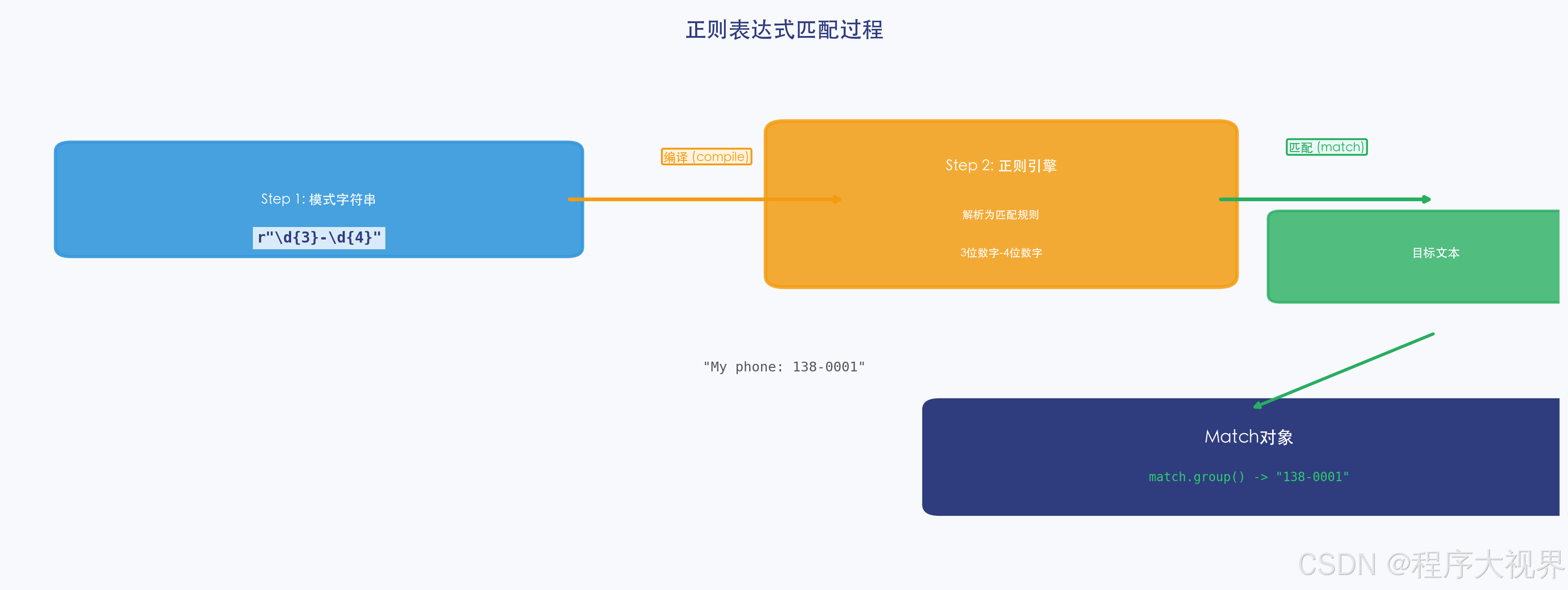
正则表达式是一串特殊的字符序列,用来定义搜索模式(Search Pattern)。
在 Python 中,我们通过内置的 re 模块来使用正则表达式。
import re

# 最基础的正则:直接匹配字符串
pattern = r"hello"
text = "hello world"

result = re.search(pattern, text)
print(result)        # <re.Match object; span=(0, 5), match='hello'>
print(result.group())  # hello
1.2 原始字符串 r"" —— 非常重要!
正则表达式中大量使用反斜杠 \,而 Python 字符串也用 \ 做转义。
# ❌ 不使用原始字符串 —— 需要双反斜杠,很难读
pattern1 = "\\d+"    # \\d 才能表示正则里的 \d

# ✅ 使用原始字符串 r"" —— 所见即所得
pattern2 = r"\d+"

print(pattern1 == pattern2)  # True,两者等价
黄金法则:写正则表达式时,永远在字符串前加 r。
1.3 re 模块的核心函数
| 函数 | 功能 | 返回值 |
|---|---|---|
re.search(pattern, string) |
搜索第一个匹配 | Match 对象 或 None |
re.match(pattern, string) |
从开头匹配 | Match 对象 或 None |
re.findall(pattern, string) |
找所有匹配 | 字符串列表 |
re.finditer(pattern, string) |
找所有匹配(迭代器版本) | 迭代器(节省内存) |
re.sub(pattern, repl, string) |
替换匹配内容 | 替换后的新字符串 |
re.split(pattern, string) |
按模式分割 | 字符串列表 |
二、元字符 —— 正则的"语法"
元字符(Metacharacters)是正则表达式中有特殊含义的字符。
2.1 最基础的元字符
import re

# . 匹配任意单个字符(除了换行符 \n)
print(re.findall(r"h.llo", "hello hills hollow"))
# ['hello', 'hills', 'hollow']

# ^ 匹配字符串开头
print(re.findall(r"^hello", "hello world"))   # ['hello']
print(re.findall(r"^hello", "say hello"))    # [] 不匹配,因为不在开头

# $ 匹配字符串结尾
print(re.findall(r"world$", "hello world"))  # ['world']
print(re.findall(r"world$", "world!"))      # [] 不匹配,因为不在结尾
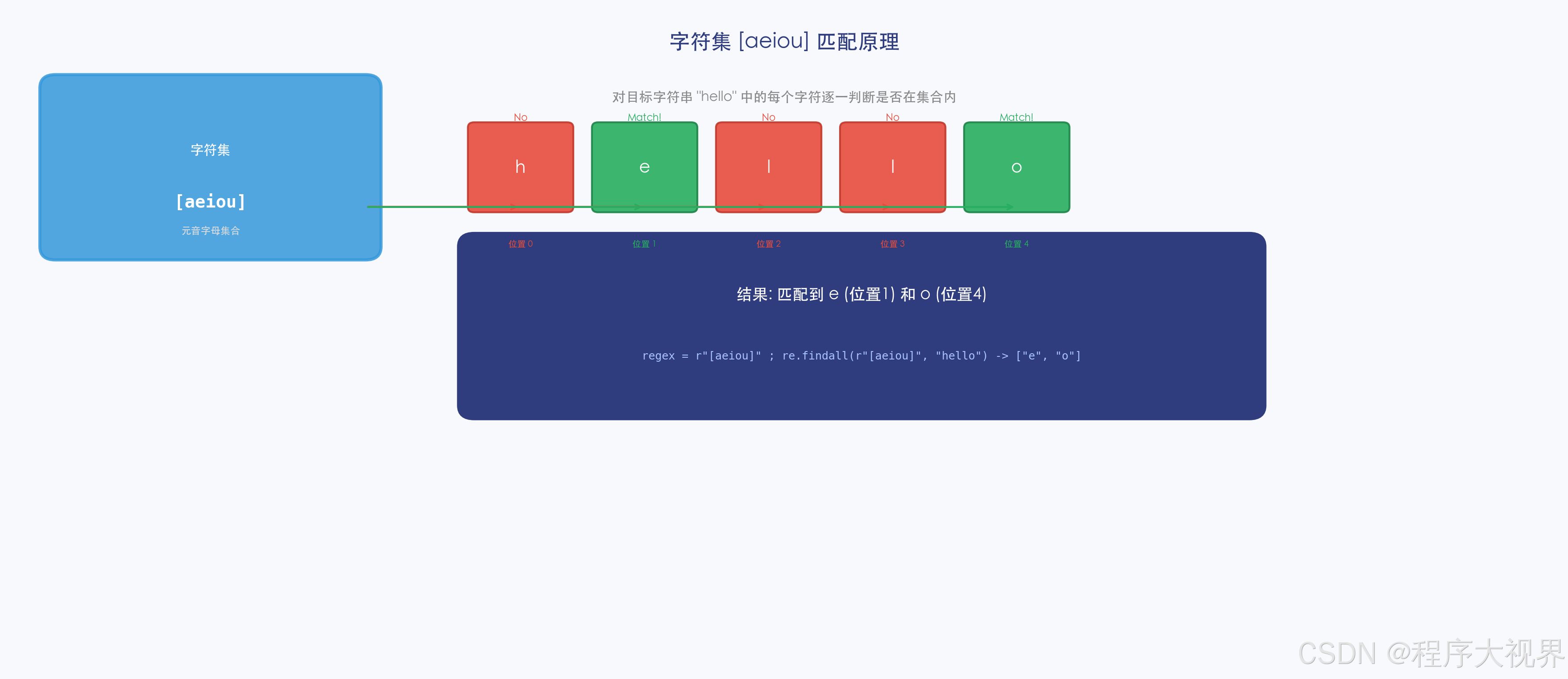
2.2 字符集 [] —— 匹配其中任意一个字符
import re

# [abc] 匹配 a 或 b 或 c
print(re.findall(r"[aeiou]", "hello world"))
# ['e', 'o', 'o']

# [a-z] 匹配 a 到 z 的任意小写字母
print(re.findall(r"[a-z]+", "Hello World 2024"))
# ['ello', 'orld']

# [0-9] 匹配任意数字
print(re.findall(r"[0-9]+", "我的电话是13800138000"))
# ['13800138000']

# [^abc] 匹配不在 a、b、c 中的任意字符(^ 在 [] 内表示"非")
print(re.findall(r"[^0-9]+", "price: $100"))
# ['price: $']

# 几个重要的预定义字符集(等价写法)
# \d 等价于 [0-9]       匹配任意数字
# \D 等价于 [^0-9]     匹配任意非数字
# \w 等价于 [a-zA-Z0-9_]  匹配"单词字符"(字母数字下划线)
# \W 等价于 [^a-zA-Z0-9_] 匹配非单词字符
# \s 匹配任意空白符(空格、Tab、换行)
# \S 匹配任意非空白符
2.3 量词 —— 匹配"重复次数"
量词用来指定前面那个字符或分组重复多少次。
import re

# * 匹配前面的元素 0 次或多次(尽可能多)
print(re.findall(r"ab*", "a ab abb abbb"))
# ['a', 'ab', 'abb', 'abbb']

# + 匹配前面的元素 1 次或多次(尽可能多)
print(re.findall(r"ab+", "a ab abb abbb"))
# ['ab', 'abb', 'abbb']  ← 注意 "a" 不匹配,因为 + 至少1次

# ? 匹配前面的元素 0 次或 1 次
print(re.findall(r"https?", "http https"))
# ['http', 'https']  ← s 出现0次或1次均可

# {n}    精确匹配 n 次
# {n,}   匹配至少 n 次
# {n,m} 匹配 n 到 m 次
print(re.findall(r"\d{3}", "123 4567 12"))
# ['123', '456']  ← 精确匹配3位数字

print(re.findall(r"\d{3,}", "123 4567 12"))
# ['123', '4567']  ← 至少3位数字

print(re.findall(r"\d{2,4}", "1 12 123 12345"))
# ['12', '123', '1234']  ← 2到4位数字(注意12345只取到前4位)
2.4 贪婪 vs 非贪婪( lazy)
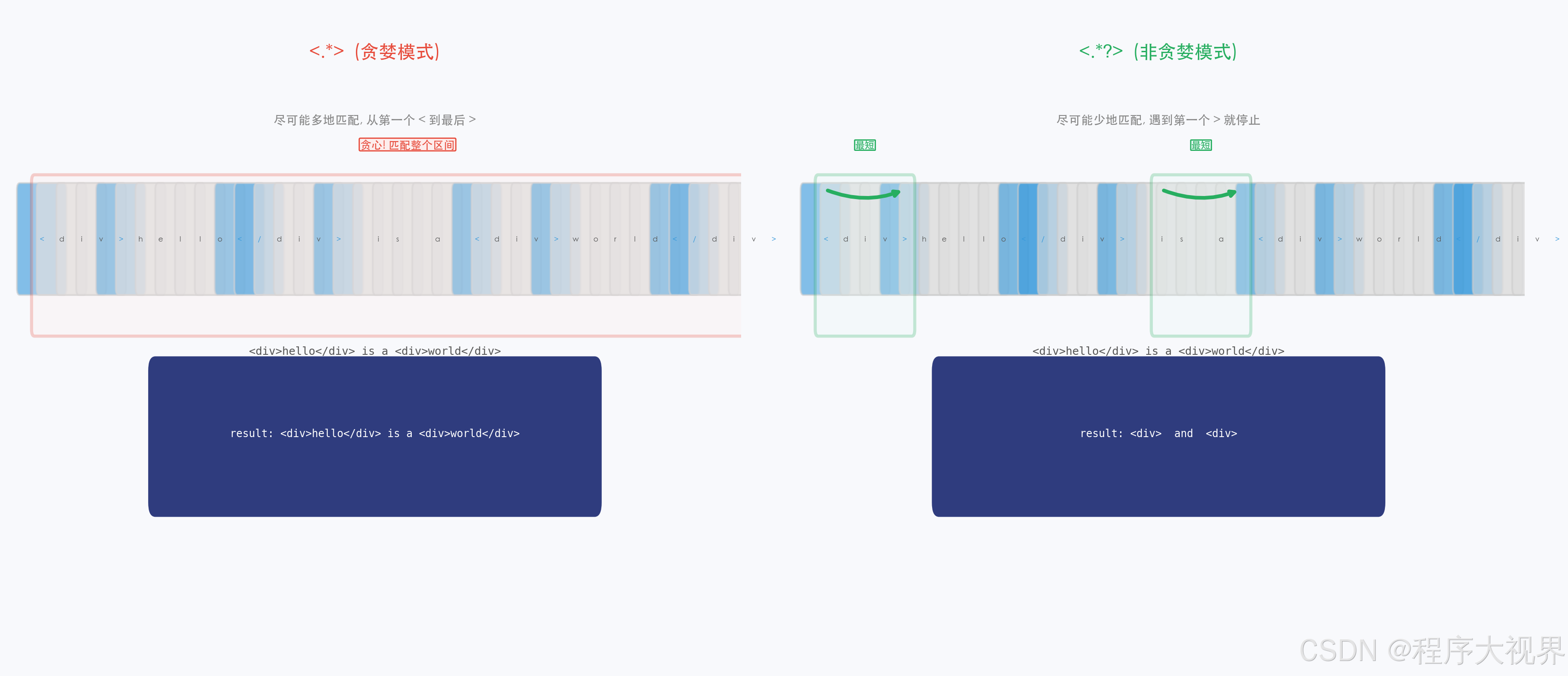
这是正则最反直觉的特性之一!
import re

text = "<div>hello</div><div>world</div>"

# 贪婪模式(默认):尽可能多地匹配
result1 = re.findall(r"<div>.*</div>", text)
print(result1)
# ['<div>hello</div><div>world</div>']  ← 一次性匹配了整段!

# 非贪婪模式(在量词后加 ?):尽可能少地匹配
result2 = re.findall(r"<div>.*?</div>", text)
print(result2)
# ['<div>hello</div>', '<div>world</div>']  ← 分别匹配了两个标签
2.5 分组 () —— 把多个字符当成一个整体
import re

# 分组1:把 abc 当成一个整体,重复1到3次
print(re.findall(r"(abc){1,3}", "abc abcabc abcabcabc"))
# ['abc', 'abc', 'abc']

# 分组2:提取子组
result = re.search(r"(\d{4})-(\d{2})-(\d{2})", "日期:2024-05-31")
if result:
    print(result.group(0))   # 2024-05-31  ← 完整匹配
    print(result.group(1))   # 2024        ← 第1个分组
    print(result.group(2))   # 05          ← 第2个分组
    print(result.groups())   # ('2024', '05', '31')  ← 所有分组

# 分组3:给分组命名(Python扩展语法)
result = re.search(r"(?P<year>\d{4})-(?P<month>\d{2})-(?P<day>\d{2})", "2024-05-31")
if result:
    print(result.group("year"))   # 2024
    print(result.group("month"))  # 05
    print(result.group("day"))    # 31
2.6 或运算符 |
import re

# 匹配 "cat" 或 "dog"
print(re.findall(r"cat|dog", "I have a cat and a dog"))
# ['cat', 'dog']

# 注意优先级:| 的优先级很低
print(re.findall(r"ca|dog", "cat dog"))   # ['ca', 'dog'] ← 可能和你预期不一样
print(re.findall(r"(cat|dog)", "cat dog"))  # ['cat', 'dog'] ← 用分组明确范围
三、re 模块常用函数详解
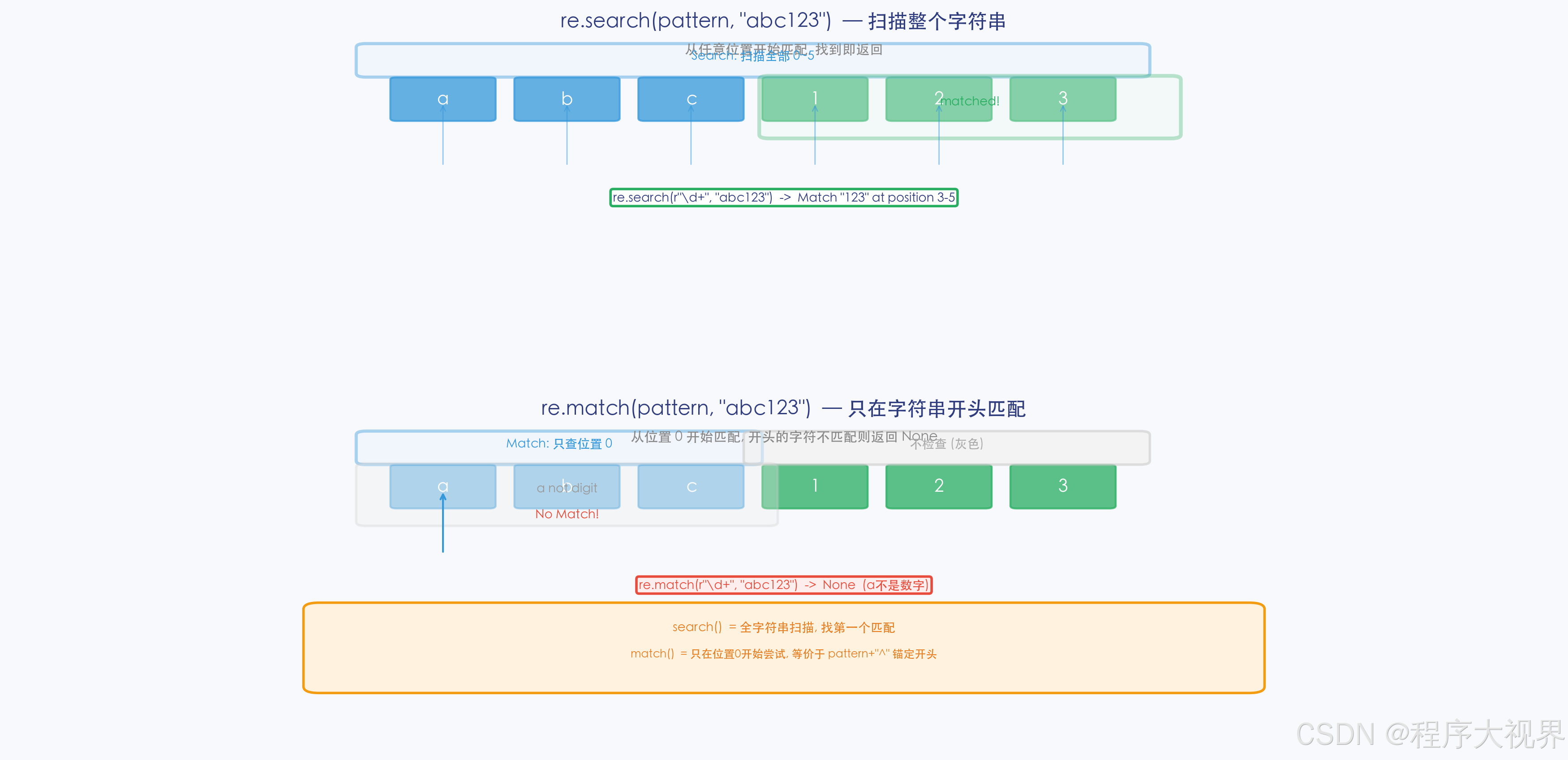
3.1 re.search() vs re.match()
import re

text = "我的电话是13800138000"

# search():在整段文本中搜索第一个匹配
result1 = re.search(r"\d+", text)
print(result1.group())  # 13800138000

# match():只从字符串开头匹配(相当于自动在模式前加了 ^)
result2 = re.match(r"\d+", text)
print(result2)             # None ← 开头是"我",不匹配!

result3 = re.match(r"我的", text)
print(result3.group())   # 我的
3.2 re.findall() 和 re.finditer()
import re

text = "我的电话13800138000,办公室62770000"

# findall():返回所有匹配的字符串列表(最常用)
phones = re.findall(r"\d{8}", text)
print(phones)  # ['13800138', '62770000']  ← 不太对,8位太短了

# 改进:匹配手机号(1开头,第二位是3-9,共11位)
phones = re.findall(r"1[3-9]\d{9}", text)
print(phones)  # ['13800138000']

# finditer():返回迭代器(处理大文本时节省内存)
for match in re.finditer(r"1[3-9]\d{9}", text):
    print(f"找到手机号:{match.group()},位置:{match.span()}")
3.3 re.sub() —— 替换
import re

text = "我的密码是123456,确认密码是123456"

# 基础替换:把密码替换成 ***
safe_text = re.sub(r"\d{6}", "******", text)
print(safe_text)
# 我的密码是******,确认密码是******

# 高级替换:使用函数动态生成替换内容
def double(match):
    """把匹配到的数字乘以2"""
    num = int(match.group())
    return str(num * 2)

result = re.sub(r"\d+", double, "价格:100,数量:3")
print(result)  # 价格:200,数量:6
3.4 re.compile() —— 预编译(提升性能)
如果一个正则表达式要重复使用多次,先编译它!
import re
import time

# ❌ 不编译:每次都要重新解析正则表达式(慢)
def without_compile(texts):
    results = []
    for text in texts:
        results.append(re.search(r"\d+", text))
    return results

# ✅ 预编译:只解析一次,后续直接使用(快)
def with_compile(texts):
    pattern = re.compile(r"\d+")  # 预编译
    results = []
    for text in texts:
        results.append(pattern.search(text))
    return results

# 性能对比(处理1万次)
texts = ["订单号:" + str(i) for i in range(10000)]

start = time.time()
without_compile(texts)
print(f"不编译耗时:{time.time() - start:.4f}秒")

start = time.time()
with_compile(texts)
print(f"预编译耗时:{time.time() - start:.4f}秒")
# 预编译通常快 2~5 倍!
四、实战场景
4.1 验证邮箱地址
import re

def is_valid_email(email):
    """简单的邮箱验证(教学用,生产环境请用专用库)"""
    pattern = r"^[a-zA-Z0-9._%+-]+@[a-zA-Z0-9.-]+\.[a-zA-Z]{2,}$"
    return re.match(pattern, email) is not None

# 测试
tests = [
    "test@example.com",        # ✅
    "user.name+tag@sub.domain.co.jp",  # ✅
    "invalid-email@",          # ❌
    "@missing-local.org",      # ❌
]
for email in tests:
    print(f"{email}: {'✅ 合法' if is_valid_email(email) else '❌ 不合法'}")
4.2 从文本中提取所有 URL
import re

text = """
欢迎访问我的网站:https://www.example.com
也可以发邮件到:contact@example.com
GitHub:https://github.com/username
"""

# 匹配 http/https URL
urls = re.findall(r"https?://[\w\.-]+(?:/[\w\.-]*)*", text)
print("找到的URL:")
for url in urls:
    print(f"  - {url}")
4.3 清洗数据:去掉所有 HTML 标签
import re

html = "<p>Hello <b>World</b>!</p>"
clean_text = re.sub(r"<[^>]+>", "", html)
print(clean_text)  # Hello World!

# 更安全的写法(处理自闭合标签)
clean_text2 = re.sub(r"<[^>]*>?", "", html)
print(clean_text2)  # Hello World!
五、动手练习
练习 1:判断字符串是否是中国手机号
import re

def is_chinese_phone(s):
    """
    判断字符串是否是中国手机号
    规则:1开头,第二位是3-9,共11位
    """
    # 在这里写你的代码
    pass

# 测试用例
print(is_chinese_phone("13800138000"))  # True
print(is_chinese_phone("12800138000"))  # False(第二位是2)
print(is_chinese_phone("1380013800"))   # False(只有10位)
练习 2:提取字符串中所有中文字符
import re

text = "Hello世界!My名字是Python学习者。"
chinese_chars = re.findall(r"[\u4e00-\u9fff]+", text)
print(chinese_chars)  # ['世界', '名字是', '学习者']
练习 3:把驼峰命名转换为下划线命名
import re

def camel_to_snake(s):
    """CamelCase → snake_case"""
    # 提示:在每一个大写字母前加下划线,然后转小写
    s = re.sub(r"(?<!^)(?=[A-Z])", "_", s)
    return s.lower()

print(camel_to_snake("CamelCase"))        # camel_case
print(camel_to_snake("HTTPResponseCode")) # http_response_code
小结
| 知识点 | 核心内容 |
|---|---|
| 元字符 | . ^ $ * + ? {} [] () | |
| 字符集 | [abc] 匹配任意一个;[^abc] 匹配不在其中的任意一个 |
| 预定义字符集 | \d 数字、\w 单词字符、\s 空白符 |
| 量词 | * 0次以上;+ 1次以上;? 0或1次;{n,m} n到m次 |
| 贪婪 vs 非贪婪 | 默认贪婪(多匹配);量词后加 ? 为非贪婪(少匹配) |
| 分组 | () 把多个字符当整体;(?P<name>...) 命名分组 |
| 常用函数 | search() 搜索;findall() 找全部;sub() 替换;compile() 预编译 |
下一篇文章,我们将深入正则表达式的进阶特性——环视(Lookahead/Lookbehind)、条件匹配、以及实战:用正则解析日志文件。这些特性让你能写出更精准的匹配模式。
本文是「Python从入门到数据分析」系列的第 14 篇,共 24 篇。关注我,不错过后续更新。
更多推荐
 5
5 0
0- 0


 已为社区贡献23条内容

所有评论(0)