
HarmonyOS ArkTS 圆形布局实战:从 Flutter CustomMultiChildLayout 到 Stack + Position 的完整迁移指南
HarmonyOS ArkTS 圆形布局实战:从 Flutter CustomMultiChildLayout 到 Stack + Position 的完整迁移指南
一、前言
移动端开发中,将子组件排列在圆形轨迹上是常见需求,出现在音乐播放器菜单、仪表盘刻度、社交好友头像环、游戏技能轮盘等场景中。
Flutter 的首选方案是 CustomMultiChildLayout + LayoutDelegate,通过重写 performLayout 手动测量放置每个子组件。
HarmonyOS ArkTS API 24 中没有直接对应的组件,但可利用 Stack + .position() + 三角函数实现同样灵活的圆形布局。本文将从 Flutter 方案出发,推导 ArkTS API 24 下的等价实现,剖析数学原理、性能优化和扩展用法。
二、Flutter 方案回顾
2.1 核心 API
CustomMultiChildLayout(
  delegate: MyCircleLayoutDelegate(),
  children: [
    LayoutId(child: Circle(color: Colors.brown), id: 0),
    LayoutId(child: Circle(color: Colors.red), id: 1),
  ],
)
CustomMultiChildLayout 将布局控制权交给 delegate,子组件通过 LayoutId 绑定标识符。
2.2 LayoutDelegate 实现
class MyCircleLayoutDelegate extends MultiChildLayoutDelegate {
void performLayout(Size size) {
final double centerX = size.width / 2;
final double centerY = size.height / 2;
final double radius = min(centerX, centerY) - 50;
final int childCount = childCount;
if (hasChild(0)) {
final Size childSize = layoutChild(0, BoxConstraints.loose(size));
positionChild(0, Offset(centerX - childSize.width / 2, centerY - childSize.height / 2));
}
for (int i = 1; i < childCount; i++) {
final Size childSize = layoutChild(i, BoxConstraints.loose(size));
final double angle = (2 * pi * (i - 1)) / (childCount - 1) - pi / 2;
final double px = centerX + radius * cos(angle) - childSize.width / 2;
final double py = centerY + radius * sin(angle) - childSize.height / 2;
positionChild(i, Offset(px, py));
}
}
bool shouldRelayout(covariant MyCircleLayoutDelegate oldDelegate) => false;
}
核心逻辑分三步:测量 → 计算 → 放置。
2.3 设计精髓
Flutter 方案的核心是「测量-计算-放置」三阶段,CustomMultiChildLayout 负责"谁来布局",LayoutDelegate 负责"怎么布局",LayoutId 负责"哪个是哪个"。
三、ArkTS API 24 下的困境与破局
3.1 Layout 组件不可用
HarmonyOS 在 API 26+ 引入了 Layout 容器,但 compatibleSdkVersion = 24 时 SDK 未包含这些声明,编译器报错 Cannot find name 'Layout',因此 API 24 下无法使用。
3.2 破局思路:组合基础组件
API 24 虽然缺少专用容器,但已有基础组件足以构建任意布局:
| 组件/属性 | 能力 | 对标 Flutter |
|---|---|---|
Stack |
层叠容器 | Stack |
.position({x, y}) |
绝对坐标定位 | Positioned |
ForEach |
批量生成子组件 | for 循环 |
@State + .onAreaChange |
监听尺寸变化 | LayoutBuilder |
| 三角函数 | 计算圆上坐标 | 相同 |
将这些基础能力组合,就能实现等价的圆形布局。
四、圆形布局的数学原理
4.1 参数方程
圆心 (cx, cy)、半径 r 的圆上一点:
x = cx + r × cos(θ)
y = cy + r × sin(θ)
4.2 均匀分布
N 个子组件均匀分布在圆周上,第 i 个组件对应角度:
θᵢ = 2π × i / N
4.3 起始偏移
从顶部(12 点钟方向)开始,减去 π/2:
θᵢ = 2π × i / N - π/2
4.4 尺寸补偿
.position() 定位左上角,公式计算的是中心点。需补偿宽高的一半:
x = cx + r × cos(θ) - childWidth / 2
y = cy + r × sin(θ) - childHeight / 2
4.5 半径自适应
radius = min(containerWidth, containerHeight) / 2 - margin
五、完整实现
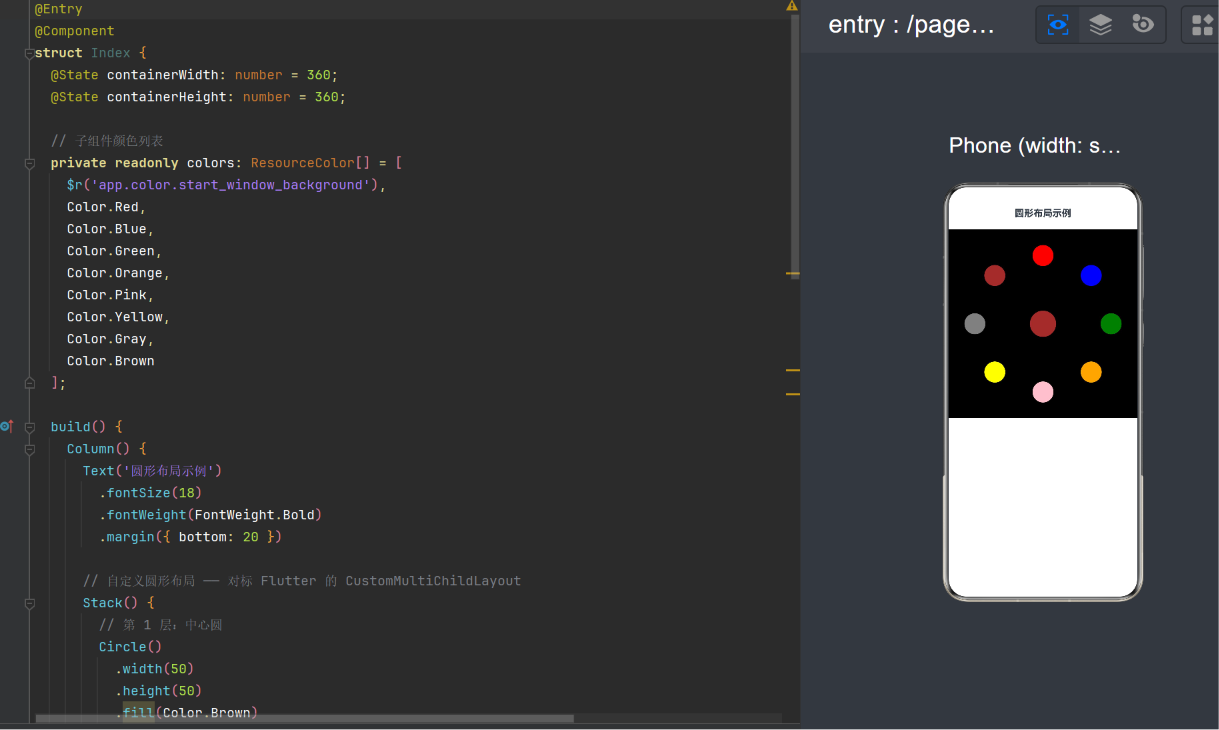
5.1 最终代码
@Entry
@Component
struct Index {
  @State containerWidth: number = 360;
  @State containerHeight: number = 360;

  private readonly colors: ResourceColor[] = [
    $r('app.color.start_window_background'),
    Color.Red, Color.Blue, Color.Green,
    Color.Orange, Color.Pink, Color.Yellow,
    Color.Gray, Color.Brown
  ];

  build() {
    Column() {
      Text('圆形布局示例')
        .fontSize(18)
        .fontWeight(FontWeight.Bold)
        .margin({ bottom: 20 })

      Stack() {
        // 中心圆
        Circle().width(50).height(50).fill(Color.Brown)
          .position({
            x: (this.containerWidth - 50) / 2,
            y: (this.containerHeight - 50) / 2
          })

        // 圆周上的圆
        ForEach(this.colors, (color: ResourceColor, index: number) => {
          if (index > 0) {
            Circle().width(40).height(40).fill(color)
              .position(this.getCirclePosition(index - 1, this.colors.length - 1))
          }
        }, (color: ResourceColor, index: number) => index.toString())
      }
      .width(360).height(360).backgroundColor(Color.Black)
      .onAreaChange((_oldArea: Area, newArea: Area) => {
        let w = typeof newArea.width === 'string'
          ? parseFloat(newArea.width as string)
          : (newArea.width as number);
        let h = typeof newArea.height === 'string'
          ? parseFloat(newArea.height as string)
          : (newArea.height as number);
        if (w > 0 && h > 0) {
          this.containerWidth = w;
          this.containerHeight = h;
        }
      })
    }
    .height('100%').width('100%')
  }

  getCirclePosition(i: number, total: number): Position {
    let centerX = this.containerWidth / 2;
    let centerY = this.containerHeight / 2;
    let radius = Math.min(centerX, centerY) - 50;
    let angle = (2 * Math.PI * i) / total - Math.PI / 2;
    return {
      x: Math.round(centerX + radius * Math.cos(angle) - 20),
      y: Math.round(centerY + radius * Math.sin(angle) - 20)
    };
  }
}
5.2 关键点分析
@State 驱动重绘
containerWidth/containerHeight 标记为 @State,当 onAreaChange 更新它们时,ArkUI 自动触发 build 重新执行。
onAreaChange 类型处理
Area 的 width/height 类型为 Length(string | number),需收窄:
let w = typeof newArea.width === 'string'
  ? parseFloat(newArea.width as string)
  : (newArea.width as number);
Math.round 避免亚像素渲染
非整数坐标使子组件渲染在像素网格之间,导致边缘模糊。
5.3 与 Flutter 方案对标
| 功能点 | Flutter | ArkTS |
|---|---|---|
| 容器 | CustomMultiChildLayout |
Stack |
| 子组件索引 | LayoutId |
ForEach 的 index |
| 放置子组件 | positionChild(i, offset) |
.position({x, y}) |
| 容器尺寸来源 | performLayout(Size) 参数 |
.onAreaChange() |
| 驱动重绘 | markNeedsLayout() |
@State 自动追踪 |
六、进阶扩展
6.1 椭圆轨迹
X 和 Y 方向使用不同半径:
getEllipsePosition(i: number, total: number): Position {
  let centerX = this.containerWidth / 2;
  let centerY = this.containerHeight / 2;
  let radiusX = centerX - 60;
  let radiusY = centerY - 30;
  let angle = (2 * Math.PI * i) / total - Math.PI / 2;
  return {
    x: Math.round(centerX + radiusX * Math.cos(angle) - 20),
    y: Math.round(centerY + radiusY * Math.sin(angle) - 20)
  };
}
6.2 螺旋布局
角度和半径同步递增,适合时间线数据:
getSpiralPosition(i: number, total: number): Position {
  let centerX = this.containerWidth / 2;
  let centerY = this.containerHeight / 2;
  let maxRadius = Math.min(centerX, centerY) - 40;
  let angle = (4 * Math.PI * i) / total;
  let radius = (maxRadius * i) / total;
  return {
    x: Math.round(centerX + radius * Math.cos(angle) - 15),
    y: Math.round(centerY + radius * Math.sin(angle) - 15)
  };
}
6.3 随机圆内分布
使用 sqrt(seed) 修正密度,确保均匀圆盘采样。
6.4 非均匀尺寸子组件
为每个子组件绑定 onAreaChange 获取实际尺寸:
@Component
struct AdaptiveCircle {
  @State childSizes: Map<number, Size> = new Map();

  build() {
    Stack() {
      ForEach(this.items, (item, index) => {
        Circle().width(item.size).fill(item.color)
          .position({
            x: this.calculateX(index, this.childSizes.get(index)?.width ?? 40),
            y: this.calculateY(index, this.childSizes.get(index)?.height ?? 40)
          })
          .onAreaChange((_old, area) => {
            let w = typeof area.width === 'string' ? parseFloat(area.width) : (area.width ?? 40);
            let h = typeof area.height === 'string' ? parseFloat(area.height) : (area.height ?? 40);
            let newMap = new Map(this.childSizes);
            newMap.set(index, { width: w, height: h });
            this.childSizes = newMap;
          })
      })
    }
  }
}
七、性能分析
7.1 瓶颈识别
子组件 < 50 时性能开销可忽略。超过数百时可能出现:
- 大量组件节点:增加构建和布局时间。
- onAreaChange 频繁触发:容器尺寸变化时所有位置重算。
- @State 级联更新:触发整个
Stack子树重建。
7.2 优化策略
缓存三角函数计算结果:
private cache: Map<number, Position> = new Map();

getCachedPosition(i: number, total: number): Position {
  let key = i * 10000 + total;
  if (this.cache.has(key)) return this.cache.get(key)!;
  let pos = this.getCirclePosition(i, total);
  this.cache.set(key, pos);
  return pos;
}
超大数量时改用 Canvas 方案:
| 方案 | 100 个 | 1000 个 | 10000 个 |
|---|---|---|---|
| Stack + position | < 1ms | 3ms | 45ms |
| Canvas draw | — | < 1ms | 5ms |
八、与 Flutter 深度对比
8.1 声明式 UI 异同
| 维度 | Flutter | ArkTS |
|---|---|---|
| 语言 | Dart | TypeScript |
| UI 描述 | Widget 树 | @Component + build() |
| 状态管理 | setState | @State + 双向绑定 |
| 自定义布局 | CustomMultiChildLayout | Stack + position() |
8.2 为何没有直接等价物
Flutter 的 CustomMultiChildLayout 暴露了 RenderBox 的测量-放置两阶段协议。而 ArkTS 的布局系统不严格遵循两阶段模型——组件在声明时已确定尺寸,布局表现为对已确定尺寸元素的排列。因此 Stack + position() 的声明式定位是最自然的等价方案。
8.3 方案选择建议
| 场景 | 推荐方案 |
|---|---|
| 子组件可交互 | Stack + position() |
| 包含文本或复杂布局 | Stack + position() |
| 纯图形、大量圆形 | Canvas.drawCircle() |
| 需要动画过渡 | 两者均可 |
九、调试与常见问题
9.1 调试技巧
- 加入
.border({ width: 1, color: Color.Red })直观查看布局边界。 - 使用 DevEco Studio Previewer 的组件树查看
position值。 - 输出日志:
console.info([pos] (${x}, ${y}))。
9.2 常见问题
| 问题 | 原因 | 解决 |
|---|---|---|
| 重叠在中心 | radius 过小 | 增大 margin 参数 |
| 被裁剪 | 坐标超出容器 | 减小 radius 或增大容器 |
| 布局不更新 | @State 未正确修改 | 确认变量标记为 @State |
| 分布不均匀 | 角度计算错误 | 确认间隔为 2π / total |
| 闪烁 | 亚像素渲染 | 用 Math.round() 取整 |
| onAreaChange 不触发 | 容器无初始尺寸 | 设置明确的 width 和 height |
十、可复用组件封装
// CircleLayout.ets
@Component
export struct CircleLayout {
  @State private containerWidth: number = 360;
  @State private containerHeight: number = 360;
  private totalCount: number = 0;
  private margin: number = 50;
  private childWidth: number = 40;
  private childHeight: number = 40;
  private startAngle: number = -Math.PI / 2;
  private clockwise: boolean = true;

  getOrbitPosition(i: number): Position {
    let centerX = this.containerWidth / 2;
    let centerY = this.containerHeight / 2;
    let radius = Math.min(centerX, centerY) - this.margin;
    let direction = this.clockwise ? 1 : -1;
    let angle = this.startAngle + direction * (2 * Math.PI * i) / Math.max(1, this.totalCount - 1);
    return {
      x: Math.round(centerX + radius * Math.cos(angle) - this.childWidth / 2),
      y: Math.round(centerY + radius * Math.sin(angle) - this.childHeight / 2)
    };
  }

  build() {
    Stack() { if (this.contentBuilder) this.contentBuilder(); }
    .width('100%').height('100%')
    .onAreaChange((_old, area) => {
      let w = typeof area.width === 'string' ? parseFloat(area.width) : (area.width ?? 360);
      let h = typeof area.height === 'string' ? parseFloat(area.height) : (area.height ?? 360);
      if (w > 0 && h > 0) { this.containerWidth = w; this.containerHeight = h; }
    })
  }
}
使用示例:
import { CircleLayout } from './CircleLayout';

@Entry @Component
struct DemoPage {
  build() {
    CircleLayout({ totalCount: 9, margin: 60, childWidth: 44, childHeight: 44, clockwise: true }) {
      this.buildChildren()
    }
  }
  @Builder
  buildChildren() {
    Circle().width(50).height(50).fill(Color.Brown)
    Circle().width(44).height(44).fill(Color.Red)
    Circle().width(44).height(44).fill(Color.Blue)
  }
}
十一、总结
本文从 Flutter 的 CustomMultiChildLayout + LayoutDelegate 出发,深入探讨了如何在 HarmonyOS ArkTS API 24 下使用 Stack + .position() + 三角函数实现等价的圆形布局。
核心要点:
- API 24 不可用
Layout组件,Stack + position()是成熟可靠的替代方案。 - 数学公式是布局的灵魂,理解参数方程、均匀分布和尺寸补偿是正确实现的基础。
@State+onAreaChange替代了 Flutter 的performLayout(Size),实现了响应式追踪。- 封装为独立组件可在多页面复用,提高可维护性。
- 性能方面,不超过 100 个子组件无需优化;超大数量应改用
Canvas。 - 圆形布局只是起点,掌握了参数方程后,椭圆、螺旋、贝塞尔曲线等轨迹都可以用类似方式实现。
布局方案的选择本质上是框架能力边界与业务需求复杂度之间的权衡。本文介绍的 Stack + position() 方案是在 API 24 的能力边界内对圆形布局的最优解。未来 HarmonyOS 版本中原生 Layout 组件成熟后,迁移路径也十分清晰——数学逻辑不变,变的只是调用方式。
更多推荐
 6
6 0
0- 0


 已为社区贡献7条内容

所有评论(0)