
vue 甘特图 vxe-gantt 的使用(五):天视图的渲染
·
在项目进度管理中,天视图是最常用的时间维度之一——它能够精确展示任务在每一天的起止位置,甚至细化到小时和分钟。vxe-gantt 提供了强大的天视图(day view) 渲染能力,支持 默认模式 和 精确模式 两种粒度,满足从日常任务跟踪到精细化排期的各种需求。
说明
vxe-gantt 通过 taskViewConfig.scales 配置项控制时间轴的层级结构。天视图通常配置为 [‘month’, ‘date’],即时间轴分为“月”和“日”两级刻度,每个单元格代表一天。
| 配置项 | 值 | 说明 |
|---|---|---|
| taskViewConfig.scales | [‘month’, ‘date’] | 以月-日为层级渲染时间轴,每个单元格对应一天。 |
| taskViewConfig.viewStyle.cellWidth | 数值(如 120) | 每个日期单元格的宽度(单位:px)。 |
| taskConfig.dateFormat | 日期格式字符串 | 控制日期解析精度,决定甘特条在单元格内的精确位置。 |
适用场景:短期项目(数天至数月)、任务排期、日常工作计划、敏捷迭代跟踪等。
默认模式
在默认模式下,甘特图将日期解析到 天(yyyy-MM-dd),每个单元格对应一天。甘特条以天为单位在时间轴上定位,不区分具体的时间点(如小时、分钟)。
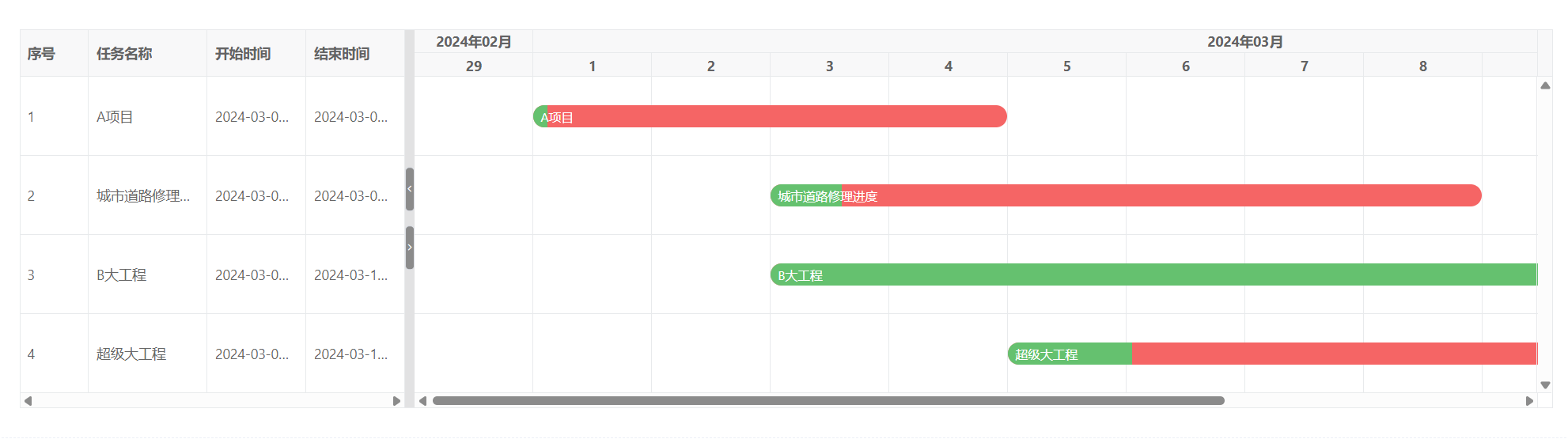
| 特点 | 说明 |
|---|---|
| ✅ 直观清晰 | 任务按天定位,一眼看出哪些天有任务。 |
| ✅ 数据兼容性强 | 即使日期包含时分秒,也会自动截取到天。 |
| ⚠️ 精度有限 | 无法区分同一天内的不同时间段。 |
| 💡 适用场景 | 日常任务跟踪、周计划、月度排期。 |
<template>
  <div>
    <vxe-gantt v-bind="ganttOptions"></vxe-gantt>
  </div>
</template>

<script setup>
import { reactive } from 'vue'

const ganttOptions = reactive({
  border: true,
  showOverflow: true,
  cellConfig: {
    height: 80
  },
  taskBarConfig: {
    showProgress: true,
    showContent: true,
    barStyle: {
      round: true,
      bgColor: '#f56565',
      completedBgColor: '#65c16f'
    }
  },
  taskViewConfig: {
    scales: ['month', 'date'],
    tableStyle: {
      width: 320
    },
    viewStyle: {
      cellWidth: 120
    }
  },
  columns: [
    { type: 'seq', field: 'seq', width: 70 },
    { field: 'title', title: '任务名称' },
    { field: 'start', title: '开始时间', width: 100 },
    { field: 'end', title: '结束时间', width: 100 }
  ],
  data: [
    { id: 10001, title: 'A项目', start: '2024-03-01 08:00:00', end: '2024-03-04 12:30:00', progress: 3 },
    { id: 10002, title: '城市道路修理进度', start: '2024-03-03 09:30:00', end: '2024-03-08 14:00:00', progress: 10 },
    { id: 10003, title: 'B大工程', start: '2024-03-03 06:30:20', end: '2024-03-11 09:30:40', progress: 90 },
    { id: 10004, title: '超级大工程', start: '2024-03-05 12:30:00', end: '2024-03-11 18:30:00', progress: 15 }
  ]
})
</script>
精确模式:精确到时分秒
通过设置 taskConfig.dateFormat,可以指定日期解析的精度(如 yyyy-MM-dd HH:mm:ss),让甘特条在单元格内精确反映任务的起止时刻。即使是天视图,也能在单日内展示任务在不同时段的分布。
注意:精确模式下,任务的 start 和 end 字段必须与 dateFormat 格式完全一致。
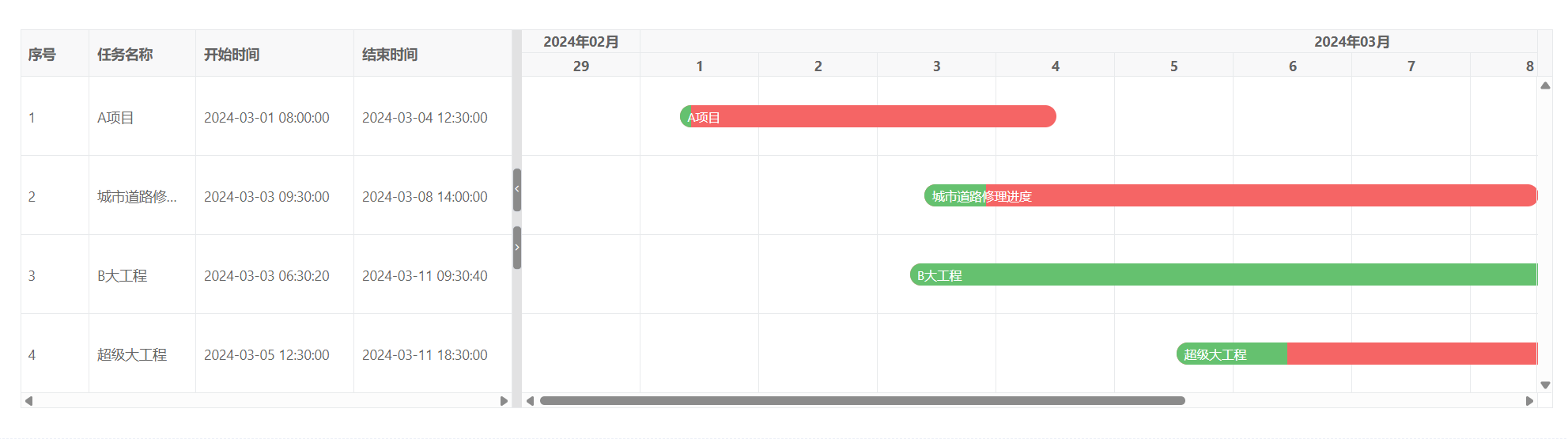
| 特点 | 说明 |
|---|---|
| ✅ 精度极高 | 可精确到秒,甘特条在单元格内的偏移量与实际时间对应。 |
| ✅ 视觉细腻 | 单日内的多个任务可以清晰区分先后顺序。 |
| ⚠️ 数据格式严格 | 日期字符串必须完全符合 dateFormat,否则解析失败。 |
| 💡 适用场景 | 精细排期、工时管理、生产线调度等需要精确到时刻的场景。 |
<template>
  <div>
    <vxe-gantt v-bind="ganttOptions"></vxe-gantt>
  </div>
</template>

<script setup>
import { reactive } from 'vue'

const ganttOptions = reactive({
  border: true,
  showOverflow: true,
  cellConfig: {
    height: 80
  },
  taskConfig: {
    dateFormat: 'yyyy-MM-dd HH:mm:ss'
  },
  taskBarConfig: {
    showProgress: true,
    showContent: true,
    barStyle: {
      round: true,
      bgColor: '#f56565',
      completedBgColor: '#65c16f'
    }
  },
  taskViewConfig: {
    scales: ['month', 'date'],
    tableStyle: {
      width: 320
    },
    viewStyle: {
      cellWidth: 120
    }
  },
  columns: [
    { type: 'seq', field: 'seq', width: 70 },
    { field: 'title', title: '任务名称' },
    { field: 'start', title: '开始时间', width: 160 },
    { field: 'end', title: '结束时间', width: 160 }
  ],
  data: [
    { id: 10001, title: 'A项目', start: '2024-03-01 08:00:00', end: '2024-03-04 12:30:00', progress: 3 },
    { id: 10002, title: '城市道路修理进度', start: '2024-03-03 09:30:00', end: '2024-03-08 14:00:00', progress: 10 },
    { id: 10003, title: 'B大工程', start: '2024-03-03 06:30:20', end: '2024-03-11 09:30:40', progress: 90 },
    { id: 10004, title: '超级大工程', start: '2024-03-05 12:30:00', end: '2024-03-11 18:30:00', progress: 15 }
  ]
})
</script>
两种模式对比
| 对比维度 | 默认模式 | 精确模式 |
|---|---|---|
| 日期解析 | 仅解析到天(yyyy-MM-dd) | 按 dateFormat 解析(如 yyyy-MM-dd HH:mm:ss) |
| 甘特条定位 | 占据整个日期单元格(左对齐或居中) | 根据实际时刻在单元格内偏移,显示精确起止 |
| 数据字段要求 | start/end 至少包含日期 | 必须包含完整的时间信息(时分秒) |
| 视觉表现 | 任务条填满整个单元格宽度 | 任务条按时间比例缩放在单元格内 |
| 性能开销 | 较低 | 稍高(需进行更精细的时间计算) |
| 典型场景 | 日计划、里程碑概览 | 工时统计、精确到小时的排期 |
- vxe-gantt 的天视图提供了两种使用模式:
- 默认模式:以天为粒度,简单直观,适合日常任务跟踪和计划展示。
- 精确模式:通过 taskConfig.dateFormat 指定时间精度,在单元格内精确定位任务的起止时刻,适合需要细粒度时间管理的场景。
更多推荐

 10
10 0
0- 0


 已为社区贡献2条内容

所有评论(0)