
韦东山嵌入式linux系列-spi驱动
spi相关理论:【STM32】SPI通信_keil w25q80应用-CSDN博客
0 SPI总线驱动模型
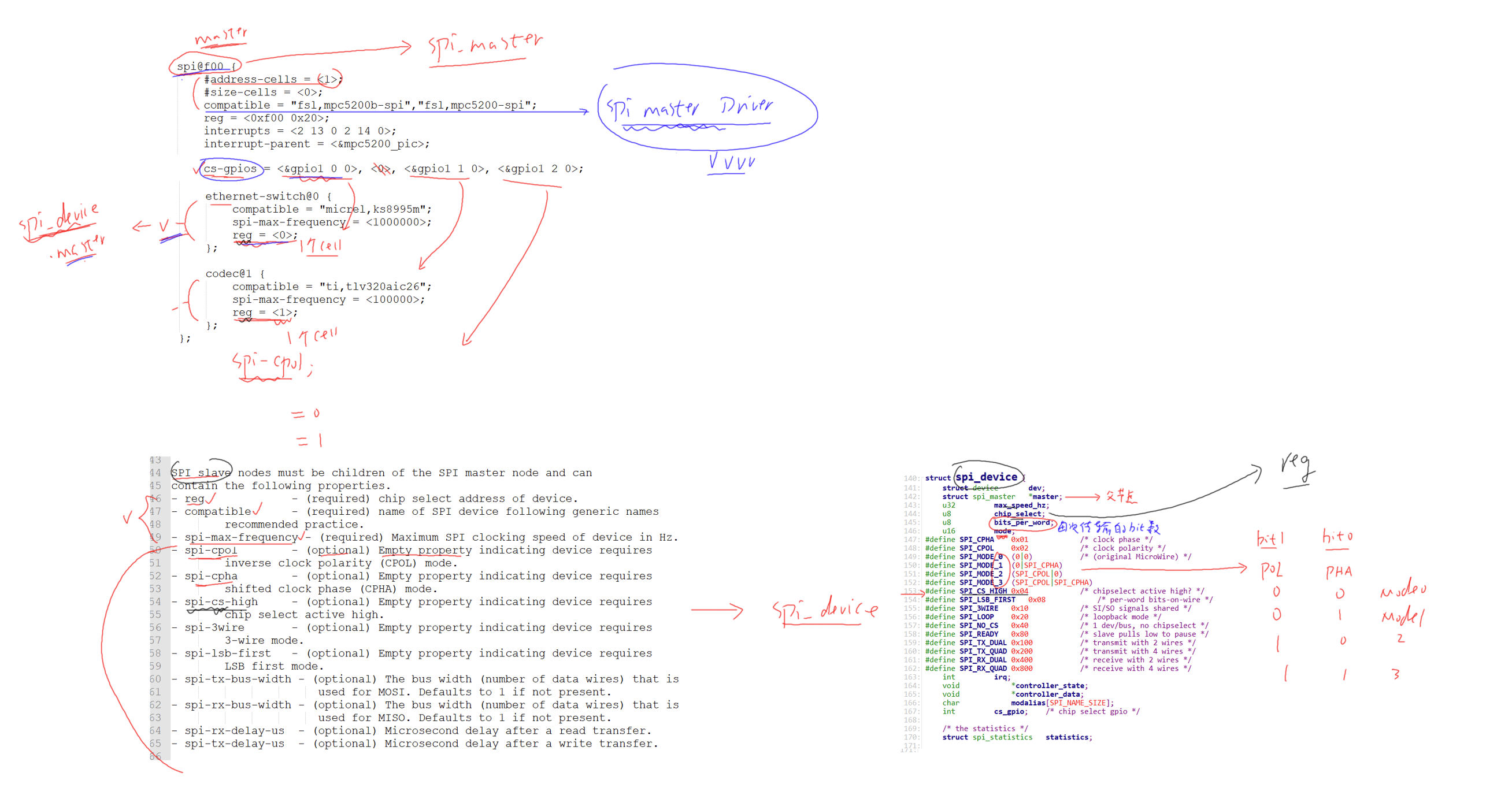
- 总线层SPI 总线核心框架,维护设备、驱动链表,依据
compatible字符串匹配设备与驱动,匹配成功触发probe。 - 主机层 spi_master代表 SoC 内置 SPI 控制器硬件,负责生成时钟、电平时序、硬件收发、片选控制;由芯片原厂/BSP 驱动实现,普通开发无需编写。
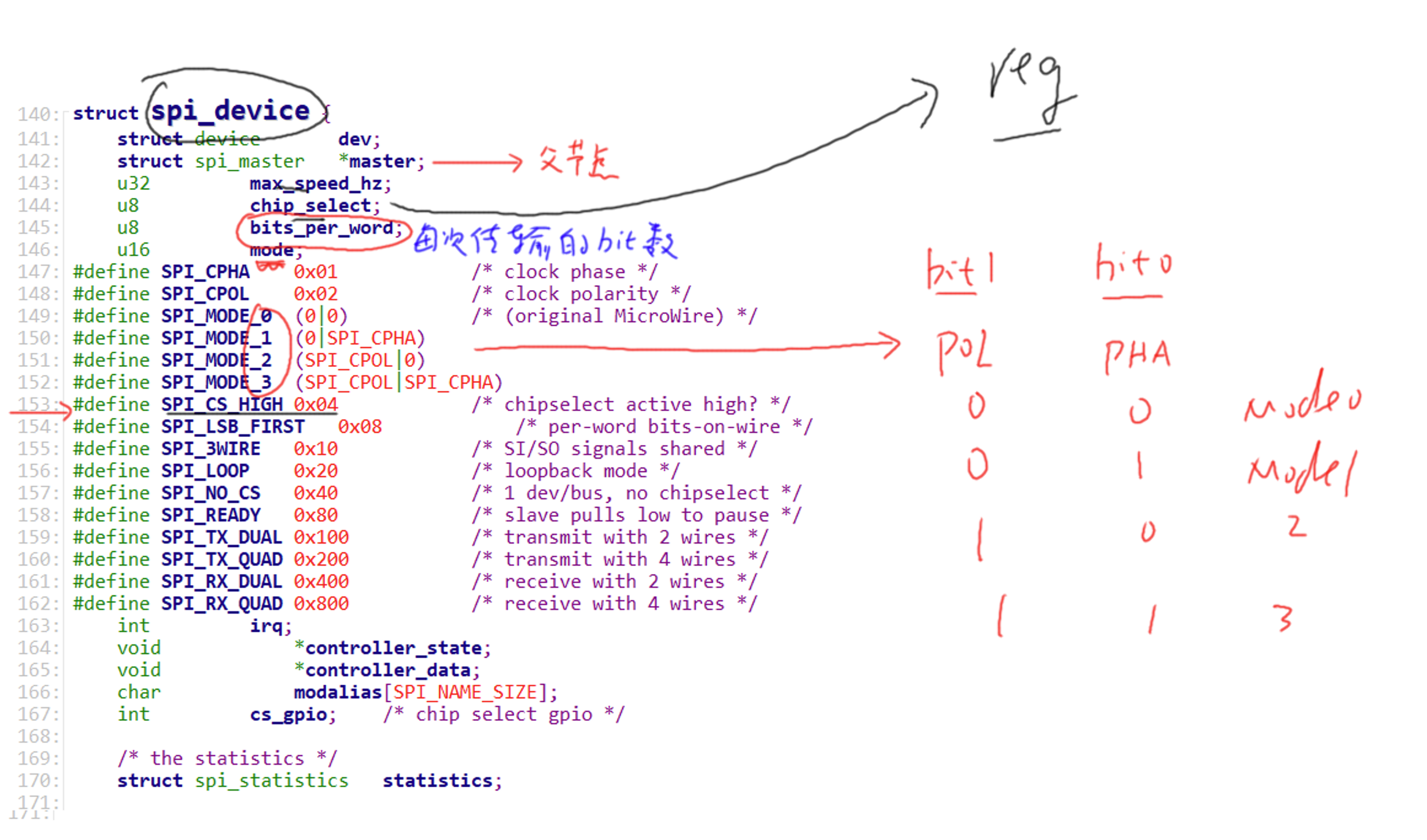
- 设备层 spi_device挂在 SPI 总线上的外设(W25Q64、OLED、传感器),设备树描述硬件信息,内核解析后自动生成该结构体实例。
- 驱动层 spi_driver外设业务驱动,实现设备初始化、数据收发、命令控制,对外提供应用访问接口。
这里写的是 SPI 从设备业务驱动
- 归属:
spi_driver层级,依托 SPI 总线模型运行 - 核心标识
- 驱动结构体:
struct spi_driver - 匹配规则:设备树
compatible字段绑定 - 核心回调:
probe初始化、remove资源释放 - 通信方式:调用
spi_sync标准接口完成全双工收发 - 对外接口:字符设备 +
ioctl,供应用层下发读写 ID、存储操作指令
- 层级边界
- 不触碰底层
spi_master控制器硬件配置 - 不用平台总线模型,专为 SPI 外挂从设备设计
1. spi_master
- 芯片厂商写的
- 你没做
2. spi_device
- 来源:设备树 DTS
- 编写者:你
- 创建者:内核自动创建
- 结论:你定义硬件,内核帮你生成设备
3. spi_driver
- 编写者:驱动开发
- 内容:probe、remove、ioctl、SPI 通信
- 结论:你写的驱动
1 借助linux 内核写好的驱动
第0步:找对应的spi接口
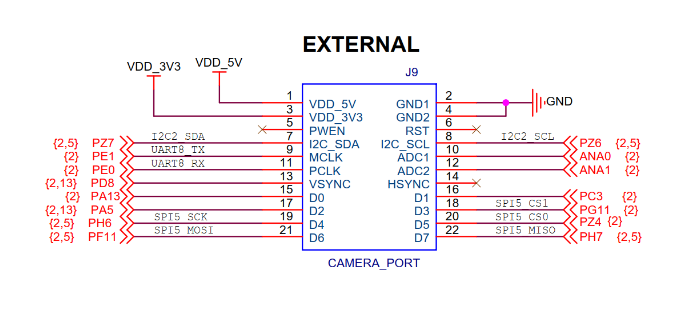
SPI5-CS1------>PG11{2}
SPI5-CS0------>PZ4{2}
SPI5-MISO------>PH7{2,5}
SPI5-MOSI------>PF11{2,5}
SPI5-CLK------>PH6{2,5}
第1步:先确认设备匹配标识
cat /proc/device-tree/compatible
完整板级标识是 stm32mp157c-100ask-512d-v1
第2步:查看当前系统 SPI 相关信息
cat /proc/devices | grep spi
ls /sys/bus/spi/devices/
dmesg | grep -i spi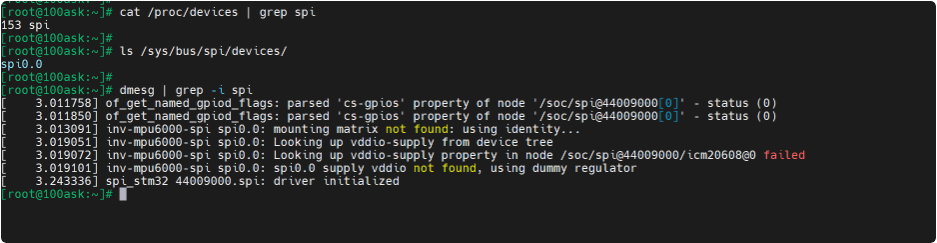
(1)系统当前只注册了 SPI0 设备,不存在 SPI5 相关设备节点
(2)日志里仅出现 44009000.spi 控制器、spi0.0 陀螺仪设备
(3)没有任何 SPI5 控制器初始化、枚举打印信息
(4)综上三点,判定 SPI5 当前未被系统加载启用。
第3步:拿到标识后,再去内核源码里找对应的 dts 文件
找到 stm32mp157c-100ask-512d-v1 对应的 .dts 文件
grep -r "spi5" arch/arm/boot/dts/stm32mp15*.dtsi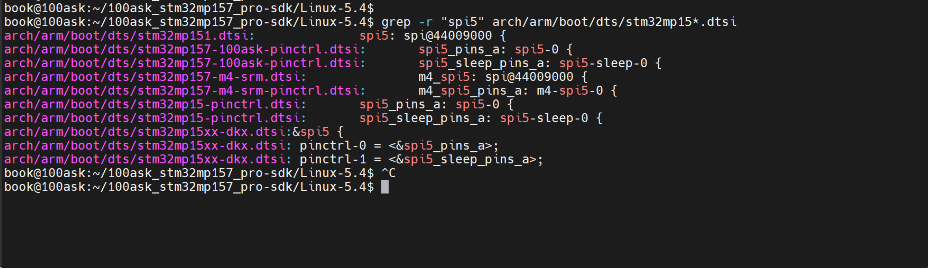
1 各类 dtsi 文件作用区分
stm32mp151.dtsi存放芯片基础硬件定义,里面写了spi5: spi@44009000,标注 SPI5 控制器寄存器、时钟、中断,默认状态关闭status = "disabled",这是硬件本体描述文件stm32mp157-100ask-pinctrl.dtsi韦东山适配自家板子的引脚配置文件,里面spi5_pins_a就是原理图上 SPI5 对应的 PH6、PH7、PF11 这些引脚复用配置stm32mp157-m4-srm.dtsi给芯片内部 M4 核使用的 SPI5,Linux 系统不用这个,直接忽略stm32mp15xx-dkx.dtsiST 原厂开发板配置,和100ask 板子硬件布线不一样,不采用2 实际要用的两份内容
- 硬件主体:
stm32mp151.dtsi里的&spi5控制器- 板子引脚:
stm32mp157-100ask-pinctrl.dtsi里的spi5_pins_a引脚组3 为什么现在系统识别不到
芯片基础文件里 SPI5 默认禁用,板级主 dts
stm32mp157c-100ask-512d-v1.dts里,没有主动去开启这个 SPI5 控制器,也没绑定引脚,系统就不会扫描加载该外设4 后续操作逻辑
只需要在板级主 dts 文件里,追加引用语句,把关闭的 SPI5 打开,绑定对应板子引脚,就能让系统识别到 SPI5 总线
第4步:查看 SPI5 默认是 disabled 还是 okay
cat arch/arm/boot/dts/stm32mp151.dtsi | grep -A 15 "spi5:"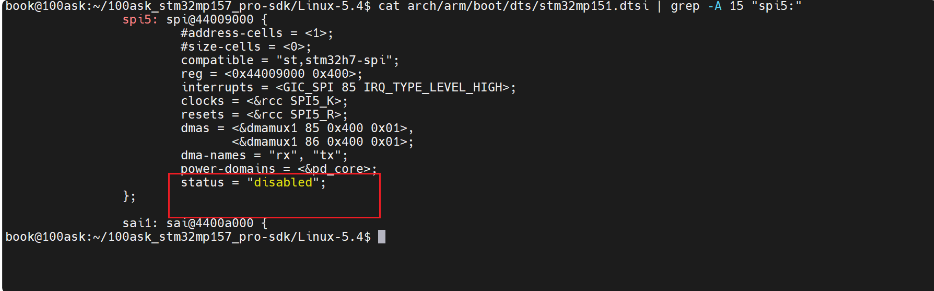
status = "disabled"→ 内核完全没有启动 SPI5→ 所以板子上看不到 /dev/spidev5.0
之前查到:spi5_pins_a→ 引脚不用自己写
第五步就要在设备树中添加spi5
注意这里spi5的寄存器地址和第二步的查spi时spi1的寄存器地址一样

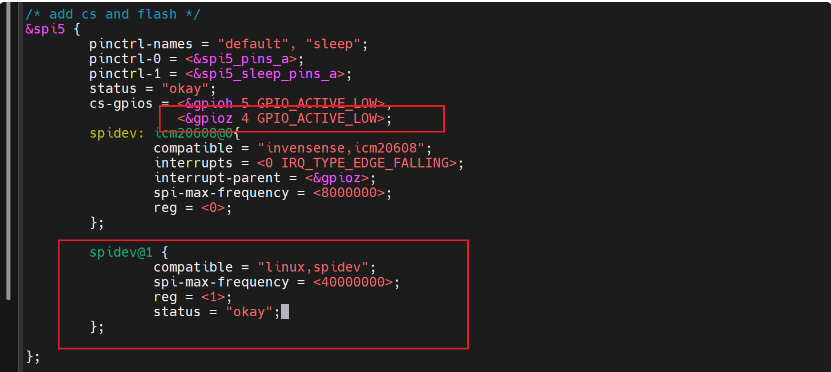
第5步:在设备树添加新的结点
vim arch/arm/boot/dts/stm32mp157c-100ask-512d-lcd-v1.dts添加
/* add cs and flash */
&spi5 {
        pinctrl-names = "default", "sleep";
        pinctrl-0 = <&spi5_pins_a>;
        pinctrl-1 = <&spi5_sleep_pins_a>;
        status = "okay";
        cs-gpios = <&gpioh 5 GPIO_ACTIVE_LOW>,
                   <&gpioz 4 GPIO_ACTIVE_LOW>;
        spidev: icm20608@0{
                compatible = "invensense,icm20608";
                interrupts = <0 IRQ_TYPE_EDGE_FALLING>;
                interrupt-parent = <&gpioz>;
                spi-max-frequency = <8000000>;
                reg = <0>;
        };

        spidev@1 {
                compatible = "linux,spidev";
                spi-max-frequency = <40000000>;
                reg = <1>;
                status = "okay";
        };

};
第6步:编译内核/设备树
内核源码
cd /home/book/100ask_stm32mp157_pro-sdk/Linux-5.4
make uImage LOADADDR=0xC2000040 -j8
make dtbs -j8
cp arch/arm/boot/uImage ~/nfs_rootfs/
cp arch/arm/boot/dts/stm32mp157c-100ask-512d-lcd-v1.dtb ~/nfs_rootfs/
make ARCH=arm CROSS_COMPILE=arm-buildroot-linux-gnueabihf- modules -j8
开发板
mount -t nfs -o nolock,vers=3 192.168.5.11:/home/book/nfs_rootfs /mnt

mount /dev/mmcblk2p2 /boot

cp /mnt/uImage /boot/
cp /mnt/*.dtb /boot/

cp /mnt/lib/modules /lib -rfd

sync
reboot
查看spi
ls /dev/spidev*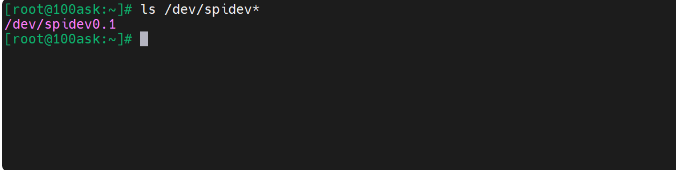
spi0.1:新增 W25Q64 对应的 spidev 设备
第7步:编写应用代码
#include <stdio.h>
#include <stdint.h>
#include <sys/types.h>
#include <sys/stat.h>
#include <fcntl.h>
#include <sys/ioctl.h>
#include <linux/spi/spidev.h>
#include <unistd.h>


#define SPI_DEVICE      "/dev/spidev0.1"        // w25q64对应的spi设备

static uint8_t mode = SPI_MODE_0;               // 使用spi模式0
static uint8_t bits = 8;                        // 传输8个字节
static uint32_t speed = 40000000;               // 传输速率40MHz


int main(int argc, char** argv)
{
    int fd;
    uint8_t tx[] = {0x9F, 0x00, 0x00, 0x00};    // 读w25q64芯片的id命令
    uint8_t rx[4] = {0};                        // 接收数据

    // 描述单个spi发送
    struct spi_ioc_transfer tr = {
        .tx_buf = (unsigned long)(tx),          // 发送缓冲区地址
        .rx_buf = (unsigned long)(rx),          // 接收缓冲区地址
        .len = 4,                               // 一次传输4个字节
        .speed_hz = speed,
        .delay_usecs = 0,
        .bits_per_word = bits,
    };

    // 打开spi设备
    fd = open(SPI_DEVICE, O_RDWR);
    if (fd < 0)
    {
        perror("open error");
        return -1;
    }

    // 利用ioctl对当前spi的参数赋值
    ioctl(fd, SPI_IOC_WR_MODE, &mode);                  // 设置模式
    ioctl(fd, SPI_IOC_WR_BITS_PER_WORD, &bits);         // 设置位宽
    ioctl(fd, SPI_IOC_WR_MAX_SPEED_HZ, &speed);         // 设置时钟

    ioctl(fd, SPI_IOC_MESSAGE(1), &tr);                 // 发送1次SPI传输

    printf("W25Q64 ID: 0x%02X 0x%02X 0x%02X\n", rx[1], rx[2], rx[3]);

    close(fd);

    return 0;
}
编译
arm-buildroot-linux-gnueabihf-gcc -o spi_test spi_test.c在开发板测试
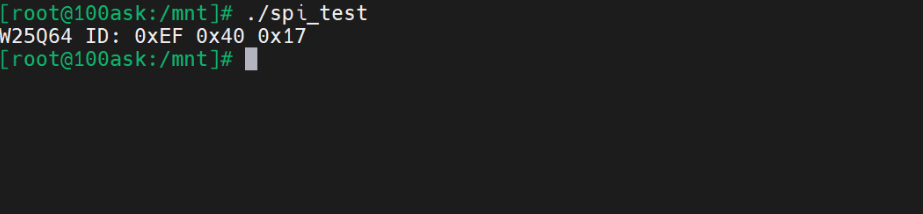
- Linux 下操作 SPI 设备,就是操作
/dev/spidevX.X - 用
ioctl配置 SPI 参数 - 用
struct spi_ioc_transfer + ioctl完成收发
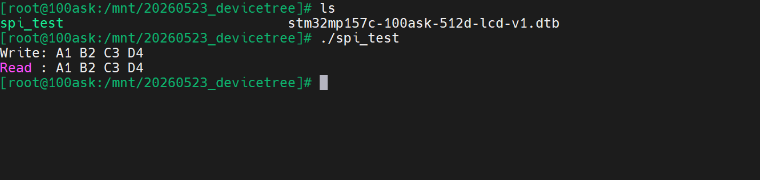
第8步:测试读写
#include <stdio.h>
#include <stdint.h>
#include <linux/spi/spidev.h>
#include <sys/ioctl.h>
#include <unistd.h>
#include <sys/types.h>
#include <sys/stat.h>
#include <fcntl.h>


#define SPI_DEVICE            "/dev/spidev0.1"  // w25q64对应的spi设备

static uint8_t mode = SPI_MODE_0;               // 使用spi模式0
static uint8_t bits = 8;                        // 传输8个字节
static uint32_t speed = 40000000;               // 传输速率40MHz

// SPI的指令
#define W25Q64_WRITE_ENABLE               0x06  // 写使能
#define W25Q64_READ_STATUS_REGISTER_1     0x05  // 读状态1
#define W25Q64_PAGE_PROGRAM               0x02  // 页编程
#define W25Q64_SECTOR_ERASE_4KB           0x20  // 擦除4KB
#define W25Q64_READ_DATA                  0x03  // 读数据


/**
 * @brief 封装SPI的收发
 * @param fd 文件描述符
 * @param tx 发送缓冲区
 * @param rx 接收缓冲区
 * @param len 发送数据长度
 */
static void spi_transfer(int fd, uint8_t* tx, uint8_t* rx, uint32_t len)
{
    // 构造spi通信数据结构体
    struct spi_ioc_transfer tr = {
        .tx_buf = (unsigned long)tx,
        .rx_buf = (unsigned long)rx,
        .len = len,
        .speed_hz = speed,
        .bits_per_word = bits,
    };

    // 进行一次SPI通信
    ioctl(fd, SPI_IOC_MESSAGE(1), &tr);
}

/**
 * @brief 写使能,必须在擦除/写之前调用
 * @param fd 文件描述符
 */
void w25q64WriteEnable(int fd)
{
    uint8_t tx = W25Q64_WRITE_ENABLE;
    spi_transfer(fd, &tx, NULL, 1);
    usleep(1000);
}

/**
 * @brief 读寄存器状态,等待忙结束
 * @param fd 文件描述符
 */
void w25q64WaitBusy(int fd)
{
    uint8_t tx[2] = {W25Q64_READ_STATUS_REGISTER_1, 0xFF};
    uint8_t rx[2];
    do {
        spi_transfer(fd, tx, rx, 2);
    } while (rx[1] & 0x01);         // 最低位为1表示忙
    usleep(1000);
}

/**
 * @brief 扇区擦除4KB
 * @param fd 文件描述符
 * @param addr 地址
 */
void w25q64SectorErase(int fd, uint32_t addr)
{
    w25q64WriteEnable(fd);          // 先写使能

    // 构建发送数据包
    uint8_t tx[4] = {
        W25Q64_SECTOR_ERASE_4KB,
        (addr >> 16) & 0xFF,
        (addr >> 8) & 0xFF,
        addr & 0xFF
    };
    spi_transfer(fd, tx, NULL, 4);

    w25q64WaitBusy(fd);            // 忙等待
}

/**
 * @brief 页编程(写入数据)
 * @param fd 文件描述符
 * @param addr 地址
 * @param buf 写入数据的首地址
 * @param len 写入数据长度
 */
void w25q64PageProgram(int fd, uint32_t addr, uint8_t* buf, uint32_t len)
{
    w25q64WriteEnable(fd);          // 先写使能

    uint8_t tx[1024] = {0};
    tx[0] = W25Q64_PAGE_PROGRAM;
    tx[1] = (addr >> 16) & 0xFF;
    tx[2] = (addr >> 8) & 0xFF;
    tx[3] = addr & 0xFF;

    for (int i = 0; i < len; i++)
    {
        tx[4 + i] = buf[i];
    }

    spi_transfer(fd, tx, NULL, 4 + len);
    w25q64WaitBusy(fd);            // 忙等待
}

/**
 * @brief 读数据函数
 * @param fd 文件描述符
 * @param addr 地址
 * @param buf 接受数据的首地址
 * @param len 接受数据长度
 */
void w25q64ReadData(int fd, uint32_t addr, uint8_t *buf, uint32_t len)
{
    uint8_t tx[1024] = {0};
    uint8_t rx[1024] = {0};

    tx[0] = W25Q64_READ_DATA;
    tx[1] = (addr >> 16) & 0xFF;
    tx[2] = (addr >> 8) & 0xFF;
    tx[3] = addr & 0xFF;

    spi_transfer(fd, tx, rx, 4 + len);

    for (int i = 0; i < len; i++)
    {
        buf[i] = rx[4 + i];
    }
}


int main(int argc, char** argv)
{
    int fd = open(SPI_DEVICE, O_RDWR);              // 打开SPI结点
    if (fd < 0)
    {
        perror("open error");
        return -1;
    }

    // 利用ioctl对当前spi的参数赋值
    ioctl(fd, SPI_IOC_WR_MODE, &mode);                  // 设置模式
    ioctl(fd, SPI_IOC_WR_BITS_PER_WORD, &bits);         // 设置位宽
    ioctl(fd, SPI_IOC_WR_MAX_SPEED_HZ, &speed);         // 设置时钟

    // 测试数据
    uint8_t arrayWrite[] = {0xA1, 0xB2, 0xC3, 0xD4};
    uint8_t arrayRead[4] = {0};

    // 1. 擦除扇区
    w25q64SectorErase(fd, 0x000000);

    // 2. 写入数据
    w25q64PageProgram(fd, 0x000000, arrayWrite, 4);

    // 3. 读取数据
    w25q64ReadData(fd, 0x000000, arrayRead, 4);

    printf("Write: %02X %02X %02X %02X\n",
           arrayWrite[0], arrayWrite[1], arrayWrite[2], arrayWrite[3]);

    printf("Read : %02X %02X %02X %02X\n",
           arrayRead[0], arrayRead[1], arrayRead[2], arrayRead[3]);

    close(fd);
    return 0;
}
编译
arm-buildroot-linux-gnueabihf-gcc -o spi_test spi_test.c在开发板测试
2 自己写驱动
第0步:写一个 最小能匹配设备树 的 SPI 驱动
#include <linux/module.h>
#include <linux/spi/spi.h>


/**
 * @brief 匹配表,和设备树对应
 */
static const struct of_device_id my_spi_dt_ids[] =
{
    { .compatible = "my_w25q64" },      // 设备树里匹配
    {}
};
MODULE_DEVICE_TABLE(of, my_spi_dt_ids);

/**
 * @brief probe函数
 */
static int my_spi_probe(struct spi_device* spi)
{
    printk("%s %s line %d\n", __FILE__, __FUNCTION__, __LINE__);
    return 0;
}

/**
 * @brief remove函数
 */
static int my_spi_remove(struct spi_device* spi)
{
    printk("%s %s line %d\n", __FILE__, __FUNCTION__, __LINE__);
    return 0;
}

/**
 * @brief 注册spi驱动
 */
static struct spi_driver my_spi_driver = {
    .probe = my_spi_probe,
    .remove = my_spi_remove,
    .driver = {
        .name = "my-spi-driver",                // 驱动名称
        .of_match_table = my_spi_dt_ids,        // 设备树匹配表
    },
};


module_spi_driver(my_spi_driver);

MODULE_LICENSE("GPL");
MODULE_AUTHOR("Winter");
MODULE_DESCRIPTION("my first spi driver");
第1步:在驱动里加上字符设备
#include <linux/module.h>
#include <linux/spi/spi.h>
#include <linux/fs.h>


#define DEVICE_NAME         "w25q64"    // 设备名称
static int major = 0;                   // 主设备号


/**
 * @brief 匹配表,和设备树对应
 */
static const struct of_device_id my_spi_dt_ids[] =
{
    { .compatible = "my_w25q64" },      // 设备树里匹配
    {}
};
MODULE_DEVICE_TABLE(of, my_spi_dt_ids);

/**
 * @brief probe函数
 */
static int my_spi_probe(struct spi_device* spi)
{
    printk("%s %s line %d\n", __FILE__, __FUNCTION__, __LINE__);

    // 注册
    major = register_chrdev(0, DEVICE_NAME, NULL);

    return 0;
}

/**
 * @brief remove函数
 */
static int my_spi_remove(struct spi_device* spi)
{
    printk("%s %s line %d\n", __FILE__, __FUNCTION__, __LINE__);

    // 注销
    unregister_chrdev(major, DEVICE_NAME);


    return 0;
}

/**
 * @brief 注册spi驱动
 */
static struct spi_driver my_spi_driver = {
    .probe = my_spi_probe,
    .remove = my_spi_remove,
    .driver = {
        .name = "my-spi-driver",                // 驱动名称
        .of_match_table = my_spi_dt_ids,        // 设备树匹配表
    },
};


module_spi_driver(my_spi_driver);

MODULE_LICENSE("GPL");
MODULE_AUTHOR("Winter");
MODULE_DESCRIPTION("my first spi driver");
第2步:自动创建 /dev/w25q64 设备节点
#include <linux/module.h>
#include <linux/spi/spi.h>
#include <linux/fs.h>
#include <linux/device.h>


#define DEVICE_NAME         "w25q64"    // 设备名称
static int major = 0;                   // 主设备号

static struct class* w25q64_class;
static struct device* w25q64_dev;


/**
 * @brief 匹配表,和设备树对应
 */
static const struct of_device_id my_spi_dt_ids[] =
{
    { .compatible = "my_w25q64" },      // 设备树里匹配
    {}
};
MODULE_DEVICE_TABLE(of, my_spi_dt_ids);

/**
 * @brief probe函数
 */
static int my_spi_probe(struct spi_device* spi)
{
    printk("%s %s line %d\n", __FILE__, __FUNCTION__, __LINE__);

    // 注册字符设备
    major = register_chrdev(0, DEVICE_NAME, NULL);

    // 创建class
    w25q64_class = class_create(THIS_MODULE, "w25q64_class");

    // 创建device,生成/dev/w25q64
    w25q64_dev = device_create(w25q64_class, NULL, MKDEV(major, 0), NULL, "w25q64");

    return 0;
}

/**
 * @brief remove函数
 */
static int my_spi_remove(struct spi_device* spi)
{
    printk("%s %s line %d\n", __FILE__, __FUNCTION__, __LINE__);

    device_destroy(w25q64_class, MKDEV(major, 0));
    class_destroy(w25q64_class);

    // 注销
    unregister_chrdev(major, DEVICE_NAME);


    return 0;
}

/**
 * @brief 注册spi驱动
 */
static struct spi_driver my_spi_driver = {
    .probe = my_spi_probe,
    .remove = my_spi_remove,
    .driver = {
        .name = "my-spi-driver",                // 驱动名称
        .of_match_table = my_spi_dt_ids,        // 设备树匹配表
    },
};


module_spi_driver(my_spi_driver);

MODULE_LICENSE("GPL");
MODULE_AUTHOR("me");
MODULE_DESCRIPTION("my first spi driver");
第3步: 加入字符设备、fops、/dev/w25q64
#include <linux/module.h>
#include <linux/spi/spi.h>
#include <linux/fs.h>
#include <linux/device.h>


#define DEVICE_NAME         "w25q64"    // 设备名称
static int major = 0;                   // 主设备号

static struct class* w25q64_class;
static struct device* w25q64_dev;


static int drv_open(struct inode *inode, struct file *file)
{
    return 0;
}

static int drv_release(struct inode *inode, struct file *file)
{
    return 0;
}

/**
 * @brief file_operations结构体
 */
static struct file_operations my_file = {
    .owner   = THIS_MODULE,
    .open    = drv_open,
    .release = drv_release,
};


/**
 * @brief 匹配表,和设备树对应
 */
static const struct of_device_id my_spi_dt_ids[] =
{
    { .compatible = "my_w25q64" },      // 设备树里匹配
    {}
};
MODULE_DEVICE_TABLE(of, my_spi_dt_ids);

/**
 * @brief probe函数
 */
static int my_spi_probe(struct spi_device* spi)
{
    int ret;
    printk("%s %s line %d\n", __FILE__, __FUNCTION__, __LINE__);

    // 注册字符设备
    major = register_chrdev(0, DEVICE_NAME, &my_file);
    if (major < 0)
    {
        printk("register_chrdev 失败\n");
        return major;
    }

    // 创建class
    w25q64_class = class_create(THIS_MODULE, "w25q64_class");
    if (IS_ERR(w25q64_class))
    {
        ret = PTR_ERR(w25q64_class);
        unregister_chrdev(major, DEVICE_NAME);
        return ret;
    }

    // 创建device,生成/dev/w25q64
    w25q64_dev = device_create(w25q64_class, NULL, MKDEV(major, 0), NULL, "w25q64");
    if (IS_ERR(w25q64_dev))
    {
        ret = PTR_ERR(w25q64_dev);
        class_destroy(w25q64_class);
        unregister_chrdev(major, DEVICE_NAME);
        return ret;
    }

    return 0;
}

/**
 * @brief remove函数
 */
static int my_spi_remove(struct spi_device* spi)
{
    printk("%s %s line %d\n", __FILE__, __FUNCTION__, __LINE__);

    device_destroy(w25q64_class, MKDEV(major, 0));
    class_destroy(w25q64_class);

    // 注销
    unregister_chrdev(major, DEVICE_NAME);


    return 0;
}

/**
 * @brief 注册spi驱动
 */
static struct spi_driver my_spi_driver = {
    .probe = my_spi_probe,
    .remove = my_spi_remove,
    .driver = {
        .name = "my-spi-driver",                // 驱动名称
        .of_match_table = my_spi_dt_ids,        // 设备树匹配表
    },
};


module_spi_driver(my_spi_driver);

MODULE_LICENSE("GPL");
MODULE_AUTHOR("me");
MODULE_DESCRIPTION("my first spi driver");
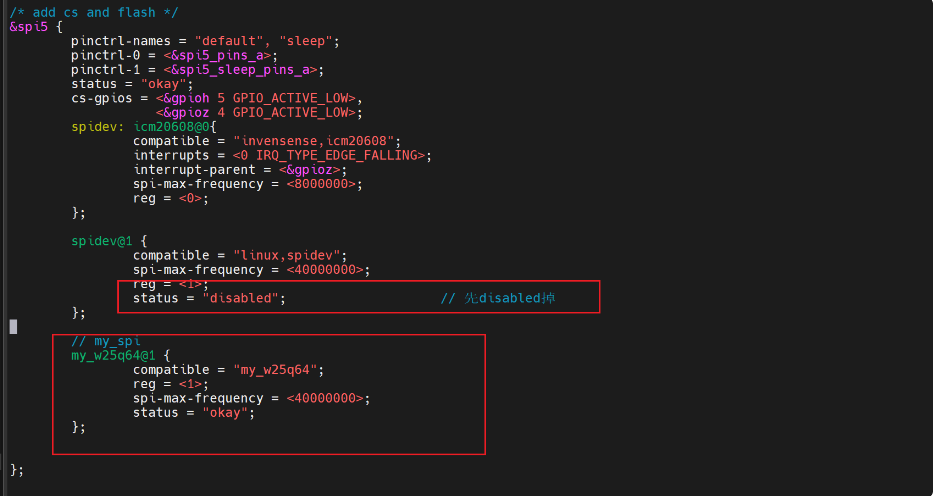
修改设备树
/* add cs and flash */
&spi5 {
        pinctrl-names = "default", "sleep";
        pinctrl-0 = <&spi5_pins_a>;
        pinctrl-1 = <&spi5_sleep_pins_a>;
        status = "okay";
        cs-gpios = <&gpioh 5 GPIO_ACTIVE_LOW>,
                   <&gpioz 4 GPIO_ACTIVE_LOW>;
        spidev: icm20608@0{
                compatible = "invensense,icm20608";
                interrupts = <0 IRQ_TYPE_EDGE_FALLING>;
                interrupt-parent = <&gpioz>;
                spi-max-frequency = <8000000>;
                reg = <0>;
        };

        spidev@1 {
                compatible = "linux,spidev";
                spi-max-frequency = <40000000>;
                reg = <1>;
                status = "disabled";                    // 先disabled掉
        };

        // my_spi
        my_w25q64@1 {
                compatible = "my_w25q64";
                reg = <1>;
                spi-max-frequency = <40000000>;
                status = "okay";
        };


};
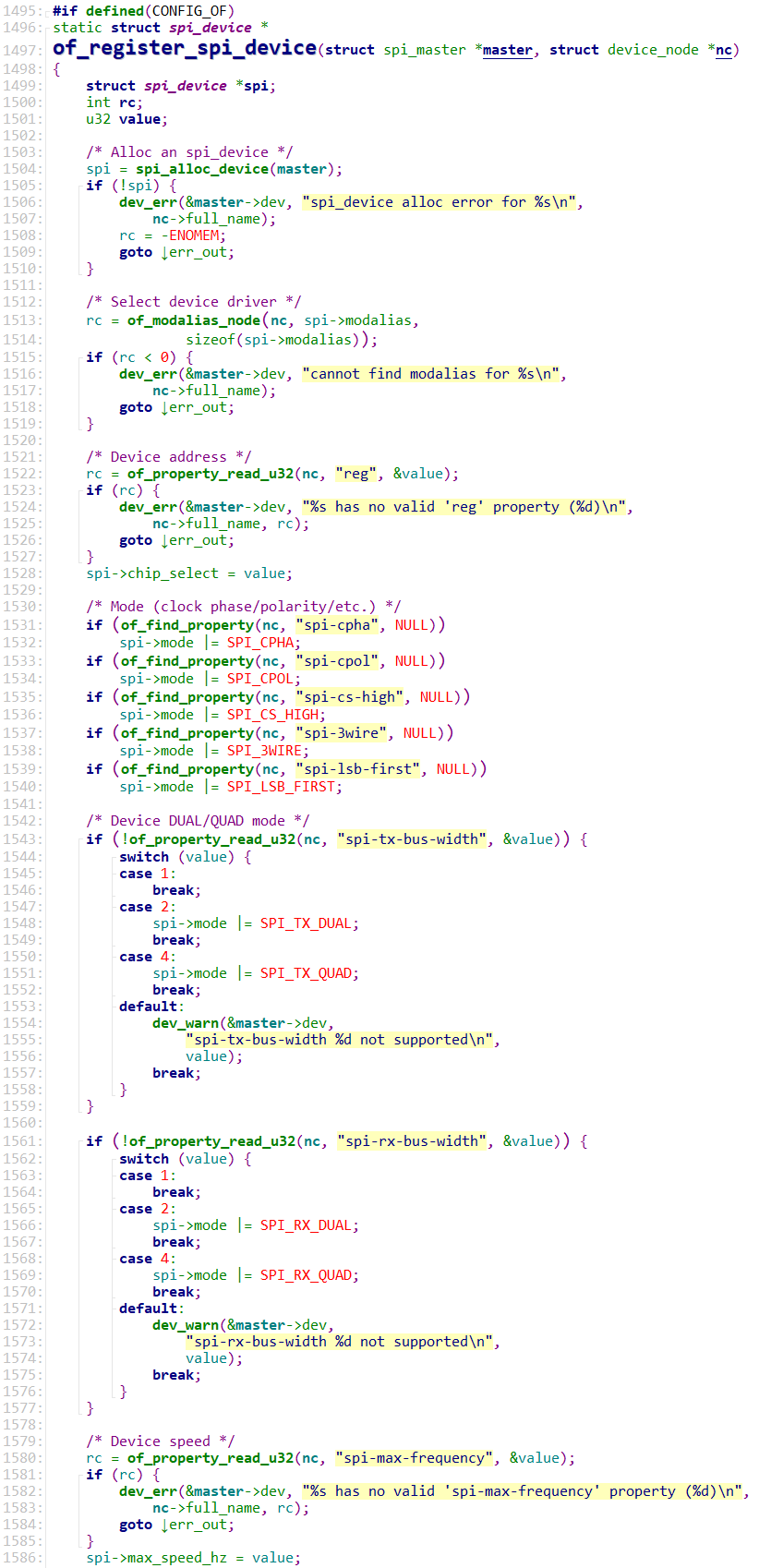
设备树处理过程
内核源码:drivers\spi\spi.c
重新编译设备树
内核源码
make dtbs -j8
cp arch/arm/boot/dts/stm32mp157c-100ask-512d-lcd-v1.dtb ~/nfs_rootfs/
开发板
mount -t nfs -o nolock,vers=3 192.168.5.11:/home/book/nfs_rootfs /mnt

cp /mnt/*.dtb /boot/
sync
reboot

ifdown eth0 && ifup eth0
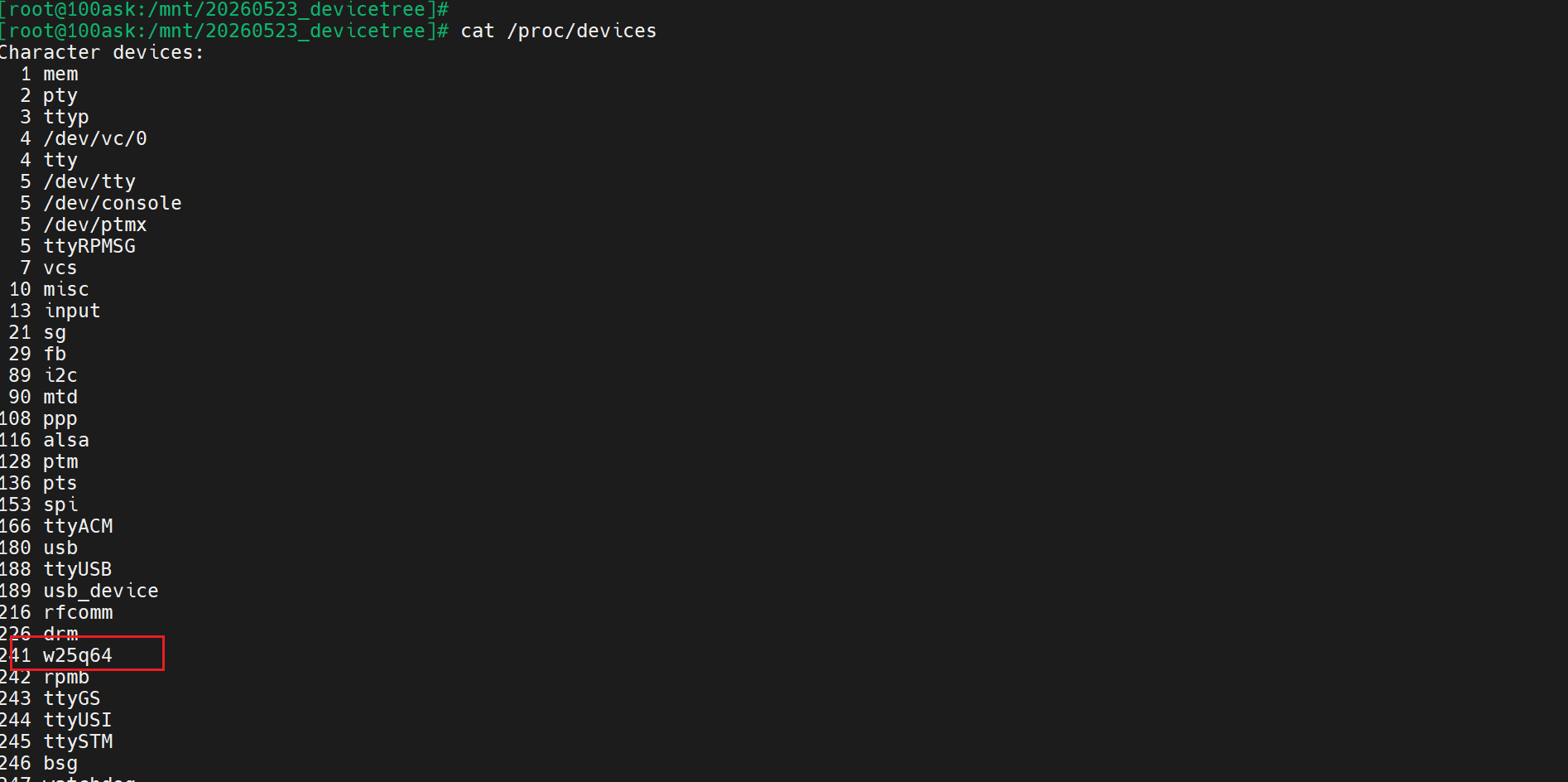
第4步:SPI 读写驱动
#include <linux/module.h>
#include <linux/spi/spi.h>
#include <linux/fs.h>
#include <linux/device.h>
#include <linux/uaccess.h>


#define DEVICE_NAME         "w25q64"    // 设备名称
static int major = 0;                   // 主设备号

static struct class* w25q64_class;
static struct device* w25q64_dev;

static struct spi_device* w25q64_spi;

/**
 * @brief 打开
 */
static int drv_open(struct inode *inode, struct file *file)
{
    printk("%s %s line %d\n", __FILE__, __FUNCTION__, __LINE__);
    return 0;
}

/**
 * @brief 释放
 */
static int drv_release(struct inode *inode, struct file *file)
{
    printk("%s %s line %d\n", __FILE__, __FUNCTION__, __LINE__);
    return 0;
}

/**
 * @brief 读
 */
static ssize_t drv_read(struct file *file, char __user *buf, size_t len, loff_t *offset)
{
    u8 tx[4] = {0x9F};  // 命令
    u8 rx[4];
    int ret;

    struct spi_transfer t = {
        .tx_buf = tx,
        .rx_buf = rx,
        .len = 4,       // 1byte cmd + 3byte ID
    };

    struct spi_message msg;
    spi_message_init(&msg);
    spi_message_add_tail(&t, &msg);

    ret = spi_sync(w25q64_spi, &msg);
    if (ret)
        return ret;

    if (copy_to_user(buf, rx+1, 3))  // ID从第2个字节开始
        return -EFAULT;

    return 3;
}

/**
 * @brief 写数据
 */
static ssize_t drv_write(struct file *file, const char __user *buf, size_t len, loff_t *offset)
{
    u8 tx_buf[256];

    if (len > 256)
        len = 256;

    // 从应用层拿到数据
    if (copy_from_user(tx_buf, buf, len))
        return -EFAULT;

    // SPI写数据
    return spi_write(w25q64_spi, tx_buf, len);
}

/**
 * @brief file_operations结构体
 */
static struct file_operations my_file = {
    .owner   = THIS_MODULE,
    .open    = drv_open,
    .release = drv_release,
    .read    = drv_read,
    .write   = drv_write,
};


/**
 * @brief 匹配表,和设备树对应
 */
static const struct of_device_id my_spi_dt_ids[] =
{
    { .compatible = "my_w25q64" },      // 设备树里匹配
    {}
};
MODULE_DEVICE_TABLE(of, my_spi_dt_ids);

/**
 * @brief probe函数
 */
static int my_spi_probe(struct spi_device* spi)
{
    int ret;
    printk("%s %s line %d\n", __FILE__, __FUNCTION__, __LINE__);

    w25q64_spi = spi;

    spi->mode = SPI_MODE_0;
    ret = spi_setup(spi);
    if (ret < 0)
    {
        return ret;
    }


    // 注册字符设备
    major = register_chrdev(0, DEVICE_NAME, &my_file);
    if (major < 0)
    {
        printk("register_chrdev 失败\n");
        return major;
    }

    // 创建class
    w25q64_class = class_create(THIS_MODULE, "w25q64_class");
    if (IS_ERR(w25q64_class))
    {
        ret = PTR_ERR(w25q64_class);
        unregister_chrdev(major, DEVICE_NAME);
        return ret;
    }

    // 创建device,生成/dev/w25q64
    w25q64_dev = device_create(w25q64_class, NULL, MKDEV(major, 0), NULL, "w25q64");
    if (IS_ERR(w25q64_dev))
    {
        ret = PTR_ERR(w25q64_dev);
        class_destroy(w25q64_class);
        unregister_chrdev(major, DEVICE_NAME);
        return ret;
    }

    return 0;
}

/**
 * @brief remove函数
 */
static int my_spi_remove(struct spi_device* spi)
{
    printk("%s %s line %d\n", __FILE__, __FUNCTION__, __LINE__);

    device_destroy(w25q64_class, MKDEV(major, 0));
    class_destroy(w25q64_class);

    // 注销
    unregister_chrdev(major, DEVICE_NAME);


    return 0;
}

/**
 * @brief 注册spi驱动
 */
static struct spi_driver my_spi_driver = {
    .probe = my_spi_probe,
    .remove = my_spi_remove,
    .driver = {
        .name = "my-spi-driver",                // 驱动名称
        .of_match_table = my_spi_dt_ids,        // 设备树匹配表
    },
};


module_spi_driver(my_spi_driver);

MODULE_LICENSE("GPL");
MODULE_AUTHOR("Winter");
MODULE_DESCRIPTION("my first spi driver");
应用程序
#include <stdio.h>
#include <unistd.h>
#include <fcntl.h>

int main()
{
    int fd;
    unsigned char cmd = 0x9F;
    unsigned char id[3];

    fd = open("/dev/w25q64", O_RDWR);
    if (fd < 0)
    {
        perror("open failed");
        return -1;
    }

    // 发送读ID命令
    write(fd, &cmd, 1);
    // 读取3字节ID
    read(fd, id, 3);

    printf("W25Q64 ID: %02x %02x %02x\n", id[0], id[1], id[2]);

    close(fd);
    return 0;
}
makefile
# 1. 使用不同的开发板内核时, 一定要修改KERN_DIR
# 2. KERN_DIR中的内核要事先配置、编译, 为了能编译内核, 要先设置下列环境变量:
# 2.1 ARCH,          比如: export ARCH=arm64
# 2.2 CROSS_COMPILE, 比如: export CROSS_COMPILE=aarch64-linux-gnu-
# 2.3 PATH,          比如: export PATH=$PATH:/home/book/100ask_roc-rk3399-pc/ToolChain-6.3.1/gcc-linaro-6.3.1-2017.05-x86_64_aarch64-linux-gnu/bin
# 注意: 不同的开发板不同的编译器上述3个环境变量不一定相同,
#       请参考各开发板的高级用户使用手册

KERN_DIR = /home/book/100ask_stm32mp157_pro-sdk/Linux-5.4

all:
	make -C $(KERN_DIR) M=`pwd` modules
	$(CROSS_COMPILE)gcc -o spi_test spi_test.c

clean:
	make -C $(KERN_DIR) M=`pwd` modules clean
	rm -rf modules.order
	rm -f spi_test

obj-m   += spi_driver.o
测试
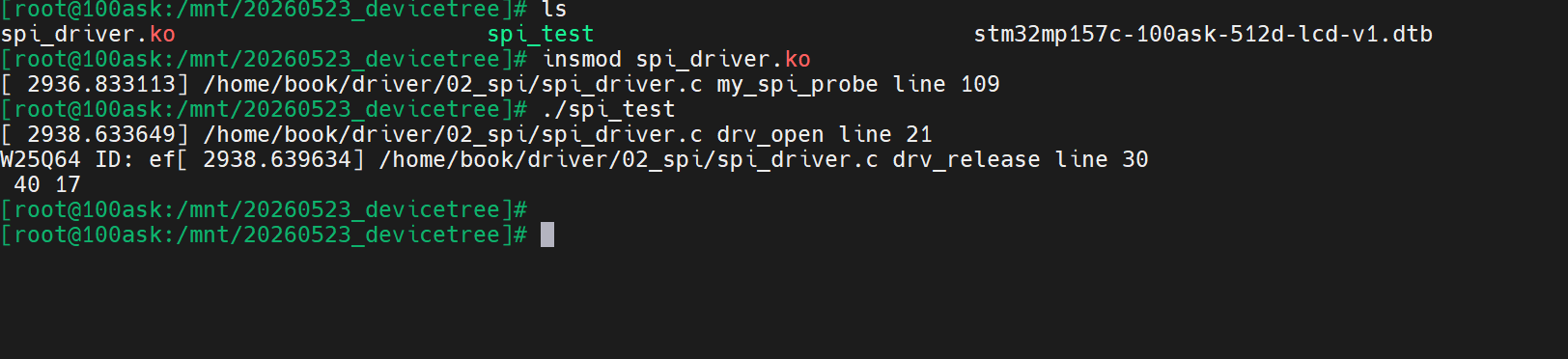
第5步:SPI-ioctl版
驱动
#include <linux/module.h>
#include <linux/spi/spi.h>
#include <linux/fs.h>
#include <linux/device.h>
#include <linux/uaccess.h>

/* 设备名称 / 主设备号定义 */
#define DEVICE_NAME         "w25q64"    /* 注册的字符设备名称 */
static int major = 0;                   /* 动态分配的主设备号 */

/* 字符设备驱动相关结构体 */
static struct class* w25q64_class;      /* 设备类结构体 */
static struct device* w25q64_dev;       /* 设备文件结构体 */

/* SPI 设备指针(全局保存,供 SPI 读写使用) */
static struct spi_device* w25q64_spi;

/* -------------------------- ioctl 命令定义 -------------------------- */
/* 命令:读取 W25Q64 芯片 ID */
#define W25Q64_IOCTL_GET_ID      _IOR('W', 1, uint32_t)


/**
 * @brief 设备打开函数
 * @param inode: 内核 inode 结构体(包含设备号等信息)
 * @param file: 文件描述符私有数据结构体
 * @return 成功返回0,失败返回错误码
 */
static int drv_open(struct inode *inode, struct file *file)
{
    printk("%s %s line %d\n", __FILE__, __FUNCTION__, __LINE__);
    return 0;
}

/**
 * @brief 设备关闭/释放函数
 * @param inode: 内核 inode 结构体
 * @param file: 文件描述符私有数据结构体
 * @return 成功返回0
 */
static int drv_release(struct inode *inode, struct file *file)
{
    printk("%s %s line %d\n", __FILE__, __FUNCTION__, __LINE__);
    return 0;
}

/**
 * @brief 读数据接口
 * @param file: 文件结构体
 * @param buf: 用户空间缓冲区
 * @param len: 读取长度
 * @param offset: 文件偏移指针
 * @return 成功返回读取长度,失败返回错误码
 */
static ssize_t drv_read(struct file *file, char __user *buf, size_t len, loff_t *offset)
{
    printk("%s %s line %d\n", __FILE__, __FUNCTION__, __LINE__);
    return 0;
}

/**
 * @brief 写数据接口
 * @param file: 文件结构体
 * @param buf: 用户空间发送缓冲区
 * @param len: 写入长度
 * @param offset: 文件偏移指针
 * @return 成功返回写入长度,失败返回错误码
 */
static ssize_t drv_write(struct file *file, const char __user *buf, size_t len, loff_t *offset)
{
    printk("%s %s line %d\n", __FILE__, __FUNCTION__, __LINE__);
    return 0;
}

/**
 * @brief IOCTL 控制接口(SPI 命令核心处理)
 * @param file: 文件结构体
 * @param cmd: 应用层下发的命令码
 * @param arg: 应用层传递的参数(地址/数据缓冲区)
 * @return 成功返回0,失败返回错误码
 */
static long drv_ioctl(struct file *file, unsigned int cmd, unsigned long arg)
{
    int ret;
    uint8_t tx_buf[4] = {0x9F};     /* SPI 发送缓冲区:0x9F = 读 ID 命令 */
    uint8_t rx_buf[4] = {0};        /* SPI 接收缓冲区 */
    uint32_t chip_id = 0;           /* 存储最终拼接的芯片 ID */

    /* 构造 SPI 传输结构体 */
    struct spi_transfer spi_trans = {
        .tx_buf = tx_buf,          /* 发送数据指针 */
        .rx_buf = rx_buf,          /* 接收数据指针 */
        .len    = 4,               /* 一次传输 4 字节 */
    };
    struct spi_message spi_msg;    /* SPI 消息结构体 */

    printk("%s %s line %d\n", __FILE__, __FUNCTION__, __LINE__);

    /* 根据命令码执行不同操作 */
    switch (cmd)
    {
        case W25Q64_IOCTL_GET_ID:
            /* 1. 初始化 SPI 消息 */
            spi_message_init(&spi_msg);
            spi_message_add_tail(&spi_trans, &spi_msg);

            /* 2. 发起 SPI 同步传输 */
            ret = spi_sync(w25q64_spi, &spi_msg);
            if (ret)
                return ret;

            /* 3. 拼接 ID:3 字节 ID = 厂商 ID + 型号 ID */
            chip_id = ((uint32_t)rx_buf[1] << 16) |
                      ((uint32_t)rx_buf[2] << 8)  |
                      ((uint32_t)rx_buf[3]);

            /* 4. 把 ID 复制到应用层 */
            if (copy_to_user((void __user *)arg, &chip_id, 4))
                return -EFAULT;

            break;

        default:
            return -EINVAL;  /* 不支持的命令 */
    }

    return 0;
}

/* 文件操作集合:绑定驱动接口 */
static struct file_operations my_fops = {
    .owner           = THIS_MODULE,
    .open            = drv_open,
    .release         = drv_release,
    .read            = drv_read,
    .write           = drv_write,
    .unlocked_ioctl  = drv_ioctl,
};


/* 设备树 compatible 属性必须与此完全一致 */
static const struct of_device_id my_spi_match_table[] = {
    { .compatible = "my_w25q64" },
    { /* 空节点表示结束 */ }
};
MODULE_DEVICE_TABLE(of, my_spi_match_table);


/**
 * @brief SPI 设备与驱动匹配成功后执行
 * @param spi: 内核传递的 SPI 设备结构体指针
 * @return 成功返回0,失败返回错误码
 */
static int my_spi_probe(struct spi_device *spi)
{
    int ret;

    printk("%s %s line %d\n", __FILE__, __FUNCTION__, __LINE__);

    /* 1. 保存 spi_device 指针,供后续 SPI 通信使用 */
    w25q64_spi = spi;

    /* 2. 配置 SPI 模式:W25Q64 使用 MODE0 */
    spi->mode = SPI_MODE_0;
    ret = spi_setup(spi);
    if (ret < 0)
        return ret;

    /* 3. 注册字符设备驱动 */
    major = register_chrdev(0, DEVICE_NAME, &my_fops);
    if (major < 0)
    {
        printk("register_chrdev failed\n");
        return major;
    }

    /* 4. 创建设备类 + 自动生成 /dev/w25q64 */
    w25q64_class = class_create(THIS_MODULE, "w25q64_class");
    if (IS_ERR(w25q64_class))
    {
        ret = PTR_ERR(w25q64_class);
        unregister_chrdev(major, DEVICE_NAME);
        return ret;
    }

    /* 5. 创建设备节点 */
    w25q64_dev = device_create(w25q64_class, NULL, MKDEV(major, 0), NULL, "w25q64");
    if (IS_ERR(w25q64_dev))
    {
        ret = PTR_ERR(w25q64_dev);
        class_destroy(w25q64_class);
        unregister_chrdev(major, DEVICE_NAME);
        return ret;
    }

    return 0;
}

/**
 * @brief 驱动卸载时执行
 * @param spi: SPI 设备结构体
 * @return 成功返回0
 */
static int my_spi_remove(struct spi_device *spi)
{
    printk("%s %s line %d\n", __FILE__, __FUNCTION__, __LINE__);

    // 释放资源
    device_destroy(w25q64_class, MKDEV(major, 0));
    class_destroy(w25q64_class);
    unregister_chrdev(major, DEVICE_NAME);

    return 0;
}

/* SPI 驱动结构体 */
static struct spi_driver my_spi_driver = {
    .probe  = my_spi_probe,
    .remove = my_spi_remove,
    .driver = {
        .name           = "my-spi-driver",
        .of_match_table = my_spi_match_table,  /* 设备树匹配 */
    },
};

/* 注册/卸载 SPI 驱动 */
module_spi_driver(my_spi_driver);

MODULE_LICENSE("GPL");
MODULE_AUTHOR("Winter");
MODULE_DESCRIPTION("W25Q64 SPI Driver with IOCTL");
应用程序
#include <stdio.h>
#include <sys/types.h>
#include <sys/stat.h>
#include <fcntl.h>
#include <sys/ioctl.h>
#include <unistd.h>

#define W25Q64_IOCTL_GET_ID      _IOR('W', 1, unsigned int)

int main(int argc, char **argv)
{
    int fd;
    unsigned int id;

    fd = open("/dev/w25q64", O_RDWR);
    if (fd < 0)
    {
        perror("open failed");
        return -1;
    }

    // 用 ioctl 读取 ID
    ioctl(fd, W25Q64_IOCTL_GET_ID, &id);
    printf("W25Q64 ID = 0x%06X\n", id);

    close(fd);
    return 0;
}

免费领 150 小时云算力,进群参与显卡、AI PC 幸运抽奖
更多推荐

 4
4 0
0- 0


 已为社区贡献1条内容

所有评论(0)