
OpenClaw源码分析(三):启动流程
目录
1. 入口文件分析
1.1 执行入口:openclaw.mjs
openclaw.mjs 作为可执行入口,负责环境准备和导入编译后的代码,导入源代码的入口entry.js(文件末尾):
if (await tryImport("./dist/entry.js")) {
  // OK
} else if (await tryImport("./dist/entry.mjs")) {
  // OK
} else {
  throw new Error("openclaw: missing dist/entry.(m)js (build output).");
}
1.2 源代码入口:entry.ts
entry.ts 是 OpenClaw 的源码入口文件,负责处理命令行参数并启动相应的功能。让我们逐行分析其核心功能:
1.2.1 依赖导入
#!/usr/bin/env node
import { spawn } from "node:child_process";
import { enableCompileCache } from "node:module";
import process from "node:process";
import { fileURLToPath } from "node:url";
import { isRootHelpInvocation, isRootVersionInvocation } from "./cli/argv.js";
import { applyCliProfileEnv, parseCliProfileArgs } from "./cli/profile.js";
import { shouldSkipRespawnForArgv } from "./cli/respawn-policy.js";
import { normalizeWindowsArgv } from "./cli/windows-argv.js";
import { isTruthyEnvValue, normalizeEnv } from "./infra/env.js";
import { isMainModule } from "./infra/is-main.js";
import { installProcessWarningFilter } from "./infra/warning-filter.js";
import { attachChildProcessBridge } from "./process/child-process-bridge.js";
- #!/usr/bin/env node 表明这是一个 Node.js 可执行文件。
- 导入了必要的 Node.js 核心模块和 OpenClaw 内部模块
1.2.2 主模块检查
确保只有在当前文件是主模块时,才执行入口逻辑,避免在被导入时重复执行
if (
  !isMainModule({
    currentFile: fileURLToPath(import.meta.url),
    wrapperEntryPairs: [...ENTRY_WRAPPER_PAIRS],
  })
) {
  // Imported as a dependency — skip all entry-point side effects.
} else {
  ......
}
1.2.3 环境初始化
process.title = "openclaw";
installProcessWarningFilter();
normalizeEnv();
if (!isTruthyEnvValue(process.env.NODE_DISABLE_COMPILE_CACHE)) {
  try {
    enableCompileCache();
  } catch {
    // Best-effort only; never block startup.
  }
}

if (shouldForceReadOnlyAuthStore(process.argv)) {
  process.env.OPENCLAW_AUTH_STORE_READONLY = "1";
}

if (process.argv.includes("--no-color")) {
  process.env.NO_COLOR = "1";
  process.env.FORCE_COLOR = "0";
}
- 设置进程标题 :将进程标题设置为 "openclaw"
- 安装警告过滤器 :过滤不必要的警告
- 标准化环境变量 :确保环境变量格式一致
- 启用编译缓存 :提高性能
- 处理认证存储模式 :根据命令参数决定是否使用只读认证存储
- 处理颜色选项 :支持 --no-color 选项
1.2.4 实验性警告处理
通过重新生成进程并添加 --disable-warning=ExperimentalWarning 标志来抑制实验性警告。
const EXPERIMENTAL_WARNING_FLAG = "--disable-warning=ExperimentalWarning";

function hasExperimentalWarningSuppressed(): boolean {
  // 检查是否已经抑制了实验性警告
}

function ensureExperimentalWarningSuppressed(): boolean {
  // 确保抑制实验性警告,如果没有则重新生成进程
}
1.2.5 快速路径处理
对于 --version 和 --help 等常见命令,提供快速处理路径,避免加载整个 CLI 框架。
function tryHandleRootVersionFastPath(argv: string[]): boolean {
  // 快速处理版本命令
}

function tryHandleRootHelpFastPath(argv: string[]): boolean {
  // 快速处理帮助命令
}
1.2.6 启动 CLI
process.argv = normalizeWindowsArgv(process.argv);

if (!ensureExperimentalWarningSuppressed()) {
  const parsed = parseCliProfileArgs(process.argv);
  if (!parsed.ok) {
    console.error(`[openclaw] ${parsed.error}`);
    process.exit(2);
  }

  if (parsed.profile) {
    applyCliProfileEnv({ profile: parsed.profile });
    process.argv = parsed.argv;
  }

  if (!tryHandleRootVersionFastPath(process.argv) && !tryHandleRootHelpFastPath(process.argv)) {
    import("./cli/run-main.js")
      .then(({ runCli }) => runCli(process.argv))
      .catch((error) => {
        console.error(
          "[openclaw] Failed to start CLI:",
          error instanceof Error ? (error.stack ?? error.message) : error,
        );
        process.exitCode = 1;
      });
  }
}
- 处理命令行参数 :标准化 Windows 命令行参数
- 解析配置文件 :处理 CLI 配置文件
- 启动 CLI :导入并运行 runCli 函数
2. CLI 主逻辑分析
run-main.ts 是 CLI 主逻辑的实现,负责处理命令行命令并路由到相应的处理函数。
2.1 辅助函数
源文件一开始定义了很多辅助函数,分析如下:
(1)重写更新标志 :将 --update 标志重写为 update 命令,方便统一处理。
export function rewriteUpdateFlagArgv(argv: string[]): string[] {
  const index = argv.indexOf("--update");
  if (index === -1) {
    return argv;
  }
  const next = [...argv];
  next.splice(index, 1, "update");
  return next;
}
(2)判断主子命令注册 :判断是否应该注册主子命令,帮助(--help)和版本(--version)命令不需要注册。
export function shouldRegisterPrimarySubcommand(argv: string[]): boolean {
  return !hasHelpOrVersion(argv);
}
(3)判断插件命令注册 :判断是否应该跳过插件命令注册,内置命令不需要注册插件。
export function shouldSkipPluginCommandRegistration(params: {
  argv: string[];
  primary: string | null;
  hasBuiltinPrimary: boolean;
}): boolean {
  if (params.hasBuiltinPrimary) {
    return true;
  }
  if (!params.primary) {
    return hasHelpOrVersion(params.argv);
  }
  return false;
}
(4) 判断CLI 路径 :判断是否应该确保 CLI 路径在环境变量中,某些命令不需要。
export function shouldEnsureCliPath(argv: string[]): boolean {
  if (hasHelpOrVersion(argv)) {
    return false;
  }
  const [primary, secondary] = getCommandPath(argv, 2);
  if (!primary) {
    return true;
  }
  if (primary === "status" || primary === "health" || primary === "sessions") {
    return false;
  }
  if (primary === "config" && (secondary === "get" || secondary === "unset")) {
    return false;
  }
  if (primary === "models" && (secondary === "list" || secondary === "status")) {
    return false;
  }
  return true;
}
2.2 主运行函数
2.2.1 命令行处理流程
step1: 标准化 Windows 命令行参数
step2: 加载 .env 文件
step3: 标准化环境变量
step4: 确保 CLI 路径在环境变量中
step5: 检查运行时版本
step6: 尝试路由 CLI 命令
step7: 启用控制台捕获
step8: 构建程序
step9: 安装错误处理程序
step10: 重写更新标志
step11: 注册主命令
step12: 注册插件命令
step13: 解析命令行参数
2.2.2 关键代码
export async function runCli(argv: string[] = process.argv) {
  const normalizedArgv = normalizeWindowsArgv(argv);
  loadDotEnv({ quiet: true });
  normalizeEnv();
  if (shouldEnsureCliPath(normalizedArgv)) {
    ensureOpenClawCliOnPath();
  }

  // Enforce the minimum supported runtime before doing any work.
  assertSupportedRuntime();

  if (await tryRouteCli(normalizedArgv)) {
    return;
  }

  // Capture all console output into structured logs while keeping stdout/stderr behavior.
  enableConsoleCapture();

  const { buildProgram } = await import("./program.js");
  const program = buildProgram();

  // Global error handlers to prevent silent crashes from unhandled rejections/exceptions.
  // These log the error and exit gracefully instead of crashing without trace.
  installUnhandledRejectionHandler();

  process.on("uncaughtException", (error) => {
    console.error("[openclaw] Uncaught exception:", formatUncaughtError(error));
    process.exit(1);
  });

  const parseArgv = rewriteUpdateFlagArgv(normalizedArgv);
  // Register the primary command (builtin or subcli) so help and command parsing
  // are correct even with lazy command registration.
  const primary = getPrimaryCommand(parseArgv);
  if (primary) {
    const { getProgramContext } = await import("./program/program-context.js");
    const ctx = getProgramContext(program);
    if (ctx) {
      const { registerCoreCliByName } = await import("./program/command-registry.js");
      await registerCoreCliByName(program, ctx, primary, parseArgv);
    }
    const { registerSubCliByName } = await import("./program/register.subclis.js");
    await registerSubCliByName(program, primary);
  }

  const hasBuiltinPrimary =
    primary !== null && program.commands.some((command) => command.name() === primary);
  const shouldSkipPluginRegistration = shouldSkipPluginCommandRegistration({
    argv: parseArgv,
    primary,
    hasBuiltinPrimary,
  });
  if (!shouldSkipPluginRegistration) {
    // Register plugin CLI commands before parsing
    const { registerPluginCliCommands } = await import("../plugins/cli.js");
    const { loadConfig } = await import("../config/config.js");
    registerPluginCliCommands(program, loadConfig());
  }

  await program.parseAsync(parseArgv);
}
3. 启动流程总结
3.1 初始化流程
- 初始化环境 :设置进程标题、安装警告过滤器、标准化环境变量
- 处理特殊选项 :处理 --no-color 等选项
- 抑制实验性警告 :通过重新生成进程来抑制实验性警告
- 处理快速路径 :快速处理版本和帮助命令
- 启动 CLI :解析配置文件并启动 CLI 主逻辑
3.2 CLI处理流程
- 初始化 :加载环境变量,检查运行时版本
- 路由 :尝试路由命令到相应的处理函数
- 构建 :构建命令行程序
- 注册 :注册核心命令和插件命令
- 解析 :解析命令行参数并执行相应的命令
3.3 完整的流程
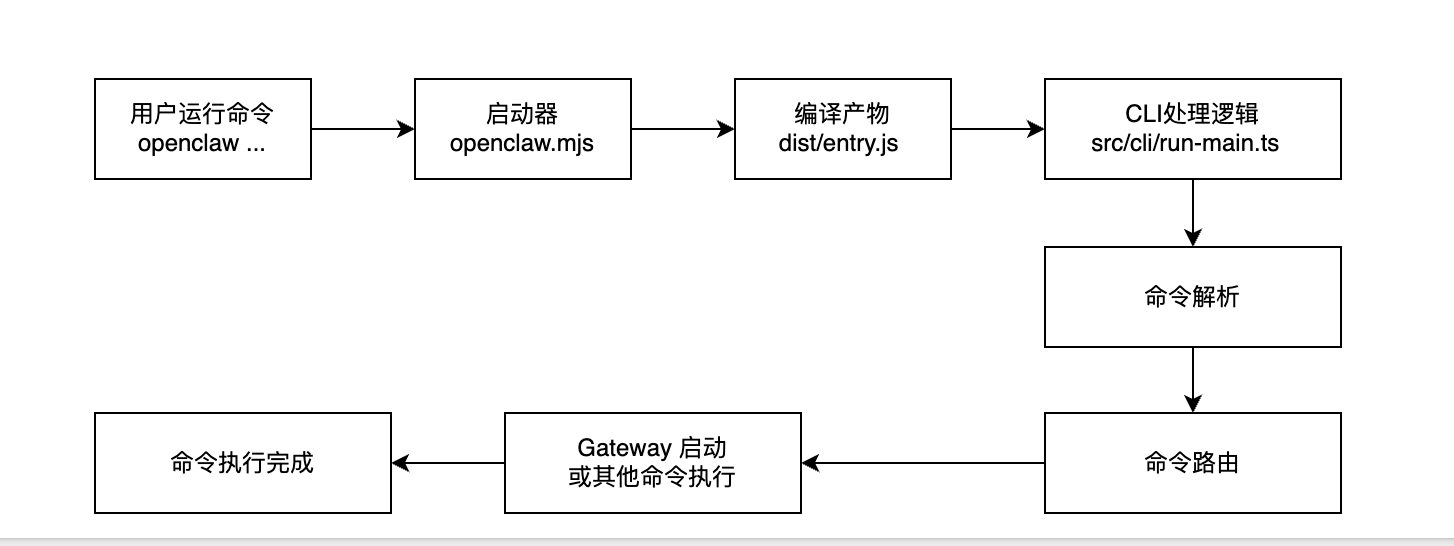
4. openclaw命令
通过以上分析,我们不难发现,openclaw 的执行入口文件是:openclaw.mjs,它是一个 Node.js 可执行文件。我们可以通过创建软链,将它链接到系统 PATH 中(源码的Dockerfile 文件第110行便使用了这种方式):
ln -sf /app/openclaw.mjs /usr/local/bin/openclaw
chmod 755 /app/openclaw.mjs
通过以上配置后,opanclaw便可以作为可执行命令,直接使用:
openclaw --version

2026.3.2
openclaw --help
OpenClaw 2026.3.2 (unknown) — If you're lost, run doctor; if you're brave, run prod; if you're wise, run tests.
Usage: openclaw [options] [command]
Options:
--dev Dev profile: isolate state under ~/.openclaw-dev, default gateway port 19001, and shift derived
ports (browser/canvas)
-h, --help Display help for command
--log-level <level> Global log level override for file + console (silent|fatal|error|warn|info|debug|trace)
--no-color Disable ANSI colors
--profile <name> Use a named profile (isolates OPENCLAW_STATE_DIR/OPENCLAW_CONFIG_PATH under ~/.openclaw-<name>)
-V, --version output the version number
Commands:
Hint: commands suffixed with * have subcommands. Run <command> --help for details.
acp * Agent Control Protocol tools
agent Run one agent turn via the Gateway
agents * Manage isolated agents (workspaces, auth, routing)
approvals * Manage exec approvals (gateway or node host)
browser * Manage OpenClaw's dedicated browser (Chrome/Chromium)
channels * Manage connected chat channels (Telegram, Discord, etc.)
china OpenClaw China 插件命令
clawbot * Legacy clawbot command aliases
completion Generate shell completion script
config * Non-interactive config helpers (get/set/unset/file/validate). Default: starts setup wizard.
configure Interactive setup wizard for credentials, channels, gateway, and agent defaults
cron * Manage cron jobs via the Gateway scheduler
daemon * Gateway service (legacy alias)
dashboard Open the Control UI with your current token
devices * Device pairing + token management
directory * Lookup contact and group IDs (self, peers, groups) for supported chat channels
dns * DNS helpers for wide-area discovery (Tailscale + CoreDNS)
docs Search the live OpenClaw docs
doctor Health checks + quick fixes for the gateway and channels
gateway * Run, inspect, and query the WebSocket Gateway
health Fetch health from the running gateway
help Display help for command
hooks * Manage internal agent hooks
logs Tail gateway file logs via RPC
memory * Search and reindex memory files
message * Send, read, and manage messages
models * Discover, scan, and configure models
node * Run and manage the headless node host service
nodes * Manage gateway-owned node pairing and node commands
onboard Interactive onboarding wizard for gateway, workspace, and skills
pairing * Secure DM pairing (approve inbound requests)
plugins * Manage OpenClaw plugins and extensions
qr Generate iOS pairing QR/setup code
reset Reset local config/state (keeps the CLI installed)
sandbox * Manage sandbox containers for agent isolation
secrets * Secrets runtime reload controls
security * Security tools and local config audits
sessions * List stored conversation sessions
setup Initialize local config and agent workspace
skills * List and inspect available skills
status Show channel health and recent session recipients
system * System events, heartbeat, and presence
tui Open a terminal UI connected to the Gateway
uninstall Uninstall the gateway service + local data (CLI remains)
update * Update OpenClaw and inspect update channel status
webhooks * Webhook helpers and integrations
Examples:
openclaw models --help
Show detailed help for the models command.
openclaw channels login --verbose
Link personal WhatsApp Web and show QR + connection logs.
openclaw message send --target +15555550123 --message "Hi" --json
Send via your web session and print JSON result.
openclaw gateway --port 18789
Run the WebSocket Gateway locally.
openclaw --dev gateway
Run a dev Gateway (isolated state/config) on ws://127.0.0.1:19001.
openclaw gateway --force
Kill anything bound to the default gateway port, then start it.
openclaw gateway ...
Gateway control via WebSocket.
openclaw agent --to +15555550123 --message "Run summary" --deliver
Talk directly to the agent using the Gateway; optionally send the WhatsApp reply.
openclaw message send --channel telegram --target @mychat --message "Hi"
Send via your Telegram bot.
Docs: docs.openclaw.ai/cli本篇详细介绍了openclaw 的启动流程,以及命令执行的逻辑,下一篇介绍Gateway的启动流程。

小龙虾开发者社区是 CSDN 旗下专注 OpenClaw 生态的官方阵地,聚焦技能开发、插件实践与部署教程,为开发者提供可直接落地的方案、工具与交流平台,助力高效构建与落地 AI 应用
更多推荐

 14
14 0
0- 0


 已为社区贡献4条内容

所有评论(0)