
windows电脑安装OpenClaw步骤
OpenClaw安装指南 本文介绍了在Windows系统上安装和配置OpenClaw的步骤: 环境准备:已安装Node.js和Git,如需本地大模型还需ollama 安装命令:执行npm i -g openclaw全局安装 验证安装:通过openclaw --version检查版本 初始化配置: 选择模型类型(本地/云) 云模型需注册ollama账号获取API key 以管理员身份运行opencl
·
基础设施
windows已经准备好了运行 OpenClaw 所需的所有基础环境和工具(Node.js、Git)
如果是使用本地大模型,还需要ollama
安装
npm i -g openclaw
输出:
Microsoft Windows [版本 10.0.26100.7840]
(c) Microsoft Corporation。保留所有权利。

C:\Users\LHF>npm i -g openclaw
npm warn deprecated inflight@1.0.6: This module is not supported, and leaks memory. Do not use it. Check out lru-cache if you want a good and tested way to coalesce async requests by a key value, which is much more comprehensive and powerful.
npm warn deprecated npmlog@5.0.1: This package is no longer supported.
npm warn deprecated npmlog@6.0.2: This package is no longer supported.
npm warn deprecated rimraf@3.0.2: Rimraf versions prior to v4 are no longer supported
npm warn deprecated glob@7.2.3: Old versions of glob are not supported, and contain widely publicized security vulnerabilities, which have been fixed in the current version. Please update. Support for old versions may be purchased (at exorbitant rates) by contacting i@izs.me
npm warn deprecated are-we-there-yet@3.0.1: This package is no longer supported.
npm warn deprecated are-we-there-yet@2.0.0: This package is no longer supported.
npm warn deprecated gauge@3.0.2: This package is no longer supported.
npm warn deprecated gauge@4.0.4: This package is no longer supported.
npm warn deprecated tar@6.2.1: Old versions of tar are not supported, and contain widely publicized security vulnerabilities, which have been fixed in the current version. Please update. Support for old versions may be purchased (at exorbitant rates) by contacting i@izs.me
npm warn deprecated tar@6.2.1: Old versions of tar are not supported, and contain widely publicized security vulnerabilities, which have been fixed in the current version. Please update. Support for old versions may be purchased (at exorbitant rates) by contacting i@izs.me
npm warn deprecated node-domexception@1.0.0: Use your platform's native DOMException instead
npm warn deprecated glob@10.5.0: Old versions of glob are not supported, and contain widely publicized security vulnerabilities, which have been fixed in the current version. Please update. Support for old versions may be purchased (at exorbitant rates) by contacting i@izs.me

removed 67 packages, and changed 698 packages in 4m

C:\Users\LHF>
验证openclaw命令:
openclaw --version
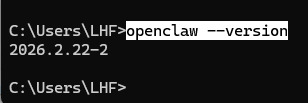
初始化配置
在配置之前先确定怎么调用大模型:
- 使用ollama本地模型,那你先下载好
- 使用ollama云模型,那你先拉取好。并且要注册ollama账号。申请
API key待会OpenClaw初始化需要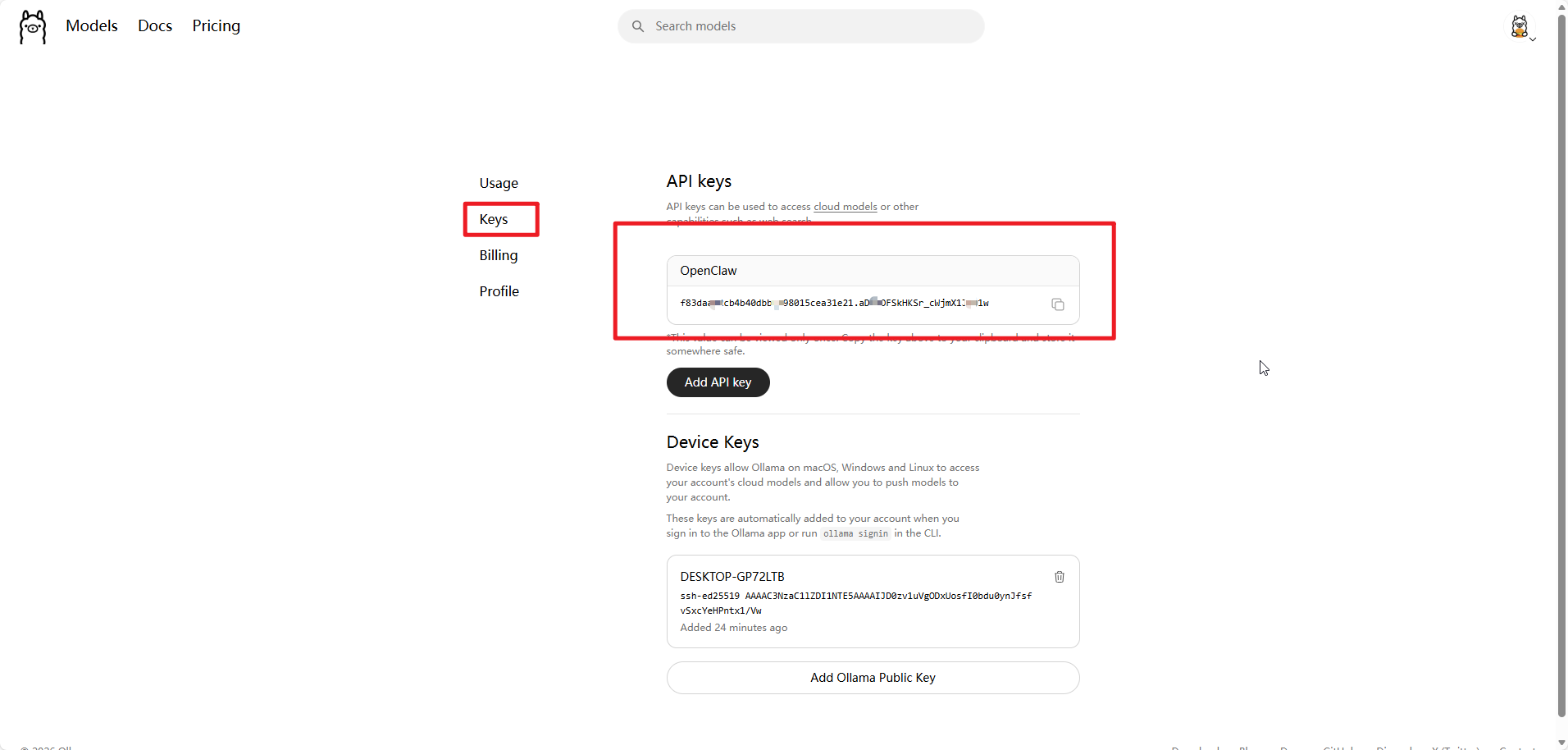
我以云模型为例:
以管理员身份运行PowerShell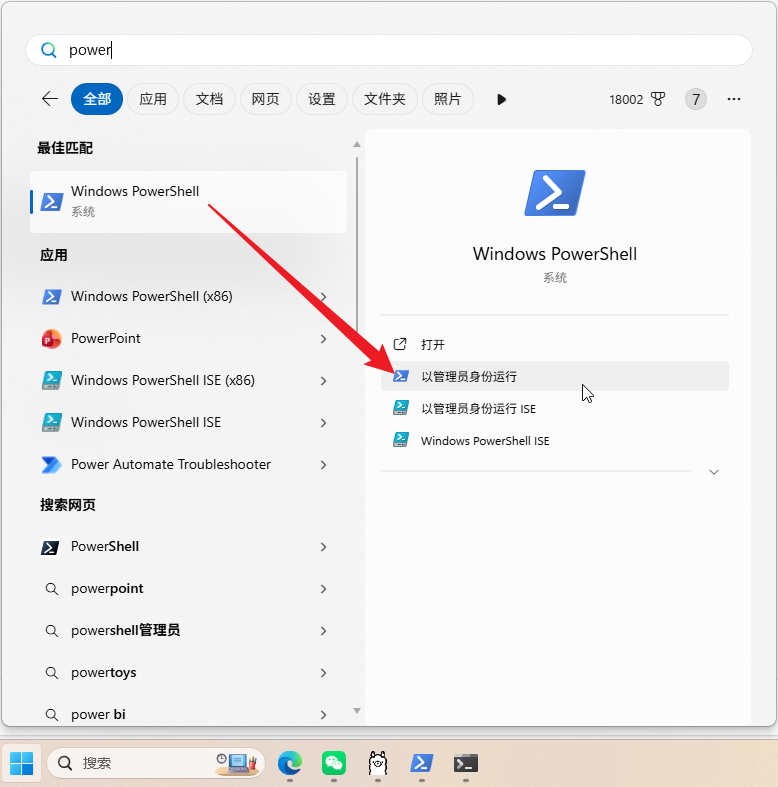
执行初始化命令:
openclaw onboard
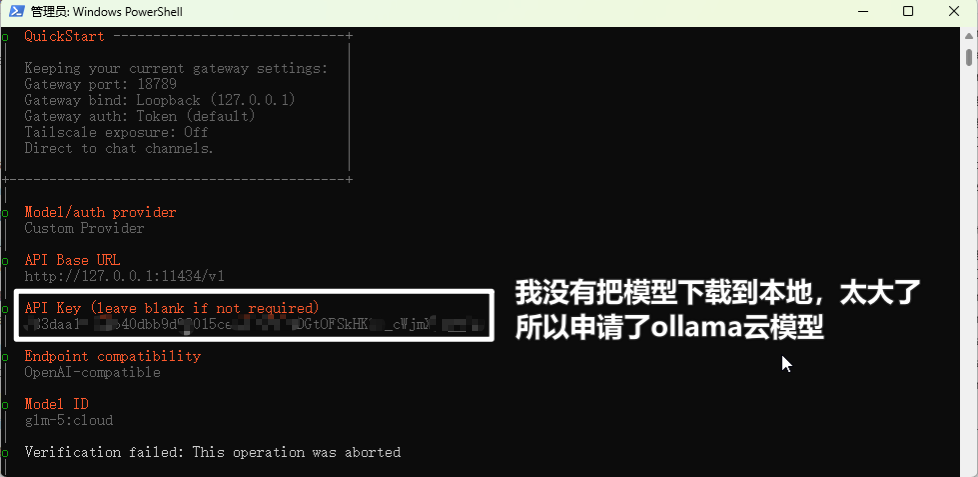
输出:
Windows PowerShell
版权所有(C) Microsoft Corporation。保留所有权利。
安装最新的 PowerShell,了解新功能和改进!https://aka.ms/PSWindows
PS C:\WINDOWS\system32> openclaw onboard
🦞 OpenClaw 2026.2.22-2 (45febec) — Chat automation for people who peaked at IRC.
Windows detected — OpenClaw runs great on WSL2!
Native Windows might be trickier.
Quick setup: wsl --install (one command, one reboot)
Guide: https://docs.openclaw.ai/windows
▄▄▄▄▄▄▄▄▄▄▄▄▄▄▄▄▄▄▄▄▄▄▄▄▄▄▄▄▄▄▄▄▄▄▄▄▄▄▄▄▄▄▄▄▄▄▄▄▄▄▄▄
██░▄▄▄░██░▄▄░██░▄▄▄██░▀██░██░▄▄▀██░████░▄▄▀██░███░██
██░███░██░▀▀░██░▄▄▄██░█░█░██░█████░████░▀▀░██░█░█░██
██░▀▀▀░██░█████░▀▀▀██░██▄░██░▀▀▄██░▀▀░█░██░██▄▀▄▀▄██
▀▀▀▀▀▀▀▀▀▀▀▀▀▀▀▀▀▀▀▀▀▀▀▀▀▀▀▀▀▀▀▀▀▀▀▀▀▀▀▀▀▀▀▀▀▀▀▀▀▀▀▀
🦞 OPENCLAW 🦞
T OpenClaw onboarding
|
o Security ------------------------------------------------------------------------------+
| |
| Security warning — please read. |
| |
| OpenClaw is a hobby project and still in beta. Expect sharp edges. |
| This bot can read files and run actions if tools are enabled. |
| A bad prompt can trick it into doing unsafe things. |
| |
| If you’re not comfortable with basic security and access control, don’t run OpenClaw. |
| Ask someone experienced to help before enabling tools or exposing it to the internet. |
| |
| Recommended baseline: |
| - Pairing/allowlists + mention gating. |
| - Sandbox + least-privilege tools. |
| - Keep secrets out of the agent’s reachable filesystem. |
| - Use the strongest available model for any bot with tools or untrusted inboxes. |
| |
| Run regularly: |
| openclaw security audit --deep |
| openclaw security audit --fix |
| |
| Must read: https://docs.openclaw.ai/gateway/security |
| |
+-----------------------------------------------------------------------------------------+
|
o I understand this is powerful and inherently risky. Continue?
| Yes
|
o Onboarding mode
| QuickStart
|
o Existing config detected ---------+
| |
| workspace: ~\.openclaw\workspace |
| model: ollama/glm-5:cloud |
| gateway.mode: local |
| gateway.port: 18789 |
| gateway.bind: loopback |
| |
+------------------------------------+
|
o QuickStart -----------------------------+
| |
| Keeping your current gateway settings: |
| Gateway port: 18789 |
| Gateway bind: Loopback (127.0.0.1) |
| Gateway auth: Token (default) |
| Tailscale exposure: Off |
| Direct to chat channels. |
| |
+------------------------------------------+
|
o Model/auth provider
| Custom Provider
|
o API Base URL
| http://127.0.0.1:11434/v1
|
o API Key (leave blank if not required)
| f83da1111140dbb9d980151564242.aDGtOFSkHKSr_cWj3333333333
|
o Endpoint compatibility
| OpenAI-compatible
|
o Model ID
| glm-5:cloud
|
o Verification successful.
|
o Endpoint ID
| ollama
|
o Model alias (optional)
| glm-5:cloud
Configured custom provider: ollama/glm-5:cloud
|
o Channel status ----------------------------+
| |
| Telegram: not configured |
| WhatsApp: not configured |
| Discord: not configured |
| IRC: not configured |
| Google Chat: not configured |
| Slack: not configured |
| Signal: not configured |
| iMessage: not configured |
| Feishu: install plugin to enable |
| Google Chat: install plugin to enable |
| Nostr: install plugin to enable |
| Microsoft Teams: install plugin to enable |
| Mattermost: install plugin to enable |
| Nextcloud Talk: install plugin to enable |
| Matrix: install plugin to enable |
| BlueBubbles: install plugin to enable |
| LINE: install plugin to enable |
| Zalo: install plugin to enable |
| Zalo Personal: install plugin to enable |
| Synology Chat: install plugin to enable |
| Tlon: install plugin to enable |
| |
+---------------------------------------------+
|
o How channels work -----------------------------------------------------------------------+
| |
| DM security: default is pairing; unknown DMs get a pairing code. |
| Approve with: openclaw pairing approve <channel> <code> |
| Public DMs require dmPolicy="open" + allowFrom=["*"]. |
| Multi-user DMs: run: openclaw config set session.dmScope "per-channel-peer" (or |
| "per-account-channel-peer" for multi-account channels) to isolate sessions. |
| Docs: channels/pairing |
| |
| Telegram: simplest way to get started — register a bot with @BotFather and get going. |
| WhatsApp: works with your own number; recommend a separate phone + eSIM. |
| Discord: very well supported right now. |
| IRC: classic IRC networks with DM/channel routing and pairing controls. |
| Google Chat: Google Workspace Chat app with HTTP webhook. |
| Slack: supported (Socket Mode). |
| Signal: signal-cli linked device; more setup (David Reagans: "Hop on Discord."). |
| iMessage: this is still a work in progress. |
| Feishu: 飞书/Lark enterprise messaging with doc/wiki/drive tools. |
| Nostr: Decentralized protocol; encrypted DMs via NIP-04. |
| Microsoft Teams: Bot Framework; enterprise support. |
| Mattermost: self-hosted Slack-style chat; install the plugin to enable. |
| Nextcloud Talk: Self-hosted chat via Nextcloud Talk webhook bots. |
| Matrix: open protocol; install the plugin to enable. |
| BlueBubbles: iMessage via the BlueBubbles mac app + REST API. |
| LINE: LINE Messaging API bot for Japan/Taiwan/Thailand markets. |
| Zalo: Vietnam-focused messaging platform with Bot API. |
| Zalo Personal: Zalo personal account via QR code login. |
| Synology Chat: Connect your Synology NAS Chat to OpenClaw with full agent capabilities. |
| Tlon: decentralized messaging on Urbit; install the plugin to enable. |
| |
+-------------------------------------------------------------------------------------------+
|
o Select channel (QuickStart)
| Skip for now
Config overwrite: C:\Users\LHF\.openclaw\openclaw.json (sha256 001d2c169e648c32aafca1fe73a1978d07ace4bcc403d56d56d9467d26e06e76 -> a2d5042e49e557de1913bcaa9021ea977b7587895b0e04f053ec3505d9a70a00, backup=C:\Users\LHF\.openclaw\openclaw.json.bak)
Updated ~\.openclaw\openclaw.json
Workspace OK: ~\.openclaw\workspace
Sessions OK: ~\.openclaw\agents\main\sessions
|
o Skills status -------------+
| |
| Eligible: 4 |
| Missing requirements: 40 |
| Unsupported on this OS: 8 |
| Blocked by allowlist: 0 |
| |
+-----------------------------+
|
o Configure skills now? (recommended)
| No
|
o Hooks ------------------------------------------------------------------+
| |
| Hooks let you automate actions when agent commands are issued. |
| Example: Save session context to memory when you issue /new or /reset. |
| |
| Learn more: https://docs.openclaw.ai/automation/hooks |
| |
+--------------------------------------------------------------------------+
|
o Enable hooks?
| 🚀 boot-md, 📎 bootstrap-extra-files, 📝 command-logger, 💾 session-memory
|
o Hooks Configured ----------------------------------------------------------------+
| |
| Enabled 4 hooks: boot-md, bootstrap-extra-files, command-logger, session-memory |
| |
| You can manage hooks later with: |
| openclaw hooks list |
| openclaw hooks enable <name> |
| openclaw hooks disable <name> |
| |
+-----------------------------------------------------------------------------------+
Config overwrite: C:\Users\LHF\.openclaw\openclaw.json (sha256 a2d5042e49e557de1913bcaa9021ea977b7587895b0e04f053ec3505d9a70a00 -> b98be544113292547bc124a9d2ed07ed7ca7f481ebdbadf31296480a5a12e0c5, backup=C:\Users\LHF\.openclaw\openclaw.json.bak)
|
o Gateway service runtime --------------------------------------------+
| |
| QuickStart uses Node for the Gateway service (stable + supported). |
| |
+----------------------------------------------------------------------+
|
o Gateway service already installed
| Restart
|
o Restarting Gateway service…Restarted Scheduled Task: OpenClaw Gateway
o Gateway service restarted.
|
o
Agents: main (default)
Heartbeat interval: 30m (main)
Session store (main): C:\Users\LHF\.openclaw\agents\main\sessions\sessions.json (0 entries)
|
o Optional apps ------------------------+
| |
| Add nodes for extra features: |
| - macOS app (system + notifications) |
| - iOS app (camera/canvas) |
| - Android app (camera/canvas) |
| |
+----------------------------------------+
|
o Control UI ---------------------------------------------------------------------+
| |
| Web UI: http://127.0.0.1:18789/ |
| Web UI (with token): |
| http://127.0.0.1:18789/#token=35856f124501fd5a6e035a6355d531b1199359898518c5c6 |
| Gateway WS: ws://127.0.0.1:18789 |
| Gateway: reachable |
| Docs: https://docs.openclaw.ai/web/control-ui |
| |
+----------------------------------------------------------------------------------+
|
o Start TUI (best option!) ---------------------------------+
| |
| This is the defining action that makes your agent you. |
| Please take your time. |
| The more you tell it, the better the experience will be. |
| We will send: "Wake up, my friend!" |
| |
+------------------------------------------------------------+
|
o Token ---------------------------------------------------------------------------------+
| |
| Gateway token: shared auth for the Gateway + Control UI. |
| Stored in: ~/.openclaw/openclaw.json (gateway.auth.token) or OPENCLAW_GATEWAY_TOKEN. |
| View token: openclaw config get gateway.auth.token |
| Generate token: openclaw doctor --generate-gateway-token |
| Web UI stores a copy in this browser's localStorage (openclaw.control.settings.v1). |
| Open the dashboard anytime: openclaw dashboard --no-open |
| If prompted: paste the token into Control UI settings (or use the tokenized dashboard |
| URL). |
| |
+-----------------------------------------------------------------------------------------+
|
o How do you want to hatch your bot?
| Open the Web UI
|
o Dashboard ready ----------------------------------------------------------------+
| |
| Dashboard link (with token): |
| http://127.0.0.1:18789/#token=35856f124501fd5a6e035a6355d531b1199359898518c5c6 |
| Opened in your browser. Keep that tab to control OpenClaw. |
| |
+----------------------------------------------------------------------------------+
|
o Workspace backup ----------------------------------------+
| |
| Back up your agent workspace. |
| Docs: https://docs.openclaw.ai/concepts/agent-workspace |
| |
+-----------------------------------------------------------+
|
o Security ------------------------------------------------------+
| |
| Running agents on your computer is risky — harden your setup: |
| https://docs.openclaw.ai/security |
| |
+-----------------------------------------------------------------+
|
o Web search (optional) -----------------------------------------------------------------+
| |
| If you want your agent to be able to search the web, you’ll need an API key. |
| |
| OpenClaw uses Brave Search for the `web_search` tool. Without a Brave Search API key, |
| web search won’t work. |
| |
| Set it up interactively: |
| - Run: openclaw configure --section web |
| - Enable web_search and paste your Brave Search API key |
| |
| Alternative: set BRAVE_API_KEY in the Gateway environment (no config changes). |
| Docs: https://docs.openclaw.ai/tools/web |
| |
+-----------------------------------------------------------------------------------------+
|
o What now -------------------------------------------------------------+
| |
| What now: https://openclaw.ai/showcase ("What People Are Building"). |
| |
+------------------------------------------------------------------------+
|
— Onboarding complete. Dashboard opened; keep that tab to control OpenClaw.
PS C:\WINDOWS\system32>
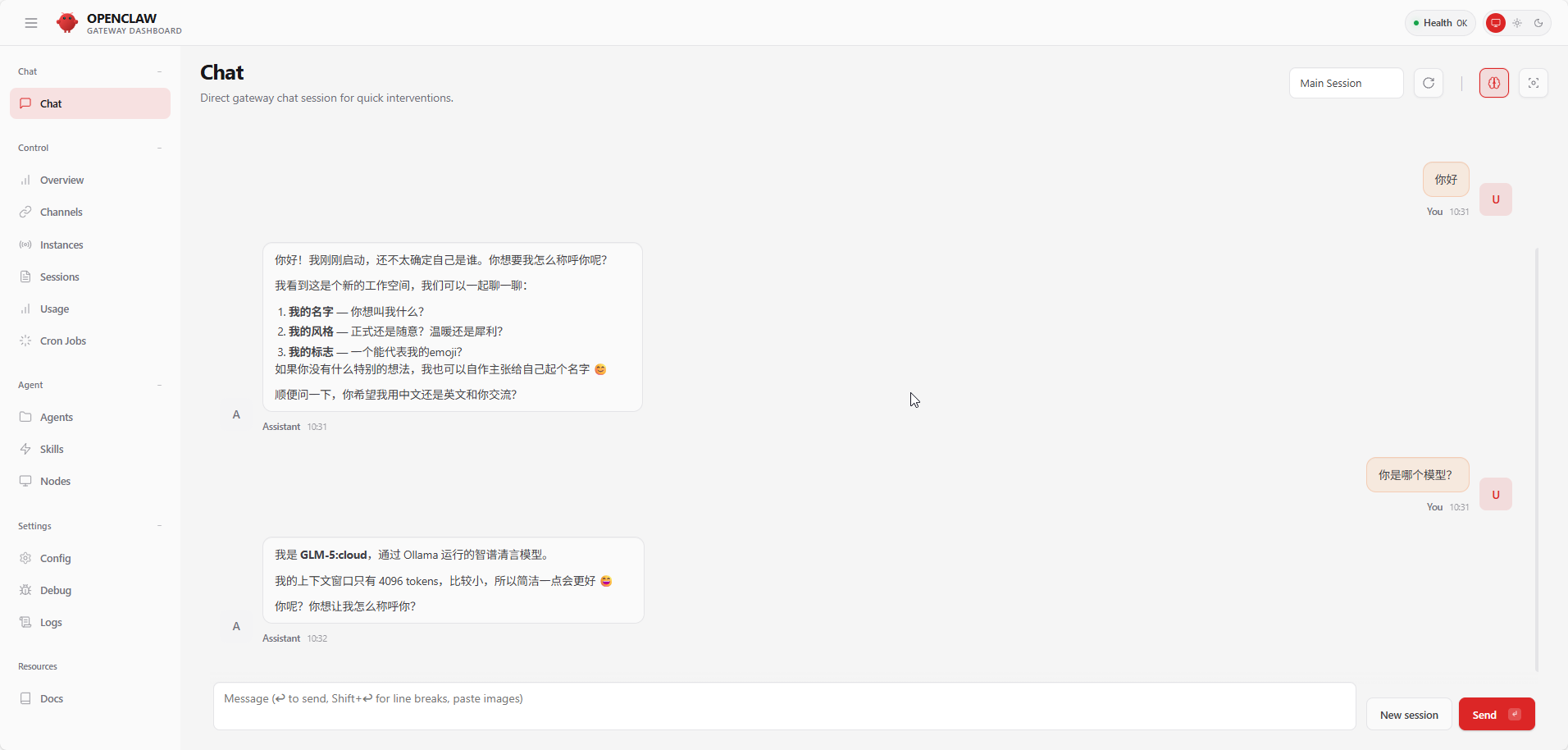

小龙虾开发者社区是 CSDN 旗下专注 OpenClaw 生态的官方阵地,聚焦技能开发、插件实践与部署教程,为开发者提供可直接落地的方案、工具与交流平台,助力高效构建与落地 AI 应用
更多推荐

 10
10 0
0- 0


 已为社区贡献7条内容

所有评论(0)