使用 MathLive 和 Vue 更新数学方程
·
问题:使用 MathLive 和 Vue 更新数学方程
我一直在努力使用 Vue 和 MathLive 来处理排版随机生成的数字及其正方形。程序的功能是生成一个1到35的随机整数,计算平方,用MathLive排版。有两个按钮可以将一个添加到整数或创建另一个随机按钮。我排版初始值没有问题,但是当我创建一个不同的整数或在页面上加 1 时,它永远不会重新排版。我正在尝试将此程序作为 Vue 中的一个组件来实现。这是我的 MWE(仅限组件):
<template lang="html">
  <div class="problem">
    <p id="math">$${{num}}^2 = {{square()}}$$</p>
    <button @click="addOne">Add One</button>
    <button @click="randomInt">Random Number</button>
  </div>
</template>

<script>
import math from 'mathjs'
import MathLive from 'mathlive'

export default {
  name: 'Problem',
  data: function () {
    return {
      num: math.randomInt(1,35)
    }
  },
  watch: {
    num: function () {
      console.log("Data changed");
      // this.renderMath();
    }
  },
  created: function () {
    console.log("Hello This is created!");
    this.renderMath();
  },
  beforeMount: function () {
    console.log("This is beforeMount");
  },
  mounted: function () {
    console.log("This is mounted!");
  },
  beforeUpdate: function () {
    console.log("This is beforeUpdate");
    this.renderMath();
  },
  methods: {
    addOne: function() {
      this.num++
    },
    randomInt: function () {
      this.num = math.randomInt(1,35)
    },
    square: function () {
      return this.num**2
    },
    renderMath: function (event) {
      this.$nextTick(function(){
        MathLive.renderMathInElement("math");
      })
    }
  }
}
</script>

<style lang="css" scoped>
@import url("../../node_modules/mathlive/dist/mathlive.core.css");
@import url("../../node_modules/mathlive/dist/mathlive.css");
p {
  color: white;
}
</style>
编辑:为了澄清当我加载页面时,初始值是使用 MathLive 正确排版的,如下所示: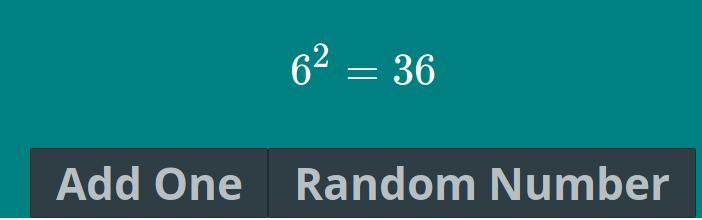 然后在我单击_Add One_ 或_Random Number_ 按钮后,程序应生成一个新值,计算其平方,并在屏幕上更新该值,如下所示: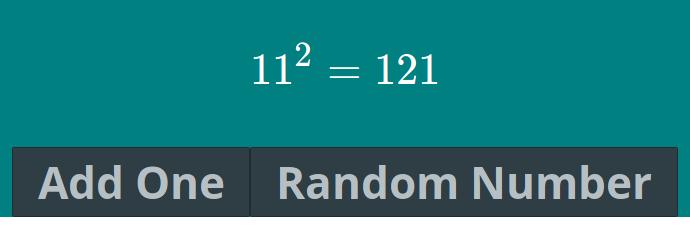
解答
MathLive 的 DOM 操作似乎与 Vue 的虚拟 DOM 冲突,从而阻止了 Vue 使用更新的文本节点修补 DOM。
一种解决方法是应用key以在key更改时强制重新创建 MathLivep元素。我们可以使用num作为键,因为它会随着每次按下按钮而改变:
<p :key="num">...</p>
num上的当前观察者需要更新以调用renderMath()以刷新 MathLive 元素:
watch: {
  num() {
    this.renderMath();
  }
},
您还应该考虑使square()成为更有效渲染的计算属性:
// script
computed: {
  square() {
    return this.num ** 2
  }
}
// template
<p :key="num">$${{num}}^2 = {{square}}$$</p>


Vue社区为您提供最前沿的新闻资讯和知识内容
更多推荐
 0
0 0
0- 0



 已为社区贡献21233条内容

所有评论(0)