Vuetify password is overlaping v-text-field label
Answer a question
I'm making a logging component with Vuetify and Firebase. I want the pasword to be hidden, but by adding the type 'pasword' to the v-text-field, it adds 4 points overlapping the label of the pasword field and the word 'admin' overlapping the email field:
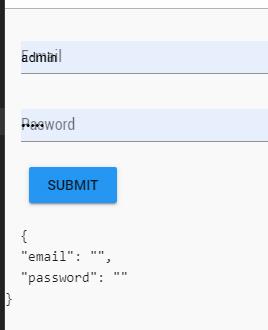
When I click on any field, I can see in $data pre that "admin" is assigned to both pasword and email. I've tryed to set 'placeholder' and 'value' properties to empty strings, but doesn't works. In the vuetify docs I can't see any prop that asigns 'admin' to v-text-field. How can I solve this issue? Here is my component code:
<template>
  <v-form>
    <v-container>
      <v-text-field
        label="E-mail"
        v-model="email"
        >
      </v-text-field>
      <v-text-field
        label="Pasword"
        v-model="password"
        type="password"
        placeholder=""
        >
      </v-text-field>
      <v-btn
        color="blue"
        @click="login()"
      >Submit
      </v-btn>
    </v-container>
    <pre>
    {{ $data}}
  </pre>
  </v-form>
</template>

<script>
  import firebase from 'firebase'
  export default {
    data() {
      return {
        email: '',
        password: ''
      }
    },
    methods: {
      login(){
        firebase.auth().signInWithEmailAndPassword(this.email, this.password)
          .then(user => console.log('User conected'), error => console.log(error))
      }
    }
  }
</script>
Answers
I don't think this has anything to do with your code, you are using Chrome, right? Google does some weird stuff that are really difficult to control, this is because you have a saved username and password and as vuetify uses the label as a placeholder, google's saved forms styles 'crashes' with yours, it has happened to me with the row color of the dropdown of saved forms and right now (just in 1 computer) the font size of the username and password is smaller inside the v-text-field until you click it

Vue社区为您提供最前沿的新闻资讯和知识内容
更多推荐
 0
0 0
0- 0



 已为社区贡献21229条内容

所有评论(0)