How to connect Vue.js as frontend and Fastapi as backend
·
Answer a question
I'm building a project On Jobs Portal and i need Vue as frontend and Fastapi as backend for (add, delete update). I want to know if i can connect these both or not.
Answers
I want to know if i can connect these both or not.
Quick answer: Yes, you can connect.
But there are many ways, you can render templates with something like Jinja or you can create a completely different project with something like Vue CLI and you might want to use something like Nginx or Apache etc to connect both.
So let's create an example app with Jinja
Structure
├── main.py
└── templates
    └── home.html
Backend- main.py
- We are serving our frontend in
/and rendering ourhome.htmlin that path. - We are using the templates folder to keep our HTML's and passing it to Jinja.
- Also, we are going to send a request to
/addfrom our front-end.
from fastapi import FastAPI, Request
from fastapi.templating import Jinja2Templates
from pydantic import BaseModel

templates = Jinja2Templates(directory="templates")

app = FastAPI()


class TextArea(BaseModel):
    content: str


@app.post("/add")
async def post_textarea(data: TextArea):
    print(data.dict())
    return {**data.dict()}


@app.get("/")
async def serve_home(request: Request):
    return templates.TemplateResponse("home.html", {"request": request})
Frontend - home.html
- Let us create a dummy app that has a textarea and button.
- We are using Axios to send our requests to backend.
- Since they are running on the same port we can pass
/addto Axios directly.
<html>
<title></title>
<script src="https://cdn.jsdelivr.net/npm/vue/dist/vue.js"></script>
<script src="https://unpkg.com/axios/dist/axios.min.js"></script>

<body>
    <div id="app">
        <textarea name="" id="content" cols="30" rows="10" v-model="content"></textarea>
        <button @click="addText" id="add-textarea">click me</button>
    </div>

    <script>
        new Vue({
            el: "#app",
            data: {
                title: '',
                content: ''
            },
            methods: {
                addText() {
                    return axios.post("/add", {
                        content: this.content
                    }, {
                        headers: {
                            'Content-type': 'application/json',
                        }
                    }).then((response) => {
                        console.log("content: " + this.content);
                    });
                }
            }
        });
    </script>
</body>

</html>
In the end, you will have a terrible looking textarea and a button. But it will help you to understand things better.
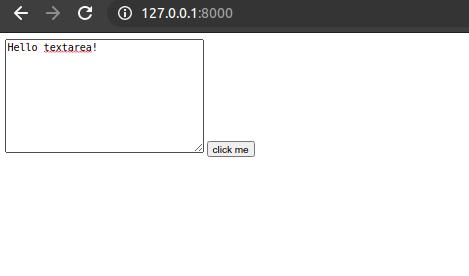
 {'content': 'Hello textarea!'}
INFO:     127.0.0.1:51682 - "POST /add HTTP/1.1" 200 OK

Vue社区为您提供最前沿的新闻资讯和知识内容
更多推荐
 0
0 0
0- 0



 已为社区贡献21229条内容

所有评论(0)