Setting up DaisyUI, Tailwind, Vue and Vite
I've decided to document how to set-up and use DaisyUI, with Vue and Tailwind, having used it recently in a client project. I added DaisyUI to ensure there was some consistency in the application I was building. It was initially being developed by myself but then it quickly grew to being developed by developers in multiple teams. Features and components were built without any wire-frames or base styleguides to follow. Some groundwork had to be introduced before the UI became too fragmented.
Prerequisites
- You'll need Node installed globally on your machine.
- See what DaisyUI offers
Initial setup
We'll be using Vite as our development server. It's now the standard, over Webpack, for developing JS applications. I highly recommend moving your existing web app builds over to Vite. The speed increase is worth the migration process.
Pop open your terminal of choice and run the following commands:
-
Run
npm init vite projectName, whereprojectNamewill be the name of a new folder for your application- select
vueusing the arrow keys and press enter to select - select
vueagain
- select
-
Once that has completed, you should see a prompt to
cdinto your new project directory- run
npm installto install the base dependencies - run
npm run devif you want to see the base Vue app. You can also experience how fast Vite is at getting your dev server running - If you've ran the last command, exit out of it so we can install the remaining dependencies
- run
-
Run
npm install -D tailwindcss postcss autoprefixerto get tailwind, postcss and autoprefixer installed as Dev dependencies- run
npx tailwindcss init -pto generate config files for Tailwind and PostCss
- run
-
Open your new project directory in your IDE
- In
tailwind.config.jswe need to updatecontent: []withcontent: ["./index.html", "./src/**/*.{vue,js,ts,jsx,tsx}",]to tell Tailwind to look at ourindex.htmland ourVue.jsfiles where we'll be using Tailwind classes - In
./src/we need to create a new CSS file. It can be called anything you like. I call itindex.css. Within this file we need to add the following to import Tailwind's directives for each of its layers:
@tailwind base; @tailwind components; @tailwind utilities;- In your
./src/main.jsadd the following lineimport './index.css', underimport App from './App.vue'to import the new stylesheet. You should have:
import { createApp } from 'vue' import App from './App.vue' import './index.css' createApp(App).mount('#app')- Empty the contents of
./src/App.vueand add the below with Tailwind's classes:
<template> <h1 class="text-3xl font-bold underline mb-10">Hello Vue!</h1> </template>- Back in your terminal, run
npm run devand go to the URL Vite has provided, e.g:http://localhost:3000 - You should see a plain white page with
Hello vue!in large bold text with an underline: 
- You can now exit this as we need to add DaisyUI to the application
- In your terminal, run the following to install DaisyUI:
npm i daisyui - In the
tailwind.config.jsfile we need to addrequire("daisyui")within thepluginsarray. You should have the following in yourtailwind.config.jsfile:
/** @type {import('tailwindcss').Config} */ module.exports = { content: [ "./index.html", "./src/**/*.{vue,js,ts,jsx,tsx}", ], theme: { extend: {}, }, plugins: [require("daisyui")], }- Back in your
./src/App.vuefile we can start adding some DaisyUI classes, e.g:
<template> <h1 class="text-3xl font-bold underline mb-10">Hello Vue!</h1> <button class="btn btn-primary">Hello Daisy button</button> </template>- In your terminal, run the following to see the changes
npm run dev. You should now see an updated page with a theme and styled button: 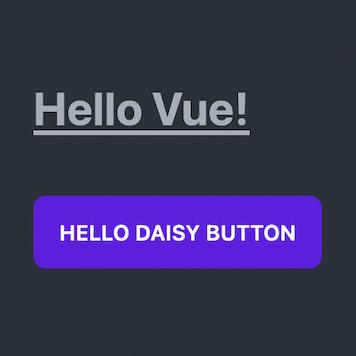
- In
-
That's it! We've now got access to all of DaisyUI's components throughout our application
Taking it a step further for future applications
I feel like the following steps are important to create a template for any new applications you feel like building:
- Delete the contents of the following directories:
./src/components/./src/assets/
That's it, You can now commit this to a repo and use it when you're starting new projects. I've created my version here for you to clone if you'd like.

Vue社区为您提供最前沿的新闻资讯和知识内容
更多推荐
 0
0 0
0- 0



 已为社区贡献21230条内容

所有评论(0)