
用 OpenClaw + DeepSeek + Ollama 自动 Review Spring Boot 项目代码
下面是一个从零开始可运行的 Windows 完整方案。我按安装 → 配置 → 代码 → 自动Review一步一步写。
一、最终系统结构 (Final Architecture)
Spring Boot Project
        │
        ▼
Code Scanner (Python)
        │
        ▼
OpenClaw Prompt Builder
        │
        ▼
Ollama API (localhost:11434)
        │
        ▼
DeepSeek-Coder
        │
        ▼
AI Code Review Report
二、Windows环境准备 (Environment Setup)
需要安装 3 个东西:
1️⃣ Python
2️⃣ Ollama
3️⃣ Git
1 安装 Python
下载:
https://www.python.org/downloads/
安装时必须勾选:
Add Python to PATH
验证:
python --version
2 安装 Git
下载:
https://git-scm.com/download/win
验证:
git --version
3 安装 Ollama (Windows)
下载:
安装完成后验证:
ollama --version

三、安装 DeepSeek 模型
推荐:
中等显卡(GTX 1080/RTX 2070/RTX 3060/RTX 4060), 显存:8GB – 12GB
ollama pull deepseek-coder:6.7b
中等显存:12GB – 16GB
ollama pull deepseek-coder-v2:16b
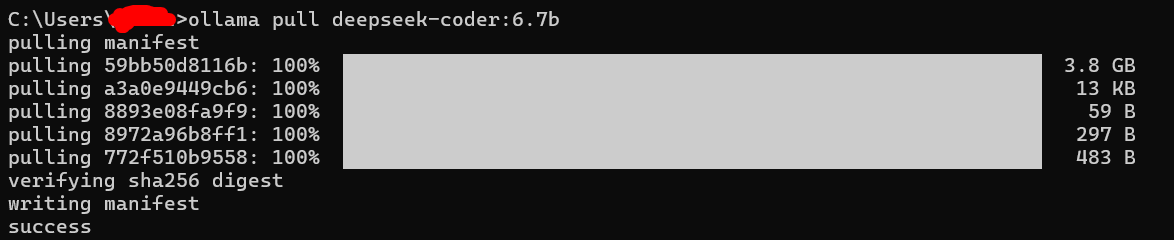
查看所有模型列表:
ollama list高性能电脑
ollama pull deepseek-coder:33b
测试模型:
ollama run deepseek-coder
输入:
review java code

说明模型已经工作。
四、测试 Ollama API
Ollama API地址:
http://localhost:11434
浏览器测试:

Windows PowerShell测试:
curl http://localhost:11434/api/generate ^
-d "{\"model\":\"deepseek-coder\",\"prompt\":\"hello\",\"stream\":false}"
返回说明 API 正常。
五、创建 AI Code Review 项目
创建目录:
mkdir ai-code-review
cd ai-code-review
结构:
ai-code-review
│
├── reviewer.py
├── scanner.py
├── prompt.py
└── report.md
六、代码扫描器 (scanner.py)
扫描 Spring Boot Java 文件。
import os

def scan_java_files(project_path):

    java_files = []

    for root, dirs, files in os.walk(project_path):
        for file in files:

            if file.endswith(".java"):
                path = os.path.join(root,file)
                java_files.append(path)

    return java_files
七、Prompt设计 (prompt.py)
def build_prompt(code):

    prompt = f"""
You are a senior Java architect.

Review this Spring Boot code.

Check:

1 Security issues
2 Performance issues
3 Bad practice
4 SQL injection
5 Concurrency problems
6 Transaction management
7 API design

Return markdown format:

## Issues

## Suggestions

## Refactor example

Code:

{code}
"""

    return prompt
八、DeepSeek调用 (reviewer.py)
安装依赖:
pip install requests
代码:
"""
AI Code Review Script
---------------------------------
This script scans all Java files in a project,
merges them together, and sends ONE request to
a local AI model for review.

It is optimized to avoid sending 200+ API requests.
Instead, it aggregates all source code and reviews once.
"""

import os
import requests
import logging

# ==========================================================
# Configuration
# ==========================================================

OLLAMA_URL = "http://localhost:11434/api/generate"
MODEL = "deepseek-coder:6.7b"  # Change to a smaller model if performance is slow
TIMEOUT = 300  # Increase timeout for large project review
MAX_FILE_SIZE = 5000  # Limit per file content to avoid token overflow


# ==========================================================
# Logging Setup
# ==========================================================

logging.basicConfig(
    level=logging.INFO,
    format="%(asctime)s [%(levelname)s] %(message)s",
    handlers=[
        logging.StreamHandler(),  # Print logs to console
        logging.FileHandler("review.log", encoding="utf-8")  # Save logs to file
    ]
)


# ==========================================================
# Scan Java Files
# ==========================================================

def scan_java_files(project_path):
    """
    Recursively scan directory and return all .java files.
    """
    java_files = []

    for root, _, files in os.walk(project_path):
        for file in files:
            if file.endswith(".java"):
                java_files.append(os.path.join(root, file))

    return java_files


# ==========================================================
# Call Local AI Model (Ollama)
# ==========================================================

def call_model(prompt):
    """
    Send prompt to local Ollama model and return response.
    Uses HTTP POST request.
    """
    try:
        response = requests.post(
            OLLAMA_URL,
            json={
                "model": MODEL,
                "prompt": prompt,
                "stream": False
            },
            timeout=TIMEOUT
        )

        response.raise_for_status()
        data = response.json()

        return data.get("response", "")

    except Exception as e:
        logging.error(f"AI request failed: {e}")
        return f"AI ERROR: {e}"


# ==========================================================
# Review Entire Project (Optimized Version)
# ==========================================================

def review_project(project_path):
    """
    1. Scan all Java files
    2. Merge them into one large code block
    3. Send ONE request to AI for review
    4. Generate report.md
    """

    files = scan_java_files(project_path)

    logging.info(f"Found {len(files)} Java files.")

    # ======================================================
    # Combine All Java Files
    # ======================================================
    combined_code = ""

    for file_path in files:
        try:
            with open(file_path, "r", encoding="utf-8", errors="ignore") as f:
                code = f.read(MAX_FILE_SIZE)

            combined_code += "\n\n"
            combined_code += "=====================================\n"
            combined_code += f"FILE: {file_path}\n"
            combined_code += "=====================================\n"
            combined_code += code

        except Exception as e:
            logging.error(f"Failed to read file {file_path}: {e}")

    # ======================================================
    # Build Prompt
    # ======================================================
    prompt = f"""
You are a senior Java Spring Boot architect.

Please review the following project code and provide:

1. Potential bugs
2. Security issues
3. Performance problems
4. Code quality issues
5. Suggested improvements

-------------------------------------------------------
PROJECT SOURCE CODE:
-------------------------------------------------------
{combined_code}
"""

    logging.info("Sending ONE request to AI for full project review...")

    # ======================================================
    # Call AI Once
    # ======================================================
    result = call_model(prompt)

    # ======================================================
    # Generate Report
    # ======================================================
    with open("report.md", "w", encoding="utf-8") as report:
        report.write("# AI Code Review Report\n\n")
        report.write(result)

    logging.info("✅ Review completed. report.md generated.")


# ==========================================================
# Entry Point
# ==========================================================

if __name__ == "__main__":
    project_directory = "src/main/java"
    review_project(project_directory)
九、放入你的 Spring Boot 项目
结构:
springboot-project
│
├── reviewer.py
├── scanner.py
├── prompt.py
│
└── src.main.java.com.leon
     ├── controller
     ├── service
     ├── repository
     └── entity
十、运行AI Review
运行:
python reviewer.py
输出:
Reviewing UserController.java
Reviewing UserService.java
Reviewing UserRepository.java
生成:
report.md
十一、AI Review效果
示例:
# File: UserController.java

## Issues

- Missing input validation
- Possible NullPointerException

## Suggestions

Use @Valid annotation

## Refactor example

@PostMapping
public ResponseEntity createUser(@Valid @RequestBody UserRequest req)
十二、自动化升级 (推荐)
可以做成 自动 PR Review
流程:
Git Push
   │
   ▼
CI Pipeline
   │
   ▼
AI Code Review
   │
   ▼
PR Comment
工具:
-
GitHub Actions
-
GitLab CI
十三、Windows自动运行脚本
创建:
run_review.bat
内容:
@echo off

echo Starting Ollama...

start "" ollama serve

timeout /t 5

echo Running AI Code Review...

python reviewer.py

pause
双击即可运行。
十四、推荐优化 (非常重要)
直接把所有代码给 LLM 会 token爆炸。
建议:
1 只分析关键代码
Controller
Service
Repository
2 限制代码长度
例如:
code = code[:8000]
3 使用 AST解析
推荐:
tree-sitter
javaparser
只给 LLM 方法级代码。
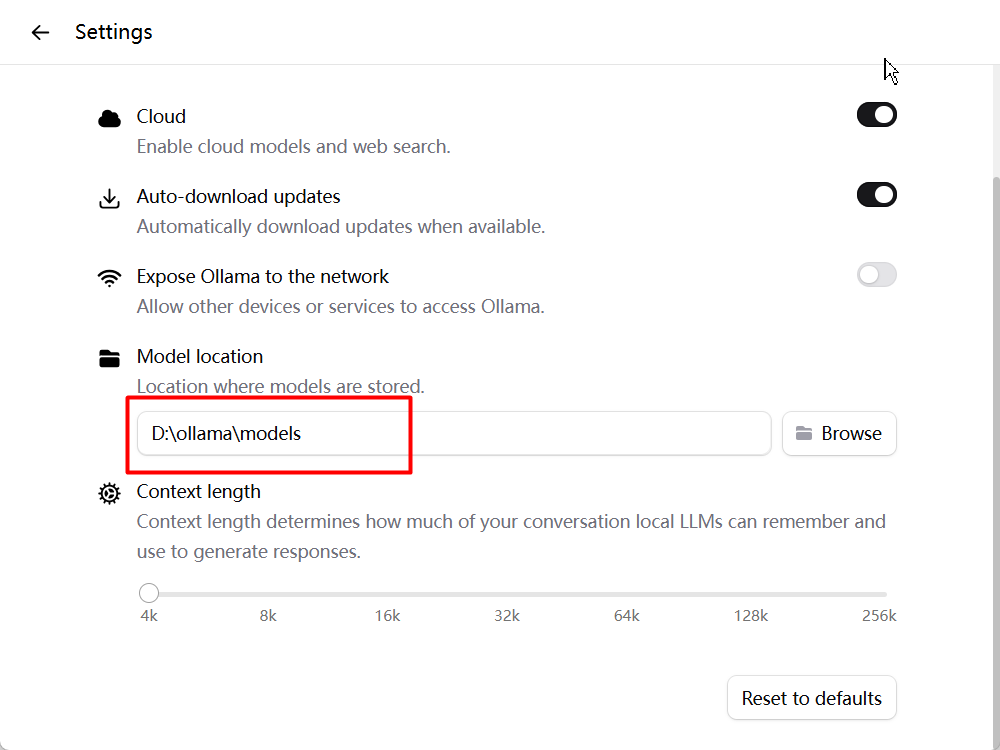
4 变更默认Ollama模型文件夹 (默认C盘会撑爆)
打开Ollama -> Setting -> Model loaction: 设置为你现在的模型文件夹
十五、最终效果
自动生成:
Spring Boot Code Review

Security Issues
Performance Issues
Architecture Problems
Refactor Suggestion
十六、企业级架构(可选)
真正企业级 AI Code Review 系统:
包含:
-
DeepSeek + Ollama
-
RAG知识库(Spring Best Practice)
-
AST静态分析
-
多AI Agent Review
-
Web UI
-
PR自动评论
整体系统大约 3000~5000 行代码,
效果会 比 GitHub Copilot Review 强很多。

小龙虾开发者社区是 CSDN 旗下专注 OpenClaw 生态的官方阵地,聚焦技能开发、插件实践与部署教程,为开发者提供可直接落地的方案、工具与交流平台,助力高效构建与落地 AI 应用
更多推荐


 5
5 0
0- 0


 已为社区贡献3条内容

所有评论(0)