
OpenClaw升级后OpenClaw和飞书“未建立有效的长链接“的问题修复过程
OpenClaw升级导致飞书插件异常问题及解决方案。升级后由于飞书插件未自动更新,导致配置项不匹配(appId和appSecret位置变更),出现消息接收失败。解决方法:1)删除旧插件目录~/.openclaw/extensions/feishu;2)重新安装插件或整体重装OpenClaw。
问题:OpenClaw升级后,飞书发送消息OpenClaw收不到
今天升级了OpenClaw,最新版本为2026.2.27。通过飞书发送消息失败。
总结原因:
1、因为OpenClaw会在2个不同的目录安装飞书插件,而~/.openclaw/extension中飞书插件不会自动更新,导致飞书插件版本与OpenClaw版本不一致。刚好这个版本修改了openclaw.json中飞书的插件的配置项。
2、本次升级关键修改点:将原来在channels.feishu下面的appId和appSecret移到了accounts.default下面。导致飞书插件异常。
3、通过代理无法与飞书建立长链接,提示“未建立有效的长链接“。把代理关闭。
  "channels": {
    "feishu": {
      "enabled": true,
      "domain": "feishu",
      "accounts": {
      #  本次版本新增
        "default": {
          "groupPolicy": "allowlist",
          "dmPolicy": "pairing",
          "appId": "cli_xxx",
          "appSecret": "",
          "botName": "主助手",
          "groupAllowFrom": [
            ""
          ]
        },
        "main": {
          "appId": "cli_xxx",
          "appSecret": "",
          "botName": "主助手",
          "groupAllowFrom": [
            ""
          ]
        },
      }
    }
  },
关键命令:
openclaw channels status
openclaw channels status --probe
# 显示probe failed
排查思路,检查飞书版本。
openclaw plugins list
# feishu插件还是2026.2.23
可能是因为我主动把~/.npm-global/lib/node_modules/openclaw/extensions/feishu/删除导致。因为每次都会提示飞书插件重复。
解决办法:删除~/.openclaw/extensions/feishu,重新安装飞书插件。
# 删除,这一步不应该执行
rm -r ~/.openclaw/extensions/feishu
# 重新安装feishu插件
openclaw plugins install @openclaw/feishu
提示错误如下,原因是我把2个飞书插件都给删了。连openclaw channels add都会报类似的错误。难道只能重新安装openclaw了吗?
Invalid config at /home/band/.openclaw/openclaw.json:\n- channels.feishu: unknown channel id: feishu
- plugins.allow: plugin not found: feishu
解决步骤,重新安装:npm i -g openclaw@latest
先重新安装openclaw,备份openclaw.json
npm i -g openclaw@latest
# ~/.npm-global/lib/node_modules/openclaw/extensions/feishu已经回来了
openclaw gateway status
# 已经启动
解决步骤,解决飞书重复问题
飞书插件3种不同的安装方式
至少有3种安装方式:
时间以2026-2-28为准,openclaw版本为2026.2.26
- npm i -g openclaw@latest,会默认安装飞书插件,版本与openclaw一致,都是2026.2.26,安装目录为~/.npm-global/lib/node_modules/openclaw/extensions/feishu
- openclaw plugins install @openclaw/feishu,版本为2026.2.25,安装目录为:
~/.openclaw/extensions/feishu - openclaw plugins install @m1heng-clawd/feishu,版本为0.1.14,安装目录为:
~/.openclaw/extensions/feishu
今天的问题,我还是怀疑版本不一致导致的。最终使用第3种方式安装。

还是没法收消息
我以为解决了,实际没解决。在飞书上发消息,还是接受不到。看后台日志,应该是这个原因导致的。在添加渠道的时候也会报这个错。但是我之前都配置过。为什么?
[ 'failed to obtain token' ]
去飞书后台,机器人的事件与回调那,点事件配置,重新选择方式,再选择长链接,会提示应用未建立长连接。
尝试重新添加渠道,openclaw channels add,还是不行。
API调试台:https://open.feishu.cn/api-explorer,能成功调用https://open.feishu.cn/open-apis/auth/v3/tenant_access_token/internal接口成功。
下面提示是代理不通,我把代理打开也不行。
00:45:58 info [error]: [
  AxiosError: connect ECONNREFUSED 127.0.0.1:10810
      at Function.from (/home/band/.npm-global/lib/node_modules/openclaw/node_modules/axios/lib/core/AxiosError.js:7:28)
      at RedirectableRequest.handleRequestError (/home/band/.npm-global/lib/node_modules/openclaw/node_modules/axios/lib/adapters/http.js:820:25)
      at RedirectableRequest.emit (node:events:531:35)
      at ClientRequest.eventHandlers.<computed> (/home/band/.npm-global/lib/node_modules/openclaw/node_modules/follow-redirects/index.js:49:24)
      at ClientRequest.emit (node:events:519:28)
      at emitErrorEvent (node:_http_client:107:11)
      at Socket.socketErrorListener (node:_http_client:574:5)
      at Socket.emit (node:events:519:28)
      at emitErrorNT (node:internal/streams/destroy:170:8)
      at emitErrorCloseNT (node:internal/streams/destroy:129:3)
      at processTicksAndRejections (node:internal/process/task_queues:90:21)
      at Axios.request (/home/band/.npm-global/lib/node_modules/openclaw/node_modules/axios/lib/core/Axios.js:46:41)
      at processTicksAndRejections (node:internal/process/task_queues:105:5) {
    isAxiosError: true,
    code: 'ECONNREFUSED',
    config: {
      transitional: [Object],
      adapter: [Array],
      transformRequest: [Array],
      transformResponse: [Array],
      timeout: 0,
      xsrfCookieName: 'XSRF-TOKEN',
      xsrfHeaderName: 'X-XSRF-TOKEN',
      maxContentLength: -1,
      maxBodyLength: -1,
      env: [Object],
      validateStatus: [Function: validateStatus],
      headers: [Object [AxiosHeaders]],
      method: 'post',
      url: 'https://open.feishu.cn/open-apis/auth/v3/tenant_access_token/internal',
      data: '{"app_id":"x","app_secret":"x"}',
      allowAbsoluteUrls: true
    },
有时候飞书日志会是下面这样,也是正常的。
01:55:42 info gateway/channels/feishu {"subsystem":"gateway/channels/feishu"} feishu[main]: starting WebSocket connection...
01:55:42 info [info]: [
  '[ws]',
  'receive events or callbacks through persistent connection only available in self-build & Feishu app, Configured in:\n' +
    '        Developer Console(开发者后台) \n' +
    '          ->\n' +
    '        Events and Callbacks(事件与回调)\n' +
    '          -> \n' +
    '        Mode of event/callback subscription(订阅方式)\n' +
    '          -> \n' +
    '        Receive events/callbacks through persistent connection(使用 长连接 接收事件/回调)'
]
01:55:42 info gateway/channels/feishu {"subsystem":"gateway/channels/feishu"} feishu[main]: WebSocket client started
VPN导致和飞书“未建立有效的长链接“
由于我是在Windows上用WSL部署的Ubuntu,本身就有网络模式可以选,建议修改为Mirrored,自动代理(默认开启,所以一般不会有这个配置项):
修改方式有2种:
1、修改配置文件,在windows的~/.wslconfig
[wsl2]
networkingMode=Mirrored
autoProxy=true
2、打开wsl setting,在网络里面修改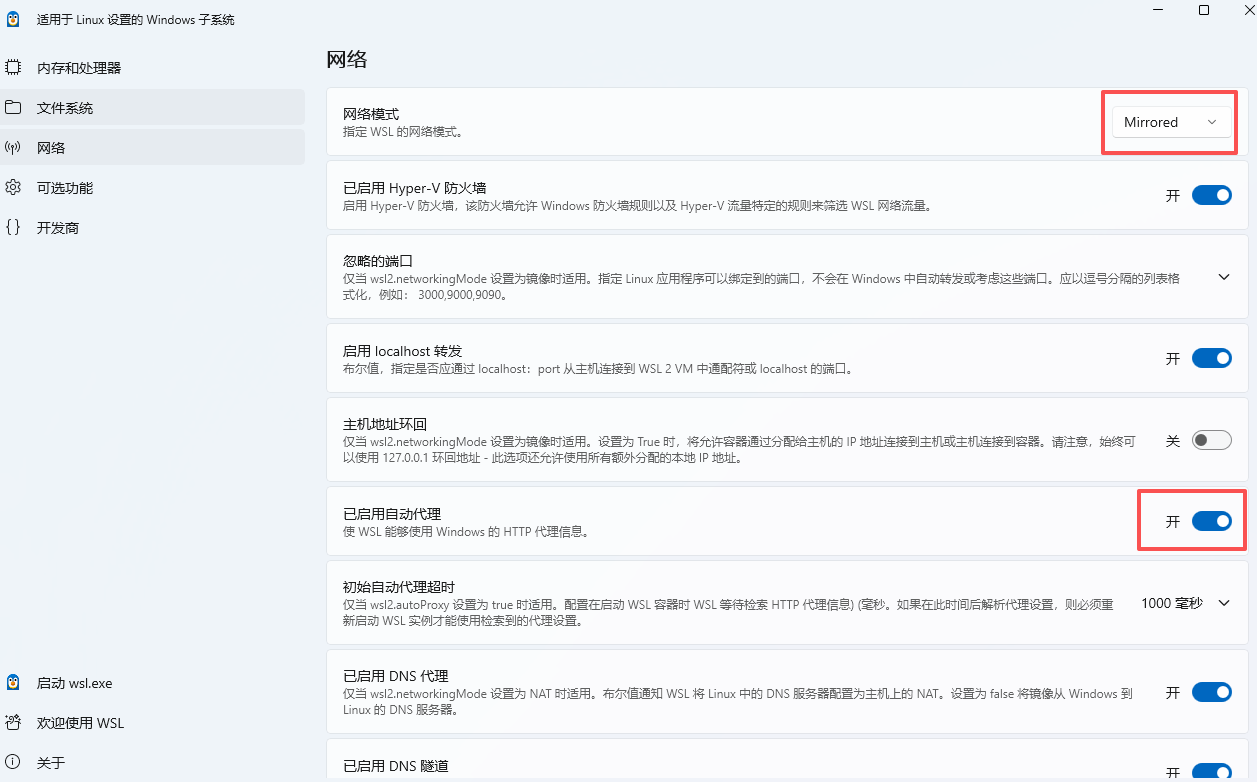
通过查看日志发现当我把代理关了,Gateway还在不停的访问代理。
127.0.0.1:10810
通过控制变量做对比分析,发现是Gateway自己调用的,跟wsl无关。
- Mirrored模式,把代理关了,百度可以,谷歌不行,OpenClaw可以打开,但无法聊天(无法调用大模型)
- Mirrored模式,把代理打开,百度可以,谷歌可以,OpenClaw可以。
- NAT模式,不管代理是否打开,百度可以访问,谷歌不可以,OpenClaw可以打开,但无法聊天,因为调用大模型失败,后台请求全通过代理出去。
根本原因是:~/.config/systemd/user/openclaw-gateway.service有下面一段,删除后,在代理打开,Mirrored模式,和飞书建立长链接,就可以正常使用了。
Environment=HTTP_PROXY=http://127.0.0.1:10810
Environment=HTTPS_PROXY=http://127.0.0.1:10810
Environment=http_proxy=http://127.0.0.1:10810
Environment=https_proxy=http://127.0.0.1:10810
其他异常:
中间出现如下错误,根本原因是当git想用ssh协议去访问github,但是没有配置sshkey.因为之前遇到过,快速解决。解决方案如下:
npm error code 128
npm error An unknown git error occurred
npm error command git --no-replace-objects ls-remote ssh://git@github.com/whiskeysockets/libsignal-node.git
npm error git@github.com: Permission denied (publickey).
npm error fatal: Could not read from remote repository.
npm error
npm error Please make sure you have the correct access rights
npm error and the repository exists.
1、创建一个ssh key,生成的文件再~/.ssh目录,有2个文件,取id*.pub的内容
ssh-keygen -t rsa -C "your@email.com"
2、将这个key增加到github上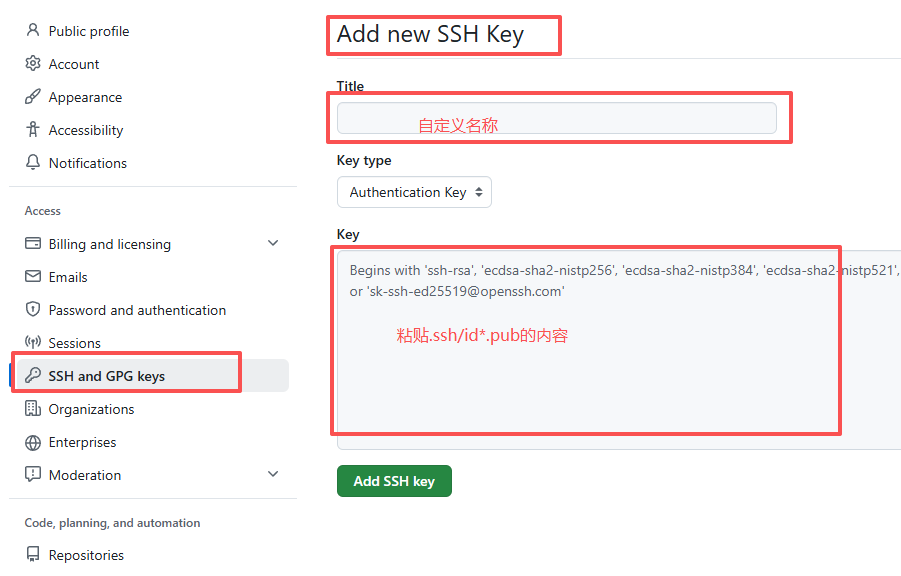
3、测试
ssh -T git@github.com
# 如下代表成功
Hi username! You've successfully authenticated, but GitHub does not provide shell access.

这是因为我开启了本地代理(VPN),但没有加到gateway.trustedProxies里面
Proxy headers detected from untrusted address. Connection will not be treated as local. Configure gateway.trustedProxies to restore local client detection behind your proxy.

小龙虾开发者社区是 CSDN 旗下专注 OpenClaw 生态的官方阵地,聚焦技能开发、插件实践与部署教程,为开发者提供可直接落地的方案、工具与交流平台,助力高效构建与落地 AI 应用
更多推荐
 5
5 0
0- 0


 已为社区贡献28条内容

所有评论(0)