- @qq_26819733


简介
该用户还未填写简介
擅长的技术栈
可提供的服务
暂无可提供的服务
分析和控制与NGINX放大你的应用程序。快速诊断和提高性能与深度诊断。得到早期访问英语русский新闻关于下载安全文档常见问题解答书支持捐赠trac维基推特博客nginx的窗户已知的问题未来可能的改进nginx的Windows版本使用本机Win32 AP
Error:(1, 0) Plugin with id 'com.android.application' not found.Open File这个错误是build.gradle造成的,我们打开文件看看有没有buildscript{}(应该是没有的,因为就是没有这个东西才报错的buildscript { repositories { maven
server{listen 443;server_name www.xxhui.space;ssl on;ssl_certificate /opt/ssl/client.pem;ssl_certificate_key /opt/ssl/client.key;ssl_session_timeout 5m;ssl_protocol
Incorrect table definition; there can be only one auto column and it must be defined as a key翻译:不正确的表定义,只能有一个自增列和它必须被定义为一个键那么我们建表的时候将自增列要设置成主键咯,多个主键的时候,我们应该将自增列放在收位,如:primary key(AUTO_COL,..
1、前言 这里的需求不是测试需求,而是一个需要批量请求的需求,所以这里只是用postman来做批量请求操作而已,并没有特殊的测试知识讲解。在使用之前,百度找了下postman变量的相关的知识,好像真没找到怎么设置变量,都是获取变量的知识,于是去官网找了下文档找到了我要的。 对于不熟悉postman测试的,先看看我以前转载的博文postman(一)批量执行接口测试用例,熟悉一下测试的流程和对..
postman是一个谷歌出的轻量级的专门测试接口的小工具~(PS:postman包括两种:Chrome浏览器插件和postman客户端,我使用的是postman客户端)虽然不如firefox的poster插件“轻量”,但是比firefox的poster插件、fiddler的接口测试功能更全面,比Jmeter更轻量、便捷~我觉得我比较喜欢postman的两个功能点,一个是它的批量执行、一个是它的..
虽然anaconda比pyenv相比有更好的python安装体验,但是有一个比较严重的问题的就是,他的python版本跨度不够大,一些老一些的项目的python版本找不到,比如py12306要求的python版本是3.6,在anaconda却找不到这个版本,而且升级默认python版本也是挺久的。
虽然anaconda比pyenv相比有更好的python安装体验,但是有一个比较严重的问题的就是,他的python版本跨度不够大,一些老一些的项目的python版本找不到,比如py12306要求的python版本是3.6,在anaconda却找不到这个版本,而且升级默认python版本也是挺久的。
1、报错信息Error response from daemon: Get https://registry-1.docker.io/v2/wnameless/oracle-xe-11g/manifests/latest: unauthorized: incorrect username or password这个报错实在pull镜像的时候发生的。2、解决方法其实这个报错,就是最简
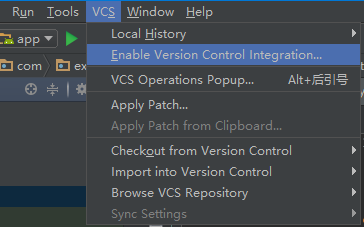
不明白可以先看看这个git命令的个人总结1、创建git仓库可以命令行直接在项目根目录(有app文件夹的那个目录):git init又或者git add .又或者git commit -m "your_msg"又或者git remote add origin https://git.oschina.net/this_dir_is_secret/remotetest.gitgit