Issue with SourceTree while cloning a GitHub repository
Answer a question
I know that similar question is already posted here, however I think that my scenario is a bit different. Here is what I have.
I downloaded and installed the latest official version of the SourceTree software. Also, I have GitHub account with permissions to clone and push the repository. In order to manage a local copy I need to clone the on-line version. Here are the steps that I take:
-
Start the SourceTree and navigate to File -> Clone / New ...
-
In the opened window I paste the HTTPS clone URL. I copied it from the browser after I logged-in my GitHub account, so the link is correct.
-
The nest step is to specify a local folder where the repository will be copied. But when I click to enter Destination Path, the window shows an error:
This is not a valid source path / URL
clicking the error may give the details:
remote: Repository not found.
fatal: repository 'https://github.com/org/repo.git/' not found
remote: Repository not found.
fatal: repository 'https://github.com/org/repo.git/' not found
Or, the Details may be empty. The SourceTree does not tell me the reason for the error or anything else.
I tried to re-install the SourceTree but the error still exists. I asked the Administration of the GitHub repository for any other permissions but my account has all of them. I am able to push changes to the online repository using the Terminal console, but I would like to use UI (that SourceTree provides) to manage and compare changes in the code.
One think I did not try is to Clone the repository using another GtHub account. But I don't want to do that because I need to commit any changes to the repository on my behalf.
Does anybody know how can this error be fixed or worked around?
Answers
The exact error message is (as illustrated here):
This is not a valid source path / URL
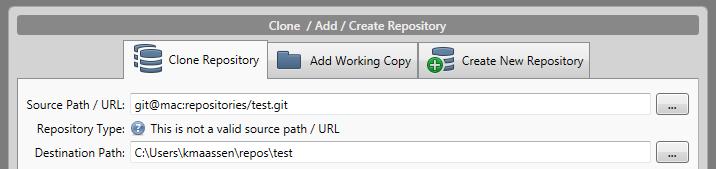
Possible cause:
-
proxy settings (as in this thread)
-
setup steps, with Git disabled (as in here)
When SourceTree started for the first time, I skipped setting up Git & Mercurial in the wizard. Then I reran the wizard and chose to download and install the embedded packages.
But it seems installing those didn't actually enable them - in theTools -> Optionsdialogue they were both disabled!
Enabling Mercurial (or Git in your case) allowed the clone dialogue to correctly identify the repo. -
credential issues (as in here, from my old answwer)

Python社区为您提供最前沿的新闻资讯和知识内容
更多推荐

 0
0 0
0- 0


 已为社区贡献126445条内容

所有评论(0)