Extracting Table data using Selenium and Python into pandas dataframe
·
Answer a question
so I have done data extract from a table using library BeautifulSoup with code below:
        if soup.find("table", {"class":"a-keyvalue prodDetTable"}) is not None:
        table = parse_table(soup.find("table", {"class":"a-keyvalue prodDetTable"}))
        df = pd.DataFrame(table)
So this worked, I get the table nad parse it out into dataframe, however i am trying to do something similar on different website using selenium and here is my code so far:
driver = webdriver.Chrome()
i = "DCD710S2"
base_url = str("https://www.lowes.com/search?searchTerm=" + str(i))
driver.get(base_url)
table = driver.find_element_by_xpath("//*[@id='collapseSpecs']/div/div/div[1]/table/tbody")
So I am getting to the table and I tried to use getAttribute(innerHTML) and some other getAttribute elements but I am unable to get the table as is into pandas. Any suggestions on how to handle that with selenium?
Here is how html looks: 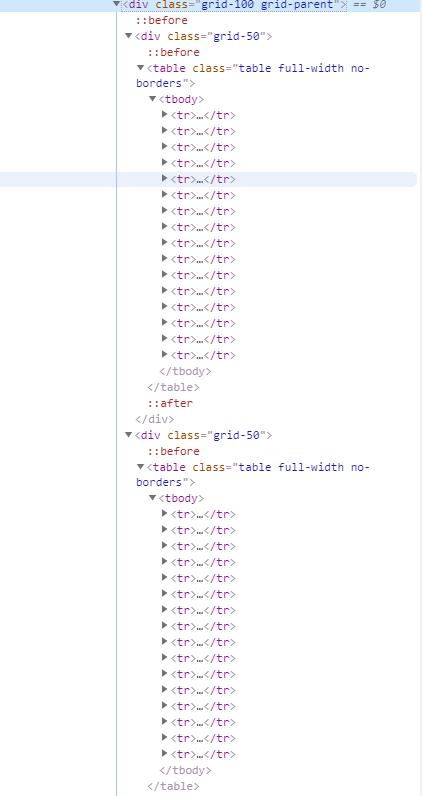
Answers
Use pandas to fetch the tables. Try following code.
import pandas as pd
import time
from selenium import webdriver
from bs4 import BeautifulSoup
driver = webdriver.Chrome()
i = "DCD710S2"
base_url = str("https://www.lowes.com/search?searchTerm=" + str(i))
driver.get(base_url)
time.sleep(3)
html=driver.page_source
soup=BeautifulSoup(html,'html.parser')
div=soup.select_one("div#collapseSpecs")
table=pd.read_html(str(div))
print(table[0])
print(table[1])
Output:
                                      0                     1
0                     Battery Amp Hours                   1.3
1                     Tool Power Output               189 UWO
2                  Side Handle Included                    No
3             Number of Clutch Settings                    15
4                             Case Type                  Soft
5                           Series Name                   NaN
6                    Tool Weight (lbs.)                   2.2
7                  Tool Length (Inches)                   7.5
8                   Tool Width (Inches)                   2.0
9                  Tool Height (Inches)                  7.75
10  Forward and Reverse Switch Included                   Yes
11                            Sub-Brand                   NaN
12                         Battery Type  Lithium ion (Li-ion)
13                      Battery Voltage           12-volt max
14                     Charger Included                   Yes
15                       Variable Speed                   Yes
                                   0               1
0                 Maximum Chuck Size          3/8-in
1       Number of Batteries Included               2
2                   Battery Warranty  3-year limited
3                Maximum Speed (RPM)          1500.0
4            Bluetooth Compatibility              No
5              Charge Time (Minutes)              40
6                  App Compatibility              No
7                     Works with iOS              No
8                          Brushless              No
9   CA Residents: Prop 65 Warning(s)             Yes
10                     Tool Warranty  3-year limited
11                            UNSPSC        27112700
12                Works with Android              No
13                  Battery Included             Yes
14                       Right Angle              No
15               Wi-Fi Compatibility              No
If you want single dataframe try this.
import pandas as pd
import time
from selenium import webdriver
from bs4 import BeautifulSoup
driver = webdriver.Chrome()
i = "DCD710S2"
base_url = str("https://www.lowes.com/search?searchTerm=" + str(i))
driver.get(base_url)
time.sleep(3)
html=driver.page_source
soup=BeautifulSoup(html,'html.parser')
div=soup.select_one("div#collapseSpecs")
table=pd.read_html(str(div))
frames = [table[0], table[1]]
result=pd.concat(frames,ignore_index=True)
print(result)
Selenium options with pandas Dataframe.
import pandas as pd
from selenium.webdriver.common.by import By
from selenium.webdriver.support.ui import WebDriverWait
from selenium.webdriver.support import expected_conditions as EC
from selenium import webdriver
spec_name=[]
spec_item=[]
driver = webdriver.Chrome()
i = "DCD710S2"
base_url = str("https://www.lowes.com/search?searchTerm=" + str(i))
driver.get(base_url)
tables=WebDriverWait(driver,20).until(EC.presence_of_all_elements_located((By.XPATH,"//div[@id='collapseSpecs']//table")))
for table in tables:
    for row in table.find_elements_by_xpath(".//tr"):
        spec_name.append(row.find_element_by_xpath('./th').get_attribute('textContent'))
        spec_item.append(row.find_element_by_xpath('./td/span').get_attribute('textContent'))

df = pd.DataFrame({"Spec_Name":spec_name,"Spec_Title":spec_item})

print(df)

Python社区为您提供最前沿的新闻资讯和知识内容
更多推荐

 0
0 0
0- 0


 已为社区贡献126445条内容

所有评论(0)