matplotlib savefig 图像大小与 bbox_inchesu003d'tight'
·
问题:matplotlib savefig 图像大小与 bbox_inchesu003d'tight'
我必须制作一个矢量图,我只想看到没有轴、标题等的向量,所以这就是我尝试这样做的方法:
pyplot.figure(None, figsize=(10, 16), dpi=100)
pyplot.quiver(data['x'], data['y'], data['u'], data['v'],
              pivot='tail',
              units='dots',
              scale=0.2,
              color='black')

pyplot.autoscale(tight=True)
pyplot.axis('off')
ax = pyplot.gca()
ax.xaxis.set_major_locator(pylab.NullLocator())
ax.yaxis.set_major_locator(pylab.NullLocator())
pyplot.savefig("test.png",
               bbox_inches='tight',
               transparent=True,
               pad_inches=0)
尽管我努力获得 1000 x 1600 的图像,但我还是得到了 775 x 1280 的图像。如何使其成为所需的尺寸?谢谢你。
更新 提出的解决方案有效,但在我的情况下,我还必须手动设置轴限制。否则,matplotlib 无法找出“紧密”的边界框。
解答
import matplotlib.pyplot as plt
import numpy as np

sin, cos = np.sin, np.cos

fig = plt.figure(frameon = False)
fig.set_size_inches(5, 8)
ax = plt.Axes(fig, [0., 0., 1., 1.], )
ax.set_axis_off()
fig.add_axes(ax)

x = np.linspace(-4, 4, 20)
y = np.linspace(-4, 4, 20)
X, Y = np.meshgrid(x, y)
deg = np.arctan(Y**3-3*Y-X)
plt.quiver(X, Y, cos(deg), sin(deg), pivot='tail', units='dots', color='red')
plt.savefig('/tmp/test.png', dpi=200)
产量
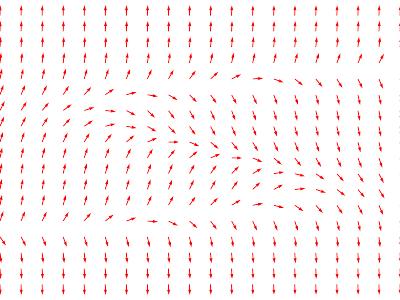
您可以通过将图形设置为 5x8 英寸来使结果图像为 1000x1600 像素
fig.set_size_inches(5, 8)
并使用DPI=200保存:
plt.savefig('/tmp/test.png', dpi=200)
删除边框的代码取自此处。
(上面发布的图片不是按比例绘制的,因为 1000x1600 相当大)。

Python社区为您提供最前沿的新闻资讯和知识内容
更多推荐

 0
0 0
0- 0


 已为社区贡献126445条内容

所有评论(0)