BeautifulSoup doesn't find all div tags
Answer a question
I have started a private project: web-scraping with Python and BeautifulSoup in Visual Studio Code (1.41.0).
I was able to scrape another site with the same structure as my "problem site". However now I have encountered, that BeautifulSoup doesn't find all div tags (there should be 20 per site and I find just 3 of them). I have informed myself on Stack Overflow but did not find the solution (or obviously didn't understand it).
Website: https://www.comparis.ch/gesundheit/arzt/pathologie
The html structure I'm interested in looks like this:
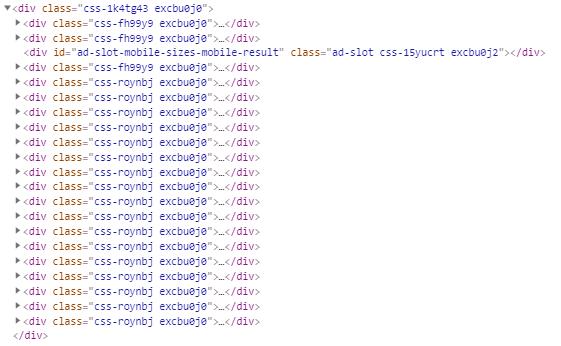
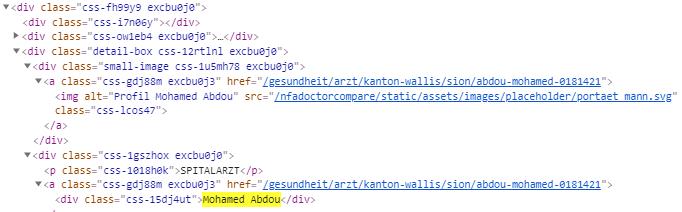
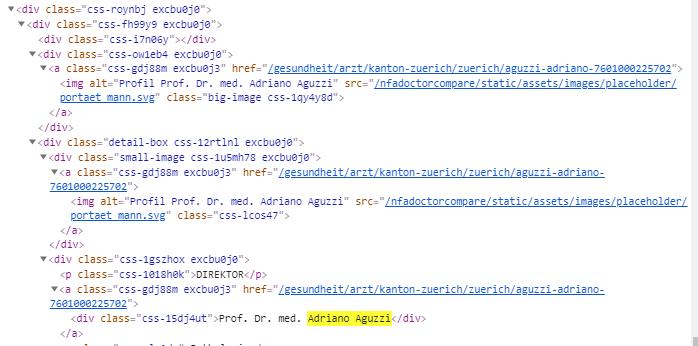
I get all the <div class="css-15dj4ut"></div> from the <div class="css-fh99y9 excbu0j0">...</div> but none from the <div class="css-roynbj excbu0j0"></div>. Do you have any idea why?
In iterate over every url to get to each site.
for i in range(0, endIndex):
try:
    if i == 0:
        urls.append(basicUrl)
        page = urllib.request.urlopen(urls[i])
        soup = BeautifulSoup(page, 'html.parser')

        getSurgeonName(soup)

    else:
        urls.append(basicUrl + urlAddon + str(i + 1))
        page = urllib.request.urlopen(urls[i])
        soup = BeautifulSoup(page, 'html.parser')

        getSurgeonName(soup)

except:
    print("An URL request error occured.")
Function Version 1:
def getSurgeonName(soup):
    # gets just first 3 surgeons of site
    docName = re.compile('css-15dj4ut')
    docNameTags = soup.find_all('div', attrs={'class': docName})
    for a in docNameTags:
            docNameList.append(a.getText())
Function Version 2:
def getSurgeonName(soup):

    parentClass = re.compile('css-fh99y9 excbu0j0')
    parentItems = soup.find_all('div', attrs={'class': parentClass})

    for parent in parentItems:
           children = parent.findChildren('div', {"class": "css-15dj4ut"})
           docNameList.append(children[0].getText())

    parentClass = re.compile('css-roynbj excbu0j0')
    parentItems = soup.find_all('div', attrs={'class': parentClass})

    for parent in parentItems:
           children = parent.findChildren('div', {'class': 'css-15dj4ut'})
           docNameList.append(children[0].getText())
Answers
Actually your desired desired data is loaded via JavaScript dynamically which the page loads, therefor requests package will not be able render JavaScript on the fly. But I've been able to locate the script tag which is holding the data in string of JSON dict, then loaded it into JSON.
Here you can parse whatever you want :).
import requests
from bs4 import BeautifulSoup
import json

r = requests.get("https://www.comparis.ch/gesundheit/arzt/pathologie")
soup = BeautifulSoup(r.content, 'html.parser')
script = soup.find("script", {'id': '__NEXT_DATA__'}).text

data = json.loads(script)

print(data.keys())  # JSON Dict

dumper = json.dumps(data, indent=4)

print(dumper)  # to see it in human readble format
Something like:
for item in data['props']['pageProps']['doctorResults']['doctorModels']:
    print(item['name'])
Output:
Mohamed Abdou
Dr. med. Heiner Adams
Dr. med. Franziska Aebersold
Prof. Dr. med. Adriano Aguzzi
Dr. med. Maria Ammann
Prosper Anani
Dr. med. Max Arnaboldi
Dr. med. Walter Arnold
Dr. med. Irena Baltisser
Dr. med. Fridolin Bannwart
Dr. med. Yara Banz
Dr. med. André Barghorn
Dr. Jessica Barizzi
Prof. Dr. med. Daniel Baumhoer
Audrey Baur Chaubert
Dr. med. Christian Georg Bayerl
Dr. med. Marc Beer
Dr. med. Sabina Berezowska
Dr. med. Steffen Bergelt
Dr. med. Barbara Elisabeth Berger-Denzler

Python社区为您提供最前沿的新闻资讯和知识内容
更多推荐

 0
0 0
0- 0


 已为社区贡献126445条内容

所有评论(0)