Can't extract src attribute from "img" tag with BeautifulSoup
Answer a question
I'm working on a project and I'm trying to extract the pictures' URL from a website. I'm a noob at this so please bear with me. Based on the HTML code, the class of the pictures that I want is "fotorama__img". However, when I execute my code, it doesn't seem to work. Anyone knows why that's the case? Also, how come the src attribute doesn't contain the whole URL, just a part of it? Example: the link to the image is https://www.supermicro.com/files_SYS/images/System/SYS-120U-TNR_callout_front.jpg but the src attribute of the img tag is "/files_SYS/images/System/sysThumb/SYS-120U-TNR_main.png".
Here is my code:
from bs4 import BeautifulSoup
import requests

page = requests.get("https://www.supermicro.com/en/products/system/Ultra/1U/SYS-120U-TNR")
soup = BeautifulSoup(page.content,'lxml')
images = soup.find_all("img", {"class": "fotorama__img"})
for image in images:
    print(image.get("src"))
And here is the picture of the HTML code for the page 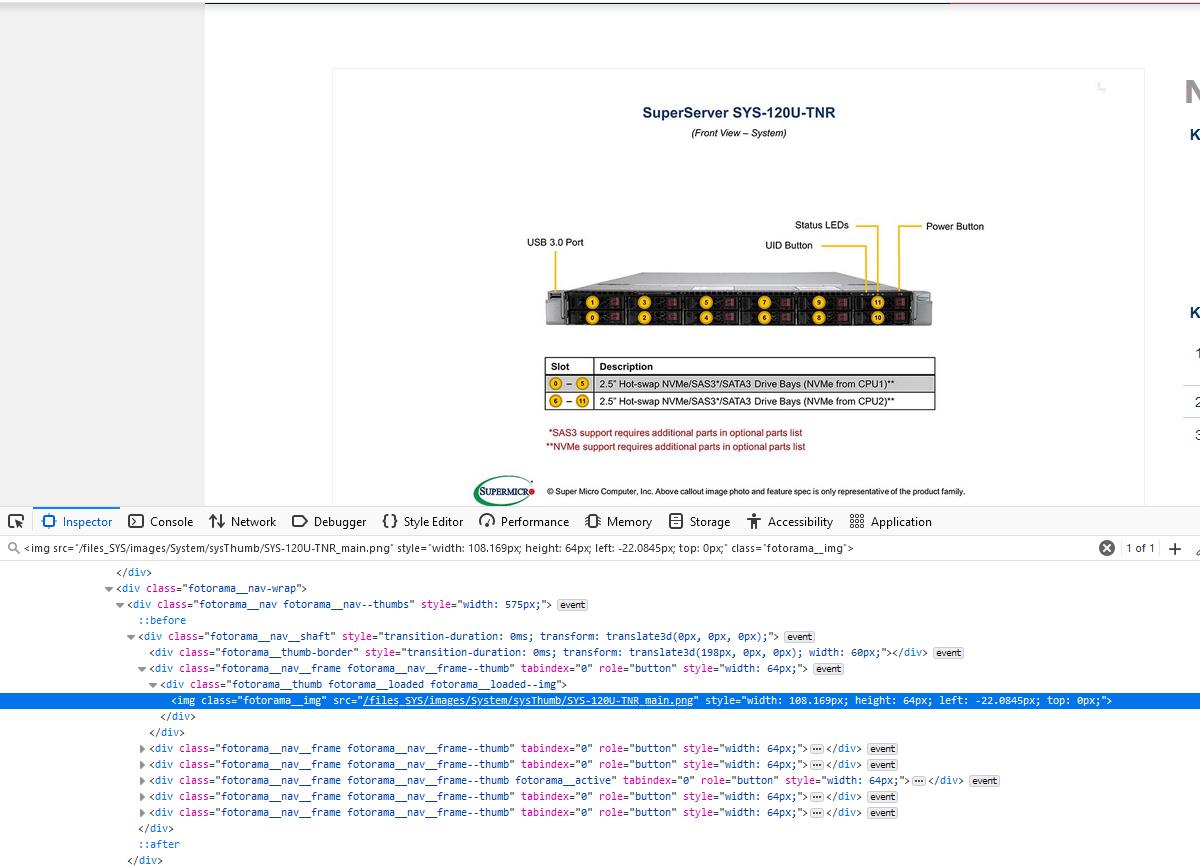
Thank you for your help!
Answers
The class is added dynamically via JavaScript, so beautifulsoup doesn't see it. To extract the images from this site, you can do:
import requests
from bs4 import BeautifulSoup

page = requests.get(
    "https://www.supermicro.com/en/products/system/Ultra/1U/SYS-120U-TNR"
)
soup = BeautifulSoup(page.content, "lxml")
images = [
    "https://www.supermicro.com" + a["href"]
    for a in soup.select(".fotorama > a")
]

print(*images, sep="\n")
Prints:
https://www.supermicro.com/files_SYS/images/System/SYS-120U-TNR_main.png
https://www.supermicro.com/files_SYS/images/System/SYS-120U-TNR_callout_angle.jpg
https://www.supermicro.com/files_SYS/images/System/SYS-120U-TNR_callout_top.jpg
https://www.supermicro.com/files_SYS/images/System/SYS-120U-TNR_callout_front.jpg
https://www.supermicro.com/files_SYS/images/System/SYS-120U-TNR_callout_rear.jpg

Python社区为您提供最前沿的新闻资讯和知识内容
更多推荐

 0
0 0
0- 0


 已为社区贡献126445条内容

所有评论(0)