Django admin listview Customize Column Name
·
Answer a question
Ok so I have a custom django admin built from a Author Model:
class AuthorAdmin(admin.ModelAdmin):
    """
    Author Admin
    """
    form = AuthorForm

    list_display = ['profile_photo', 'first_name', 'last_name', 'title']
    search_fields = ['first_name', 'last_name', 'title', 'credential']
    prepopulated_fields = {'slug': ('first_name', 'last_name', 'title')}

    def profile_photo(self, obj) :
        return '<img src="%s" title="%s" />' % (resize_image(obj.photo, '100x100'), obj.title)

    profile_photo.allow_tags = True
But in the django admin listview the column title for the custom column does not have proper capitalization. 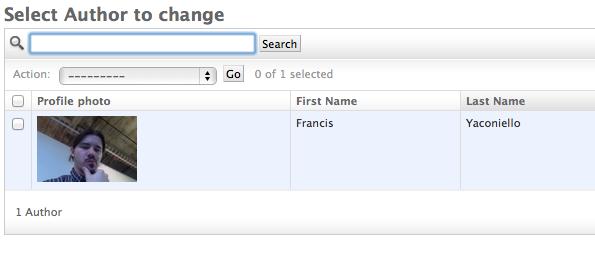
Does anyone know how to override the column headers that are built from custom function's names?
I've tried:
def my_function(self, obj) :
    """My Custom Title"""
    ...
and
def my_function(self, obj) :
    class Meta:
        verbose_name = _(u"My Custom Title")
Answers
Use:
class AuthorAdmin(admin.ModelAdmin):
    …
    def my_function(self, obj) :
        """My Custom Title"""
    …
    my_function.short_description = 'This is the Column Name'
It's buried in the admin docs. short_description, specifically, is barely mentioned under the discussion of list_display (more by example than actually called out). The other items like this are similiarly buried in the admin docs, but here's a summary:
short_description: the column title to use (string)allow_tags: what the name says... let's you use HTML (TrueorFalse)admin_order_field: a field on the model to order this column by (string, field name)boolean: indicates the return value is boolean and signals the admin to use the nice graphic green check/red X (TrueorFalse)

Python社区为您提供最前沿的新闻资讯和知识内容
更多推荐

 0
0 0
0- 0


 已为社区贡献126445条内容

所有评论(0)