I am coding a application which needs a custom buttons in QMessageBox. i managed to create an example in QT designer which is given below.
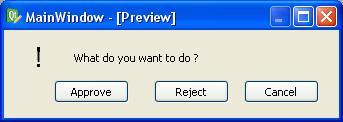
i wanted to do this in a QMessageBox.
I am using python 2.6.4 and PyQt4. please, can any one help.
I am coding a application which needs a custom buttons in QMessageBox. i managed to create an example in QT designer which is given below.
i wanted to do this in a QMessageBox.
I am using python 2.6.4 and PyQt4. please, can any one help.
Here is an example of building a custom message box from the ground up.
import sys
from PyQt4 import QtCore, QtGui


class Example(QtGui.QDialog):
    def __init__(self, parent=None):
        super(Example, self).__init__(parent)

        msgBox = QtGui.QMessageBox()
        msgBox.setText('What to do?')
        msgBox.addButton(QtGui.QPushButton('Accept'), QtGui.QMessageBox.YesRole)
        msgBox.addButton(QtGui.QPushButton('Reject'), QtGui.QMessageBox.NoRole)
        msgBox.addButton(QtGui.QPushButton('Cancel'), QtGui.QMessageBox.RejectRole)
        ret = msgBox.exec_()


if __name__ == "__main__":
    app = QtGui.QApplication(sys.argv)
    ex = Example()
    ex.show()
    sys.exit(app.exec_())

Python社区为您提供最前沿的新闻资讯和知识内容
更多推荐
 0
0 0
0

 已为社区贡献126442条内容



所有评论(0)