I'm using the following code to create a custom matplotlib legend.
import matplotlib.patches as mpatches
import matplotlib.pyplot as plt
colors = ["g", "w"]
texts = ["Green Data Description", "RedData Description"]
patches = [ mpatches.Patch(color=colors[i], label="{:s}".format(texts[i]) ) for i in range(len(texts)) ]
plt.legend(handles=patches, bbox_to_anchor=(0.5, 0.5), loc='center', ncol=2 )
The resulted legend is as follows:

1 - The white symbol in the legend is not shown because that the default legend background is white as well. How can I set the legend background to other color ?
2 - How to change the rectangular symbols in the legend into circular shape ?
-
Setting the legend's background color can be done using the facecolor argument to plt.legend(),
plt.legend(facecolor="plum")
-
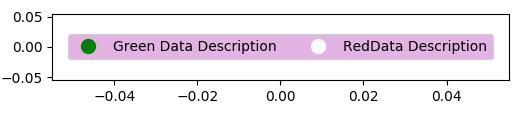
To obtain a circular shaped legend handle, you may use a standard plot with a circular marker as proxy artist,
plt.plot([],[], marker="o", ms=10, ls="")
Complete example:
import matplotlib.patches as mpatches
import matplotlib.pyplot as plt
colors = ["g", "w"]
texts = ["Green Data Description", "RedData Description"]
patches = [ plt.plot([],[], marker="o", ms=10, ls="", mec=None, color=colors[i],
            label="{:s}".format(texts[i]) )[0]  for i in range(len(texts)) ]
plt.legend(handles=patches, bbox_to_anchor=(0.5, 0.5),
           loc='center', ncol=2, facecolor="plum", numpoints=1 )

plt.show()
(Note that mec and numpoints arguments are only required for older versions of matplotlib)
For more complicated shapes in the legend, you may use a custom handler map, see the legend guide or e.g. this answer as an example





 已为社区贡献126442条内容

所有评论(0)