

I was trying to plot barplot and scatterplot in the same plot in plotly, but it shows only scatterplot.
How to show both the plots?
data
import numpy as np
import pandas as pd
import seaborn as sns
import matplotlib.pyplot as plt
from matplotlib.ticker import PercentFormatter

import plotly
import plotly.offline as py
import plotly.graph_objs as go
import plotly.figure_factory as ff
import plotly.tools as tls
from plotly.subplots import make_subplots
from plotly.offline import plot, iplot, init_notebook_mode
init_notebook_mode(connected=False)

df = pd.DataFrame({
            'price': [ 4.0, 17.0, 7.0, 7.0, 2.0, 1.0, 1.0],
            'item': ['apple', 'banana', 'carrot', 'plum',
                    'orange', 'date', 'cherry']})

df = df.sort_values(num,ascending=False)
df['cumulative_sum'] = df[num].cumsum()
df['cumulative_perc'] = 100*df['cumulative_sum']/df[num].sum()

df['demarcation'] = 80


num = 'price'
cat = 'item'
title = 'Pareto Chart'
Code
trace1 = go.Bar(
    x=df[cat],
    y=df[num],
    name=num,
    marker=dict(
        color='rgb(34,163,192)'
               )
)
trace2 = go.Scatter(
    x=df[cat],
    y=df['cumulative_perc'],
    name='Cumulative Percentage',
    yaxis='y2',

)

data = [trace1,trace2]

fig = dict(data=data)
iplot(fig)
Output
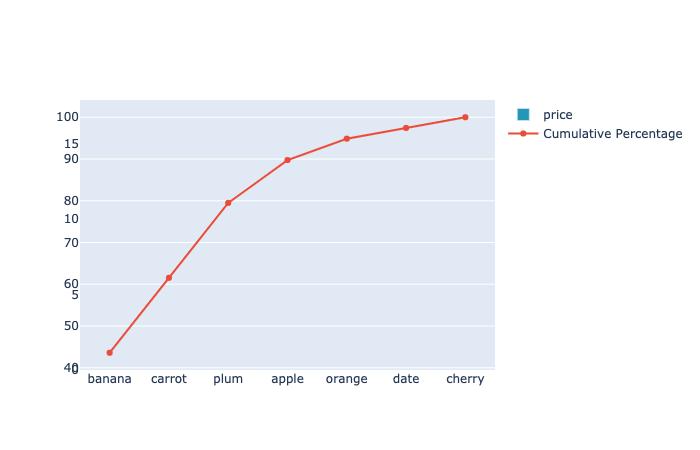
Required
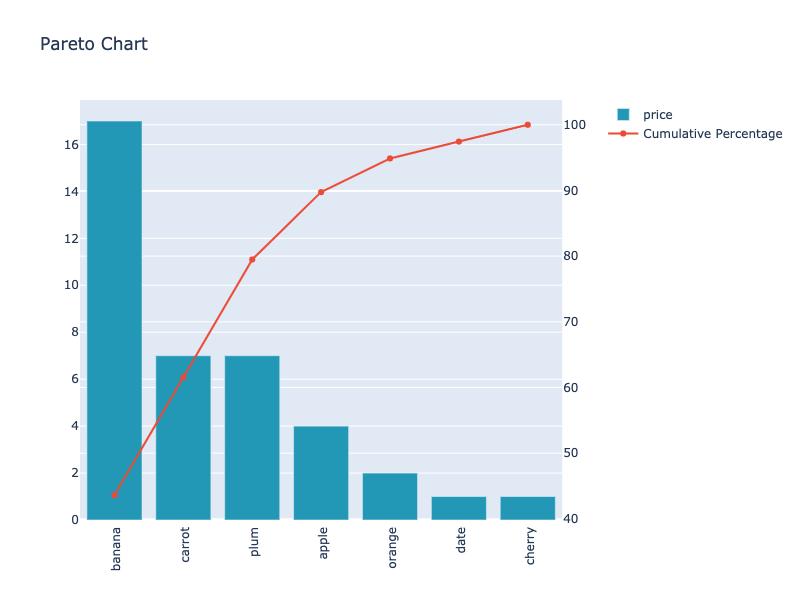
- show both barchart and scatterplot
- barchart y-ticks on left y-axis
- scatterplot y-ticks on right y-axis
- xticklabels rotate 90 degree



 已为社区贡献126440条内容

所有评论(0)