

I've looking for a solution to solve the slow upload speed of images dataset on google colab when i use a connection from GoogleDrive. Using the follow code:
from google.colab import drive

drive.mount('/content/gdrive')
Using this procedure i can upload images and create labels using a my def load_dataset:
'train_path=content/gdrive/MyDrive/Capstone/Enviroment/cell_images/train'
train_files, train_targets = load_dataset(train_path)
But, as i said, it's very slow, especially because my full dataset is composed by 27560 images.
To solve my problem, i've tried to use this solution.
But now, in order to still use my deffunction, after download the .tar file i wanna extract in a specific folder in the colab enviroment. I found this answer but not solve my problem.
Example:
This is the environment with the test.tar already downloaded. 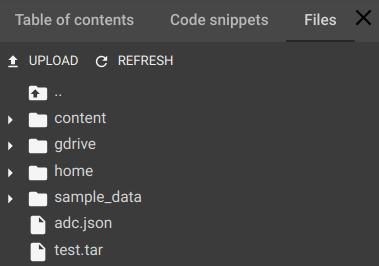
But i wanna extract the files in the tar file, which structure is train/Uninfected ; train/Parasitized, to get this:
-
content
- cell_images
- test
- Parasitized
- Uninfected
- train
- Parasitized
- Uninfected
- valid
- Parasitized
- Uninfected
- test
- cell_images
To use the path in def function:
train_path = train_path=content/cell_images/train/'
train_files, train_targets = load_dataset(train_path)
test_path = train_path=content/cell_images/test/'
test_files, test_targets = load_dataset(test_path)
valid_path = train_path=content/cell_images/valid/'
valid_files, valid_targets = load_dataset(valid_path)
I tried to use: ! mkdir -p content/cell_images and !tar -xvf 'test.tar' content/cell_images
But it doesn't work.
Does anyone know how to proceed?
Thanks!



 已为社区贡献126445条内容

所有评论(0)