I'm trying to create a Listbox in Tkinter that has columns.
I'm returning from a DB query records and would like to display each entry in it's own column for each record.
Looking at Listbox, I feel like there should be this functionality there but can't find it. What widget should I be using to do this? I've been searching around online but documentation has been very sparse.
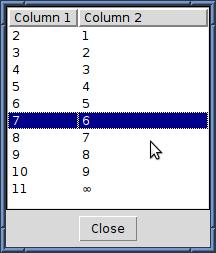
Using TkTreectrl:
import Tkinter as tk
import TkTreectrl as treectrl
import sqlite3

def setup_table(connection):
    cursor=connection.cursor()
    cursor.execute('''CREATE TABLE foo
                      (id INTEGER PRIMARY KEY AUTOINCREMENT,
                      bar TEXT)''')
    sql='INSERT INTO foo (bar) values (?)'
    for i in range(10):
        cursor.execute(sql,(i,))
    cursor.execute(sql,(u'\N{INFINITY}',))

def select_cmd(selected):
    print 'Selected items:', selected

def main():
    connection=sqlite3.connect(':memory:')
    setup_table(connection)
    cursor=connection.cursor()

    root = tk.Tk()
    root.title('Simple MultiListbox demo')
    mlb = treectrl.MultiListbox(root)
    mlb.pack(side='top', fill='both', expand=1)
    tk.Button(root, text='Close', command=root.quit).pack(side='top', pady=5)
    mlb.focus_set()
    mlb.configure(selectcmd=select_cmd, selectmode='extended')
    mlb.config(columns=('Column 1', 'Column 2'))
    cursor.execute('SELECT * from foo')
    for row in cursor.fetchall():
        mlb.insert('end',*map(unicode,row))
    root.mainloop()

if __name__=='__main__':
    main()
yields





 已为社区贡献126445条内容

所有评论(0)