

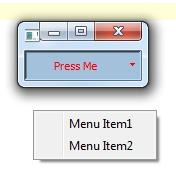
I am using following code to connect QMenu to QPushButton. When button is clicked a pull-down menu with multiple sub-menu's items is shown.
button=QPushButton()
button.setText("Press Me")

font=QtGui.QFont()
button.setFont(font)
button.setSizePolicy(ToolButtonSizePolicy)

button.setPopupMode(QtGui.QToolButton.InstantPopup)
menu=QtGui.QMenu()
button.setMenu(menu)

menuItem1=menu.addAction('Menu Item1')
menuItem2=menu.addAction('Menu Item2')
Now depending on a condition I would like to customize QPushButton display by giving it a text and background color. The following line of code (which is supposed to change background color) has no effect on QPushButton connected to QMenu.
button.setStyleSheet('QPushButton {background-color: #A3C1DA}')
I would like to know how to change the background color of QPushButton as well as button's text's color.



 已为社区贡献126445条内容

所有评论(0)