

I have a Pandas dataframe in Python. The contents of the dataframe are from here. I modified the case of the first alphabet in the "Single" column slightly. Here is what I have:
import pandas as pd
df = pd.read_csv('test.csv')
print df

Position                       Artist                  Single               Year     Weeks
       1                Frankie Laine               I Believe               1953  18 weeks
       2                  Bryan Adams         I Do It for You               1991  16 weeks
       3                  Wet Wet Wet      love Is All Around               1994  15 weeks
       4  Drake (feat. Wizkid & Kyla)               One Dance               2016  15 weeks
       5                        Queen       bohemian Rhapsody  1975/76 & 1991/92  14 weeks
       6                 Slim Whitman              Rose Marie               1955  11 weeks
       7              Whitney Houston  i Will Always Love You               1992  10 weeks
I would like to sort by the Single column in ascending order (a to z). When I run
df.sort_values(by='Single',inplace=True)
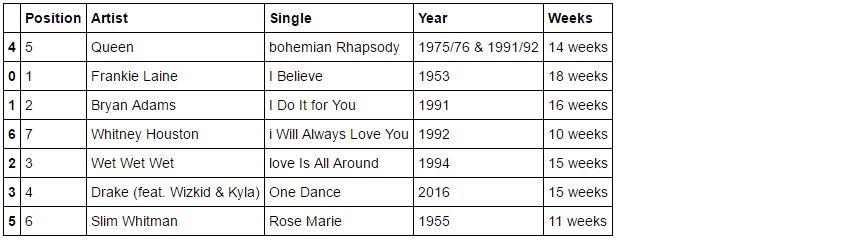
it seems that the sort is not able to combine upper and lowercase. Here is what I get:
Position                       Artist                  Single               Year     Weeks
       1                Frankie Laine               I Believe               1953  18 weeks
       2                  Bryan Adams         I Do It for You               1991  16 weeks
       4  Drake (feat. Wizkid & Kyla)               One Dance               2016  15 weeks
       6                 Slim Whitman              Rose Marie               1955  11 weeks
       5                        Queen       bohemian Rhapsody  1975/76 & 1991/92  14 weeks
       7              Whitney Houston  i Will Always Love You               1992  10 weeks
       3                  Wet Wet Wet      love Is All Around               1994  15 weeks
So, it is sorting by uppercase first and then performing a separate sort by lower case. I want a combined sort, regardless of the case of the starting alphabet in the Single column. The row with "bohemian Rhapsody" is in the wrong location after sorting. It should be first; instead it is appearing as the 5th row after the sort.
Is there a way to do sort a Pandas DataFrame while ignoring the case of the text in the Single column?



 已为社区贡献126442条内容

所有评论(0)