I'm trying to write data into a cell, which has multiple line breaks (I believe \n), the resulting .xlsx has line breaks removed. Is there a way to keep these line breaks?
Writing multi-line strings into cells using openpyxl
·
Answer a question
Answers
Disclaimer: This won't work in recent versions of Openpyxl. See other answers.
In openpyxl you can set the wrap_text alignment property to wrap multi-line strings:
from openpyxl import Workbook

workbook = Workbook()
worksheet = workbook.worksheets[0]
worksheet.title = "Sheet1"

worksheet.cell('A1').style.alignment.wrap_text = True
worksheet.cell('A1').value = "Line 1\nLine 2\nLine 3"

workbook.save('wrap_text1.xlsx')
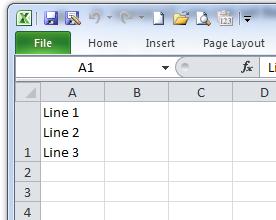
This is also possible with the XlsxWriter module.
Here is a small working example:
from xlsxwriter.workbook import Workbook

# Create an new Excel file and add a worksheet.
workbook = Workbook('wrap_text2.xlsx')
worksheet = workbook.add_worksheet()

# Widen the first column to make the text clearer.
worksheet.set_column('A:A', 20)

# Add a cell format with text wrap on.
cell_format = workbook.add_format({'text_wrap': True})

# Write a wrapped string to a cell.
worksheet.write('A1', "Line 1\nLine 2\nLine 3", cell_format)

workbook.close()

Python社区为您提供最前沿的新闻资讯和知识内容
更多推荐

 0
0 0
0- 0


 已为社区贡献126440条内容

所有评论(0)