使用 matplotlib quiver 更改箭头的大小
·
回答问题
我正在使用 matplotlib 中的 quiver 来绘制矢量场。我想根据产生矢量场的特定箭头的数据数量来更改每个箭头的粗细大小。因此,我要寻找的不是箭头大小的一般比例转换,而是在 quiver 中逐一自定义箭头粗细的方法。可能吗?你能帮助我吗?
Answers
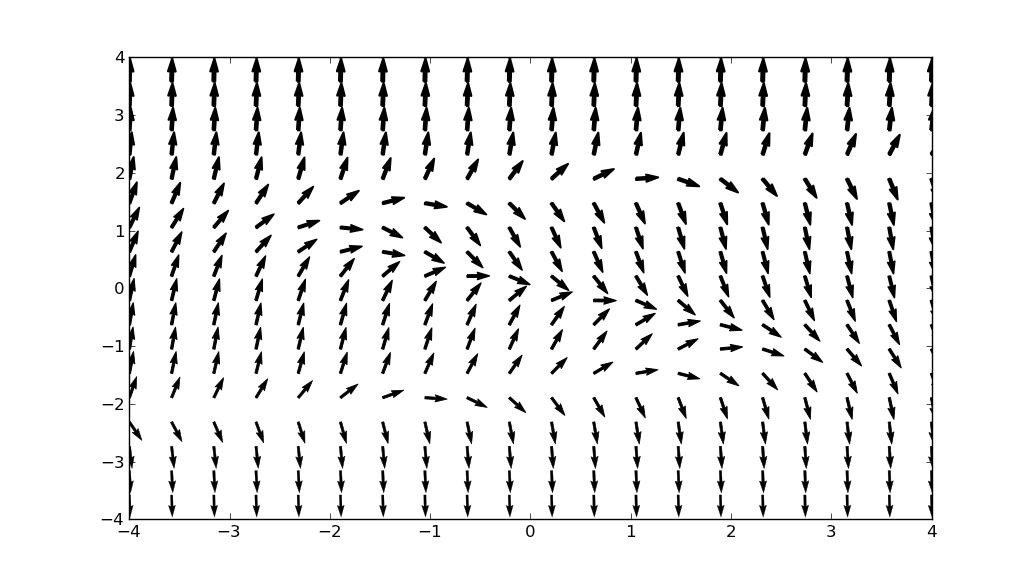
plt.quiver的linewidths参数控制箭头的粗细。如果将一维数组值传递给它,则每个箭头的粗细都不同。
例如,
widths = np.linspace(0, 2, X.size)
plt.quiver(X, Y, cos(deg), sin(deg), linewidths=widths)
创建从 0 到 2 的线宽。
import matplotlib.pyplot as plt
import numpy as np
sin = np.sin
cos = np.cos

# http://stackoverflow.com/questions/6370742/#6372413
xmax = 4.0
xmin = -xmax
D = 20
ymax = 4.0
ymin = -ymax
x = np.linspace(xmin, xmax, D)
y = np.linspace(ymin, ymax, D)
X, Y = np.meshgrid(x, y)
# plots the vector field for Y'=Y**3-3*Y-X
deg = np.arctan(Y ** 3 - 3 * Y - X)
widths = np.linspace(0, 2, X.size)
plt.quiver(X, Y, cos(deg), sin(deg), linewidths=widths)
plt.show()
产量

Python社区为您提供最前沿的新闻资讯和知识内容
更多推荐

 0
0 0
0- 0


 已为社区贡献126440条内容

所有评论(0)