lastly I'm working on google colab I get this dataset colled celeba and it is into a google drive accout and this account is not mine but I have the access to go through it now because the internet problems and drive capacity I can not dounload the dataset then upload it to my drive ... so the question is: is there any way to let google colab get access to this dataset or such a way to import the path...
I have this function definition below
create_celebahq_cond_continuous('/content/drive/My Drive/kiki96/results/tfrecords','https://drive.google.com/open?id=0B7EVK8r0v71pWEZsZE9oNnFzTm8','https://drive.google.com/open?id=0B4qLcYyJmiz0TXY1NG02bzZVRGs',4,100,False)
where I have tried to put the sharablelink of the dataset but, it does not work
please help
To download a file to Colab
If you want to download the file directly into your Google Colab instance, then you can use gdown.
Note that the file must be shared to the public.
If the link to your dataset is https://drive.google.com/file/d/10vAwF6hFUjvw3pf6MmB_S0jZm9CLWbSx/view?usp=sharing, you can use:
!gdown --id "10vAwF6hFUjvw3pf6MmB_S0jZm9CLWbSx"
To download the file to your Drive
Instead, if you want to download it to your drive then
Mount your Google Drive
from google.colab import drive
drive.mount('/content/drive')
Change the directory to a folder in your Google Drive
cd '/content/drive/My Drive/datasets/'
Download the file into your Google Drive folder
!gdown --id "10vAwF6hFUjvw3pf6MmB_S0jZm9CLWbSx"
To download a folder
If you are trying to download a folder, follow these steps:
- Open the shared folder
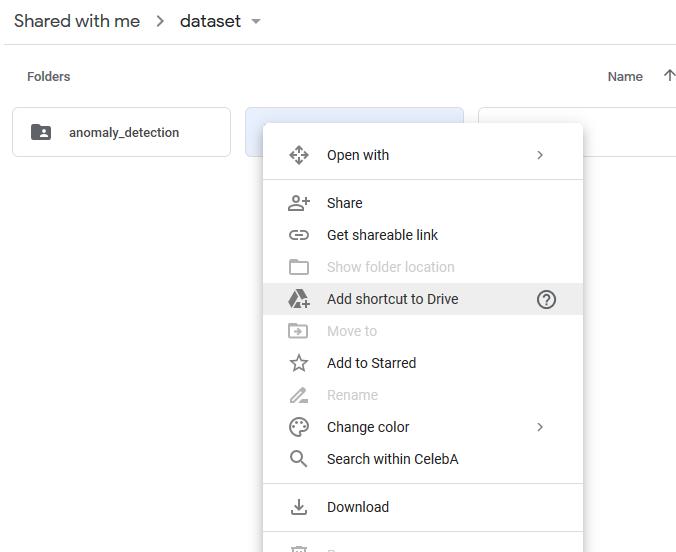
- Click "Add shortcut to my drive" and select a folder
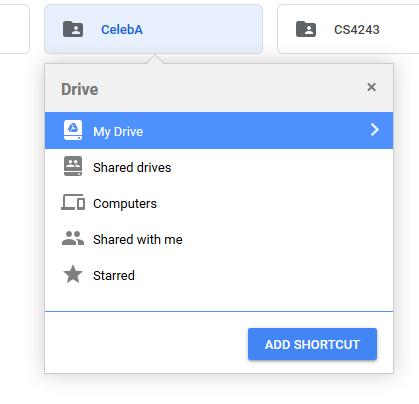
-
Mount your Google Drive to Google Colab
-
Go to the folder where you added the shortcut

You can see the newly-added folder, being referenced by its Google Drive folder ID.





 已为社区贡献126442条内容

所有评论(0)