I put in a partially transparent PNG image in Tkinter and all I get is this
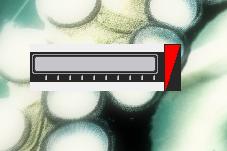
How do I make the dark triangle on the right clear? (like it's supposed to be)
This is python 2.6 on Windows 7, btw.
I put in a partially transparent PNG image in Tkinter and all I get is this
How do I make the dark triangle on the right clear? (like it's supposed to be)
This is python 2.6 on Windows 7, btw.
Here's an example (the PNG file example.png has lots of transparency in different places):
from Tkinter import Tk, Frame, Canvas
import ImageTk

t = Tk()
t.title("Transparency")

frame = Frame(t)
frame.pack()

canvas = Canvas(frame, bg="black", width=500, height=500)
canvas.pack()

photoimage = ImageTk.PhotoImage(file="example.png")
canvas.create_image(150, 150, image=photoimage)

t.mainloop()
You need to make sure the image has been stored as "RGBA" which is RGB with an alpha channel. You can check for that using a graphics program of your choice, or using PIL (Python Imaging Library):
import Image
im = Image.open("button.png")
print im.mode
This should print "RGBA". If not, you'll have to make sure the alpha channel is saved with the image. You'll have to consult your graphics program manual for how to do that.

Python社区为您提供最前沿的新闻资讯和知识内容
更多推荐
 0
0 0
0

 已为社区贡献126445条内容



所有评论(0)