In the excel sheet , i have two columns with large numbers.
But when i read the excel file with read_excel() and display the dataframe,
those two columns are printed in scientific format with exponential.
How can get rid of this format?
Thanks
Output in Pandas
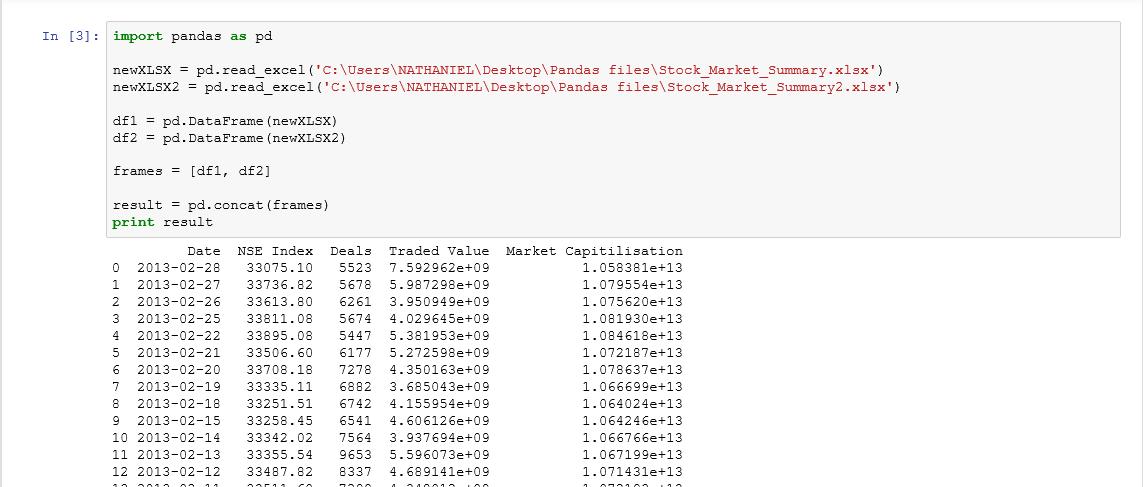
The way scientific notation is applied is controled via pandas' display options:
pd.set_option('display.float_format', '{:.2f}'.format)
df = pd.DataFrame({'Traded Value':[67867869890077.96,78973434444543.44],
                   'Deals':[789797, 789878]})
print(df)
       Traded Value   Deals
0 67867869890077.96  789797
1 78973434444543.44  789878
If this is simply for presentational purposes, you may convert your data to strings while formatting them on a column-by-column basis:
df = pd.DataFrame({'Traded Value':[67867869890077.96,78973434444543.44],
                   'Deals':[789797, 789878]})
df

    Deals   Traded Value
0   789797  6.786787e+13
1   789878  7.897343e+13


df['Deals'] = df['Deals'].apply(lambda x: '{:d}'.format(x))
df['Traded Value'] = df['Traded Value'].apply(lambda x: '{:.2f}'.format(x))
df

     Deals       Traded Value
0   789797  67867869890077.96
1   789878  78973434444543.44
An alternative more straightforward method would to put the following line at the top of your code that would format floats only:
pd.options.display.float_format = '{:.2f}'.format





 已为社区贡献126442条内容

所有评论(0)