

How do I get the shade of blue that is used as default in matplotlib.pyplot.scatter? When giving the keyword argument c='b', it gives a darker shade of blue. In this documentation of matplotlib.pyplot.scatter, it says the default is supposed to be 'b', yet it looks different.
See example below:
import matplotlib.pyplot as plt
fig, ax = plt.subplots()
ax.scatter(-1, 0)
ax.text(-1, 0, 'Default blue')
ax.scatter(1, 0, c='b')
ax.text(1, 0, 'Darker blue')
ax.set_xlim(-2, 2)
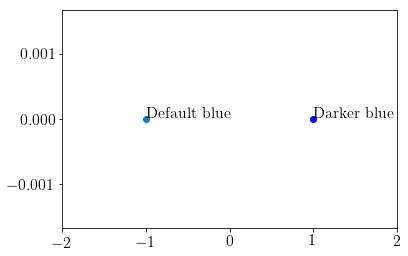
I'm using Python 3.5 with Matplotlib 2.0.0. The reason why I'm asking this, is because I would like to use the same blue colour when plotting some of the points one by one with plt.plot().



 已为社区贡献126442条内容

所有评论(0)