

I'm working on a small command-line game in python where I am showing a progress bar using the tqdm module. I listen for user input using the msvcrt module to interrupt the progress. Once interrupted, the user can restart by entering 'restart' into the command line prompt. The second time the progress bar is shown, instead of updating the same line with the progress, it creates a new line each time.
How would I get it to show the progress on the same line?
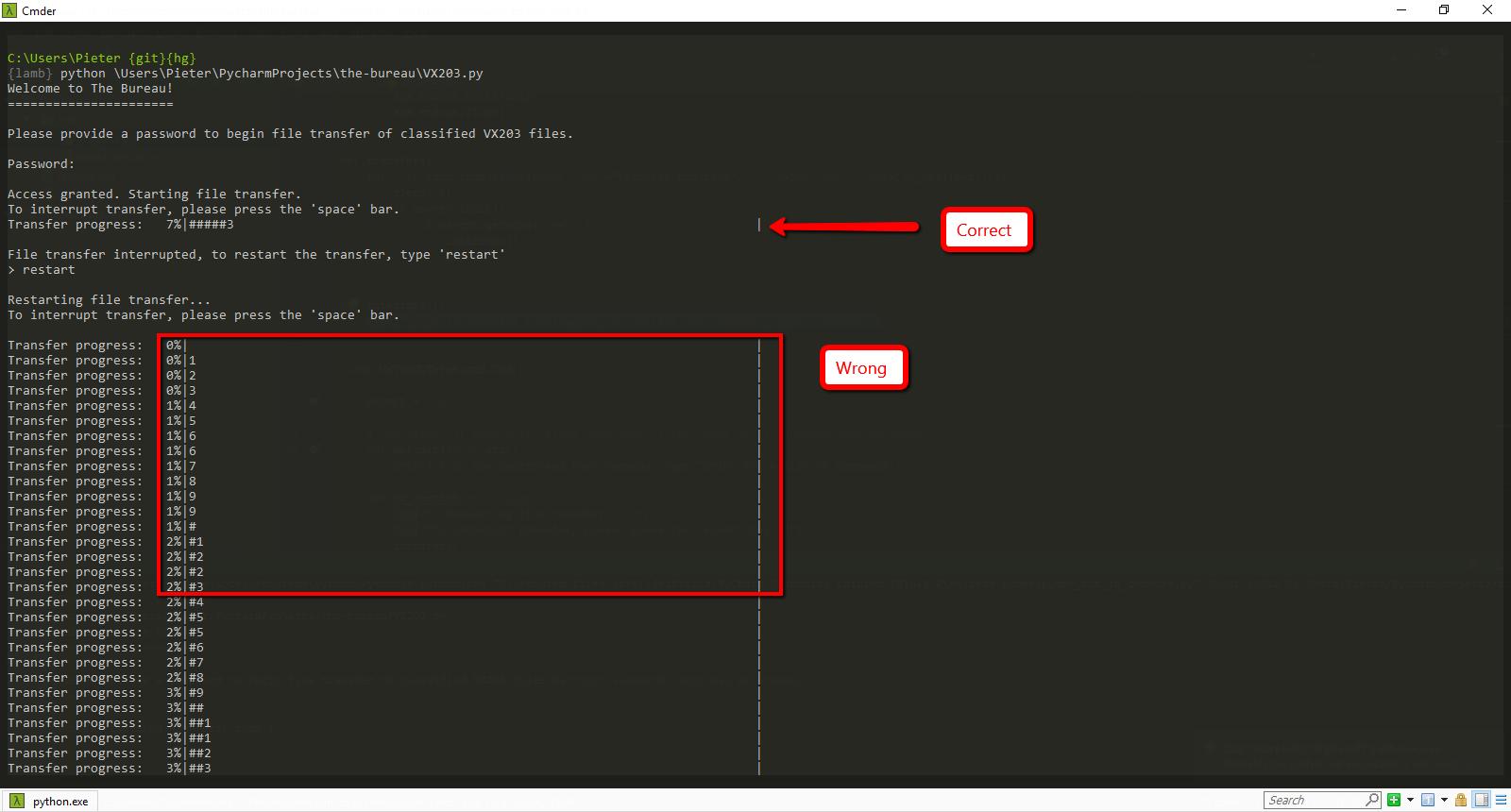
This code snippet illustrates my use of the progress bar.
def transfer():
    for i in tqdm.tqdm(range(1000), desc="Transfer progress", ncols=100, bar_format='{l_bar}{bar}|'):
        sleep(.1)
        if msvcrt.kbhit():
            if msvcrt.getwche() == ' ':
                interrupt()
                break

def interrupt():
    type("File transfer interrupted, to restart the transfer, type 'restart'")



 已为社区贡献126445条内容

所有评论(0)