In the main shell of IDLE, errors always return a line number but the development environment doesn't even have line numbers. Is there anyway to turn on line numbers?
How to turn on line numbers in IDLE?
·
Answer a question
Answers
Version 3.8 or newer:
To show line numbers in the current window, go to Options and click Show Line Numbers.
To show them automatically, go to Options > Configure IDLE > General and check the Show line numbers in new windows box.
Version 3.7 or older:
Unfortunately there is not an option to display line numbers in IDLE although there is an enhancement request open for this.
However, there are a couple of ways to work around this:
-
Under the edit menu there is a go to line option (there is a default shortcut of Alt+G for this).
-
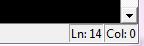
There is a display at the bottom right which tells you your current line number / position on the line:

Python社区为您提供最前沿的新闻资讯和知识内容
更多推荐

 0
0 0
0- 0


 已为社区贡献126445条内容

所有评论(0)