I'm using python + matplotlib and I'm having two plots share an axis. If you try to set graph1.set_xticklabels([]) while sharing an axis, it has no effect because it is shared. Is there a way to share the axis AND be able to hide the x axis of one plot?
matplotlib share x axis but don't show x axis tick labels for both, just one
·
Answer a question
Answers
This is a common gotcha when using shared axes.
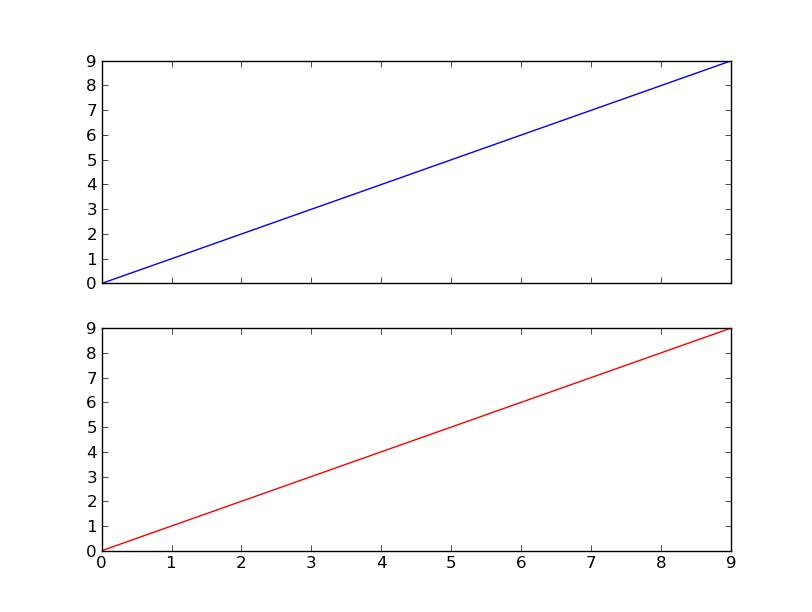
Fortunately, there's a simple fix: use plt.setp(ax.get_xticklabels(), visible=False) to make the labels invisible on just one axis.
This is equivalent to [label.set_visible(False) for label in ax.get_xticklabels()], for whatever it's worth. setp will automatically operate on an iterable of matplotlib objects, as well as individual objects.
As an example:
import matplotlib.pyplot as plt
fig = plt.figure()
ax1 = fig.add_subplot(2,1,1)
ax1.plot(range(10), 'b-')

ax2 = fig.add_subplot(2,1,2, sharex=ax1)
ax2.plot(range(10), 'r-')

plt.setp(ax1.get_xticklabels(), visible=False)

plt.show()

Python社区为您提供最前沿的新闻资讯和知识内容
更多推荐

 0
0 0
0- 0


 已为社区贡献126445条内容

所有评论(0)