如何使用 Python 和 Notion API
每个人都使用 Notion。那么为何不?这是一个很棒的工具。但是,如果您还想将它添加到您的某些应用程序中怎么办?看来您现在可以使用 Notion API 来实现,我将展示如何使用 Python 集成它。
概念设置
首先,您需要在 Notion 中创建一个包含数据库的页面。在此示例中,我们将创建一个包含 3 个字段的字段:name, genre, and completed。
[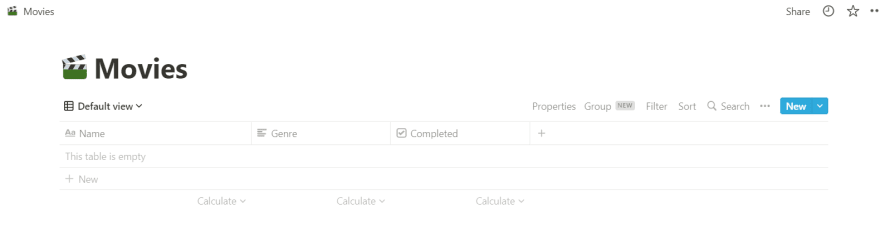 ](https://res.cloudinary.com/practicaldev/image/fetch/s--j8IqNs9i--/c_limit%2Cf_auto%2Cfl_progressive%2Cq_auto%2Cw_880/https://cdn.hashnode .com/res/hashnode/image/upload/v1641454499743/26O5x4__I.png)
为了在 Python 中访问这个页面,我们需要为它创建一个集成。为此,您可以访问Settings => Integrations => Develop your own integrations。之后,您为集成指定一个名称并单击提交。最后,您将进入此屏幕:
[ ](https://res.cloudinary.com/practicaldev/image/fetch/s--SpCgyxXY--/c_limit%2Cf_auto%2Cfl_progressive%2Cq_auto%2Cw_880/https://cdn.hashnode .com/res/hashnode/image/upload/v1641454720564/wHtL1V_hv.png)
正如您在照片中看到的,您现在拥有了一个密钥。复制它,因为我们将在 Python 程序中需要它。
在开始编写一些代码之前,我们需要在 Notion 中再执行 2 个步骤:
- 我们需要进入概念页面,点击
Share按钮,按下Invite,然后你可以从列表中选择你刚刚创建的集成:
[ ](https://res.cloudinary.com/practicaldev/image/fetch/s--0BiWsb-P--/c_limit%2Cf_auto%2Cfl_progressive%2Cq_auto%2Cw_880/https://cdn .hashnode.com/res/hashnode/image/upload/v1641454890420/AWKuYAkLc.png)
- 在浏览器中打开页面后,您将需要一个数据库 ID。假设链接如下:
https://www.notion.so/19f00145217c4437afb06cfdbb2ad994?v=51972570a71c4b8b9b1feeec01e87eb5。数据库 id 是19f00145217c4437afb06cfdbb2ad994。
Python 设置
首先,我们导入将用于与 Notion API 交互的请求库。然后,我们存储概念设置中的秘密和数据库_id。
import json
import requests

token = 'secret_from_notion_integration'
database_id = 'database_id_from_link'
进入全屏模式 退出全屏模式
接下来,我们将使用 requests 库与 Notion API 进行交互。
我们要创建的第一个函数是getMovies。
def getMovies():
  url = f'https://api.notion.com/v1/databases/{database_id}/query'

  r = requests.post(url, headers={
    "Authorization": f"Bearer {token}",
    "Notion-Version": "2021-08-16"
  })

  result_dict = r.json()
  movie_list_result = result_dict['results']

  print(movie_list_result)
进入全屏模式 退出全屏模式
现在,如果你在 Notion 中添加一部电影,然后调用这个函数,你会看到很多数据。为了使其更具可读性并仅使用我们需要的信息,我们将制作一个辅助函数:
def mapNotionResultToMovie(result):
  # you can print result here and check the format of the answer.
  movie_id = result['id']
  properties = result['properties']
  genre = properties['Genre']['rich_text'][0]['text']['content']
  name = properties['Name']['title'][0]['text']['content']
  completed = properties['Completed']['checkbox']

  return {
    'genre': genre,
    'name': name,
    'completed': completed,
    'movie_id': movie_id
  }
进入全屏模式 退出全屏模式
并在getMovies内部调用它。该函数应包含以下代码:
def getMovies():
  url = f'https://api.notion.com/v1/databases/{database_id}/query'

  r = requests.post(url, headers={
    "Authorization": f"Bearer {token}",
    "Notion-Version": "2021-08-16"
  })

  result_dict = r.json()
  movie_list_result = result_dict['results']

  movies = []

  for movie in movie_list_result:

    movie_dict = mapNotionResultToMovie(movie)
    movies.append(movie_dict)

  return movies
进入全屏模式 退出全屏模式
使用示例:
movies = getMovies()
# json.dumps is used to pretty print a dictionary
print('Movie list:', json.dumps(movies, indent=2))
进入全屏模式 退出全屏模式
现在,您可以使用此函数在 Python 中显示您的电影。很酷,对吧😁?
我们要实现的下一个函数是createMovie。为此,我们需要构造一个类似于来自getMovies的响应的有效负载。
def createMovie(name, genre, completed=False):
  url = f'https://api.notion.com/v1/pages'

  payload = {
    "parent": {
      "database_id": database_id
    },
    "properties": {
      "Name": {
        "title": [
          {
            "text": {
              "content": name
            }
          }
        ]
      },
      "Genre": {
        "rich_text": [
          {
            "text": {
              "content": genre
            }
          }
        ]
      },
      "Completed": {
        "checkbox": completed
      }
    }}

  r = requests.post(url, headers={
    "Authorization": f"Bearer {token}",
    "Notion-Version": "2021-08-16",
    "Content-Type": "application/json"
  }, data=json.dumps(payload))

  movie = mapNotionResultToMovie(r.json())
  return movie
进入全屏模式 退出全屏模式
你可以像这样使用它:
createdMovie = createMovie('Movie1', 'Genre1', False)

print('Created Movie:', json.dumps(createdMovie, indent=2))
进入全屏模式 退出全屏模式
如果您检查 Notion,您将看到在表中创建了一个新条目。🎉🎉🎉
更新功能与创建功能非常相似。主要区别在于我们还需要考虑movieId。我们以类似的方式创建有效负载,但我们还在 URL 中添加了movieId。
def updateMovie(movieId, movie):
  url = f'https://api.notion.com/v1/pages/{movieId}'

  payload = {
    "properties": {
      "Name": {
        "title": [
          {
            "text": {
              "content": movie['name']
            }
          }
        ]
      },
      "Genre": {
        "rich_text": [
          {
            "text": {
              "content": movie['genre']
            }
          }
        ]
      },
      "Completed": {
        "checkbox": movie['completed']
      }
    }}

  r = requests.patch(url, headers={
    "Authorization": f"Bearer {token}",
    "Notion-Version": "2021-08-16",
    "Content-Type": "application/json"
  }, data=json.dumps(payload))

  movie = mapNotionResultToMovie(r.json())
  return movie
进入全屏模式 退出全屏模式
要使用这个功能,首先需要调用getMovies()。在该响应中,您可以获得一个movieId(在 ex:fdd0fa87-4729-43e6-ae3f-823d48b382ee中)并像这样使用它:
updatedMovie = updateMovie('fdd0fa87-4729-43e6-ae3f-823d48b382ee', {
  'name': 'UpdatedMovie1',
  'genre': 'UpdatedGenre1',
  'completed': True
})
print('Update movie', json.dumps(updatedMovie, indent=2))
进入全屏模式 退出全屏模式
我们要创建的最后一个函数是deleteMovie。在 Notion 中,页面使用名为archived的属性。如果我们将其设置为 true,则该页面将被删除。因此,此函数将使用更新端点来更改“存档”布尔值的值。
def deleteMovie(movieId):
  url = f'https://api.notion.com/v1/pages/{movieId}'

  payload = {
    "archived": True
  }

  r = requests.patch(url, headers={
    "Authorization": f"Bearer {token}",
    "Notion-Version": "2021-08-16",
    "Content-Type": "application/json"
  }, data=json.dumps(payload))
进入全屏模式 退出全屏模式
现在,您可以将它与movieId一起使用,如果您在 Notion 中检查数据库,该特定行将被删除。
deleteMovie('a19e538d-10cc-40ec-91bb-f7237c93e428')
进入全屏模式 退出全屏模式
从 JavaScript 与 Notion 交互更容易,因为它们提供了一个客户端,而在 Python 中,我们没有,但这不应该阻止你使用它😁。

Python社区为您提供最前沿的新闻资讯和知识内容
更多推荐

 0
0 0
0- 0


 已为社区贡献126445条内容

所有评论(0)