

Official account: Special House
Author: Peter
Editor: Peter
Hello, I'm Peter~
This will be the last article on DataFrame data filtering, focusing on the use of three pairs of functions:
- iloc and loc, the most important and frequently used pair of functions
- at and iat
- any and all

Important learning materials: https://pandas.pydata.org/pandas-docs/stable/reference/api/pandas.DataFrame.html , various examples on the official website of pandas take you to learn.
Extended reading
Pandas has a variety of data retrieval methods. There are many functions and skills that we need to master and accumulate. The previous two articles are:
- pandas data retrieval operation of various coquettish - up
- Various padans access operations - medium
Analog data
Two data are simulated in this paper:
- The index of the first copy is of character type
- The second index uses the default numeric type
import pandas as pd
import numpy as np
# First analog data df0

df0 = pd.DataFrame(
    [[one hundred and one, one hundred and two, one hundred and forty], [114, 95, 67], [eighty-seven, 128, 117]],
    index=['language', 'mathematics', 'English'],
    columns=['Xiao Ming', 'Xiao Hong',"Xiao Sun"])

df0
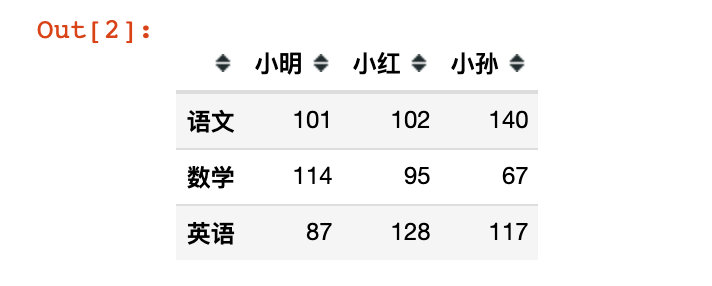
#  Second analog number df

df = pd.DataFrame({
    "name":['Xiao Ming','Xiao Wang','Zhang Fei','Guan Yu','Xiao Xiao Sun','Wang Jianguo','Liu Bei'],
    "sex":['male','female','female','male','female','male','female'],
    "age":[20,23,18,21,25,21,24],
    "score":[np.nan,600,550,np.nan,610,580,634],  # Two pieces of data are missing
    "address":[
        "Nanshan District, Shenzhen City, Guangdong Province",
        np.nan,  # Missing data
        "Yuhua District, Changsha City, Hunan Province",
        "Dongcheng District ",
        "Baiyun District, Guangzhou City, Guangdong Province",
        "Jiangxia District, Wuhan City, Hubei Province",
        "Longhua District, Shenzhen City, Guangdong Province"
        ]
})

df
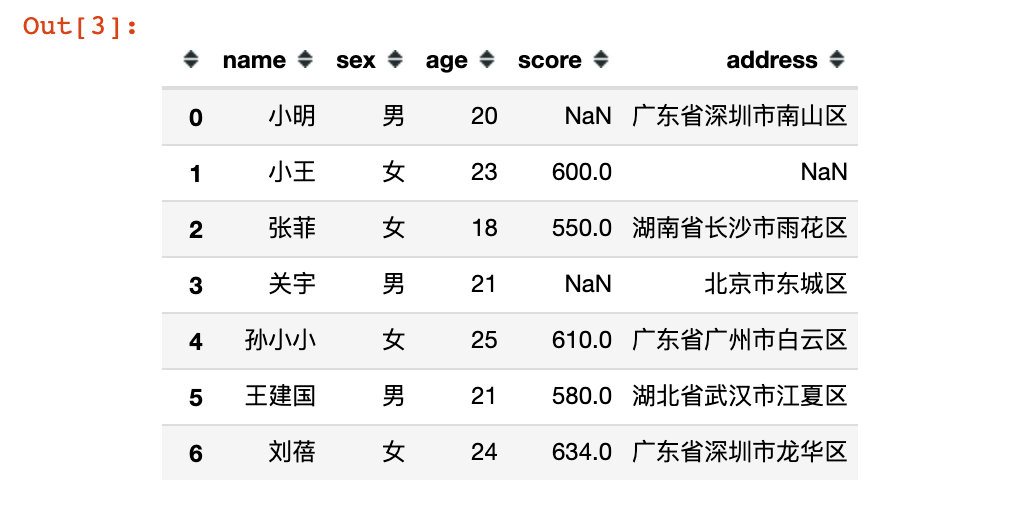
iloc and loc
iloc filters by numeric value, while loc filters by attribute or row index name
iloc
Directly specify the value and take out the single line record
# 1. Use value

df1 = df.iloc[1]  # Row record of single value extraction
df1

# result
name          Xiao Wang
sex            female
age           23
score      600.0
address      NaN
Name: 1, dtype: object
Use colons to indicate all
df1 = df.iloc[1,:]  # : colon indicates all
df1

# result
name          Xiao Wang
sex            female
age           23
score      600.0
address      NaN
Name: 1, dtype: object
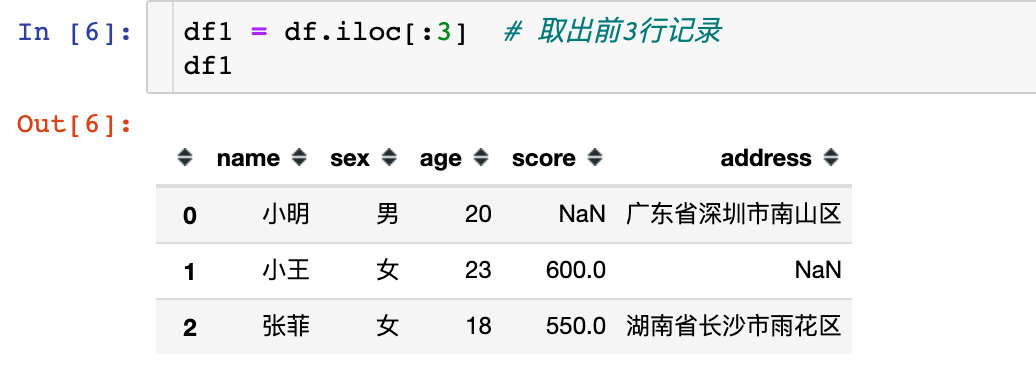
You can also use slices to retrieve data:
df1 = df.iloc[:3]  # Take out the first 3 lines of records
df1
Take out discontinuous multi line records:
df2 = df.iloc[[1,2,4]]  # Take out multiple lines of records
df2
| name | sex | age | score | address | |
|---|---|---|---|---|---|
| 1 | Xiao Wang | female | 23 | 600.0 | NaN |
| 2 | Zhang Fei | female | 18 | 550.0 | Yuhua District, Changsha City, Hunan Province |
| 4 | Xiao Xiao Sun | female | 25 | 610.0 | Baiyun District, Guangzhou City, Guangdong Province |
# 2. Extract some column attributes of row records

df3 = df.iloc[2,0:2]
df3

# result
name    Zhang Fei
sex      female
Name: 2, dtype: object
# Use slices in the column direction in steps of 2

df4 = df.iloc[2,0:5:2]
df4

# result
name              Zhang Fei
age               18
address    Yuhua District, Changsha City, Hunan Province
Name: 2, dtype: object
# The row index is 2 and the column index numbers are 1 and 3

df5 = df.iloc[2,[1,3]]
df5

# result
sex          female
score    550.0
Name: 2, dtype: object
# 3. Take out the specific value

df6 = df.iloc[2,4]
df6

# result
'Yuhua District, Changsha City, Hunan Province'
Using slices in both row and column directions, you can also specify the step size:
# 4. Use slices in both row and column directions

df7 = df.iloc[0:4,0:6:2]
df7
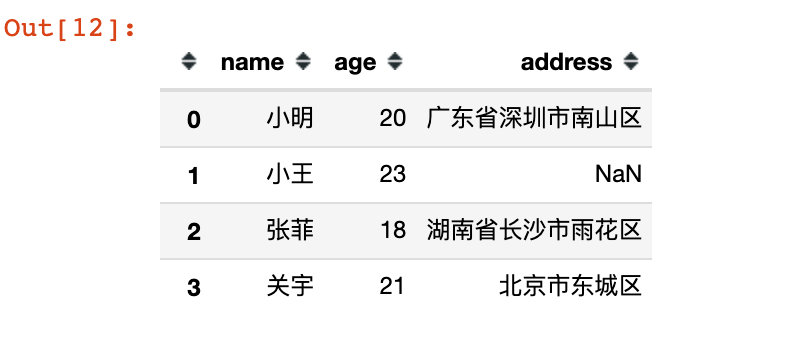
Compare with the original data:
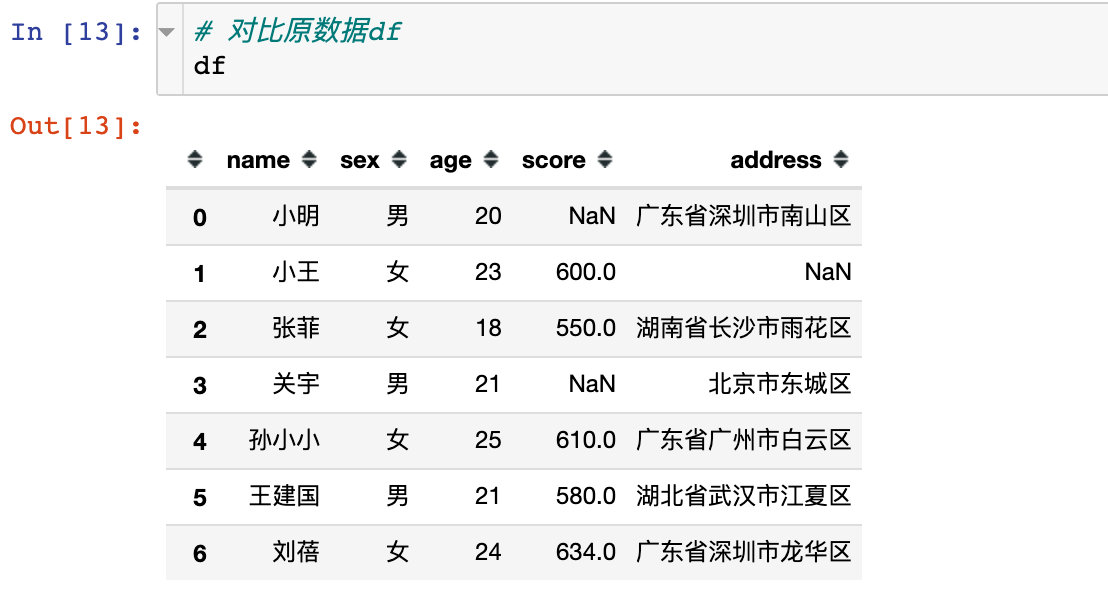
!!! A very useful method: NP r_, Help us extract discontinuous column attributes
# 5. Take out the discontinuous row and column data and use NP r_

df8 = df.iloc[:, np.r_[0,2:4]]
df8
| name | age | score | |
|---|---|---|---|
| 0 | Xiao Ming | 20 | NaN |
| 1 | Xiao Wang | 23 | 600.0 |
| 2 | Zhang Fei | 18 | 550.0 |
| 3 | Guan Yu | 21 | NaN |
| 4 | Xiao Xiao Sun | 25 | 610.0 |
| 5 | Wang Jianguo | 21 | 580.0 |
| 6 | Liu Bei | 24 | 634.0 |
df9 = df.iloc[np.r_[0,2:4],:]
df9
| name | sex | age | score | address | |
|---|---|---|---|---|---|
| 0 | Xiao Ming | male | 20 | NaN | Nanshan District, Shenzhen City, Guangdong Province |
| 2 | Zhang Fei | female | 18 | 550.0 | Yuhua District, Changsha City, Hunan Province |
| 3 | Guan Yu | male | 21 | NaN | Dongcheng District |
loc
Use the row index name or column attribute to retrieve data directly
# 1. Take out a single column

df10 = df.loc[:,"name"]
df10
0     Xiao Ming
1     Xiao Wang
2     Zhang Fei
3     Guan Yu
4    Xiao Xiao Sun
5    Wang Jianguo
6     Liu Bei
Name: name, dtype: object
# 2. Fetch multiple columns

df11 = df.loc[:,["name","age"]]
df11
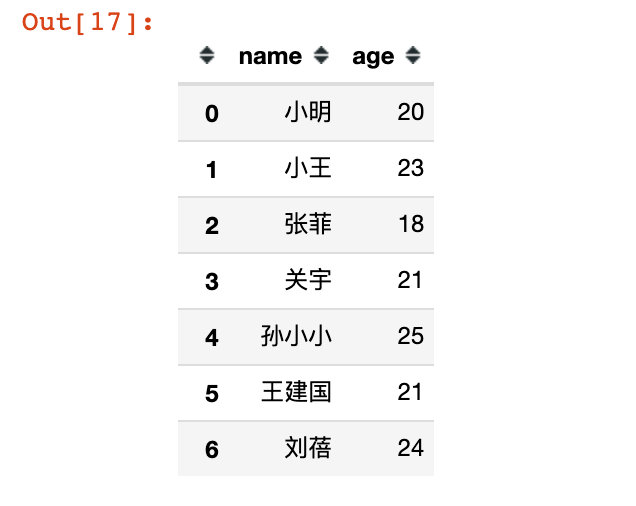
#  3. Using numeric values, take out the first row with index 0

df12 = df.loc[0]
df12

name              Xiao Ming
sex                male
age               20
score            NaN
address    Nanshan District, Shenzhen City, Guangdong Province
Name: 0, dtype: object
# 4. Take out the row records with indexes of 0, 1 and 3. At this time, all column fields are reserved

df13 = df.loc[[0,1,3]]
df13
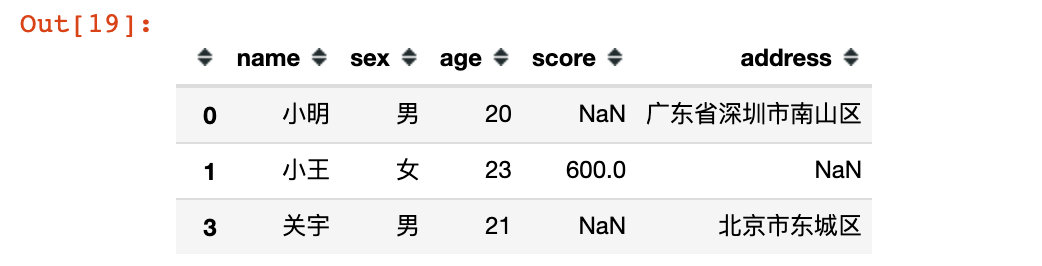
# Use colon:, to indicate all columns. The effect is the same as above

df14 = df.loc[[0,1,3],:]
df14
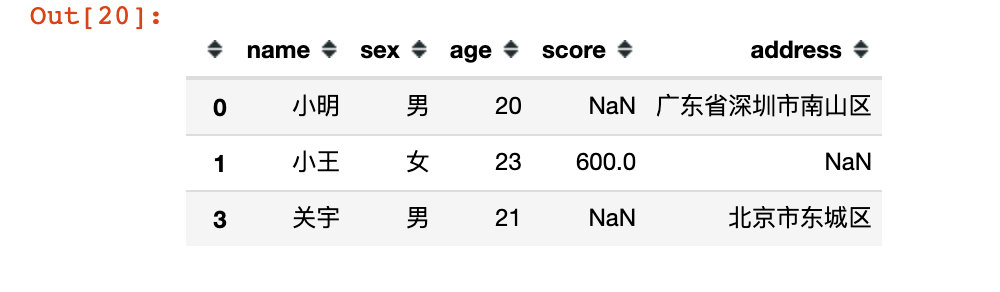
# 5. Take out some rows and some columns

df15 = df.loc[[0,1,3],["name","sex","score"]]
df15
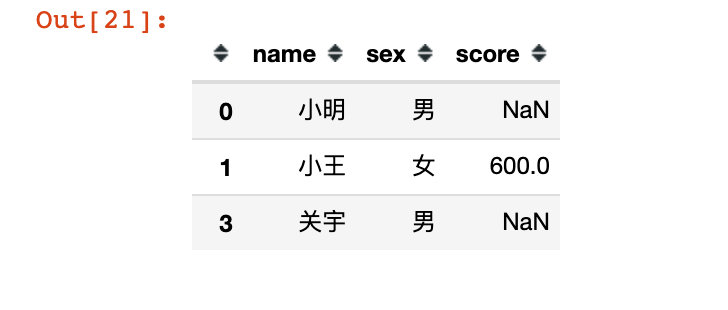
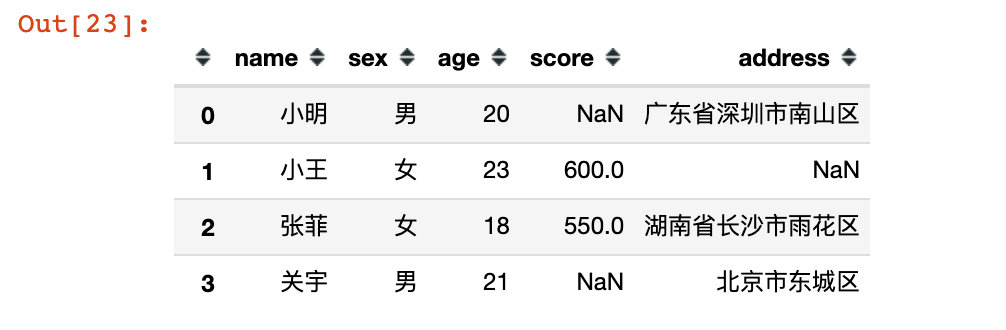
# 6,!!! Use index slice: both start and end positions are included

df16 = df.loc[0:3]
df16
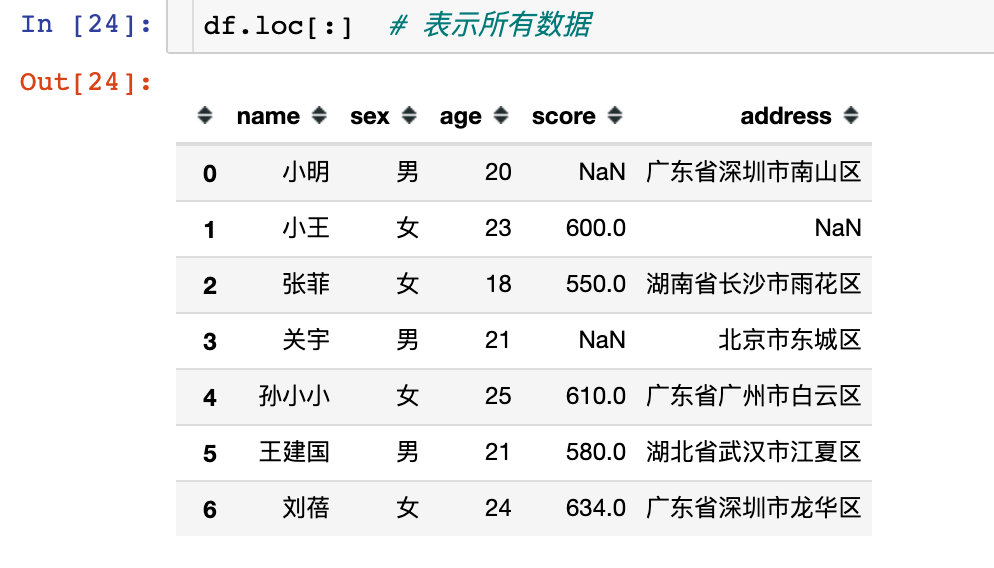
df.loc[:] # Represents all data
# 7. When filtering columns, there must be row elements

# name and score columns of all rows
df17 = df.loc[:,["name","score"]]
df17
| name | score | |
|---|---|---|
| 0 | Xiao Ming | NaN |
| 1 | Xiao Wang | 600.0 |
| 2 | Zhang Fei | 550.0 |
| 3 | Guan Yu | NaN |
| 4 | Xiao Xiao Sun | 610.0 |
| 5 | Wang Jianguo | 580.0 |
| 6 | Liu Bei | 634.0 |
# age of all rows and all subsequent columns

df18 = df.loc[:,"age":]
df18
| age | score | address | |
|---|---|---|---|
| 0 | 20 | NaN | Nanshan District, Shenzhen City, Guangdong Province |
| 1 | 23 | 600.0 | NaN |
| 2 | 18 | 550.0 | Yuhua District, Changsha City, Hunan Province |
| 3 | 21 | NaN | Dongcheng District |
| 4 | 25 | 610.0 | Baiyun District, Guangzhou City, Guangdong Province |
| 5 | 21 | 580.0 | Jiangxia District, Wuhan City, Hubei Province |
| 6 | 24 | 634.0 | Longhua District, Shenzhen City, Guangdong Province |
# 8. Partial row, age and all subsequent columns

# Remember: the start and end positions are included, which is different from python slicing

df19 = df.loc[1:3,"age":]
df19
| age | score | address | |
|---|---|---|---|
| 1 | 23 | 600.0 | NaN |
| 2 | 18 | 550.0 | Yuhua District, Changsha City, Hunan Province |
| 3 | 21 | NaN | Dongcheng District |
# 9. Fetching for non numeric row index

df20 = df0.loc["language"]
df20
Xiao Ming    one hundred and one
 Xiao Hong    102
 Xiao Sun    140
Name: language, dtype: int64
# 10. Note that the two square brackets take out DataFrame data, and the single bracket is Series data

df0.loc[["language"]]
| Xiao Ming | Xiao Hong | Xiao Sun | |
|---|---|---|---|
| language | 101 | 102 | 140 |
df0.loc[["language","English"]]
| Xiao Ming | Xiao Hong | Xiao Sun | |
|---|---|---|---|
| language | 101 | 102 | 140 |
| English | 87 | 128 | 117 |
# 11. Extract some row and column data

df21 = df0.loc[["language","English"],"Xiao Ming"]
df21

language    101
 English     87
Name: Xiao Ming, dtype: int64
df0.loc[["language","English"],["Xiao Ming","Xiao Sun"]]
| Xiao Ming | Xiao Sun | |
|---|---|---|
| language | 101 | 140 |
| English | 87 | 117 |
# 12. Directly use the row index name to retrieve data

df0.loc[["language","English"]]
| Xiao Ming | Xiao Hong | Xiao Sun | |
|---|---|---|---|
| language | 101 | 102 | 140 |
| English | 87 | 128 | 117 |
Comparison between the two
df.loc[[1,2]]
| name | sex | age | score | address | |
|---|---|---|---|---|---|
| 1 | Xiao Wang | female | 23 | 600.0 | NaN |
| 2 | Zhang Fei | female | 18 | 550.0 | Yuhua District, Changsha City, Hunan Province |
df.iloc[[1,2]]
| name | sex | age | score | address | |
|---|---|---|---|---|---|
| 1 | Xiao Wang | female | 23 | 600.0 | NaN |
| 2 | Zhang Fei | female | 18 | 550.0 | Yuhua District, Changsha City, Hunan Province |
# Specify the column property name we need

df.loc[[1,2],["name","score"]]
| name | score | |
|---|---|---|
| 1 | Xiao Wang | 600.0 |
| 2 | Zhang Fei | 550.0 |
# Take out rows 1 and 2, columns 0 and 3

df.iloc[[1,2],np.r_[0,3]]
| name | score | |
|---|---|---|
| 1 | Xiao Wang | 600.0 |
| 2 | Zhang Fei | 550.0 |
at and iat
at
The at function is similar to loc, but what the at function takes out is only a value
df22 = df.at[4,"sex"]
df22

'female'
df.at[2,"name"]

'Zhang Fei'
df0
| Xiao Ming | Xiao Hong | Xiao Sun | |
|---|---|---|---|
| language | 101 | 102 | 140 |
| mathematics | 114 | 95 | 67 |
| English | 87 | 128 | 117 |
# Specify both index and column names

df23 = df0.at['language','Xiao Sun']
df23

140
# at and loc

df.loc[1].at['age']

23
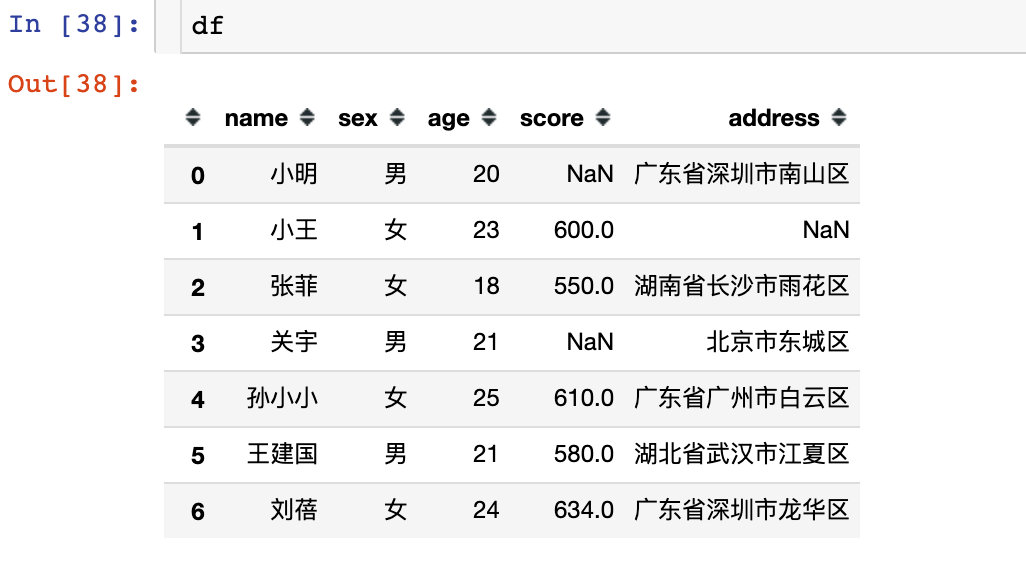
df
| name | sex | age | score | address | |
|---|---|---|---|---|---|
| 0 | Xiao Ming | male | 20 | NaN | Nanshan District, Shenzhen City, Guangdong Province |
| 1 | Xiao Wang | female | 23 | 600.0 | NaN |
| 2 | Zhang Fei | female | 18 | 550.0 | Yuhua District, Changsha City, Hunan Province |
| 3 | Guan Yu | male | 21 | NaN | Dongcheng District |
| 4 | Xiao Xiao Sun | female | 25 | 610.0 | Baiyun District, Guangzhou City, Guangdong Province |
| 5 | Wang Jianguo | male | 21 | 580.0 | Jiangxia District, Wuhan City, Hubei Province |
| 6 | Liu Bei | female | 24 | 634.0 | Longhua District, Shenzhen City, Guangdong Province |
# The fourth element with the column name name
df.name.at[4]

'Xiao Xiao Sun'
iat
Like iloc, only numeric indexing is supported
df24 = df.iat[2,4]
df24

'Yuhua District, Changsha City, Hunan Province'
df.loc[2].iat[4]

'Yuhua District, Changsha City, Hunan Province'
df.iloc[2].iat[4]

'Yuhua District, Changsha City, Hunan Province'
any and all
- any: True if at least one is True
- All: all results are required to be True
When the incoming axis=1, the query will be performed according to the row; axis=0 means query by column
Comparison of data in Series
# Two False pass any and the result is False

pd.Series([False, False]).any()   # False
pd.Series([True, False]).any() # True
pd.Series([True, False]).all() # False
# any: skip null value

pd.Series([np.nan]).any()  # False
pd.Series([np.nan]).any(skipna=False) # True
# all: skip null value

pd.Series([np.nan]).all()  # True
pd.Series([np.nan]).all(skipna=False) #True
Comparison in DataFrame
df0
| Xiao Ming | Xiao Hong | Xiao Sun | |
|---|---|---|---|
| language | 101 | 102 | 140 |
| mathematics | 114 | 95 | 67 |
| English | 87 | 128 | 117 |
# 1. Fetch the data to be queried
df0.loc[:,["Xiao Ming","Xiao Hong"]]
| Xiao Ming | Xiao Hong | |
|---|---|---|
| language | 101 | 102 |
| mathematics | 114 | 95 |
| English | 87 | 128 |
# 2. Compare
df0.loc[:,["Xiao Ming","Xiao Hong"]] >= 100
| Xiao Ming | Xiao Hong | |
|---|---|---|
| language | True | True |
| mathematics | True | False |
| English | False | True |
any
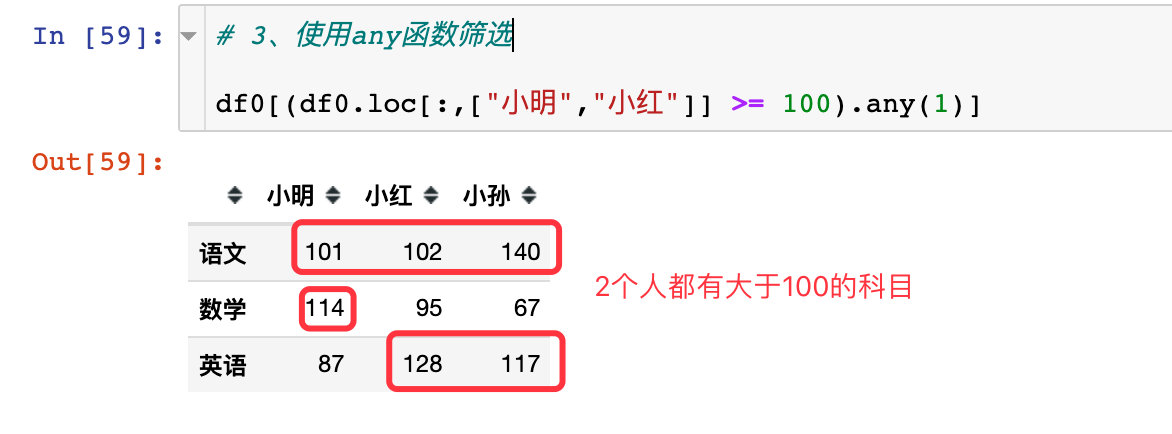
# 3. Filter with any function

df0[(df0.loc[:,["Xiao Ming","Xiao Hong"]] >= 100).any(1)]
all
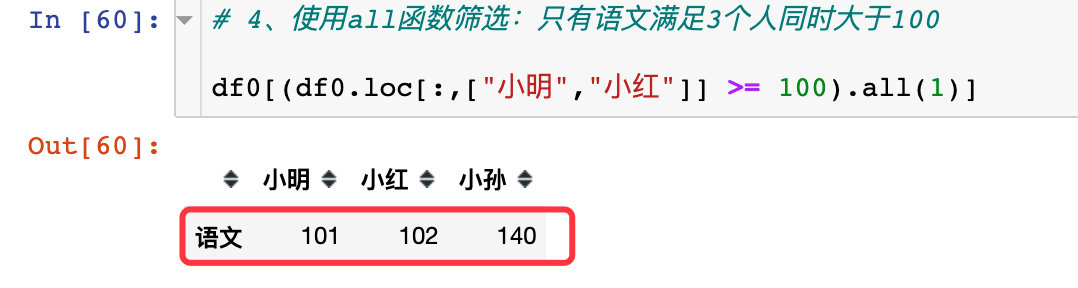
Only language can meet the needs of three people at the same time, and all of them are more than 100
# 4. Use the all function to filter: only the language meets 3 people and is greater than 100 at the same time

df0[(df0.loc[:,["Xiao Ming","Xiao Hong"]] >= 100).all(1)]
summary
This paper introduces the use of three pairs of functions of pandas through simulated data. Among them, loc and iloc functions are very common and practical functions, which they often use. So far, the data filtering part of pandas has been fully introduced.
Of course, the methods introduced are only part of pandas's rich retrieval skills. There are many functions and methods that readers need to learn and accumulate by themselves. I hope the methods introduced will be helpful to you.
Starting with the next article, we will introduce various operation skills in Pandas.



 已为社区贡献126440条内容

所有评论(0)