
如何运行 github-actions 步骤,即使上一步失败,同时作业仍然失败
问题:如何运行 github-actions 步骤,即使上一步失败,同时作业仍然失败
我正在尝试按照 Github 的示例使用 github 操作测试我的构建,然后压缩测试结果并将它们作为工件上传。https://help.github.com/en/actions/automating-your-workflow-with-github-actions/persisting-workflow-data-using-artifacts#uploading-build-and-test-artifacts
但是,当我的测试失败时,我遇到了麻烦。这是我的行动。当我的测试通过一切正常时,我的结果会被压缩并导出为工件,但如果我的测试失败,它会停止工作中的其余步骤,因此我的结果永远不会被发布。
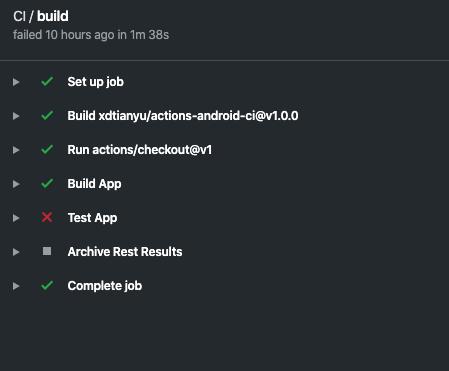
我尝试添加 continue-on-error: truehttps://help.github.com/en/actions/automating-your-workflow-with-github-actions/workflow-syntax-for-github-actions#jobsjob\ _idstepscontinue-on-error
这使它在失败后继续并上传我的测试结果。但是即使我的测试步骤失败了,该作业也被标记为通过。有没有办法让它上传我的工件,即使一个步骤失败,同时仍然将整个工作标记为失败?
name: CI
on:
  pull_request:
    branches:
    - master
  push:
    branches:
      - master

jobs:
  build-and-test:
    runs-on: ubuntu-latest
    steps:
    - uses: actions/checkout@v1
    - name: Test App
      run: ./gradlew test

    - name: Archive Rest Results
      uses: actions/upload-artifact@v1
      with:
        name: test-results
        path: app/build/reports/tests
解答
你可以加
if: always()
即使上一步失败,您的步骤也可以运行https://docs.github.com/en/actions/learn-github-actions/expressions#status-check-functions
所以对于一个步骤,它看起来像这样:
steps:
- name: Build App
  run: ./build.sh

- name: Archive Test Results
  if: always()
  uses: actions/upload-artifact@v1
  with:
    name: test-results
    path: app/build
或者您可以将其添加到作业中:
jobs:
  job1:
  job2:
    needs: job1
  job3:
    if: always()
    needs: [job1, job2]
此外,如下所述,即使构建被取消,放置 always() 也会导致函数运行。
如果不希望在手动取消作业时运行该功能,则可以改为:
if: success() || failure()

ModelScope旨在打造下一代开源的模型即服务共享平台,为泛AI开发者提供灵活、易用、低成本的一站式模型服务产品,让模型应用更简单!
更多推荐
 0
0 0
0- 0


 已为社区贡献27134条内容

所有评论(0)